At a glance
| Accessory Type | Thunderbolt docking station |
|---|---|
| Works With | macOS, Windows, iPadOS, ChromeOS |
| Connection | Thunderbolt (USB-C host port) |
- Model Thunderbolt Go Dock
- Released 2023
OWCLast updated on November 2026
OWC Thunderbolt Go Dock Review
Prices, shipping and returns are handled by the retailer.
On this page
Overview
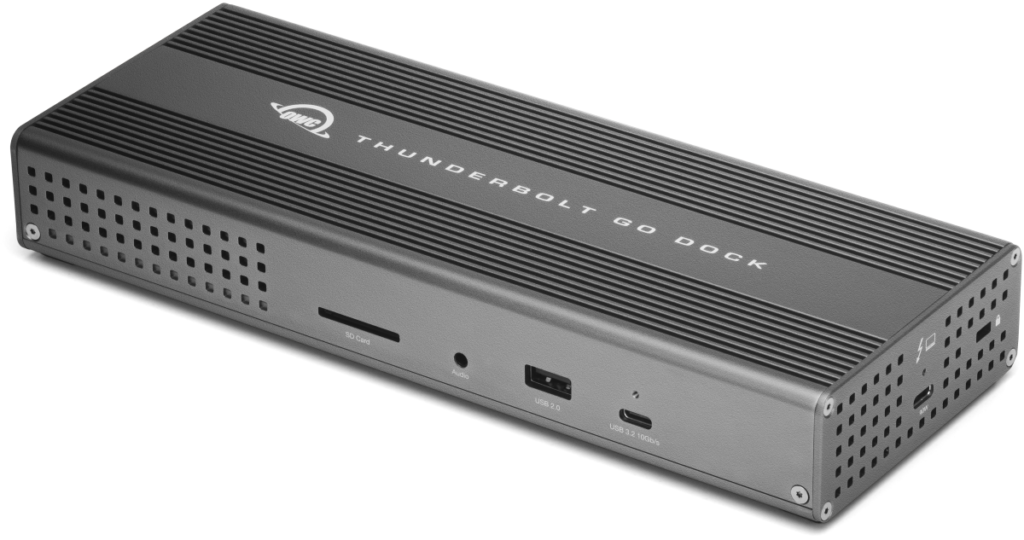
Want a full dock that travels without a power brick? The OWC Thunderbolt Go Dock builds its power supply into a fanless aluminium case and adds 11 ports, including HDMI 2.1 and 2.5GbE, with 90 W laptop charging over one Thunderbolt cable.
- No external power brick
- 2.5GbE for stable calls
- HDMI 2.1 and Thunderbolt display outputs
- Rugged fanless aluminium body
Key Takeaways
- Standard figure-8 power cord
- 0.7 m Thunderbolt cable included
- MDM compatible
Best For
- Travel
- Hot desks
- Mac and PC laptops
Avoid If
- You only need a few USB ports
- You want the cheapest Thunderbolt dock
Pros & Cons
The Go Dock is the dock for people who set up a workstation in different places: no external brick, just a standard figure-8 power cord. On a fixed desk, a cheaper dock with an external adapter offers similar connectivity.
PROS
- No external power brick
- 2.5GbE for stable calls
- HDMI 2.1 and Thunderbolt display outputs
- Rugged fanless aluminium body
CONS
- Pricier than many docks
- Heavier than USB-C hubs
- Display support varies by host
Review Scores
Score Breakdown
8.7/10 Expert Score
- Primary Output Performance8.5/10
- Build & Desk Ergonomics8.5/10
- Software Suite & Automation8.0/10
- Universal Compatibility9.3/10
- Setup & Installation10.0/10
How this score is calculated
Each criterion is the weighted average of its available spec scores (0–10), calculated from official specifications using our Accessories scoring matrix. Empty specs are skipped, not scored as 0. The Expert Score is the weighted average of the scored criteria, shown out of 10; stars = Expert Score ÷ 2 (a 9.4/10 score is 4.7 stars), to one decimal.
| Criterion | Weight | From specs | Score |
|---|---|---|---|
| Primary Output PerformanceAccessory Type (Lighting, Mounts & Stands, Docks & Hubs, Capture, Backdrops, Other): Thunderbolt docking station → 7.0; Power Delivery: 90 W → 9.2; Video Output: One 8K or up to two 4K displays → 9.5; Key Features: Built-in power supply → 6.5; Materials: Aluminium → 8.0 | 40% | 8.5 | 8.5 |
| Build & Desk ErgonomicsMaterials: Aluminium → 8.5 | 20% | 8.5 | 8.5 |
| Software Suite & AutomationKey Features: Built-in power supply → 8.0 | 15% | 8.0 | 8.0 |
| Universal CompatibilityOS Support: macOS, Windows, iPadOS, ChromeOS → 10.0; Connection: Thunderbolt (USB-C host port) → 9.0; Compatible Devices: Thunderbolt 3 → 7.0 | 15% | 9.3 | 9.3 |
| Setup & InstallationPlug and Play: Yes → 10.0; OS Support: macOS, Windows, iPadOS, ChromeOS → 10.0 | 10% | 10.0 | 10.0 |
| Expert Score | 8.7/10 | ||
OWC Thunderbolt Go Dock Review
OWC is a US maker of storage and docks for Mac and PC. It unveiled the Thunderbolt Go Dock at CES 2023 at $399, describing it as the first full-featured Thunderbolt dock with a built-in power supply.
Primary Output Performance 8.5/10
The 11 ports include three Thunderbolt ports, HDMI 2.1, 2.5GbE, USB-A and USB-C ports, an SD card reader and an audio combo jack.
Spec-based reasoning: wired 2.5GbE takes venue Wi-Fi out of the equation on video calls. HDMI 2.1 drives high-resolution displays, and the audio combo jack takes wired headsets.
Downstream Thunderbolt ports can chain drives and monitors.
OWC launched it at $399, which places it alongside premium desk docks.
The built-in power supply is the reason to choose it: one box and one power cord instead of a dock plus an external adapter.
For a fixed desk, a cheaper dock with an external adapter offers similar connectivity.
- Type Thunderbolt docking station
- PD 90 W
- Video Out One 8K or up to two 4K disp…
- Features Built-in power supply
Build & Desk Ergonomics 8.5/10
The dock uses a rugged, fanless aluminium case with the power supply inside, so it needs only a standard two-prong figure-8 power cord and a Thunderbolt cable.
A fanless design adds no fan noise near a desk microphone. Figure-8 power cords are a common standard, so a replacement is easy to source.
It is heavier than a USB-C hub, but it replaces a dock plus a separate power adapter.
- Materials Aluminium
Software Suite & Automation 8.0/10
OWC lists MDM compatibility and its Dock Ejector software, which unmounts connected drives in one click.
- Features Built-in power supply
Universal Compatibility 9.3/10
The dock works with Thunderbolt 3, Thunderbolt 4, USB4 and USB-C hosts, including Mac, Windows PCs, iPad and Chromebook. OWC lists support for one 8K or up to two 4K displays.
Display support depends on the host. Apple’s base-chip Macs differ here: base M1 and M2 models support one external display, and later base models support two in some configurations, so check Apple’s tech specs for your Mac.
Compared with the CalDigit TS4, the OWC has fewer ports but is built to travel, which is a different priority.
- OS macOS
- Connect Thunderbolt
Setup & Installation 10.0/10
One Thunderbolt cable connects the dock to a laptop and delivers up to 90 W charging. A certified 0.7 m OWC Thunderbolt cable comes in the box.
Setup is power cord, laptop cable, then displays, Ethernet and a headset.
MDM compatibility lets IT teams manage Go Dock workstations remotely, which suits hot desks and travelling staff.
- Plug & Play Yes
- OS macOS
Full Specifications
General
| Best For | Travelling professionals and hot desks |
|---|---|
| Release Year | 2023 |
| Launch Price | $399 |
| Model Number | OWCTB4DKG11P |
Primary Output Performance 8.5/10
| Accessory Type (Lighting, Mounts & Stands, Docks & Hubs, Capture, Backdrops, Other) | Thunderbolt docking station |
|---|---|
| Power Delivery | 90 W |
| Video Output | One 8K or up to two 4K displays (host dependent) |
| Key Features | Built-in power supply, fanless design, MDM compatible, Dock Ejector software |
| Materials | Aluminium |
Universal Compatibility 9.3/10
| OS Support | macOS, Windows, iPadOS, ChromeOS |
|---|---|
| Connection | Thunderbolt (USB-C host port) |
| Compatible Devices | Thunderbolt 3, Thunderbolt 4, USB4 and USB-C hosts |
| Works With | macOS, Windows, iPadOS, ChromeOS |
| Ports | 11 ports: 3 x Thunderbolt, HDMI 2.1, 2.5GbE, USB-A, USB-C, SD card reader, audio combo jack |
Setup & Installation 10.0/10
| Plug and Play | Yes |
|---|---|
| Cables Included | 0.7 m OWC Thunderbolt cable, power cord |
| Power | Built-in power supply |
Product Details
| Brand | OWC |
|---|---|
| Model | Thunderbolt Go Dock |
| Model number | Thunderbolt Go Dock |
| Release year | 2023 |
Price Comparison
| Store | Price | Deal |
|---|---|---|
| Owc.comOfficial OWC store | Launch price $399 | View deal (opens in a new tab) |
The Verdict
Buy the OWC Thunderbolt Go Dock if you set up a full workstation in client rooms, hotels or hot desks and want 2.5GbE, HDMI 2.1 and 90 W charging without carrying a power brick.
Skip it if the dock stays on one desk: the CalDigit TS4 has more ports, and the UGREEN Revodok Max 213 costs less.
Our assessment is based on OWC’s product page, launch announcement and specifications. See How We Score for how the Expert Score weighs each criterion.
FAQs
What makes the Go Dock different?
Its power supply is built in, so there is no external brick.
How many ports does it have?
11.
How much charging power does it provide?
Up to 90 W.
Does it have Ethernet?
Yes, 2.5 Gigabit.
How many displays does it support?
One 8K or up to two 4K, depending on the host.
Is it fanless?
Yes.
Does it work with Windows laptops?
Yes, along with Mac, iPad and Chromebook.
What was the launch price?
$399.