
Anker 563 Dock vs CalDigit TS4 Comparison
Compare Anker 563 Dock vs CalDigit TS4 side by side: specs, ratings, pros and cons, and which one fits your room best.
On this page

At a Glance
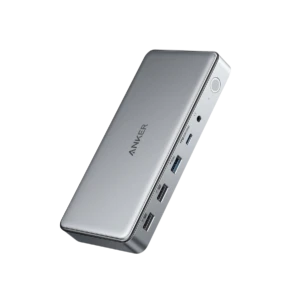
The Anker 563 USB-C Docking Station is a 10-in-1 desktop dock with 100 W laptop charging, two HDMI ports and a DisplayPort, Gigabit Ethernet, four USB ports and a 3.5 mm audio jack, using DisplayLink for triple displays.
- Best For
- Laptop users who need multiple monitors
- Accessory Type
- USB-C docking station
- Launch Price
- $259.99
- Works With
- Windows, macOS, ChromeOS
- Connection
- USB-C
The CalDigit TS4 is an 18-port Thunderbolt 4 dock with 98 W laptop charging, 2.5 Gb Ethernet, a DisplayPort 1.4 output and three downstream Thunderbolt 4 ports, built to run a whole desk from one cable.
- Best For
- Thunderbolt laptop desks
- Accessory Type
- Docks & Hubs
- Launch Price
- —
- Works With
- macOS, Windows
- Connection
- Thunderbolt 4
Review Scores Compared
Expert Score
Primary Output Performance
Build & Desk Ergonomics
Software Suite & Automation
Universal Compatibility
Setup & Installation
Editorial Reviews Comparison
Primary Output Performance
- Anker 563 Dock7.7/10
- CalDigit TS48.0/10Leader
Anker 563 Dock
Ports include two HDMI, one DisplayPort, Gigabit Ethernet, a 3.5 mm audio jack, a USB-C port with 30 W charging, one 5 Gbps USB-A and two USB-A 2.0. Wired Ethernet improves video call stability compared with Wi-Fi in busy offices. The audio jack is handy for a wired headset without adding a separate adapter.
CalDigit TS4
There are 18 ports in total, including three downstream Thunderbolt 4 ports, USB-A and USB-C data ports at 10 Gbps, 2.5 Gb Ethernet, DisplayPort 1.4, UHS-II SD and microSD readers, and separate audio in and out. The 2.5 Gb Ethernet port is worth noting for video calls. A wired network link keeps Teams and Zoom stable when office or home Wi-Fi is busy.
Build & Desk Ergonomics
- Anker 563 Dock—
- CalDigit TS48.2/10
Anker 563 Dock
The dock is a flat, horizontal unit measuring 170.1 x 80.1 x 24.5 mm, with ports on the front and back. It runs from its own mains power rather than drawing power from the laptop. The casing feels solid and stays put on a desk, with frequently used ports at the front.
CalDigit TS4
The aluminium chassis stands upright or lies flat, and the finned design acts as a passive heatsink. There is no fan, so it runs silently on a desk. Ports are split sensibly between front and back, with SD and microSD readers, audio jacks and a couple of USB ports at the front for things you plug in daily.
Software Suite & Automation
- Anker 563 Dock6.0/10
- CalDigit TS46.0/10
Anker 563 Dock
The Anker 563 Dock is a USB-C docking station. Official features include DisplayLink triple display, 100 W laptop charging. It is listed for Windows, macOS, ChromeOS. The official connection is USB-C. Port layout is listed as 2 x HDMI, 1 x DisplayPort, 1 x USB-C (30 W), 1 x USB-A 5 Gbps, 2 x USB-A 2.0, Gigabit Ethernet, 3.5 mm audio.
CalDigit TS4
The TS4 is a Docks & Hubs. Official features include 98 W charging, 2.5 Gb Ethernet, up to two 4K displays (host dependent). It is listed for macOS, Windows. The official connection is Thunderbolt 4. Port layout is listed as 18 ports: 3x Thunderbolt 4 downstream, USB-C and USB-A 10 Gbps, 2.5 GbE, DisplayPort 1.4, SD and microSD UHS-II, audio in, audio out, combo audio.
Universal Compatibility
- Anker 563 Dock9.3/10Leader
- CalDigit TS48.2/10
Anker 563 Dock
The dock works with USB-C laptops including Windows, macOS and ChromeOS devices. Anker markets it for triple displays on M1 MacBooks, which normally drive one external screen. Display modes vary. One monitor gets 4K at 30 Hz on HDMI 1, 2K at 50 Hz on HDMI 2, or 2K at 60 Hz on DisplayPort.
CalDigit TS4
The dock works with Thunderbolt 4, Thunderbolt 3 and USB4 hosts on macOS and Windows, and in a reduced mode with plain USB-C laptops. It is certified for Thunderbolt 4. Display support depends on the host. Apple silicon base chips may run only one external display, while Windows Thunderbolt laptops can drive two 4K screens through the dock.
Setup & Installation
- Anker 563 Dock10.0/10Leader
- CalDigit TS49.7/10
Anker 563 Dock
A single USB-C cable connects the laptop, providing power, data and video. Triple displays on macOS require the DisplayLink Manager app. Windows laptops work with native display output on the first HDMI port and DisplayLink for others. On a Mac, install DisplayLink before connecting the extra monitors, and allow screen recording permission when asked.
CalDigit TS4
Plug the TS4 into a Thunderbolt 4 or USB4 laptop and your displays, webcam, mic and network come up together. Macs need no drivers, and Windows only needs updates for some features. For a hybrid worker that one-cable connection is the real benefit. Arrive at the desk, plug in, and your USB microphone and webcam are ready before the meeting starts.
Why Anker 563 Dock Beats CalDigit TS4 (and Vice Versa)
Why Anker 563 Dock beats CalDigit TS4
- Better universal compatibility: 9.3 vs 8.2 out of 10
- Power Delivery: 100 W to laptop, 30 W USB-C vs 98 W
- Video Output: HDMI 4K30, HDMI 2K50, DisplayPort 2K60 vs DisplayPort 1.4 plus Thunderbolt 4 ports
Why CalDigit TS4 beats Anker 563 Dock
- Ports: 18 ports: 3x Thunderbolt 4 downstream, USB-C and USB-A 10 Gb… vs 2 x HDMI, 1 x DisplayPort, 1 x USB-C (30 W), 1 x USB-A 5 Gbp…
- Data Speed: 40 Gbps (Thunderbolt), 10 Gbps (USB) vs 5 Gbps
Review-score leads of 0.5+ points out of 10 first, then specs where only one comes out ahead.
Full Specifications
General
| Anker 563 Dock | CalDigit TS4 | |
|---|---|---|
| Best For | Laptop users who need multiple monitors | Thunderbolt laptop desks |
| Accessory Type (Lighting, Mounts & Stands, Docks & Hubs, Capture, Backdrops, Other) | USB-C docking station | Docks & Hubs |
| Release Year | 2021 | 2022 |
| Launch Price | $259.99 | — |
| Brand Compatibility | — | Thunderbolt 4, Thunderbolt 3 and USB4 laptops |
| Use Case | Multi-monitor laptop desk | Single-cable docking |
Compatibility
| Anker 563 Dock | CalDigit TS4 | |
|---|---|---|
| Works With | Windows, macOS, ChromeOS | macOS, Windows |
| Connection | USB-C | Thunderbolt 4 |
| OS Support | Windows, macOS, ChromeOS | macOS, Windows |
| Plug and Play | — | Yes |
| Compatible Devices | USB-C laptops | Thunderbolt 4/3 and USB4 laptops; reduced function on USB-C |
| Ports | 2 x HDMI, 1 x DisplayPort, 1 x USB-C (30 W), 1 x USB-A 5 Gbps, 2 x USB-A 2.0, Gigabit Ethernet, 3.5 mm audio | 18 ports: 3x Thunderbolt 4 downstream, USB-C and USB-A 10 Gbps, 2.5 GbE, DisplayPort 1.4, SD and microSD UHS-II, audio in, audio out, combo audio Better |
| Cable Length | — | 0.8 m |
| Certifications | — | Thunderbolt 4 |
Features
| Anker 563 Dock | CalDigit TS4 | |
|---|---|---|
| Key Features | DisplayLink triple display, 100 W laptop charging | 98 W charging, 2.5 Gb Ethernet, up to two 4K displays (host dependent) |
| Power | — | External power supply |
| Power Delivery | 100 W to laptop, 30 W USB-C Better | 98 W |
| Video Output | HDMI 4K30, HDMI 2K50, DisplayPort 2K60 Better | DisplayPort 1.4 plus Thunderbolt 4 ports |
| Data Speed | 5 Gbps | 40 Gbps (Thunderbolt), 10 Gbps (USB) Better |
| Noise Level | — | 0 dB |
Design & Build
| Anker 563 Dock | CalDigit TS4 | |
|---|---|---|
| Materials | — | Aluminium |
| Weight | — | 640 g |
| Dimensions | 170.1 x 80.1 x 24.5 mm | 141 x 42 x 113 mm |
| Tool-Free Setup | — | Yes |
| Foldable / Portable | — | No |
| Anti-Slip Base | — | Yes (rubber feet strips included) |
In the Box
| Anker 563 Dock | CalDigit TS4 | |
|---|---|---|
| In the Box | — | TS4 dock, Thunderbolt 4 cable, power adapter |
| Warranty | — | 2 yr |
| Cables Included | — | Thunderbolt 4 cable |
Identifiers
| Anker 563 Dock | CalDigit TS4 | |
|---|---|---|
| Model Number | A8395 | TS4 |
Takeaways
- It's a tie on our rating (4/5) between Anker 563 Dock and CalDigit TS4, so choose on the rows that matter most to you.
- Choose Anker 563 Dock for laptop users who need multiple monitors.
- Choose CalDigit TS4 for thunderbolt laptop desks.
Pros and Cons
Anker 563 Dock
PROS
- Up to three external monitors
- 100 W laptop charging
- Gigabit Ethernet and audio jack
- Works with base M1 and M2 MacBooks
CONS
- 4K limited to 30 Hz
- Data limited to 5 Gbps
- DisplayLink driver required for extra screens
CalDigit TS4
PROS
- 18 ports including 3x Thunderbolt 4
- Up to 98W Power Delivery
- Dual 4K display support
- 2.5GbE Ethernet and SD 4.0
CONS
- Requires Thunderbolt 4 / USB4
- Premium price
- 98W may be low for some workstations
Quick Verdict
- Anker 563 Dock 8.0Best overallLeads in Universal Compatibility, Setup & Installation
- CalDigit TS4 7.9Leads in Primary Output Performance