
PowerConf S500 vs Sync 40 Comparison
Compare PowerConf S500 vs Sync 40 side by side: specs, ratings, pros and cons, and which one fits your room best.
On this page
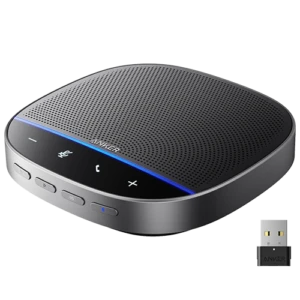
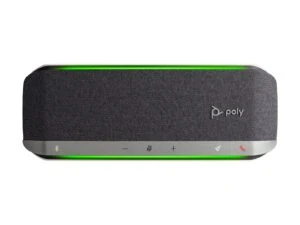
At a Glance
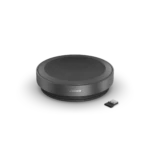
The Anker PowerConf S500 is a conference speakerphone for rooms up to 12 people, or 20 with two linked units. It has four mics with VoiceRadar voice tracking and two-way noise reduction, a 1.75-inch 10 W speaker and a 5 m pickup range.
- Best For
- Zoom rooms
- Mics
- 4
- Pickup
- 5 m
- Talk Time
- 13 h
- BT
- 5.4
- Certified
- Zoom Rooms, Google Meet
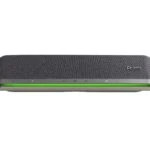
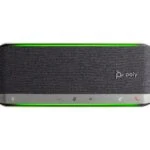
The Poly Sync 40 is a speakerphone for huddle rooms up to about 5 x 5 m. It has three mics, a 50 mm speaker, a 2.5 m pickup range and two status light bars visible from any side.
- Best For
- Huddle rooms
- Mics
- 3
- Pickup
- 2.5 m
- Talk Time
- 30 h
- BT
- 5.1
- Certified
- Microsoft Teams (Teams model), Zoom
Review Scores Compared
Expert Score
Mic Array & Full-Duplex
Speaker Clarity & Volume
Connectivity & Daisy-Chaining
Portability & Power
Call Controls & Certifications
Why PowerConf S500 Beats Sync 40 (and Vice Versa)
Why PowerConf S500 beats Sync 40
- Better connectivity & daisy-chaining: 9.8 vs 8.0 out of 10
- Better mic array & full-duplex: 9.4 vs 8.1 out of 10
- Microphones: 4 vs 3
- Pickup Range: 5 m vs 2.5 m
- Charging Time: 4 h vs 5 h
- Bluetooth Version: 5.4 vs 5.1
Why Sync 40 beats PowerConf S500
- Better call controls & certifications: 9.8 vs 8.5 out of 10
- Better portability & power: 9.1 vs 8.0 out of 10
- Mic Frequency Range: 100 Hz - 6.7 kHz vs 32 kHz sample rate (ultra HD voice)
- Speaker Frequency Range: 75 Hz - 20 kHz vs 80 Hz - 20 kHz
- Talk Time: 30 h vs 13 h
- Certifications: Microsoft Teams (Teams model), Zoom vs Zoom Rooms, Google Meet
Review-score leads of 0.5+ points out of 10 first, then specs where only one comes out ahead.
Full Specifications
General
| PowerConf S500 | Sync 40 | |
|---|---|---|
| Best For | Zoom rooms | Huddle rooms |
| Ideal Room Size | Up to 12 people (20 with two linked units) | Up to 5 x 5 m |
| Max People | 12 | — |
| Form Factor | Puck | Bar |
Microphones
| PowerConf S500 | Sync 40 | |
|---|---|---|
| Microphones | 4 Better | 3 |
| Pickup Range | 5 m Better | 2.5 m |
| Mic Frequency Range | 32 kHz sample rate (ultra HD voice) | 100 Hz - 6.7 kHz Better |
| Full Duplex | Yes | Yes |
| Echo Cancellation | Yes | Yes |
| Noise Reduction | Yes | Yes |
| Mic Type | — | 3-mic steerable array |
| Automatic Gain Control | Yes (voice balancing) | — |
Speaker
| PowerConf S500 | Sync 40 | |
|---|---|---|
| Speaker | 1.75 in full-range, 10 W | 50 mm |
| Max Output | — | 89 dB SPL (nominal) |
| Speaker Frequency Range | 80 Hz - 20 kHz | 75 Hz - 20 kHz Better |
| Speaker Drivers | — | 1 |
| Music Playback | Yes | — |
Battery & Charging
| PowerConf S500 | Sync 40 | |
|---|---|---|
| Talk Time | 13 h | 30 h Better |
| Battery | 6000 mAh (16 h playtime) | Li-ion, 5000 mAh |
| Charging Time | 4 h Better | 5 h |
| Mains Powered | No | No |
Connectivity
| PowerConf S500 | Sync 40 | |
|---|---|---|
| Connection | USB-C, Bluetooth, USB dongle | USB-A, USB-C, Bluetooth |
| Bluetooth Version | 5.4 Better | 5.1 |
| USB Dongle | Yes Better | No (Sync 40+ includes BT600) |
| Link Two Units | Yes (two units, wireless) | Yes (two units, wireless) |
| Certifications | Zoom Rooms, Google Meet | Microsoft Teams (Teams model), Zoom Better |
| Cable Length | — | 1.05 m |
| Bluetooth Range | — | 30 m |
| Bluetooth Profiles | — | A2DP, AVRCP, HFP, HSP, BLE |
Design & Build
| PowerConf S500 | Sync 40 | |
|---|---|---|
| Weight | 422 g Better | 610 g |
| Dimensions | 127 x 127 x 51 mm | 38 x 102 x 273 mm |
| Dust/Water Rating | — | IP64 |
| Colors | — | Silver |
| Controls | — | Touch: call answer/end, mute, volume, programmable button, pairing; buttons: power, wireless daisy chain |
| Management Software | AnkerWork app and PC software | — |
| Mute Button | — | Yes |
In the Box
| PowerConf S500 | Sync 40 | |
|---|---|---|
| In the Box | Speakerphone, USB-C cable, Bluetooth dongle, welcome guide | Speakerphone, USB-A cable, USB-C cable, quick start guide |
| Warranty | — | 2 years |
Identifiers
| PowerConf S500 | Sync 40 | |
|---|---|---|
| Model Number | A3305 | 772C4AA |
Compatibility
| PowerConf S500 | Sync 40 | |
|---|---|---|
| OS Compatibility | — | Windows 11, Windows 10, macOS |
Takeaways
- It's a tie on our rating (4.5/5) between PowerConf S500 and Sync 40, so choose on the rows that matter most to you.
- Choose PowerConf S500 for zoom rooms.
- Choose Sync 40 for huddle rooms.
Pros and Cons
PowerConf S500
PROS
- 5 m pickup, rooms up to 12
- Zoom Rooms and Google Meet certified
- Bluetooth 5.4 plus USB dongle
- Link two units for 20 people
CONS
- No Teams certification listed
- 13 h talk time
Sync 40
PROS
- Up to 30 h talk time
- Link two units wirelessly
- IP64 and Kensington slot
- USB-A and USB-C
CONS
- Three mics
- 610 g
Similar Comparisons
 PowerConf S500 vs Luna
- PowerConf S500 vs Speak2 75
- PowerConf S500 vs Sync 60
 Sync 40 vs Luna
- Sync 40 vs Speak2 75
- Sync 40 vs Sync 60
Quick Verdict
- PowerConf S500 9.2Best overallLeads in Mic Array & Full-Duplex, Speaker Clarity & Volume, Connectivity & Daisy-Chaining
- Sync 40 8.6Leads in Portability & Power, Call Controls & Certifications