
Beats Studio Pro vs Poly Blackwire 3320 Comparison
Compare Beats Studio Pro vs Poly Blackwire 3320 side by side: specs, ratings, pros and cons, and which one fits your room best.
On this page
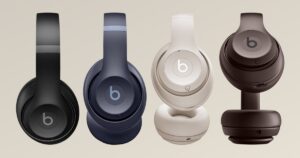
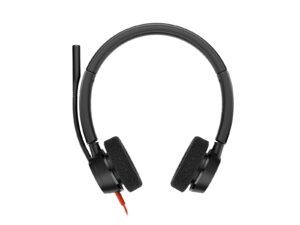
At a Glance
The Beats Studio Pro is an over-ear headphone with fully adaptive ANC, a Transparency mode and custom 40 mm drivers. It works with both Apple and Android, with one-touch pairing and Find My on Apple and Google Fast Pair on Android.
- Best For
- Mixed Apple and Android users
- Style
- Over-ear
- Weight
- 260 g
- ANC
- Fully adaptive ANC
- Mics
- —
- Boom Mic
- No
- Talk Time
- 24 h
- Connect
- Bluetooth (Class 1), USB-C audio, 3.5 mm
- Certified
- —
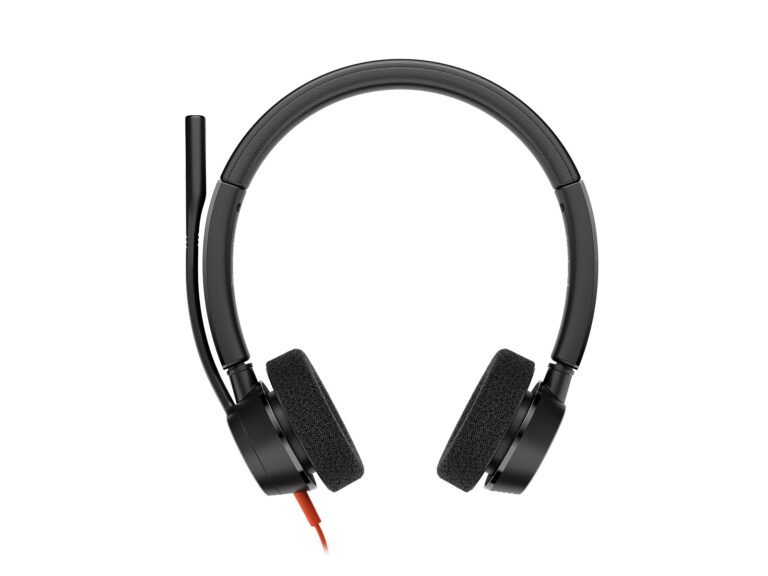
The Poly Blackwire 3320 is a wired stereo on-ear headset. It has 32 mm speakers, a noise-cancelling boom mic that rotates 280°, and an inline control with a Teams button on the Teams version.
- Best For
- Desk users
- Style
- On-ear stereo headband
- Weight
- 131 g
- ANC
- None
- Mics
- 1
- Boom Mic
- Yes (flexible boom, 280° rotation, 135 mm)
- Talk Time
- —
- Connect
- Wired USB-C with USB-A adapter
- Certified
- Microsoft Teams, Works With Chromebook
Review Scores Compared
Expert Score
Voice & Mic Clarity
Comfort & Ergonomics
Connectivity & Range
Battery & Charging
Certification & Controls
Editorial Reviews Comparison
Voice & Mic Clarity
- Beats Studio Pro4.0/10
- Poly Blackwire 33207.1/10Leader
Beats Studio Pro
Voice-targeting mics without a boom handle calls. The processing strips background noise reasonably well, though voices can sound a little compressed. From a moderately busy room, I'd expect a listener to find it clear enough. That's fine for casual calls, but it trails Jabra's work headsets. There's no physical mute switch on the cups, so you rely on the meeting app's mute.
Poly Blackwire 3320
The noise-cancelling mic sits on a 135 mm boom that rotates 280°, with a 100 Hz to 10 kHz range. However, among open-plan desks, I'd expect your voice to come through clearly from the far end, excellent for the price. A 135 mm boom with 280° rotation means left- and right-ear wearers are both covered without a special SKU.
Comfort & Ergonomics
- Beats Studio Pro8.3/10
- Poly Blackwire 33209.3/10Leader
Beats Studio Pro
At 260 g, with UltraPlush leather cushions and metal sliders, the fit is snug and secure. The leather traps heat, so on a warm afternoon I'd expect to want a break after a shorter session. For long meeting days, the cloth-covered Logitech Zone Vibe 100 stays cooler. Metal sliders and UltraPlush leather look premium, and the clamp holds well if you move around.
Poly Blackwire 3320
At 131 g with foam cushions, it's light. The on-ear stereo design is comfortable for shorter stretches. Expect the foam to feel warm after a long session. At 131 g it's one of the lightest stereo headsets we list, so all-day shifts are realistic if you accept on-ear pressure. Foam wears faster than leatherette; keep spare cushions in the IT closet for a fleet rollout.
Connectivity & Range
- Beats Studio Pro6.1/10
- Poly Blackwire 3320—
Beats Studio Pro
Class 1 Bluetooth, USB-C audio and a 3.5 mm cable cover every connection, and one-touch pairing works on both iOS and Android. It lacks multipoint, a dongle and Teams certification, so moving between a phone and a laptop means re-pairing. That makes it better suited to personal use than a managed office.
Poly Blackwire 3320
USB-C with a USB-A adapter. Inline controls cover call answer, mute, volume and a Teams button. It's certified for Teams and Works With Chromebook, and Poly Lens handles firmware. Inline Teams button, mute and volume keep hands on the keyboard while calls start. Poly Lens is optional for home users but useful once you manage more than a handful of units.
Battery & Charging
- Beats Studio Pro6.6/10
- Poly Blackwire 3320—
Beats Studio Pro
Beats rates 24 hours with ANC and 40 hours with it off, and Fast Fuel gives up to 4 hours from a 10-minute charge. Running ANC through a day of calls, I'd plan on a few working days of runtime. The Sony WH-CH720N, rated at 35 hours, outlasts it for much less money.
Poly Blackwire 3320
For a shared desk, there's nothing to charge or lose. No battery also means no charging dock to lose and no sudden mid-call dropouts from a forgotten charge. The 2.18 m cable is long enough for tower PCs under the desk; coil the excess with a clip so chairs don't roll over it.
Certification & Controls
- Beats Studio Pro4.0/10
- Poly Blackwire 33208.7/10Leader
Beats Studio Pro
The Studio Pro is not listed with Microsoft Teams or Zoom headset certification. There is no busy light. On-headset controls are listed as "b" button, volume rocker, multi-function button. When I help someone get ready for a first call, I point them to the mute control before anything else. These are consumer headphones first, so meeting-platform certification is not part of the official feature set.
Poly Blackwire 3320
The Blackwire 3320 is listed as Microsoft Teams, Works With Chromebook. Mute is listed as Inline mute button. Call controls include call answer/end; Teams button on Teams variants. On-headset controls are listed as Inline: call answer/end, mute, volume, Teams button. IT can manage it through Poly Lens. I'd look for a physical mute I can find without thinking, especially in an open office.
Why Beats Studio Pro Beats Poly Blackwire 3320 (and Vice Versa)
Why Beats Studio Pro beats Poly Blackwire 3320
- Driver Size: 40 mm vs 32 mm
Why Poly Blackwire 3320 beats Beats Studio Pro
- Better certification & controls: 8.7 vs 4.0 out of 10
- Better voice & mic clarity: 7.1 vs 4.0 out of 10
- Better comfort & ergonomics: 9.3 vs 8.3 out of 10
- Weight: 131 g vs 260 g
- Boom Mic: Yes (flexible boom, 280° rotation, 135 mm) vs No
- Connection: Wired USB-C with USB-A adapter vs Bluetooth (Class 1), USB-C audio, 3.5 mm
Review-score leads of 0.5+ points out of 10 first, then specs where only one comes out ahead.
Full Specifications
General
| Beats Studio Pro | Poly Blackwire 3320 | |
|---|---|---|
| Best For | Mixed Apple and Android users | Desk users |
| Wearing Style | Over-ear | On-ear stereo headband |
| Use Case | — | Office and contact-centre calls; plug-and-play USB |
Design & Build
| Beats Studio Pro | Poly Blackwire 3320 | |
|---|---|---|
| Weight | 260 g | 131 g Better |
| Materials | UltraPlush engineered leather cushions, metal sliders | — |
| Ear Cushions | — | Foam |
| Colors | — | Black |
| Headband | Premium metal sliders | — |
| Dimensions | 178 x 78 x 181 mm | 166 x 40 x 199 mm |
Audio
| Beats Studio Pro | Poly Blackwire 3320 | |
|---|---|---|
| Driver Size | 40 mm Better | 32 mm |
| Frequency Response | — | 20 Hz - 20 kHz |
| Driver Type | Custom active driver | — |
| Impedance | — | 32 Ω |
| Spatial Audio | Personalized Spatial Audio with dynamic head tracking | — |
| Custom EQ | 3 built-in sound profiles | — |
| Wired Listening | Yes (3.5 mm analog cable and USB-C lossless audio) | Yes (USB-C, USB-A adapter) |
| Stereo / Mono | Stereo | Stereo |
| Speaker Bandwidth (Calls) | — | 20 Hz - 20 kHz |
| Hearing Protection | — | SoundGuard Digital |
Noise Cancelling
| Beats Studio Pro | Poly Blackwire 3320 | |
|---|---|---|
| Noise Cancelling | Fully adaptive ANC | None |
| Active Noise Cancelling | Yes | — |
| Transparency Mode | Yes (Transparency mode) | — |
| Adaptive ANC | Yes | — |
Microphone
| Beats Studio Pro | Poly Blackwire 3320 | |
|---|---|---|
| Microphones | — | 1 |
| Microphone Setup | — | Noise-cancelling boom, 100 Hz - 10 kHz |
| Call Noise Reduction | — | Yes (noise-cancelling microphone) |
| Boom Mic | No | Yes (flexible boom, 280° rotation, 135 mm) Better |
| Mute Control | — | Inline mute button |
| Busylight | No | — |
| Mic Frequency Response | — | 100 Hz - 10 kHz |
| Open Office Certified | No | — |
Battery & Charging
| Beats Studio Pro | Poly Blackwire 3320 | |
|---|---|---|
| Talk Time | 24 h | — |
| Fast Charging | Yes (10 min = up to 4 h, Fast Fuel) | — |
| Charging Stand | No | No |
| Music Time | 24 h | — |
| Charging Port | USB-C (lossless audio) | — |
| Music Time (ANC Off) | 40 h | — |
| Wireless Charging | No | No |
| Replaceable Battery | — | No |
Connectivity
| Beats Studio Pro | Poly Blackwire 3320 | |
|---|---|---|
| Connection | Bluetooth (Class 1), USB-C audio, 3.5 mm | Wired USB-C with USB-A adapter Better |
| USB Dongle | No | No |
| Certifications | — | Microsoft Teams, Works With Chromebook |
| USB Audio | Yes | Yes |
| Cable Length | — | 2.18 m |
| LE Audio / Auracast | — | No |
| Google Fast Pair | Yes | — |
| DECT Standard | No | No |
Controls & App
| Beats Studio Pro | Poly Blackwire 3320 | |
|---|---|---|
| Controls | "b" button, volume rocker, multi-function button | Inline: call answer/end, mute, volume, Teams button |
| Management Software | Beats app | Poly Lens |
| Voice Assistant | Hey Siri | — |
| Teams / Call Button | — | Yes (call answer/end; Teams button on Teams variants) |
| IT Remote Management | — | Poly Lens |
| Firmware Updates | Over the air | Yes (Poly Lens) |
In the Box
| Beats Studio Pro | Poly Blackwire 3320 | |
|---|---|---|
| In the Box | Headphones, carrying case, USB-C to USB-C cable, 3.5 mm cable | Headset, USB-C to USB-A adapter, user guide |
| Warranty | — | 2-year limited |
| Carry Case | Yes (carrying case) | No |
Identifiers
| Beats Studio Pro | Poly Blackwire 3320 | |
|---|---|---|
| Model Number | — | 8X220AA |
Compatibility
| Beats Studio Pro | Poly Blackwire 3320 | |
|---|---|---|
| OS Compatibility | — | Windows 11, Windows 10, macOS, Android, iOS (USB-C) |
| Works With | — | Microsoft Teams, Works With Chromebook, Windows, macOS, Android, iOS |
Takeaways
- Our pick: Poly Blackwire 3320, with the highest spec-based rating (4/5).
- Choose Beats Studio Pro for mixed Apple and Android users.
- Choose Poly Blackwire 3320 for desk users.
Pros and Cons
Beats Studio Pro
PROS
- Fully adaptive ANC and Transparency
- USB-C lossless and 3.5 mm input
- Works well with Apple and Android
- Fast Fuel: 10 min = up to 4 h
CONS
- 24 h with ANC on
- Codec support not detailed on the product page
Poly Blackwire 3320
PROS
- Noise-cancelling boom mic, 280° rotation
- USB-C with USB-A adapter
- Teams and Works With Chromebook certified
- SoundGuard Digital
CONS
- No ANC
- Wired only
Similar Comparisons
 Poly Blackwire 33208.2/10
 Jabra Evolve2 759.2/10Poly Blackwire 3320 vs Jabra Evolve2 75
- Poly Blackwire 33208.2/10
 Jabra Evolve2 30 SE9.0/10Poly Blackwire 3320 vs Jabra Evolve2 30 SE
- Poly Blackwire 33208.2/10
 Yealink BH768.9/10Poly Blackwire 3320 vs Yealink BH76
- Poly Blackwire 33208.2/10
 Jabra Evolve2 558.8/10Poly Blackwire 3320 vs Jabra Evolve2 55
Quick Verdict
- Beats Studio Pro 5.8No outright category lead
- Poly Blackwire 3320 8.2Best overallLeads in Voice & Mic Clarity, Comfort & Ergonomics, Certification & Controls