
Bose QuietComfort vs Logitech H390 Comparison
Compare Bose QuietComfort vs Logitech H390 side by side: specs, ratings, pros and cons, and which one fits your room best.
On this page
At a Glance
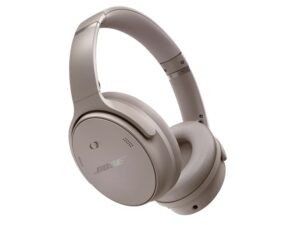
The Bose QuietComfort Headphones replaced the QuietComfort 45. They are an around-ear ANC headphone with protein leather cushions and a hard carry case.
- Best For
- Travellers on a mid budget
- Style
- Over-ear (around-ear)
- Weight
- 236 g
- ANC
- Active noise cancelling
- Mics
- —
- Boom Mic
- No
- Talk Time
- 24 h
- Connect
- Bluetooth
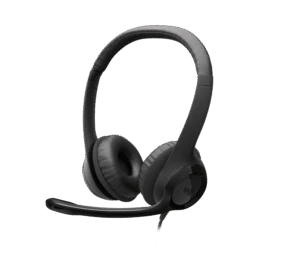
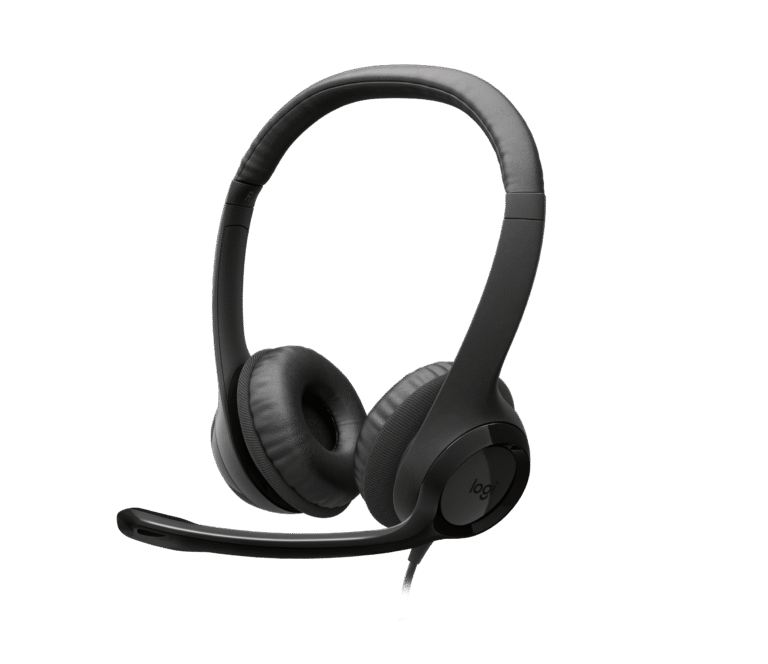
The Logitech H390 is a long-running wired USB headset. It has 30 mm drivers, a bi-directional noise-cancelling mic on a rotating boom, and inline volume and mute controls.
- Best For
- Students
- Style
- On-ear headband
- Weight
- 197 g
- ANC
- None
- Mics
- 1
- Boom Mic
- Yes (rotating boom)
- Talk Time
- —
- Connect
- Wired USB-A or USB-C, 1.9 m cable
Review Scores Compared
Expert Score
Voice & Mic Clarity
Comfort & Ergonomics
Connectivity & Range
Battery & Charging
Certification & Controls
Editorial Reviews Comparison
Voice & Mic Clarity
- Bose QuietComfort4.0/10
- Logitech H3907.1/10Leader
Bose QuietComfort
Built-in mics handle calls without a boom, and they work best in a quiet room. In a moderately busy office, I'd expect listeners to find it clear enough. For clearer calls at a lower weight, the Jabra Evolve2 55 is the work-focused alternative. Without a boom or advanced beamforming readout, results depend heavily on how quiet your room is.
Logitech H390
A bi-directional noise-cancelling boom covers 100 Hz to 10 kHz, and it rotates to either side. However, from a moderately noisy room, I'd expect listeners to find it clear enough, better than most headphones without a boom. Rotating the boom to either side helps left- and right-handed users on shared units.
Comfort & Ergonomics
- Bose QuietComfort8.9/10
- Logitech H3909.8/10Leader
Bose QuietComfort
At 236 g, this is the lightest Bose in our lineup, with removable protein-leather cushions and an adjustable headband. I'd estimate a long session before it needs a break, making it one of the easiest premium headphones to wear through a long day. At 236 g with removable cushions, these are the easiest Bose over-ears to forget you're wearing.
Logitech H390
At 197 g, with padded swivel cushions and an adjustable band, it's comfortable for the price. After a long session, I'd expect the cushions to feel warm. That's fine for students and occasional callers. The adjustable padded band suits shared classrooms where head sizes vary. At 197 g it isn't featherlight, yet for three-hour seminar blocks it's adequate before the pads feel sticky.
Connectivity & Range
- Bose QuietComfort6.1/10
- Logitech H390—
Bose QuietComfort
Bluetooth is the only wireless path. Bose says it isn't recommended for gaming because of latency, which can also show up as slight lip-sync drift on video. There's no dongle or certification, so on a managed Windows PC a dongle-based headset is safer. Without a physical mute switch, the habits in our meeting etiquette guide matter more.
Logitech H390
It comes in USB-A or USB-C, with inline volume and mute. It's plug-and-play on Windows, macOS and Chromebooks. There's no certification, but every major platform treats it as a standard USB headset. For students joining online lessons, our guide on virtual meetings for students is a good next read.
Battery & Charging
- Bose QuietComfort5.8/10
- Logitech H390—
Bose QuietComfort
Bose rates 24 hours of playback, with a 2.5-hour charge over USB. With ANC and regular calls, I'd plan for a long runtime. The Sony WH-CH720N lasts longer on paper, at 35 hours. The 2.5-hour charge is a bit quicker than the Ultra's three hours, which helps if you top up at lunch.
Logitech H390
It's wired, so there's no battery, and the 1.9 m cable gives plenty of slack. For classrooms and shared desks, that avoids flat-battery surprises. A 1.9 m cable reaches from a floor PC to a standing desk without an extension. The trade-off is cable tangle in a backpack; for travel, a wireless Zone Vibe 100 makes more sense.
Certification & Controls
- Bose QuietComfort4.0/10
- Logitech H3908.8/10Leader
Bose QuietComfort
The QuietComfort is not listed with Microsoft Teams or Zoom headset certification. There is no busy light. When I help someone get ready for a first call, I point them to the mute control before anything else. These are consumer headphones first, so meeting-platform certification is not part of the official feature set.
Logitech H390
The H390 is not listed with Microsoft Teams or Zoom headset certification. Mute is listed as Inline mic mute. A mute alert or indicator is included, so you can tell when you are muted. On-headset controls are listed as Inline volume +/-, mic mute. I'd look for a physical mute I can find without thinking, especially in an open office.
Why Bose QuietComfort Beats Logitech H390 (and Vice Versa)
Why Bose QuietComfort beats Logitech H390
- Connection: Bluetooth vs Wired USB-A or USB-C, 1.9 m cable
Why Logitech H390 beats Bose QuietComfort
- Better certification & controls: 8.8 vs 4.0 out of 10
- Better voice & mic clarity: 7.1 vs 4.0 out of 10
- Better comfort & ergonomics: 9.8 vs 8.9 out of 10
- Weight: 197 g vs 236 g
- Boom Mic: Yes (rotating boom) vs No
Review-score leads of 0.5+ points out of 10 first, then specs where only one comes out ahead.
Full Specifications
General
| Bose QuietComfort | Logitech H390 | |
|---|---|---|
| Best For | Travellers on a mid budget | Students |
| Wearing Style | Over-ear (around-ear) | On-ear headband |
Design & Build
| Bose QuietComfort | Logitech H390 | |
|---|---|---|
| Weight | 236 g | 197 g Better |
| Materials | Metal, plastic, protein leather | — |
| Ear Cushions | Protein leather, removable | Leatherette, padded, swivel-mounted |
| Colors | — | Black, Off-white, Rose |
| Headband | Adjustable | Adjustable, padded |
| Dimensions | 195 x 157 x 80 mm | 171 x 151 x 68 mm |
Audio
| Bose QuietComfort | Logitech H390 | |
|---|---|---|
| Driver Size | — | 30 mm |
| Frequency Response | — | 20 Hz - 20 kHz |
| Impedance | — | 32 Ω |
| Sensitivity | — | 94 dBV/Pa ±3 dB |
| Wired Listening | Yes (3.5 mm to 2.5 mm audio cable included; passive listening when battery is depleted) | Yes (USB) |
| Stereo / Mono | Stereo | Stereo |
Noise Cancelling
| Bose QuietComfort | Logitech H390 | |
|---|---|---|
| Noise Cancelling | Active noise cancelling | None |
| Active Noise Cancelling | Yes | — |
| Transparency Mode | Yes (Aware Mode) | — |
Microphone
| Bose QuietComfort | Logitech H390 | |
|---|---|---|
| Microphones | — | 1 |
| Microphone Setup | — | Bi-directional noise-cancelling, 100 Hz - 10 kHz |
| Call Noise Reduction | — | Yes (noise-cancelling mic) |
| Boom Mic | No | Yes (rotating boom) Better |
| Mute Control | — | Inline mic mute |
| Busylight | No | — |
| Mic Frequency Response | — | 100 Hz - 10 kHz |
| Mic Pickup Pattern | — | Bi-directional |
| Mute Alert | — | Yes (mute light on the in-line controller) |
| Open Office Certified | No | — |
Battery & Charging
| Bose QuietComfort | Logitech H390 | |
|---|---|---|
| Talk Time | 24 h | — |
| Charging Time | 2.5 h | — |
| Charging Stand | No | No |
| Music Time | 24 h | — |
| Charging Port | USB | — |
| Wireless Charging | No | No |
| Replaceable Battery | — | No |
Connectivity
| Bose QuietComfort | Logitech H390 | |
|---|---|---|
| Connection | Bluetooth Better | Wired USB-A or USB-C, 1.9 m cable |
| USB Dongle | No | No |
| Low-Latency Mode | Not recommended for gaming (Bose) | — |
| USB Audio | — | Yes |
| Cable Length | — | 1.9 m |
| LE Audio / Auracast | — | No |
| DECT Standard | No | No |
Controls & App
| Bose QuietComfort | Logitech H390 | |
|---|---|---|
| Controls | — | Inline volume +/-, mic mute |
| Management Software | Bose app | — |
| Voice Assistant | Phone's native assistant via multi-function button | — |
In the Box
| Bose QuietComfort | Logitech H390 | |
|---|---|---|
| In the Box | — | Headset, documentation |
| Warranty | 1-year limited | 2 years |
| Carry Case | Yes (hard carry case) | No |
Identifiers
| Bose QuietComfort | Logitech H390 | |
|---|---|---|
| Model Number | — | A00146 |
Compatibility
| Bose QuietComfort | Logitech H390 | |
|---|---|---|
| OS Compatibility | — | Windows, macOS, ChromeOS |
Takeaways
- Our pick: Logitech H390, with the highest spec-based rating (4/5).
- Choose Bose QuietComfort for travellers on a mid budget.
- Choose Logitech H390 for students.
Pros and Cons
Bose QuietComfort
PROS
- Bose active noise cancelling
- Lighter than the QC Ultra
- Hard carry case
- Protein leather cushions
CONS
- 24 h battery is below most rivals here
- Bluetooth version and codecs not listed on the page we checked
Logitech H390
PROS
- Noise-cancelling boom mic
- Inline volume and mute
- USB-A or USB-C
- Long 1.9 m cable
CONS
- No ANC or wireless
- No certification listed on the spec page
Similar Comparisons
 Logitech H3908.4/10
 Jabra Evolve2 759.2/10Logitech H390 vs Jabra Evolve2 75
- Logitech H3908.4/10
 Jabra Evolve2 30 SE9.0/10Logitech H390 vs Jabra Evolve2 30 SE
- Logitech H3908.4/10
 Yealink BH768.9/10Logitech H390 vs Yealink BH76
- Logitech H3908.4/10
 Jabra Evolve2 558.8/10Logitech H390 vs Jabra Evolve2 55
Quick Verdict
- Bose QuietComfort 5.8No outright category lead
- Logitech H390 8.4Best overallLeads in Voice & Mic Clarity, Comfort & Ergonomics, Certification & Controls