
Elgato Stream Deck + vs Logitech Tap IP Comparison
Compare Elgato Stream Deck + vs Logitech Tap IP side by side: specs, ratings, pros and cons, and which one fits your room best.
On this page
At a Glance
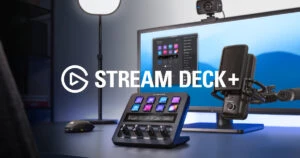
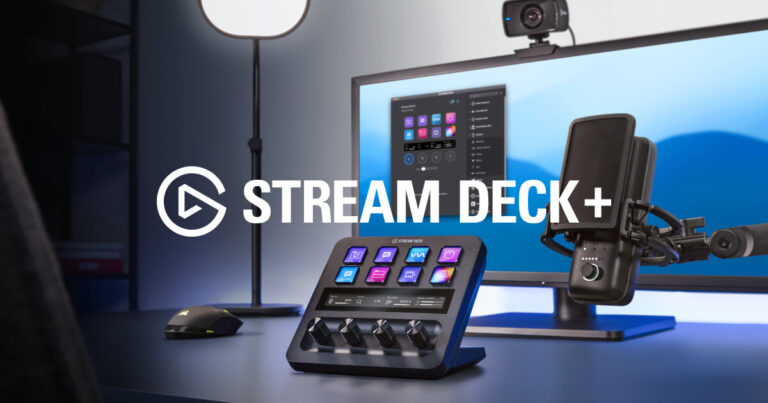
Want physical controls for mute, call volume and lights? The Elgato Stream Deck + is a USB-C control surface with eight LCD keys, four push dials and a touch strip, with plugins for Teams, Zoom and Elgato's audio and lighting apps.
- Best For
- Hybrid workers who run calls and media
- Accessory Type
- Other
- Launch Price
- $199.99
- Works With
- Windows, macOS
- Connection
- USB-C
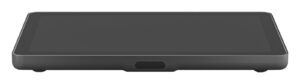
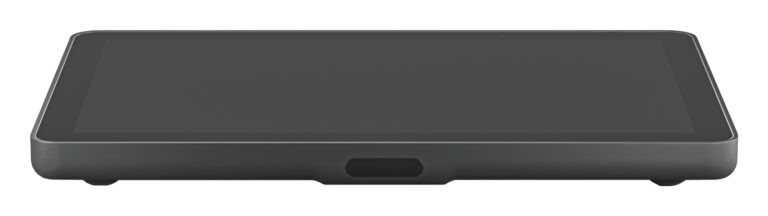
Want a meeting-room controller that runs on one network cable? Logitech Tap IP is a 10.1-inch PoE touch controller for Logitech video bars, certified for Microsoft Teams Rooms on Android and Zoom Rooms, with a motion sensor that wakes the screen.
- Best For
- Teams Rooms and Zoom Rooms built on Logitech video bars
- Accessory Type
- Meeting room touch controller
- Launch Price
- $999
- Works With
- Microsoft Teams Rooms on Android, Zoom Rooms
- Connection
- Ethernet (PoE)
Review Scores Compared
Expert Score
Primary Output Performance
Build & Desk Ergonomics
Software Suite & Automation
Universal Compatibility
Setup & Installation
Editorial Reviews Comparison
Primary Output Performance
- Elgato Stream Deck +8.3/10Leader
- Logitech Tap IP6.4/10
Elgato Stream Deck +
The dials are the key upgrade over other Stream Deck models. Turn to change volume, press to mute, and the touch strip shows the current level and lets you tap for alternate functions. With Elgato Wave Link, the dials can set separate levels for call audio, music and system sounds, which pairs with mics such as the Wave:3 MK.2.
Logitech Tap IP
An integrated PIR motion sensor wakes the screen when someone enters, while an ambient light sensor adjusts brightness and an ultrasonic speaker supports proximity features. Spec-based reasoning: with motion wake-up, the screen is already on when people walk in. The panel is a 10-point capacitive touchscreen. Logitech Sync, Microsoft Teams Admin Center and Zoom Device Management can all monitor and update it alongside the rest of the room hardware.
Build & Desk Ergonomics
- Elgato Stream Deck +—
- Logitech Tap IP6.1/10
Elgato Stream Deck +
The eight LCD keys sit above four rotary dials and a narrow touch strip, on a removable stand that angles the surface toward you. It connects and draws power over USB-C. Each key's screen can show an icon and a state, such as a red microphone when muted. At 140 x 138 x 110 mm, it is larger than a standard Stream Deck MK.2, so measure the space beside the keyboard.
Logitech Tap IP
The controller has a 10.1-inch IPS display with 1280 x 800 resolution, 400 nits of brightness and a 1000:1 contrast ratio. An oleophobic coating resists fingerprints, and the unit weighs 1.0 kg. The screen sits at a 14° display angle with an 85° viewing angle, and the low profile keeps it below sightlines to the room display and camera.
Software Suite & Automation
- Elgato Stream Deck +8.7/10Leader
- Logitech Tap IP5.0/10
Elgato Stream Deck +
The Stream Deck app handles key and dial assignments, multi-actions and plugins.
Logitech Tap IP
Security features include AES-128 full disk encryption, device attestation and a Kensington lock slot.
Universal Compatibility
- Elgato Stream Deck +7.8/10
- Logitech Tap IP8.0/10Leader
Elgato Stream Deck +
Plugins cover Microsoft Teams, Zoom, OBS, Spotify, Philips Hue, and Elgato's Wave Link and Control Center. Many others come from developers in the Marketplace. Teams integration depends on Teams third-party app API access. Some managed laptops disable that, and the plugin then cannot read meeting state. The device works on Windows and macOS, and the Stream Deck software has to run in the background.
Logitech Tap IP
Tap IP is certified for Microsoft Teams Rooms on Android and Zoom Rooms, and it works with Logitech appliances such as the Rally Bar and Rally Bar Mini. For rooms running a Windows PC, the USB-connected Logitech Tap may still be the better fit. Check Logitech's compatibility list before buying, because supported platforms vary with the video bar.
Setup & Installation
- Elgato Stream Deck +7.7/10
- Logitech Tap IP8.1/10Leader
Elgato Stream Deck +
Install the Stream Deck app on Windows or macOS, plug in the device and drag actions onto keys and dials. Profiles can switch automatically when you change apps. A typical meeting layout puts mute and camera on keys, call volume on one dial, and brightness for a Key Light Air MK.2 on another.
Logitech Tap IP
A single PoE cable (IEEE 802.3af, Class 3) provides power and data. Cables can be routed through the back or below the device into a table grommet. USB controllers need extenders and power bricks for long runs; Tap IP needs only a PoE switch port or injector. Table, riser and wall mounts are optional, and the table and riser mounts rotate 180°.
Why Elgato Stream Deck + Beats Logitech Tap IP (and Vice Versa)
Why Elgato Stream Deck + beats Logitech Tap IP
- Better software suite & automation: 8.7 vs 5.0 out of 10
- Better primary output performance: 8.3 vs 6.4 out of 10
- Connection: USB-C vs Ethernet (PoE)
- Key Features: 8 LCD keys, 4 push dials, touch strip, plugins, multi-action… vs 10.1-inch 1280 x 800 IPS touchscreen, PIR motion sensor, amb…
- Weight: 465 g vs 1.0 kg
Why Logitech Tap IP beats Elgato Stream Deck +
- Accessory Type (Lighting, Mounts & Stands, Docks & Hubs, Capture, Backdrops, Other): Meeting room touch controller vs Other
Review-score leads of 0.5+ points out of 10 first, then specs where only one comes out ahead.
Full Specifications
General
| Elgato Stream Deck + | Logitech Tap IP | |
|---|---|---|
| Best For | Hybrid workers who run calls and media | Teams Rooms and Zoom Rooms built on Logitech video bars |
| Release Year | 2022 | 2021 |
| Launch Price | $199.99 Better | $999 |
| Brand Compatibility | Elgato and third-party apps via plugins | — |
| Use Case | Meeting, audio and lighting control | — |
| Colors | Black, White | Graphite, White |
| Model Number | Stream Deck + | 952-000085 |
Primary Output Performance
| Elgato Stream Deck +8.3/10 Better | Logitech Tap IP6.4/10 | |
|---|---|---|
| Accessory Type (Lighting, Mounts & Stands, Docks & Hubs, Capture, Backdrops, Other) | Other | Meeting room touch controller Better |
| Mount Type | — | Table, riser or wall mount (sold separately) |
| Key / Button Count | 8 | — |
| Key Features | 8 LCD keys, 4 push dials, touch strip, plugins, multi-actions Better | 10.1-inch 1280 x 800 IPS touchscreen, PIR motion sensor, ambient light sensor |
Build & Desk Ergonomics
| Elgato Stream Deck + | Logitech Tap IP6.1/10 | |
|---|---|---|
| Dimensions | 140 x 138 x 110 mm | 56.1 x 246.2 x 171.3 mm |
| Weight | 465 g Better | 1.0 kg |
| Adjustable | Yes (removable stand) | — |
| Cable Management | — | Internal cable retention and strain relief |
Software Suite & Automation
| Elgato Stream Deck +8.7/10 Better | Logitech Tap IP5.0/10 | |
|---|---|---|
| App / Software Control | Yes | — |
| Companion App | Stream Deck | — |
| Software Integrations | Over 200 ready-made plugins via Elgato Marketplace (OBS, Wave Link, Discord, lighting apps and more) | — |
| Wireless | — | Wi-Fi 802.11a/b/g/n/ac, Bluetooth 5.0 |
Universal Compatibility
| Elgato Stream Deck +7.8/10 | Logitech Tap IP8.0/10 Better | |
|---|---|---|
| OS Support | Windows 10/11, macOS | — |
| Connection | USB-C Better | Ethernet (PoE) |
| Mount Thread | M3 Phillips footpad screw, 0.5 pitch, 8 mm | — |
| VESA Pattern | — | 100 x 100 mm |
| Works With | Windows, macOS | Microsoft Teams Rooms on Android, Zoom Rooms |
| Ports | — | RJ-45 |
| Certifications | — | Microsoft Teams Rooms, Zoom Rooms |
Setup & Installation
| Elgato Stream Deck +7.7/10 | Logitech Tap IP8.1/10 Better | |
|---|---|---|
| Plug and Play | No (Stream Deck software required) | — |
| In the Box | Stream Deck +, stand, USB-C cable | Tap IP, 4 VESA screws, microfiber cloth, documentation |
| Cables Included | USB 2.0 Type-C to Type-C cable | — |
| Power | USB bus power | PoE IEEE 802.3af Type 1, Class 3 |
Takeaways
- Elgato Stream Deck + costs the least ($199.99), and Logitech Tap IP the most ($999).
- Our pick: Elgato Stream Deck +, with the highest spec-based rating (4.1/5).
- Choose Elgato Stream Deck + for hybrid workers who run calls and media.
- Choose Logitech Tap IP for teams Rooms and Zoom Rooms built on Logitech video bars.
Pros and Cons
Elgato Stream Deck +
PROS
- Physical dials for volume and lighting
- Customisable LCD keys
- Plugins for Teams, Zoom and more
- Works on Windows and macOS
CONS
- Large for a small desk
- Needs Stream Deck software running
- Some plugins come from third parties
Logitech Tap IP
PROS
- One PoE cable for power and network
- Motion sensor wakes the screen
- Clean cable retention
- Managed in Logitech Sync
CONS
- Table and wall mounts sold separately
- Works best with Logitech room systems
- Ethernet limited to 10/100
Similar Comparisons
 Elgato Stream Deck +8.2/10
 Elgato Prompter7.4/10Elgato Stream Deck + vs Elgato Prompter
 Logitech Tap IP6.5/10Elgato Prompter7.4/10Logitech Tap IP vs Elgato Prompter
Quick Verdict
- Elgato Stream Deck + 8.2Best overallLeads in Primary Output Performance, Software Suite & Automation
- Logitech Tap IP 6.5Leads in Universal Compatibility, Setup & Installation