
MX Brio vs Tiny 2 Comparison
Compare MX Brio vs Tiny 2 side by side: specs, ratings, pros and cons, and which one fits your room best.
On this page
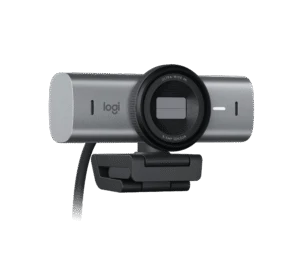
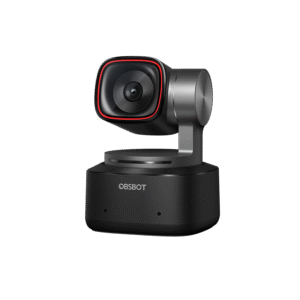
At a Glance
MX Brio
The Logitech MX Brio is Logitech's top webcam. It uses an 8.5 MP Sony STARVIS sensor, records 4K at 30 fps or 1080p at 60 fps, and lets you pick a 90°, 78° or 65° field of view.
- Best For
- Executives and presenters
- Res.
- 4K
- View
- 90°
- Autofocus
- Yes (advanced autofocus)
- Low Light
- Yes (RightLight 5 with face-based enhancement)
- Mics
- Dual beamforming
- Shutter
- Yes (built-in privacy shutter)
- Connect
- USB-C (USB 3.0), detachable USB-C to USB-C
Tiny 2
The OBSBOT Tiny 2 is a 4K webcam on a 2-axis gimbal. It has a large 1/1.5-inch 50 MP sensor, f/1.9 aperture, all-pixel PDAF autofocus and HDR.
- Best For
- Teachers and trainers
- Res.
- 4K
- View
- 85.5°
- Autofocus
- Yes (all-pixel PDAF, plus manual)
- Low Light
- Yes (Dual Native ISO)
- Mics
- Dual omni-directional with noise reduction
- Shutter
- —
- Connect
- USB 3.0
Review Scores Compared
Expert Score
Visual Image Quality
Autofocus & Low-Light
FOV & Framing
Privacy, Mount & Build
Software & App Controls
Connectivity & Port Interface
Integrated Audio
Why MX Brio Beats Tiny 2 (and Vice Versa)
Why MX Brio beats Tiny 2
- Better integrated audio: 8.9 vs 8.4 out of 10
- Max Frame Rate: 60 (1080p) vs 30 (4K), 60 (1080p)
- Field of View: 90° vs 85.5°
Why Tiny 2 beats MX Brio
- Better fov & framing: 9.6 vs 8.6 out of 10
- Better software & app controls: 8.1 vs 7.5 out of 10
- Megapixels: 50 MP vs 8.5 MP
- AI Framing: AI tracking with auto zoom on 2-axis gimbal; gesture and voi… vs Show Mode
- Weight: 95.6 g vs 137 g
- Software: OBSBOT Center vs Logi Options+, G HUB
Review-score leads of 0.5+ points out of 10 first, then specs where only one comes out ahead.
Full Specifications
General
| MX Brio | Tiny 2 | |
|---|---|---|
| Best For | Executives and presenters | Teachers and trainers |
Image
| MX Brio | Tiny 2 | |
|---|---|---|
| Max Resolution | 4K | 4K |
| Max Frame Rate | 60 (1080p) Better | 30 (4K), 60 (1080p) |
| Sensor | Sony STARVIS | 1/1.5" CMOS |
| Megapixels | 8.5 MP | 50 MP Better |
| Field of View | 90° Better | 85.5° |
| Autofocus | Yes (advanced autofocus) | Yes (all-pixel PDAF, plus manual) |
| HDR | Yes (RightLight 5) | Yes |
| Light Correction | Yes (RightLight 5 with face-based enhancement) | Yes (Dual Native ISO) |
| Digital Zoom | 4 x | 4 x |
| AI Framing | Show Mode | AI tracking with auto zoom on 2-axis gimbal; gesture and voice control Better |
| Aperture | — | f/1.9 |
| Video Format | — | MJPEG, YUY2, H.264 |
| Focus Range | — | From 10 cm |
| Resolutions & Frame Rates | 4K30, 1080p60 | — |
| FOV Presets | 90° / 78° / 65° | — |
| Auto Exposure | Yes | — |
| Auto White Balance | Yes | — |
| Manual Controls | ISO, shutter speed, white balance, tint, vibrance (Logi Options+ / G HUB) | — |
| Background Effects | — | Beauty mode |
| Gesture Control | — | Yes (Gesture Control 2.0) |
| Subject Tracking | — | AI human tracking with auto zoom, 2-axis gimbal |
| Focus Type | — | All-pixel PDAF (plus manual) |
Audio
| MX Brio | Tiny 2 | |
|---|---|---|
| Microphones | Dual beamforming | Dual omni-directional with noise reduction |
| Mic Range | 1.2 m | — |
| Noise Reduction | Yes (AI noise reduction) | Yes |
| Microphone Count | 2 | 2 |
| Mic Pickup Pattern | Beamforming | — |
Design & Privacy
| MX Brio | Tiny 2 | |
|---|---|---|
| Privacy Shutter | Yes (built-in privacy shutter) | — |
| Mounting | Detachable universal clip (laptops, monitors) | — |
| Tripod Thread | 1/4 in thread | Yes (UNC 1/4-20 thread) |
| Weight | 137 g | 95.6 g Better |
| Dimensions | 44 x 98 x 36 mm (without mount) | 47 x 44 x 62 mm |
| Pan / Tilt | — | Pan ±140°, tilt −30° to +70° |
Connectivity
| MX Brio | Tiny 2 | |
|---|---|---|
| Connection | USB-C (USB 3.0), detachable USB-C to USB-C | USB 3.0 |
| Cable Length | 1.5 m | — |
| Software | Logi Options+, G HUB | OBSBOT Center Better |
| Operating Systems | Windows 10+, macOS 10.15+, ChromeOS and Linux (UVC) | Windows 10+, macOS 11+ |
| Certifications | Microsoft Teams, Zoom, Google Meet, Works With Chromebook, Streamlabs | — |
| UVC | Yes | — |
| USB Standard | — | USB 3.0 (USB-C port) |
| Detachable Cable | Yes | — |
| USB-A Adapter | — | Yes |
In the Box
| MX Brio | Tiny 2 | |
|---|---|---|
| In the Box | MX Brio, USB-C 3.0 cable, mount clip with removable adapter, user documentation | Tiny 2, adjustable mount, USB-C 3.0 cable, USB-C to USB-A adapter, storage case |
| Warranty | 1-year limited hardware | 1 year |
Takeaways
- It's a tie on our rating (4.5/5) between MX Brio and Tiny 2, so choose on the rows that matter most to you.
- Choose MX Brio for executives and presenters.
- Choose Tiny 2 for teachers and trainers.
Pros and Cons
MX Brio
PROS
- 4K30 or 1080p60, 8.5 MP STARVIS sensor
- RightLight 5 with HDR
- Built-in privacy shutter
- Certified for Teams, Zoom and Meet
CONS
- Needs a USB 3.0 USB-C port
- 1-year warranty on the page we checked
Tiny 2
PROS
- Largest listed sensor here (1/1.5-inch, 50 MP)
- 2-axis gimbal with AI tracking
- Gesture and voice control
- 4K30 and 1080p60
CONS
- No privacy shutter listed
- Some effects need a strong GPU
Similar Comparisons
 MX Brio vs PowerConf C200

- MX Brio vs Link 2
- MX Brio vs Facecam MK.2
 Tiny 2 vs PowerConf C200
- Tiny 2 vs Link 2
- Tiny 2 vs Facecam MK.2
Quick Verdict
- MX Brio 9.0Leads in Visual Image Quality, Connectivity & Port Interface, Integrated Audio
- Tiny 2 9.1Best overallLeads in Autofocus & Low-Light, FOV & Framing, Privacy, Mount & Build