
Logitech Scribe vs Poly TC10 Comparison
Compare Logitech Scribe vs Poly TC10 side by side: specs, ratings, pros and cons, and which one fits your room best.
On this page
At a Glance
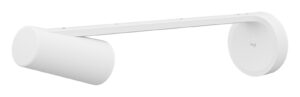
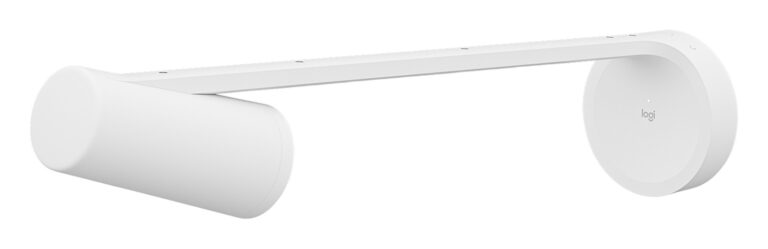
How do remote attendees read a physical whiteboard? Logitech Scribe is a wall-mounted camera that shares boards up to 1.8 x 1.2 m into Teams Rooms, Zoom Rooms and Google Meet Rooms at 1080p, and makes the presenter semi-transparent.
- Best For
- Meeting rooms and classrooms that use a dry-erase whiteboard
- Accessory Type
- Whiteboard content camera
- Launch Price
- $1,299
- Works With
- Teams Rooms, Google Meet Rooms, Zoom Rooms; USB camera for other apps
- Connection
- Category cable to USB dongle transceiver
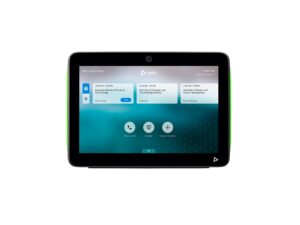
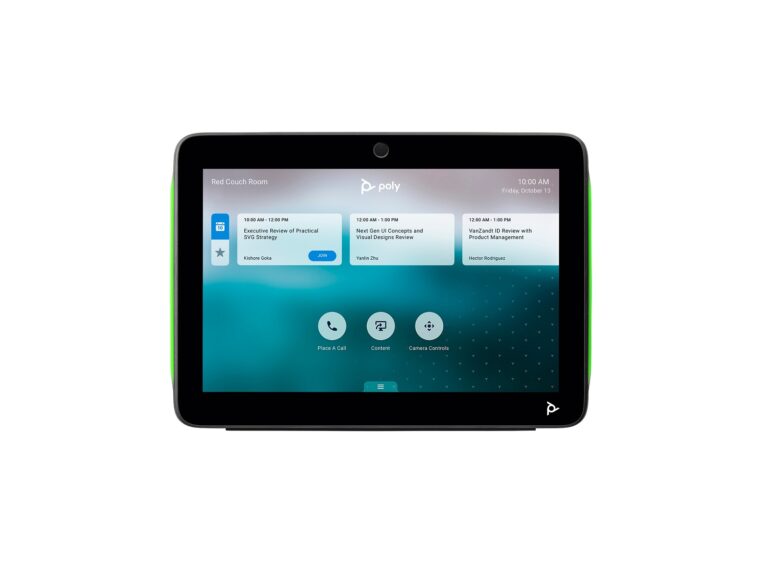
Need one panel model for both in-room control and door scheduling? The Poly TC10 is a 10.1-inch touch controller that runs either role, powered over a single PoE cable and certified for Zoom and Microsoft Teams.
- Best For
- Poly Studio rooms and scheduling outside meeting spaces
- Accessory Type
- Touch controller and scheduling panel
- Launch Price
- $749
- Works With
- Zoom Rooms, Microsoft Teams, Poly Video OS partner apps
- Connection
- Ethernet (PoE)
Review Scores Compared
Expert Score
Primary Output Performance
Build & Desk Ergonomics
Software Suite & Automation
Universal Compatibility
Setup & Installation
Editorial Reviews Comparison
Primary Output Performance
- Logitech Scribe6.1/10
- Poly TC106.4/10Leader
Logitech Scribe
Logitech's AI processing performs presenter removal, rendering the person at the board semi-transparent so remote viewers can read what is behind them. Content enhancement boosts marker colours and contrast. Sticky note detection uses image segmentation to keep notes on the board visible in the shared feed. Output is 1080p at 15 fps.
Poly TC10
Built-in sensors include proximity and air quality detection. Standalone mode allows scheduling without a paired video system, which suits small rooms that have no camera but still need a booking panel at the door. The proximity sensor wakes the screen as someone approaches, and air quality data can feed workplace dashboards.
Build & Desk Ergonomics
- Logitech Scribe6.1/10
- Poly TC106.1/10
Logitech Scribe
The camera measures 149 x 119 x 593 mm and weighs 1.1 kg. It mounts on an arm above the whiteboard and points down at the surface from a fixed position. The arm holds the lens above and in front of the board, so the whole surface is in view while people write.
Poly TC10
The TC10 uses a 10.1-inch IPS touchscreen at 1280 x 800, rated at 300 nits with 1000:1 static contrast. It measures 260 x 184 x 64 mm and weighs 1.27 kg. Multi-colour LEDs around the frame show room availability from a distance when it runs as a scheduler. A Kensington lock slot adds security in open offices.
Software Suite & Automation
- Logitech Scribe6.0/10
- Poly TC106.0/10
Logitech Scribe
The processing runs on the camera, and Logitech Sync covers firmware updates and device monitoring alongside other Logitech room devices.
Poly TC10
In scheduling mode it runs standalone, with no paired video system, and connects to Zoom or Teams room booking.
Universal Compatibility
- Logitech Scribe7.5/10Leader
- Poly TC106.0/10
Logitech Scribe
Scribe integrates as a content camera with Teams Rooms, Google Meet Rooms and Zoom Rooms. It also works as a USB camera with nearly any video app. In certified rooms the board appears as shared content rather than a second camera feed, so remote attendees see it next to the people in the room.
Poly TC10
The TC10 is certified for Zoom and Microsoft Teams, and pairs with Poly systems such as the Poly Studio X52 and G7500. When paired with a Poly Video OS system, it supports native apps including Zoom Rooms, 8x8, GoToRoom, RingCentral, Dialpad and others. That breadth is useful for organisations that use more than one meeting platform.
Setup & Installation
- Logitech Scribe8.1/10
- Poly TC108.1/10
Logitech Scribe
Scribe ships with a wall mounting kit, a 100 to 240 V power supply, a USB dongle transceiver and two 5 m Cat5e cables. Total cable runs up to 35 m are supported. Using category cable instead of USB makes long runs from the board to the room PC or video bar practical.
Poly TC10
A single RJ-45 cable provides power and data using PoE compatible with IEEE 802.3at Class 0. A wall mount kit, table stand and RJ-45 cable come in the box. With both mounts included, it can move between wall, glass and table positions without extra parts. Setup as a controller pairs it with a Poly Video OS system, while scheduling mode connects to Zoom or Teams room booking services.
Why Logitech Scribe Beats Poly TC10 (and Vice Versa)
Why Logitech Scribe beats Poly TC10
- Better universal compatibility: 7.5 vs 6.0 out of 10
- Connection: Category cable to USB dongle transceiver vs Ethernet (PoE)
- Weight: 1.1 kg vs 1.27 kg
Why Poly TC10 beats Logitech Scribe
- Accessory Type (Lighting, Mounts & Stands, Docks & Hubs, Capture, Backdrops, Other): Touch controller and scheduling panel vs Whiteboard content camera
Review-score leads of 0.5+ points out of 10 first, then specs where only one comes out ahead.
Full Specifications
General
| Logitech Scribe | Poly TC10 | |
|---|---|---|
| Best For | Meeting rooms and classrooms that use a dry-erase whiteboard | Poly Studio rooms and scheduling outside meeting spaces |
| Release Year | 2022 | 2021 |
| Launch Price | $1,299 | $749 Better |
| Colors | White | Black, White |
| Model Number | 960-001332 | 875K5AA (Black) |
Primary Output Performance
| Logitech Scribe6.1/10 | Poly TC106.4/10 Better | |
|---|---|---|
| Accessory Type (Lighting, Mounts & Stands, Docks & Hubs, Capture, Backdrops, Other) | Whiteboard content camera | Touch controller and scheduling panel Better |
| Video Output | 1080p at 15 fps | — |
| Mount Type | Wall mount (glass mount optional) | Wall, glass or table |
| Key Features | Presenter removal, content enhancement, sticky note detection, wireless share button | 10.1-inch 1280 x 800 IPS, LED status lights, proximity and air quality sensors, standalone scheduling |
Build & Desk Ergonomics
| Logitech Scribe6.1/10 | Poly TC106.1/10 | |
|---|---|---|
| Dimensions | 149 x 119 x 593 mm | 260 x 184 x 64 mm |
| Weight | 1.1 kg Better | 1.27 kg |
| Warranty | — | 1 year limited |
Universal Compatibility
| Logitech Scribe7.5/10 Better | Poly TC106.0/10 | |
|---|---|---|
| Connection | Category cable to USB dongle transceiver Better | Ethernet (PoE) |
| Cable Length | 2 x 5 m Cat5e included; up to 35 m total | — |
| Works With | Teams Rooms, Google Meet Rooms, Zoom Rooms; USB camera for other apps | Zoom Rooms, Microsoft Teams, Poly Video OS partner apps |
| Screen / Device Size | Whiteboards up to 1.8 x 1.2 m | — |
| Ports | — | 1 x RJ-45 |
| Certifications | Teams Rooms, Zoom Rooms, Google Meet Rooms | Zoom, Microsoft Teams |
Setup & Installation
| Logitech Scribe8.1/10 | Poly TC108.1/10 | |
|---|---|---|
| In the Box | Camera, share button, dongle transceiver, power supply with adaptors, 2 x 5 m Cat5e cables, cable clips, installation kit | TC10, wall mount kit, table stand, mounting hardware, RJ-45 cable |
| Power | 100 to 240 V power supply | PoE IEEE 802.3at Class 0 |
Takeaways
- Poly TC10 costs the least ($749), and Logitech Scribe the most ($1,299).
- Our pick: Logitech Scribe, with the highest spec-based rating (3.3/5).
- Choose Logitech Scribe for meeting rooms and classrooms that use a dry-erase whiteboard.
- Choose Poly TC10 for poly Studio rooms and scheduling outside meeting spaces.
Pros and Cons
Logitech Scribe
PROS
- Presenter removal keeps the board visible
- Boosts marker colour and contrast
- Wireless one-touch share button
- Works as a USB camera too
CONS
- Limited to boards up to 1.8 x 1.2 m
- 15 fps output
- Expensive add-on
Poly TC10
PROS
- Doubles as controller or scheduling panel
- Single PoE cable
- Wall, glass and table mounting
- Status LEDs visible from a distance
CONS
- 300-nit screen, below the Tap IP's 400 nits
- One-year standard warranty
- Controller role needs a Poly video system
Similar Comparisons
 Logitech Scribe6.5/10
 Elgato Stream Deck +8.2/10Logitech Scribe vs Elgato Stream Deck +
 Poly TC106.4/10Elgato Stream Deck +8.2/10Poly TC10 vs Elgato Stream Deck +
- Logitech Scribe6.5/10
 Elgato Prompter7.4/10Logitech Scribe vs Elgato Prompter
- Poly TC106.4/10Elgato Prompter7.4/10Poly TC10 vs Elgato Prompter
Quick Verdict
- Logitech Scribe 6.5Best overallLeads in Universal Compatibility
- Poly TC10 6.4Leads in Primary Output Performance