At a glance
| Type | Monitor light bar |
|---|---|
| Connect | USB-C (power) |
- Model ScreenBar Halo
- Released 2021
BenQLast updated on November 2026
BenQ ScreenBar Halo Review
Prices, shipping and returns are handled by the retailer.
On this page
Overview
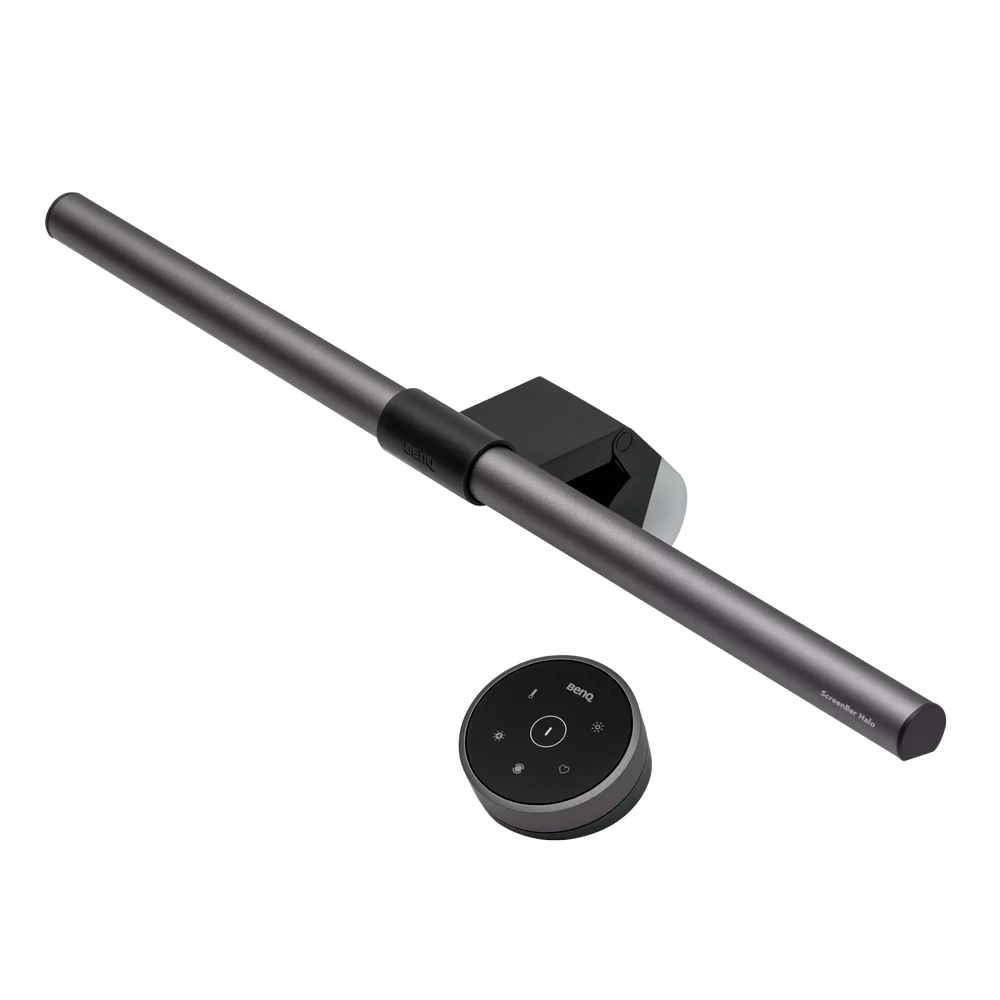
The BenQ ScreenBar Halo is a monitor light bar with dual-colour LEDs from 2700 K to 6500 K, CRI of 95 or higher, a rear backlight, auto-dimming and a wireless controller.
- Lights the desk without screen glare
- Rear backlight reduces eye strain
- Wireless controller
- Fits curved monitors
Key Takeaways
- 800 lux at 45 cm
- CRI Ra 95 or higher
- USB-C powered
Best For
- Home offices
- Late meetings
- Note takers
Avoid If
- You need a video key light
- Your monitor has a very thick bezel
Pros & Cons
The ScreenBar Halo is one of the best monitor light bars for desk work. It lights your workspace without glare and adds a soft backlight, though it does not replace a key light for video.
PROS
- Lights the desk without screen glare
- Rear backlight reduces eye strain
- Wireless controller
- Fits curved monitors
CONS
- Does not light your face for video
- Controller uses AAA batteries
- Pricier than basic light bars
Review Scores
Score Breakdown
7.9/10 Expert Score
- Primary Output Performance8.0/10
- Build & Desk Ergonomics8.1/10
- Software Suite & Automation6.0/10
- Universal Compatibility8.2/10
- Setup & Installation9.3/10
How this score is calculated
Each criterion is the weighted average of its available spec scores (0–10) from our Accessories scoring matrix. Empty specs are skipped, not scored as 0. The Expert Score is the weighted average of the scored criteria, shown out of 10; stars = Expert Score / 20, rounded to the nearest half star.
| Criterion | Weight | From specs | Score |
|---|---|---|---|
| Primary Output PerformanceAccessory Type (Lighting, Mounts & Stands, Docks & Hubs, Capture, Backdrops, Other): Monitor light bar → 7.0; Light Output: 800 lux at 45 cm → 6.2; CRI: Ra 95 or higher → 9.5; Color Temperature: 2700 K to 6500 K → 9.0; Mount Type: Monitor clamp → 9.0; Key Features: Rear backlight → 6.5; Materials: Aluminium → 8.0 | 40% | 8.0 | 8.0 |
| Build & Desk ErgonomicsMaterials: Aluminium → 8.5; Mount Type: Monitor clamp → 8.0; Dimensions: Lamp 500 x 95 x 97 mm → 6.5 | 20% | 8.1 | 8.1 |
| Software Suite & AutomationKey Features: Rear backlight → 6.0 | 15% | 6.0 | 6.0 |
| Universal CompatibilityConnection: USB-C (power) → 9.0; Compatible Devices: Flat and curved monitors → 7.0; Cable Length: 1.5 → 8.0 | 15% | 8.2 | 8.2 |
| Setup & InstallationTool-Free Setup: Yes → 10.0; Plug and Play: Yes → 10.0; In the Box: Light bar → 9.0; Mount Type: Monitor clamp → 7.0 | 10% | 9.3 | 9.3 |
| Expert Score | 7.9/10 | ||
BenQ ScreenBar Halo Review
BenQ introduced the original ScreenBar in 2017, and the Halo followed in 2021 with a wireless controller and a rear backlight. BenQ has since released a Halo 2, but the original remains on sale.
Primary Output Performance 8.0/10
Dual-colour LEDs adjust from 2700 K to 6500 K, with a CRI of 95 or higher. BenQ rates illuminance at 800 lux at 45 cm, covering 63 x 40 cm at 500 lux.
A rear backlight lights the wall behind the monitor, which acts as bias lighting and reduces the contrast between a bright screen and a dark room.
Auto-dimming adjusts brightness to ambient light. For video calls, it lights your desk and hands, but your face still needs a front light such as the Elgato Key Light Air.
- Type Monitor light bar
- CRI Ra 95 or higher
- Mount Monitor clamp
- Features Rear backlight
Build & Desk Ergonomics 8.1/10
The bar is aluminium, with an asymmetric optical design that throws light down onto the desk rather than onto the screen. A counterweight clamp holds it on the monitor.
The clamp fits flat and curved monitors, including curved displays from 1000R to 1800R. It sits securely and does not wobble when you type.
Build quality is high, with a solid metal finish that looks tidy above a monitor. The wireless controller is weighted and feels premium. There are no exposed wires besides the single USB-C lead, which keeps the desk tidy.
- Materials Aluminium
- Mount Monitor clamp
- Size Lamp 500 x 95 x 97 mm
Software Suite & Automation 6.0/10
The ScreenBar Halo is a monitor light bar. Official features include Rear backlight, auto-dimming, wireless controller.
Wireless support is Wireless controller. Wireless controller (3 x AAA) is included. The official connection is USB-C (power). When I commission a desk or a room, I like software I can set once and leave alone.
Universal Compatibility 8.2/10
The clamp fits most monitors between thin and moderately thick bezels, flat or curved. It does not suit monitors with very thick tops or built-in webcams on the bezel.
Because it sits on the monitor, it can block a webcam clipped on top. Mount the webcam on a separate arm or below the screen if both are needed.
It works with any monitor, since it draws only USB power. There is no software required. BenQ lists the supported bezel thickness range on its specification page, which is worth checking first.
- Connect USB-C (power)
- Devices Flat and curved monitors
- Cable 1.5 m
Setup & Installation 9.3/10
Installation takes a minute. Place the clamp on the monitor, connect USB-C to a port or adapter, and the light is ready.
Power draw is up to 6.5 W at 5 V 1.3 A, so a monitor USB port can usually run it. If the port is weak, a phone charger works better.
The wireless controller pairs automatically and runs on three AAA batteries, which last months with normal use. The dial on the controller makes small brightness changes easy without reaching up to the monitor.
- Tool-Free Yes
- In Box Light bar
- Mount Monitor clamp
Software Suite & Automation
The ScreenBar Halo is a monitor light bar. Official features include Rear backlight, auto-dimming, wireless controller.
Wireless support is Wireless controller. Wireless controller (3 x AAA) is included. The official connection is USB-C (power). When I commission a desk or a room, I like software I can set once and leave alone.
Value
At around 180 dollars, the Halo costs more than basic light bars, but the backlight and controller justify the premium for heavy users.
If you work late or take evening meetings, the improvement in comfort is noticeable over a desk lamp. XDA’s review called it one of the best ways to light a desk.
Cheaper light bars without the backlight are fine for occasional use. The Halo earns its price for long, daily sessions. The controller also adds favourite settings, which make it quick to switch between reading and video modes.
Full Specifications
General
| Best For | Home office desks and late meetings |
|---|---|
| Accessory Type (Lighting, Mounts & Stands, Docks & Hubs, Capture, Backdrops, Other) | Monitor light bar |
| Release Year | 2021 |
| Launch Price | $179 |
| Use Case | Desk lighting |
Compatibility
| Connection | USB-C (power) |
|---|---|
| Plug and Play | Yes |
| Compatible Devices | Flat and curved monitors (1000R to 1800R) |
| Screen / Device Size | Monitor thickness: flat 0.7–6 cm; curved 1.6–3.8 cm |
| Cable Length | 1.5 m |
Features
| Key Features | Rear backlight, auto-dimming, wireless controller |
|---|---|
| Adjustable | Yes |
| Power | 5 V 1.3 A (up to 6.5 W) |
| Light Output | 800 lux at 45 cm |
| Color Temperature | 2700 K to 6500 K |
| CRI | Ra 95 or higher |
| Remote Control | Wireless controller (3 x AAA) |
| Mount Type | Monitor clamp |
| Wireless | Wireless controller |
Design & Build
| Materials | Aluminium |
|---|---|
| Weight | 800 g |
| Dimensions | Lamp 500 x 95 x 97 mm; controller 74 x 74 x 38 mm |
| Tool-Free Setup | Yes |
| Colors | Metallic Grey |
In the Box
| In the Box | Light bar, clamp, wireless controller, USB-C cable |
|---|---|
| Cables Included | USB cable (150 cm) |
Identifiers
| Model Number | ScreenBar Halo |
|---|
Product Details
| Brand | BenQ |
|---|---|
| Model | ScreenBar Halo |
| Model number | ScreenBar Halo |
| Release year | 2021 |
Price Comparison
| Store | Price | Deal |
|---|---|---|
| Benq.comOfficial BenQ store | Launch price $179 | View deal (opens in a new tab) |
The Verdict
I’d buy the ScreenBar Halo for evening work at a desk. Pair it with the Elgato Key Light Air if you also want your face well lit on calls.
FAQs
What colour temperatures does the Halo support?
2700 K to 6500 K.
What is the CRI?
Ra 95 or higher.
Does it fit curved monitors?
Yes, from 1000R to 1800R.
How is it powered?
By USB-C at up to 6.5 W.
Does it light my face for video calls?
No, it lights the desk, so use a separate key light.
What does the backlight do?
It lights the wall behind the monitor to reduce eye strain.
What batteries does the controller use?
Three AAA batteries.
How bright is it?
800 lux at 45 cm.