At a glance
| Accessory Type | Teleprompter and display |
|---|---|
| Works With | Windows, macOS |
| Connection | USB-C |
- Model Prompter
- Released 2023
ElgatoLast updated on November 2026
Elgato Prompter Review
Prices, shipping and returns are handled by the retailer.
On this page
Overview
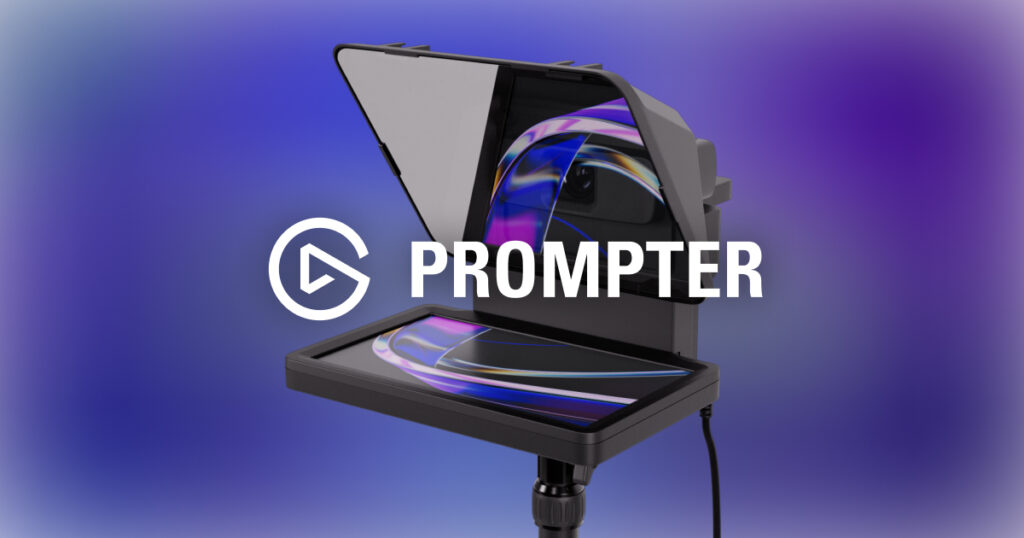
The Elgato Prompter is an all-in-one teleprompter with a 9 inch 1024 x 600 display behind 70/30 beam splitter glass, supporting webcams, smartphones and cameras with 49 to 82 mm lenses.
- Natural eye contact on calls
- Works as an extra display
- Supports webcams and cameras
- Simple USB-C connection
Key Takeaways
- 70/30 beam splitter glass
- Shows scripts or a meeting window
- Weighs 690 g
Best For
- Presenters
- Content creators
- Executives on video
Avoid If
- You have very limited desk space
- You rarely present on video
Pros & Cons
The Elgato Prompter is the best way to fix eye contact on video calls. It doubles as a display for notes or meetings, though it takes up space and costs more than simple prompters.
PROS
- Natural eye contact on calls
- Works as an extra display
- Supports webcams and cameras
- Simple USB-C connection
CONS
- Bulky on a desk
- Display resolution is modest
- Pricier than basic prompters
Review Scores
Score Breakdown
7.4/10 Expert Score
- Primary Output Performance6.4/10
- Software Suite & Automation7.8/10
- Universal Compatibility8.7/10
- Setup & Installation9.2/10
How this score is calculated
Each criterion is the weighted average of its available spec scores (0–10) from our Accessories scoring matrix. Empty specs are skipped, not scored as 0. The Expert Score is the weighted average of the scored criteria, shown out of 10; stars = Expert Score / 20, rounded to the nearest half star. Not scored for this product (it doesn't apply, or the published specs don't cover it): Build & Desk Ergonomics. Its weight is shared by the other criteria.
| Criterion | Weight | From specs | Score |
|---|---|---|---|
| Primary Output PerformanceAccessory Type (Lighting, Mounts & Stands, Docks & Hubs, Capture, Backdrops, Other): Teleprompter and display → 6.0; Key Features: 70/30 beam splitter, 9 inch display → 6.5 | 50% | 6.4 | 6.4 |
| Build & Desk ErgonomicsDimensions: 224 x 219 x 282 mm → 6.5 | — | required inputs missing | — |
| Software Suite & AutomationCompanion App: Elgato Camera Hub → 9.0; Key Features: 70/30 beam splitter, 9 inch display → 6.0 | 19% | 7.8 | 7.8 |
| Universal CompatibilityOS Support: Windows, macOS → 8.5; Connection: USB-C → 9.0; Mount Thread: 1/4 inch → 10.0; Compatible Devices: Webcams → 7.0; Cable Length: 2 → 9.0 | 19% | 8.7 | 8.7 |
| Setup & InstallationIn the Box: Prompter → 9.0; OS Support: Windows, macOS → 9.5 | 13% | 9.2 | 9.2 |
| Expert Score | 7.4/10 | ||
Elgato Prompter Review
Elgato launched the Prompter in October 2023, and The Verge described it as an all-in-one teleprompter and extra monitor. It brought the teleprompter concept to desk setups.
Primary Output Performance 6.4/10
The 9 inch display runs at 1024 x 600. It can show a script, scrolling text or a second screen.
Placing the meeting window on the Prompter lets you look at participants and the camera at once, which improves eye contact. That makes calls feel more personal.
The resolution is modest, so small text can look soft. Larger fonts and simple layouts work best. Camera Hub also offers a scrolling script mode with speed control, so the Prompter works for recorded videos as well as live calls. Font size and colour can be adjusted to suit the room.
- Type Teleprompter and display
- Features 70/30 beam splitter
Software Suite & Automation 7.8/10
The Prompter is controlled through Elgato Camera Hub. Official features include 70/30 beam splitter, 9 inch display.
It is listed for Windows and macOS. The official connection is USB-C. When I commission a desk or a room, I like software I can set once and leave alone.
Universal Compatibility 8.7/10
It supports DSLR and mirrorless cameras with 49 to 82 mm lenses, webcams and smartphones. Cameras need a 1/4 inch mount.
Webcams such as the Elgato Facecam MK.2 fit easily, while larger cameras may need extra support. Check lens size before buying.
It works with Windows and macOS, and as a display it can show any app, including scripts, notes or the meeting window. Phones mount with the included brackets, which makes it useful for recording short clips without a dedicated camera. Larger lenses beyond 82 mm will not fit the opening.
- OS Windows, macOS
- Connect USB-C
- Thread 1/4 inch
- Devices Webcams
Setup & Installation 9.2/10
The Prompter connects over USB-C and mounts on a stand, arm or tripod. Elgato includes backplates and brackets for different cameras.
Setup takes some time to align the camera behind the glass, but once done it stays in place. Elgato Camera Hub manages the display and teleprompter features.
A desk arm or Multi Mount keeps the Prompter at eye level, which helps natural framing on calls. Elgato’s quick start guide walks through camera alignment for each mount type, which saves time on the first try. Plan for a stable surface or arm, because the glass and hood add weight in front of the camera.
- In Box Prompter
- OS Windows, macOS
Software Suite & Automation
The Prompter is controlled through Elgato Camera Hub. Official features include 70/30 beam splitter, 9 inch display.
It is listed for Windows and macOS. The official connection is USB-C. When I commission a desk or a room, I like software I can set once and leave alone.
Value
At around 280 dollars at launch, the Prompter costs more than basic prompters but adds display features.
For presenters, coaches and leaders who spend hours on video, the eye contact improvement is noticeable and worth the price.
If you only join meetings occasionally, a simpler setup with the webcam close to the screen is enough. The Prompter earns its place for regular presenting. For teams producing training videos, it can replace a separate prompter rig and monitor. The time saved on retakes adds up quickly when recording regularly.
Full Specifications
General
| Best For | Presenters and frequent video callers |
|---|---|
| Accessory Type (Lighting, Mounts & Stands, Docks & Hubs, Capture, Backdrops, Other) | Teleprompter and display |
| Release Year | 2023 |
| Launch Price | $279.99 |
| Use Case | Eye contact on video calls and recording |
Compatibility
| Works With | Windows, macOS |
|---|---|
| Connection | USB-C |
| OS Support | Windows, macOS |
| Compatible Devices | Webcams, smartphones, cameras with 49–82 mm lenses |
| Cable Length | 2 m |
Features
| Key Features | 70/30 beam splitter, 9 inch display |
|---|---|
| Companion App | Elgato Camera Hub |
Design & Build
| Weight | 690 g |
|---|---|
| Dimensions | 224 x 219 x 282 mm (with universal bracket) |
| Mount Thread | 1/4 inch |
In the Box
| In the Box | Prompter, backplates, brackets, USB-C cable |
|---|---|
| Cables Included | USB-C to USB-A 3.0 cable (200 cm) |
Identifiers
| Model Number | Prompter |
|---|
Product Details
| Brand | Elgato |
|---|---|
| Model | Prompter |
| Model number | Prompter |
| Release year | 2023 |
Price Comparison
| Store | Price | Deal |
|---|---|---|
| Elgato.comOfficial Elgato store | Launch price $279.99 | View deal (opens in a new tab) |
The Verdict
I’d pick the Prompter if you present on video every week. Pair it with the Elgato Facecam MK.2 for a compact, eye-level setup.
FAQs
What size is the Prompter display?
9 inches at 1024 x 600.
What cameras does it support?
Webcams, smartphones and cameras with 49 to 82 mm lenses.
Can it show my meeting window?
Yes, it works as an extra display.
How heavy is it?
690 g.
What glass does it use?
70/30 beam splitter glass.
How does it connect?
Over USB-C.
Which software controls it?
Elgato Camera Hub.
Is it good for video calls?
Yes, it improves eye contact.