At a glance
| Resolution | 1080p |
|---|---|
| Field of View | 360° |
| Auto Framing | Yes (Owl Intelligence System) |
| Camera | 16 MP fisheye |
| Connection | USB-C |
| Teams Rooms | Microsoft Teams |
- Model Meeting Owl 3
- Released 2021
Owl LabsLast updated on November 2026
Owl Labs Meeting Owl 3 Review
- Small room EXCELLENT
- Large room FAIR
Prices, shipping and returns are handled by the retailer.
On this page
Overview
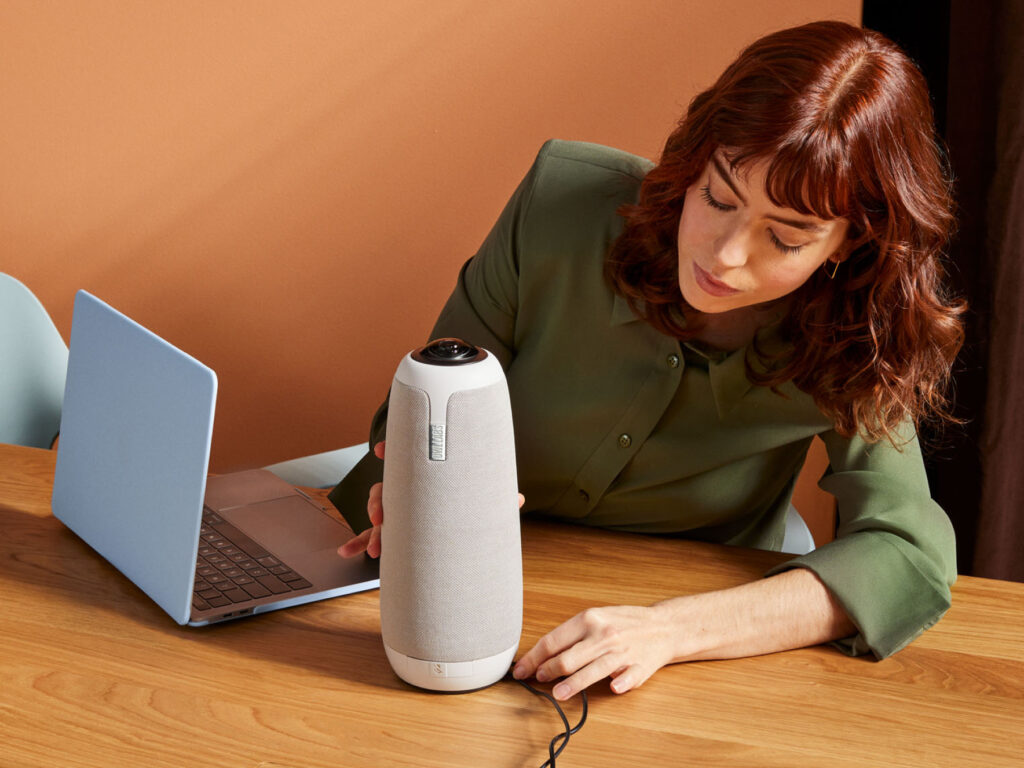
The Owl Labs Meeting Owl 3 is a centre-of-table 360° camera, microphone and speaker with 1080p video, eight beamforming microphones and automatic speaker focus, connected to the host computer over USB-C.
- 360° view shows everyone around the table
- Camera, mics and speaker in one unit
- Automatic focus on whoever speaks
- Certified for Microsoft Teams
Key Takeaways
- Eight mics with 5.5 m pickup
- Three built-in speakers
- Pairs with Owl Bar or a second Owl
Best For
- Small conference rooms
- Round tables
- Hybrid team huddles
Avoid If
- People sit more than 3 m from the camera
- You want a wall-mounted camera at the screen
Pros & Cons
The Meeting Owl 3 gives remote attendees a seat at the table. The 360° view and automatic speaker focus make small rooms feel inclusive. Its 1080p camera and 3 m range limit it to small spaces.
PROS
- 360° view shows everyone around the table
- Camera, mics and speaker in one unit
- Automatic focus on whoever speaks
- Certified for Microsoft Teams
CONS
- 1080p only
- Video radius limited to about 3 m
- Sits in the middle of the table
Review Scores
Score Breakdown
8.8/10 Expert Score
- Optics & Room Coverage8.5/10
- AI Speaker Tracking & Framing8.7/10
- Room Audio Pickup & Output10.0/10
- OS Platform & Ecosystem9.5/10
- Deployment & I/O6.6/10
How this score is calculated
Each criterion is the weighted average of its available spec scores (0–10) from our Conference Cameras scoring matrix. Empty specs are skipped, not scored as 0. The Expert Score is the weighted average of the scored criteria, shown out of 10; stars = Expert Score / 20, rounded to the nearest half star.
| Criterion | Weight | From specs | Score |
|---|---|---|---|
| Optics & Room CoverageField of View: 360 → 10.0; Ideal Room Size: Small (video radius 3 m) → 7.0; Pan / Tilt: No mechanical PTZ → 10.0; Max Resolution: 1080p → 6.5 | 30% | 8.5 | 8.5 |
| AI Speaker Tracking & FramingSpeaker Tracking: Yes → 10.0; Auto Framing: Yes (Owl Intelligence System) → 8.5; Multi-Stream / Gallery: Panoramic strip plus up to three speake… → 4.0 | 25% | 8.7 | 8.7 |
| Room Audio Pickup & OutputBuilt-in Mics: 8 omnidirectional beamforming mics → 10.0; Full Duplex: Yes → 10.0 | 20% | 10.0 | 10.0 |
| OS Platform & EcosystemRemote Management: Yes (Nest portal) → 10.0; Certifications: Microsoft Teams → 8.5 | 15% | 9.5 | 9.5 |
| Deployment & I/OMounting: Table centre, tripod or ceiling → 8.5; HDMI: No HDMI output to a display → 7.0; Power over Ethernet: No → 4.0 | 10% | 6.6 | 6.6 |
| Expert Score | 8.8/10 | ||
Scores by Use Case
- Small room100/100
- Large room40/100
Owl Labs Meeting Owl 3 Review
Owl Labs shipped the first Meeting Owl in 2017, and its owl-shaped tower has become a familiar sight in hybrid offices. The third generation keeps the concept: put the camera in the middle of the group, not at the front of the room.
Optics & Room Coverage 8.5/10
A 360° fisheye camera outputs 1080p HD, with a panoramic strip across the top of the frame and up to three close-ups below. The video pickup radius is about 3 m.
Faces look clear within that radius, which suits a table for six to eight. Beyond it, detail drops quickly, and anyone seated past it looks soft and grainy.
The resolution is now behind newer 4K Owls and most video bars. For a small, well-lit room it is still enough for typical 720p or 1080p meeting streams.
The field of view is a full 360°, which is the whole point of the design. Everyone around the table appears face-on rather than in profile.
That inclusiveness is what remote attendees notice. They can see reactions from people on both sides of the table, not just whoever faces the screen.
The trade-off is placement. The Owl must sit in the middle of the table and about 1 m from the display, and room for laptops and coffee cups gets tighter.
- View 360°
- Room Size Small (video radius 3 m)
- Pan/Tilt No mechanical PTZ
- Res. 1080p
AI Speaker Tracking & Framing 8.7/10
There is no optical zoom. The Owl Intelligence System crops into the 360° image digitally to frame whoever is speaking.
In practice the camera switches to the speaker in about a second and holds that shot while they talk. It can show up to three people at once in the lower part of the frame.
You can pin a person or lock the camera to an area in the app, which helps when someone presents from a fixed spot.
- Tracking Yes
- Gallery Panoramic strip plus up to…
Room Audio Pickup & Output 10.0/10
The Meeting Owl 3 uses 8 omnidirectional beamforming mics, 5.5 m pickup.
Full-duplex audio is listed, so both ends can talk without the usual half-duplex clipping. It is specified for Small (video radius 3 m). When I commission a bar, I walk the table first and check whether the built-in array can cover the seats you actually have.
- Duplex Yes
OS Platform & Ecosystem 9.5/10
The Owl is certified for Microsoft Teams and works with Zoom, Google Meet, Webex and virtually any platform that accepts a USB camera and mic.
The Meeting Owl app and the Nest portal handle updates, settings and fleet management. Pairing a second Owl or an Owl Bar extends coverage for larger rooms.
If your rooms are larger than about 5 m across, look at a front-of-room video bar such as the Jabra PanaCast 50 instead, or pair two Owls.
- Mgmt Yes (Nest portal)
Deployment & I/O 6.6/10
A USB-C cable connects the Owl to the host laptop or room PC, and an external power supply plugs into the wall. Setup takes a few minutes with the Meeting Owl app.
In the box you get a 2 m USB-C cable and a 3.8 m power cord. Tripod and ceiling mounting are options for rooms without a centre table.
Eight omnidirectional beamforming microphones cover an 18 ft (5.5 m) radius, and three speakers play remote voices at up to 83 dB SPL.
- Mounting Table centre
- HDMI No HDMI output to a display
- PoE No
Full Specifications
General
| Best For | Small rooms with a centre table |
|---|---|
| Ideal Room Size | Small (video radius 3 m) |
| Release Year | 2021 |
| Launch Price | $1,099 |
Camera
| Camera Resolution | 1080p |
|---|---|
| Sensor | 16 MP fisheye |
| Field of View | 360° |
| Pan / Tilt | No mechanical PTZ (fixed 360° fisheye; AI focuses on the active speaker) |
| Auto Framing | Yes (Owl Intelligence System) |
| Speaker Tracking | Yes |
| Megapixels | 16 MP |
| Horizontal FOV | 360° |
| Multi-Stream / Gallery | Panoramic strip plus up to three speaker views |
| Camera | 16 MP fisheye |
Connectivity
| Connection | USB-C |
|---|---|
| Video Outputs | USB-C to the host computer |
| Power over Ethernet | No |
| Control Protocols | Meeting Owl App (iOS, Android, iPad, Mac, Windows); The Nest fleet management |
| USB | USB-C |
| HDMI | No HDMI output to a display (USB-C to the host; Expansion Mic uses micro-HDMI) |
| SDI | No |
| Wireless | Wi-Fi (setup and pairing) |
| Wi-Fi | Wi-Fi (setup and pairing) |
Platforms
| Certifications | Microsoft Teams |
|---|---|
| Remote Management | Yes (Nest portal) |
| Microsoft Teams | Microsoft Teams certified |
| Software | Meeting Owl app, Nest |
| OS Compatibility | Windows, macOS, ChromeOS |
| Teams Rooms | Microsoft Teams |
Design
| Mounting | Table centre, tripod or ceiling |
|---|---|
| Weight | 1200 g |
| Dimensions | 111 x 111 x 272 mm |
| Power | External power supply |
In the Box
| In the Box | Meeting Owl 3, power supply and line cord (3.8 m), 2 m USB-C to USB-C cable, setup guide |
|---|---|
| Warranty | 2-year |
| Optional Accessories | Expansion Mic, Owl Bar, Whiteboard Owl, lock adapter |
Identifiers
| Model Number | MTW300-1000 |
|---|
Audio
| Built-in Mics | 8 omnidirectional beamforming mics, 5.5 m pickup |
|---|---|
| Audio Input | Optional Expansion Mic (micro-HDMI) |
| Audio Output | Three 360° speakers, 83 dB SPL |
| Full Duplex | Yes |
Product Details
| Brand | Owl Labs |
|---|---|
| Model | Meeting Owl 3 |
| Model number | Meeting Owl 3 |
| Release year | 2021 |
Price Comparison
| Store | Price | Deal |
|---|---|---|
| Owllabs.comOfficial Owl Labs store | Launch price $1,099 | View deal (opens in a new tab) |
The Verdict
I’d pick the Meeting Owl 3 for small rooms with a round or square table where everyone should be seen face-on. For a rectangular room with seats facing the screen, the Jabra PanaCast 50 is the better fit.
FAQs
What resolution is the Meeting Owl 3?
1080p HD from a 360° fisheye camera.
How far does the camera see?
Owl Labs lists a video pickup radius of about 3 m (10 ft).
How far do the microphones reach?
About 5.5 m (18 ft) from eight beamforming mics.
Does it have a speaker?
Yes. Three built-in speakers play remote audio.
Is it certified for Microsoft Teams?
Yes, and it works with Zoom, Meet, Webex and other platforms over USB.
How does it connect?
USB-C to the host computer, with a separate power supply.
Can I extend coverage?
Yes. Pair a second Owl or an Owl Bar, or add the Expansion Mic.
Where should it sit?
In the middle of the table, about 1 m from the display and within 5.5 m of everyone.