At a glance
| Accessory Type | Meeting room touch controller |
|---|---|
| Works With | Microsoft Teams Rooms on Android, Zoom Rooms |
| Connection | Ethernet (PoE) |
- Model Tap IP
- Released 2021
LogitechLast updated on November 2026
Logitech Tap IP Review
Prices, shipping and returns are handled by the retailer.
On this page
Overview
Want a meeting-room controller that runs on one network cable? Logitech Tap IP is a 10.1-inch PoE touch controller for Logitech video bars, certified for Microsoft Teams Rooms on Android and Zoom Rooms, with a motion sensor that wakes the screen.
- One PoE cable for power and network
- Motion sensor wakes the screen
- Clean cable retention
- Managed in Logitech Sync
Key Takeaways
- 400-nit capacitive display
- 1.0 kg
- Graphite finish
Best For
- Meeting rooms
- Teams Rooms on Android
- Zoom Rooms
Avoid If
- Your room runs on a Windows PC with HDMI-connected Tap
- You need a scheduling panel outside the room
Pros & Cons
Tap IP is the controller for rooms built on Logitech Rally Bar appliances: one PoE cable, a 400-nit screen and Logitech Sync management. It costs $999 before mounts, and Windows-PC rooms are better served by the USB Tap.
PROS
- One PoE cable for power and network
- Motion sensor wakes the screen
- Clean cable retention
- Managed in Logitech Sync
CONS
- Table and wall mounts sold separately
- Works best with Logitech room systems
- Ethernet limited to 10/100
Review Scores
Score Breakdown
6.5/10 Expert Score
- Primary Output Performance6.4/10
- Build & Desk Ergonomics6.1/10
- Software Suite & Automation5.0/10
- Universal Compatibility8.0/10
- Setup & Installation8.1/10
How this score is calculated
Each criterion is the weighted average of its available spec scores (0–10), calculated from official specifications using our Accessories scoring matrix. Empty specs are skipped, not scored as 0. The Expert Score is the weighted average of the scored criteria, shown out of 10; stars = Expert Score ÷ 2 (a 9.4/10 score is 4.7 stars), to one decimal.
| Criterion | Weight | From specs | Score |
|---|---|---|---|
| Primary Output PerformanceAccessory Type (Lighting, Mounts & Stands, Docks & Hubs, Capture, Backdrops, Other): Meeting room touch controller → 7.0; Mount Type: Table → 6.0; Key Features: 10.1-inch 1280 x 800 IPS touchscreen → 6.5 | 40% | 6.4 | 6.4 |
| Build & Desk ErgonomicsMount Type: Table → 6.0; Dimensions: 56.1 x 246.2 x 171.3 mm → 6.5 | 20% | 6.1 | 6.1 |
| Software Suite & AutomationKey Features: 10.1-inch 1280 x 800 IPS touchscreen → 5.0 | 15% | 5.0 | 5.0 |
| Universal CompatibilityConnection: Ethernet (PoE) → 6.0; VESA Pattern: 100 x 100 mm → 10.0 | 15% | 8.0 | 8.0 |
| Setup & InstallationIn the Box: Tap IP → 9.0; Mount Type: Table → 7.0 | 10% | 8.1 | 8.1 |
| Expert Score | 6.5/10 | ||
Logitech Tap IP Review
Logitech announced Tap IP in 2021 as a network version of its original USB Tap controller, designed for appliance-style video bars that run meeting software on board.
Primary Output Performance 6.4/10
An integrated PIR motion sensor wakes the screen when someone enters, while an ambient light sensor adjusts brightness and an ultrasonic speaker supports proximity features.
Spec-based reasoning: with motion wake-up, the screen is already on when people walk in. The panel is a 10-point capacitive touchscreen.
Logitech Sync, Microsoft Teams Admin Center and Zoom Device Management can all monitor and update it alongside the rest of the room hardware.
At $999, Tap IP is a significant line in a room budget, and table, riser and wall mounts are extra.
What it buys is the same control surface in every room and a single-cable install.
Offices with one or two rooms may find that hard to justify against joining from a laptop. Logitech also sells room bundles that include Tap IP.
- Type Meeting room touch controll…
- Mount Table
- Features 10.1-inch 1280 x 800 IPS to…
Build & Desk Ergonomics 6.1/10
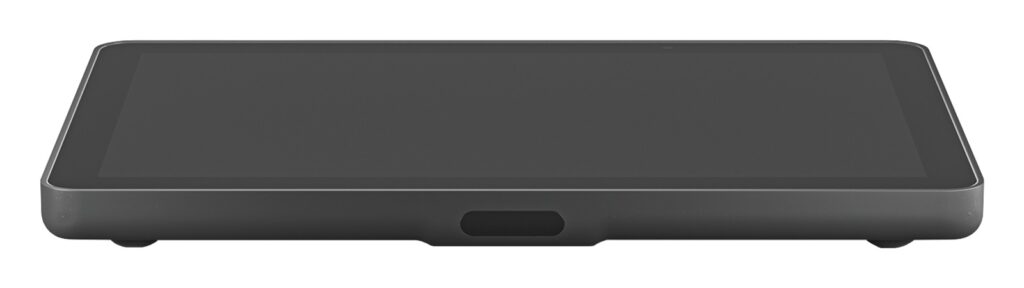
The controller has a 10.1-inch IPS display with 1280 x 800 resolution, 400 nits of brightness and a 1000:1 contrast ratio. An oleophobic coating resists fingerprints, and the unit weighs 1.0 kg.
The screen sits at a 14° display angle with an 85° viewing angle, and the low profile keeps it below sightlines to the room display and camera.
Internal cable retention and strain relief hide the PoE cable inside the enclosure and secure it against accidental disconnection.
- Mount Table
- Size 56.1 x 246.2 x 171.3 mm
Software Suite & Automation 5.0/10
Security features include AES-128 full disk encryption, device attestation and a Kensington lock slot.
- Features 10.1-inch 1280 x 800 IPS to…
Universal Compatibility 8.0/10
Tap IP is certified for Microsoft Teams Rooms on Android and Zoom Rooms, and it works with Logitech appliances such as the Rally Bar and Rally Bar Mini.
For rooms running a Windows PC, the USB-connected Logitech Tap may still be the better fit. Check Logitech’s compatibility list before buying, because supported platforms vary with the video bar.
It also has Wi-Fi 802.11ac and Bluetooth 5.0 radios, and its wired port is 10/100 Mbps. A VESA 100 x 100 mm pattern allows third-party mounting arms.
- Connect Ethernet (PoE)
- VESA 100 x 100 mm
Setup & Installation 8.1/10
A single PoE cable (IEEE 802.3af, Class 3) provides power and data. Cables can be routed through the back or below the device into a table grommet.
USB controllers need extenders and power bricks for long runs; Tap IP needs only a PoE switch port or injector. Table, riser and wall mounts are optional, and the table and riser mounts rotate 180°.
The device pairs with a Logitech video bar over the network, so the controller and bar can sit far apart in larger rooms.
- In Box Tap IP
- Mount Table
Full Specifications
General
| Best For | Teams Rooms and Zoom Rooms built on Logitech video bars |
|---|---|
| Release Year | 2021 |
| Launch Price | $999 |
| Colors | Graphite, White |
| Model Number | 952-000085 |
Primary Output Performance 6.4/10
| Accessory Type (Lighting, Mounts & Stands, Docks & Hubs, Capture, Backdrops, Other) | Meeting room touch controller |
|---|---|
| Mount Type | Table, riser or wall mount (sold separately) |
| Key Features | 10.1-inch 1280 x 800 IPS touchscreen, PIR motion sensor, ambient light sensor |
Build & Desk Ergonomics 6.1/10
| Dimensions | 56.1 x 246.2 x 171.3 mm |
|---|---|
| Weight | 1.0 kg |
| Cable Management | Internal cable retention and strain relief |
Software Suite & Automation 5.0/10
| Wireless | Wi-Fi 802.11a/b/g/n/ac, Bluetooth 5.0 |
|---|
Universal Compatibility 8.0/10
| Connection | Ethernet (PoE) |
|---|---|
| VESA Pattern | 100 x 100 mm |
| Works With | Microsoft Teams Rooms on Android, Zoom Rooms |
| Ports | RJ-45 |
| Certifications | Microsoft Teams Rooms, Zoom Rooms |
Setup & Installation 8.1/10
| In the Box | Tap IP, 4 VESA screws, microfiber cloth, documentation |
|---|---|
| Power | PoE IEEE 802.3af Type 1, Class 3 |
Product Details
| Brand | Logitech |
|---|---|
| Model | Tap IP |
| Model number | Tap IP |
| Release year | 2021 |
Price Comparison
| Store | Price | Deal |
|---|---|---|
| Logitech.comOfficial Logitech store | Launch price $999 | View deal (opens in a new tab) |
The Verdict
Buy the Logitech Tap IP if your rooms run Teams Rooms on Android or Zoom Rooms on a Logitech Rally Bar, Rally Bar Mini or Rally Bar Huddle and you want a single-cable controller.
Skip it if your room runs on a Windows PC, where the USB Tap fits better, or you need a scheduling panel outside the room. For a compact huddle setup, see the Rally Bar Huddle.
The facts on this page come from Logitech’s product page and specification sheet. For the scoring criteria and weights, see How We Score.
FAQs
How is Tap IP powered?
By PoE over a single Ethernet cable.
What size is the screen?
10.1 inches, 1280 x 800.
Which platforms does it support?
Microsoft Teams Rooms on Android and Zoom Rooms.
Are mounts included?
No, table, riser and wall mounts are sold separately.
Does it wake automatically?
Yes, a PIR motion sensor wakes it.
Can IT manage it remotely?
Yes, through Logitech Sync.
How much does it cost?
$999.
How heavy is it?
1.0 kg.