At a glance
| Accessory Type | Touch controller and scheduling panel |
|---|---|
| Works With | Zoom Rooms, Microsoft Teams, Poly Video OS partner apps |
| Connection | Ethernet (PoE) |
- Model TC10
- Released 2021
PolyLast updated on November 2026
Poly TC10 Review
Prices, shipping and returns are handled by the retailer.
On this page
Overview
Need one panel model for both in-room control and door scheduling? The Poly TC10 is a 10.1-inch touch controller that runs either role, powered over a single PoE cable and certified for Zoom and Microsoft Teams.
- Doubles as controller or scheduling panel
- Single PoE cable
- Wall, glass and table mounting
- Status LEDs visible from a distance
Key Takeaways
- 1.27 kg
- Kensington lock slot
- Air quality and proximity sensors
Best For
- Poly Studio rooms
- Room scheduling
- Teams and Zoom Rooms
Avoid If
- You run Logitech or Cisco room systems
- You need a bright screen in a sunlit room
Pros & Cons
The TC10 suits Poly rooms where IT wants one device type for control and scheduling, with both mounts in the box. Outside Poly systems it is a scheduling panel only, and its 300-nit screen is dimmer than the Logitech Tap IP’s 400 nits.
PROS
- Doubles as controller or scheduling panel
- Single PoE cable
- Wall, glass and table mounting
- Status LEDs visible from a distance
CONS
- 300-nit screen, below the Tap IP’s 400 nits
- One-year standard warranty
- Controller role needs a Poly video system
Review Scores
Score Breakdown
6.4/10 Expert Score
- Primary Output Performance6.4/10
- Build & Desk Ergonomics6.1/10
- Software Suite & Automation6.0/10
- Universal Compatibility6.0/10
- Setup & Installation8.1/10
How this score is calculated
Each criterion is the weighted average of its available spec scores (0–10), calculated from official specifications using our Accessories scoring matrix. Empty specs are skipped, not scored as 0. The Expert Score is the weighted average of the scored criteria, shown out of 10; stars = Expert Score ÷ 2 (a 9.4/10 score is 4.7 stars), to one decimal.
| Criterion | Weight | From specs | Score |
|---|---|---|---|
| Primary Output PerformanceAccessory Type (Lighting, Mounts & Stands, Docks & Hubs, Capture, Backdrops, Other): Touch controller and scheduling panel → 7.0; Mount Type: Wall, glass or table → 6.0; Key Features: 10.1-inch 1280 x 800 IPS → 6.5 | 40% | 6.4 | 6.4 |
| Build & Desk ErgonomicsMount Type: Wall, glass or table → 6.0; Dimensions: 260 x 184 x 64 mm → 6.5 | 20% | 6.1 | 6.1 |
| Software Suite & AutomationKey Features: 10.1-inch 1280 x 800 IPS → 6.0 | 15% | 6.0 | 6.0 |
| Universal CompatibilityConnection: Ethernet (PoE) → 6.0 | 15% | 6.0 | 6.0 |
| Setup & InstallationIn the Box: TC10 → 9.0; Mount Type: Wall, glass or table → 7.0 | 10% | 8.1 | 8.1 |
| Expert Score | 6.4/10 | ||
Poly TC10 Review
Poly, now part of HP, launched the TC10 to replace the older TC8 with one device that can be set up as either a meeting controller or a room scheduler.
Primary Output Performance 6.4/10
Built-in sensors include proximity and air quality detection. Standalone mode allows scheduling without a paired video system, which suits small rooms that have no camera but still need a booking panel at the door.
The proximity sensor wakes the screen as someone approaches, and air quality data can feed workplace dashboards. Security supports 802.1X network authentication.
Poly Lens provides cloud management, firmware updates and monitoring for controllers and scheduling panels from one console.
At $749, it is priced in line with other certified room controllers, and both a wall mount kit and a table stand are in the box.
Because one model serves both roles, IT teams can stock a single spare for in-room control and door scheduling.
The standard warranty is one year, which is short for room hardware; Poly+ support plans extend cover for larger deployments.
- Type Touch controller and schedu…
- Mount Wall, glass or table
- Features 10.1-inch 1280 x 800 IPS
Build & Desk Ergonomics 6.1/10
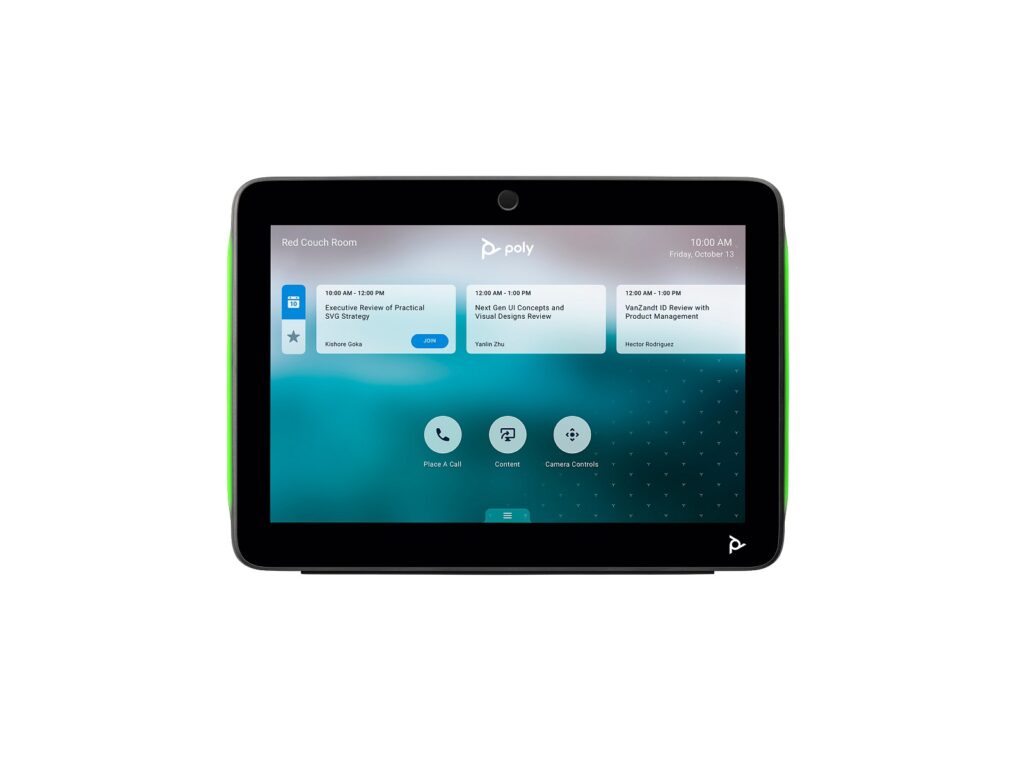
The TC10 uses a 10.1-inch IPS touchscreen at 1280 x 800, rated at 300 nits with 1000:1 static contrast. It measures 260 x 184 x 64 mm and weighs 1.27 kg.
Multi-colour LEDs around the frame show room availability from a distance when it runs as a scheduler.
A Kensington lock slot adds security in open offices. At 300 nits, it is better kept out of direct sunlight.
- Mount Wall, glass or table
Software Suite & Automation 6.0/10
In scheduling mode it runs standalone, with no paired video system, and connects to Zoom or Teams room booking.
- Features 10.1-inch 1280 x 800 IPS
Universal Compatibility 6.0/10
The TC10 is certified for Zoom and Microsoft Teams, and pairs with Poly systems such as the Poly Studio X52 and G7500.
When paired with a Poly Video OS system, it supports native apps including Zoom Rooms, 8×8, GoToRoom, RingCentral, Dialpad and others. That breadth is useful for organisations that use more than one meeting platform.
It also integrates with Extron for room environmental controls such as lighting and blinds. Logitech and Cisco systems use their own controllers, so the TC10 is not a cross-brand choice.
- Connect Ethernet (PoE)
Setup & Installation 8.1/10
A single RJ-45 cable provides power and data using PoE compatible with IEEE 802.3at Class 0. A wall mount kit, table stand and RJ-45 cable come in the box.
With both mounts included, it can move between wall, glass and table positions without extra parts.
Setup as a controller pairs it with a Poly Video OS system, while scheduling mode connects to Zoom or Teams room booking services.
- In Box TC10
- Mount Wall, glass or table
Full Specifications
General
| Best For | Poly Studio rooms and scheduling outside meeting spaces |
|---|---|
| Release Year | 2021 |
| Launch Price | $749 |
| Colors | Black, White |
| Model Number | 875K5AA (Black) |
Primary Output Performance 6.4/10
| Accessory Type (Lighting, Mounts & Stands, Docks & Hubs, Capture, Backdrops, Other) | Touch controller and scheduling panel |
|---|---|
| Mount Type | Wall, glass or table |
| Key Features | 10.1-inch 1280 x 800 IPS, LED status lights, proximity and air quality sensors, standalone scheduling |
Build & Desk Ergonomics 6.1/10
| Dimensions | 260 x 184 x 64 mm |
|---|---|
| Weight | 1.27 kg |
| Warranty | 1 year limited |
Universal Compatibility 6.0/10
| Connection | Ethernet (PoE) |
|---|---|
| Works With | Zoom Rooms, Microsoft Teams, Poly Video OS partner apps |
| Ports | 1 x RJ-45 |
| Certifications | Zoom, Microsoft Teams |
Setup & Installation 8.1/10
| In the Box | TC10, wall mount kit, table stand, mounting hardware, RJ-45 cable |
|---|---|
| Power | PoE IEEE 802.3at Class 0 |
Product Details
| Brand | Poly |
|---|---|
| Model | TC10 |
| Model number | TC10 |
| Release year | 2021 |
Price Comparison
| Store | Price | Deal |
|---|---|---|
| Hp.comOfficial Poly store | Launch price $749 | View deal (opens in a new tab) |
The Verdict
Buy the Poly TC10 if your rooms run Poly Studio X or G7500 systems and you want one panel model for in-room control and door scheduling, powered by PoE.
Skip it if your rooms are built on Logitech or Cisco systems, which use their own controllers. For a compact Poly video bar to pair with it, see the Poly Studio X32.
This is a research-based review built on HP Poly’s product page and specifications. The Expert Score is calculated from official specifications; How We Score explains the criteria and weights.
FAQs
Can the TC10 be used as a scheduling panel?
Yes, it works inside or outside the room.
How is it powered?
By PoE (802.3at Class 0) over one RJ-45 cable.
What size is the screen?
10.1 inches, 1280 x 800.
Is it Teams certified?
Yes, and Zoom certified.
Which mounts are included?
A wall mount kit and table stand.
How is it managed?
Through Poly Lens.
What colours are available?
Black and white.
What warranty does it have?
One year limited.