At a glance
| Resolution | 2160p 4K UHD (3840 x 2160), 30 fps |
|---|---|
| Zoom | 5x digital |
| Field of View | 121° |
| Auto Framing | Yes (DirectorAI people, group and speaker framing) |
| Camera | 4K single lens |
| Connection | Ethernet, USB-C, 2 x USB-A, HDMI in, 2 x HDMI out, Wi-Fi, Bluetooth 5.0 |
- Model Studio X50
- Released 2019
PolyLast updated on November 2026
Poly Studio X50 Review
- Small room STRONG
- Large room STRONG
Prices, shipping and returns are handled by the retailer.
On this page
Overview
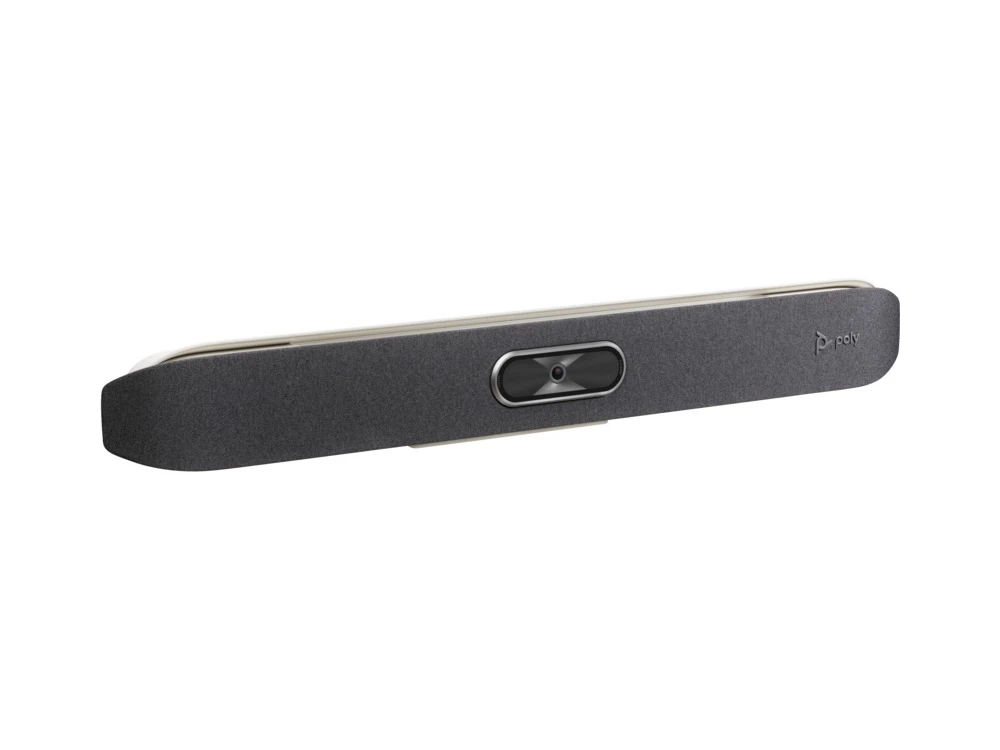
The Poly Studio X50 is an all-in-one video bar for medium rooms of up to about 10 people. It has a 4K camera with a 121° diagonal view and 5x digital zoom, five microphones that reach up to 7.62 m, and Poly DirectorAI framing.
- Mic pickup up to 7.62 m
- 110° horizontal view
- Teams, Zoom Rooms and Google Meet built in
- Two HDMI outputs plus HDMI in
Key Takeaways
- 4K camera, 121° view
- 5 mics, 7.62 m pickup
- Two displays, HDMI in
Best For
- Medium rooms
- Wide, shallow rooms
- Existing Poly fleets
Avoid If
- You need optical zoom for a deep room
- You are buying new and want current Teams Rooms certification
Pros & Cons
The Studio X50 is still a capable medium-room bar. A 7.62 m pickup range, stereo speakers, NoiseBlockAI and Acoustic Fence cover the audio side, and it runs Teams, Zoom Rooms and Google Meet without a PC. The trade-offs are digital-only zoom, older Wi-Fi and HDMI 1.4, and its absence from Microsoft’s current Teams Rooms list.
PROS
- Mic pickup up to 7.62 m
- 110° horizontal view
- Teams, Zoom Rooms and Google Meet built in
- Two HDMI outputs plus HDMI in
CONS
- Digital zoom only
- Wi-Fi 5 and HDMI 1.4
- Not on Microsoft's current Teams Rooms list
- 1-year warranty
Review Scores
Score Breakdown
9.0/10 Expert Score
- Optics & Room Coverage7.9/10
- AI Speaker Tracking & Framing9.3/10
- Room Audio Pickup & Output9.2/10
- OS Platform & Ecosystem9.9/10
- Deployment & I/O10.0/10
How this score is calculated
Each criterion is the weighted average of its available spec scores (0–10) from our Conference Cameras scoring matrix. Empty specs are skipped, not scored as 0. The Expert Score is the weighted average of the scored criteria, shown out of 10; stars = Expert Score / 20, rounded to the nearest half star.
| Criterion | Weight | From specs | Score |
|---|---|---|---|
| Optics & Room CoverageZoom: 5x digital → 6.5; Field of View: 121 → 9.0; Ideal Room Size: Medium (up to 10 people) → 7.5; Pan / Tilt: Digital (electronic framing) → 6.0; Max Resolution: 4K UHD (3840 x 2160), 30 fps → 9.5 | 30% | 7.9 | 7.9 |
| AI Speaker Tracking & FramingSpeaker Tracking: Yes → 10.0; Auto Framing: Yes → 8.5; AI Features: Poly DirectorAI: speaker framing → 8.0 | 25% | 9.3 | 9.3 |
| Room Audio Pickup & OutputBuilt-in Mics: 5 → 8.5; Mic Pickup Range: 7.62 m → 9.8; Expansion Mics: Optional Studio Extension Microphone → 10.0; Beamforming: Yes → 10.0; Speakers: Stereo → 8.0; Max SPL: 20 W RMS (40 W max) → 6.0 | 20% | 9.2 | 9.2 |
| OS Platform & EcosystemAppliance Mode: Yes → 10.0; USB / BYOD Mode: Yes (USB Device mode) → 10.0; Remote Management: Poly Lens → 10.0; Teams Rooms: Microsoft Teams Rooms → 9.5; Certifications: Zoom → 10.0 | 15% | 9.9 | 9.9 |
| Deployment & I/OMounting: Wall mount kit → 10.0; HDMI: 1 in (1.4, video+audio), 2 out (1.4) → 10.0; VESA / TV Mount: Optional VESA mount kit → 10.0 | 10% | 10.0 | 10.0 |
| Expert Score | 9.0/10 | ||
Scores by Use Case
- Small room80/100
- Large room80/100
Poly Studio X50 Review
The Studio X50 was the larger of the two all-in-one bars Poly launched in late 2019, priced at $3,499 with the TC8 touch controller. It runs the meeting app on the bar itself, so a medium room needs no PC.
I have judged it on Poly’s published specs against the rooms it is sold for: medium spaces of up to about 10 people. HP’s current all-in-one range now lists the X32, X52 and X72, so the real question is where the older bar still makes sense. Our Jabra PanaCast 50 vs Poly Studio X50 comparison covers the USB alternative.
Optics & Room Coverage 7.9/10
The X50 uses a single-lens 4K camera that captures at 3840 x 2160. Poly lists a 121° diagonal and 110° horizontal field of view with 5x digital zoom. People video runs at 4K30 or 1080p60, and a secondary camera can be added over USB or HDMI.
That 110° horizontal view is wider than the Poly Studio X52‘s 95°, so in a wide, shallow room the X50 keeps the end seats in frame without a second camera. The trade-off is depth: digital zoom crops the image rather than magnifying it optically.
When I plan a room around a bar like this, I check the corner seats first. If the table is long and narrow, a camera with optical zoom is the better fit.
- Zoom 5x digital
- View 121°
- Room Size Medium (up to 10 people)
- Pan/Tilt Digital (electronic framing)
AI Speaker Tracking & Framing 9.3/10
Poly DirectorAI runs the framing. HP lists speaker framing, people framing, group framing, presenter tracking and DirectorAI perimeter, which keeps the camera from reacting to people outside a set boundary.
Those modes cover most medium-room meetings: group framing for open discussion, speaker framing when people take turns around the table, and presenter tracking when someone stands at the screen. Perimeter matters most in glass-walled rooms next to busy corridors.
Poly does not publish a tracking latency or a multi-stream gallery mode for the X50, so I have not scored either. I set one default framing mode per room so nobody has to change it before a call.
- Tracking Yes
- AI Poly DirectorAI: speaker fr…
Room Audio Pickup & Output 9.2/10
The X50 has five microphones, three MEMS and two second-order, in a beamforming array. Poly rates pickup at up to 7.62 m, the longest of the Poly bars on this site, and a line input takes the optional Studio Extension Microphone.
Stereo speakers are rated at 20 W RMS and 40 W maximum with 86.1 dB sensitivity. NoiseBlockAI filters background noise between speech, and Acoustic Fence keeps voices from outside the pickup zone out of the call.
Audio is the X50’s strongest area. I would still add the extension microphone when seats sit beyond the rated range, and set up Acoustic Fence once the furniture is in its final position.
- Mics 5
- Pickup 7.62 m
- Add Mics Optional Studio Extension M…
- Beamform Yes
OS Platform & Ecosystem 9.9/10
The X50 runs Poly VideoOS with native Microsoft Teams, Zoom Rooms and Google Meet apps. Poly Video mode adds H.323 and SIP calling at up to 6 Mbps, and USB device mode turns the bar into a camera, microphone and speaker for a guest laptop.
HP’s datasheet lists Teams, Zoom and Google Meet certification. Microsoft’s current Teams Rooms on Android certified list names the X32, X52 and X72 but not the X50, although Microsoft still lists Teams app updates for it.
Poly Lens handles deployment, firmware and settings across a fleet, and control comes from a TC8 or TC10 touch controller. For a new Teams room I would buy a currently certified bar; for Zoom Rooms or an existing X50 fleet, it still fits.
- Appliance Yes
- BYOD Yes (USB Device mode)
- Mgmt Poly Lens
- Teams Rooms Microsoft Teams Rooms
Deployment & I/O 10.0/10
The connections cover a two-screen room: one HDMI 1.4 input with audio, two HDMI 1.4 outputs, one USB-C and two USB-A ports at 5 Gbps, gigabit Ethernet, 3.5 mm audio in and out, and Wi-Fi 802.11ac with Bluetooth 5.0 on radio versions.
A wall mount kit and privacy cover come in the box, with a VESA kit and table stand as options. Power comes from an external auto-sensing supply rated at 37 VA, and the bar weighs 2.54 kg at 762 mm wide. Poly does not list PoE, so plan an outlet near the display.
The HDMI 1.4 ports and 802.11ac Wi-Fi are the clearest signs of its age next to newer bars in our conference camera reviews. Neither stops a standard two-display room from working well.
- Mounting Wall mount kit
- HDMI 1 in
- VESA Optional VESA mount kit
Full Specifications
General
| Best For | Medium rooms |
|---|---|
| Ideal Room Size | Medium (up to 10 people) |
| Release Year | 2019 |
Camera
| Camera Resolution | 2160p 4K UHD (3840 x 2160), 30 fps |
|---|---|
| Max Frame Rate | 60 (1080p60; 4K at 30 fps) |
| Zoom | 5x digital |
| Field of View | 121° |
| Pan / Tilt | Digital (electronic framing) |
| Auto Framing | Yes (DirectorAI people, group and speaker framing) |
| Speaker Tracking | Yes (DirectorAI speaker framing and presenter tracking) |
| Horizontal FOV | 110° |
| Digital Zoom | 5x |
| Video Codecs | H.264 AVC, H.264 High Profile, H.265, H.239 |
| Camera | 4K single lens |
| AI Features | Poly DirectorAI: speaker framing, people framing, group framing, presenter tracking, DirectorAI perimeter; NoiseBlockAI; Acoustic Fence |
| Cameras | 1 |
| Whiteboard Camera | Digital whiteboarding |
Connectivity
| Connection | Ethernet, USB-C, 2 x USB-A, HDMI in, 2 x HDMI out, Wi-Fi, Bluetooth 5.0 |
|---|---|
| Video Outputs | 2 x HDMI out (touch display compatible) |
| USB | 1 x USB-C 5 Gbps, 2 x USB-A 5 Gbps |
| HDMI | 1 in (1.4, video+audio), 2 out (1.4) |
| Network | 10/100/1G Ethernet, IPv4/IPv6, H.323/SIP up to 6 Mbps |
| Wireless | Wi-Fi 802.11a/b/g/n/ac (MIMO) and Bluetooth 5.0 (not on no-radio versions) |
| Displays Supported | 2 |
| Ports | RJ-45, 3.5 mm audio in, 3.5 mm audio out, line in (optional mic) |
| Content Sharing | HDMI input, Apple AirPlay, Miracast, digital whiteboarding |
| HDMI In | 1 x HDMI 1.4 (video + audio) |
| HDMI Out | 2 x HDMI 1.4 (video) |
| Ethernet | 1 x RJ-45 10/100/1G (Auto-MDIX) |
| Wi-Fi | Wi-Fi 802.11a/b/g/n/ac (MIMO), multi-channel concurrency |
| Bluetooth | Bluetooth 5.0 |
| USB Host Ports | 2 x USB-A 5 Gbps |
| Line In / Out | 1 x 3.5 mm line in, 1 x 3.5 mm audio out, line in (optional mic) |
Platforms
| Certifications | Zoom, Google Meet; Microsoft Teams (per HP; not on Microsoft's current Teams Rooms on Android list) |
|---|---|
| Remote Management | Poly Lens |
| Microsoft Teams | Microsoft Teams app built in; not on Microsoft's current Teams Rooms on Android certified list (Nov 2026) |
| Zoom | Zoom Certified (Zoom Rooms) |
| Software | Poly VideoOS, Poly Lens |
| Teams Rooms | Microsoft Teams Rooms, Zoom Rooms, Google Meet, Poly Video mode, USB device mode |
| Operating System | Poly VideoOS |
| USB / BYOD Mode | Yes (USB Device mode) |
| Touch Controller | Poly TC8 or TC10 |
| Zoom Rooms | Certified |
| Google Meet | Certified |
| SIP / H.323 | Yes (H.323 / SIP up to 6 Mbps in Poly Video mode) |
| Appliance Mode | Yes |
Design
| Remote Control | Poly Bluetooth remote control (optional) |
|---|---|
| Mounting | Wall mount kit (included); VESA mount kit and stand (optional) |
| Weight | 2.54 kg |
| Privacy Cover | Attachable privacy cover (included) |
| Dimensions | 762 x 102 x 102 mm |
| Power | External auto-sensing; 37 VA typical at 120 V / 230 V |
| Power Consumption | 37 VA typical |
| Operating Temperature | 0 to 40 °C |
In the Box
| In the Box | Studio X50, Ethernet cable, wall mount kit, AC power adapter, privacy cover, cable bundle |
|---|---|
| Warranty | Poly standard 1-year limited |
| Optional Accessories | VESA mount kit, stand, Poly TC8, Poly TC10, Poly Bluetooth remote control, Poly Trio, Studio Extension Microphone |
Identifiers
| Model Number | 83Z44AA (83Z47AA with TC8) |
|---|
Audio
| Built-in Mics | 5 |
|---|---|
| Audio Input | 1 x 3.5 mm line in, HDMI in, expansion mic input |
| Audio Output | 3.5 mm audio out, HDMI |
| Mic Pickup Range | 7.62 m |
| Speakers | Stereo, 20 W RMS (40 W max), 86.1 dB sensitivity |
| Audio Processing | Beamforming, NoiseBlockAI, Acoustic Fence |
| Expansion Mics | Optional Studio Extension Microphone (line in) |
| Mic Array | 3 MEMS + 2 second-order mics |
| Speaker Output | 20 W RMS (40 W max) |
| Beamforming | Yes |
| AI Noise Suppression | Yes (NoiseBlockAI) |
| Audio Fence / Zones | Acoustic Fence |
| Audio Out | 3.5 mm audio output |
Design & Setup
| Security | AES-128/256 media encryption, H.235.6, security profiles, Active Directory authentication, Kensington slot |
|---|---|
| Security Slot | Yes |
| Cooling | 65 BTU/h heat dissipation |
| VESA / TV Mount | Optional VESA mount kit |
Product Details
| Brand | Poly |
|---|---|
| Model | Studio X50 |
| Model number | 83Z44AA |
| Release year | 2019 |
Price Comparison
| Store | Price | Deal |
|---|---|---|
| Hp.comOfficial Poly store | See price | View deal (opens in a new tab) |
The Verdict
I’d keep the Studio X50 in wide medium rooms where its 7.62 m pickup and 110° horizontal view do the most work, and it suits teams that already run X50s. For a new Teams room, the Poly Studio X52 adds Wi-Fi 6, HDMI 2.0 and current certification. For small rooms, the Studio X32 is the simpler choice.
FAQs
How far does the Studio X50 pick up voices?
Poly lists a pickup range of up to 7.62 m (25 ft). An optional Studio Extension Microphone plugs into the line input for longer tables.
What camera does the Poly Studio X50 use?
A single-lens 4K camera with a 121° diagonal and 110° horizontal view and 5x digital zoom. People video runs at up to 4K30 or 1080p60.
Which platforms does the Studio X50 support?
Microsoft Teams, Zoom Rooms and Google Meet run natively, alongside Poly Video mode with H.323 and SIP and a USB device mode for laptops.
Is the Studio X50 still certified for Microsoft Teams Rooms?
HP’s datasheet lists it as Microsoft Teams certified, but Microsoft’s current Teams Rooms on Android certified list names the X32, X52 and X72, not the X50. Microsoft still lists Teams app updates for it.
Can it connect to two displays?
Yes. It has two HDMI 1.4 outputs and one HDMI 1.4 input for wired content sharing.
Does the Studio X50 need a PC?
No. The meeting apps run on the bar’s Poly VideoOS. A laptop is only needed when you use it as a USB camera and speakerphone.
What is in the box?
The Studio X50, an Ethernet cable, a wall mount kit, an AC power adapter, a privacy cover and a cable bundle.
How is the X50 different from the Studio X52?
The X52 adds a 20 MP camera, Wi-Fi 6 and HDMI 2.0. The X50 has a wider 110° horizontal view and a longer 7.62 m mic pickup.
What did the Studio X50 cost at launch?
Poly announced it in 2019 at $3,499, including the Poly TC8 touch controller.