At a glance
| Zoom | 5x digital |
|---|---|
| View | 120° |
| Camera | 12 MP, 1/2.3" CMOS, f/2.5, fixed focus; 1080p video |
| Teams Rooms | Webex (RoomOS) with Teams, Zoom and Google Meet interop; Microsoft Teams Rooms on Android; USB-C BYOD |
- Model Room Bar
CiscoLast updated on October 2026
Cisco Room Bar Review
- Small room GOOD
- Large room GOOD
Prices, shipping and returns are handled by the retailer.
On this page
Overview
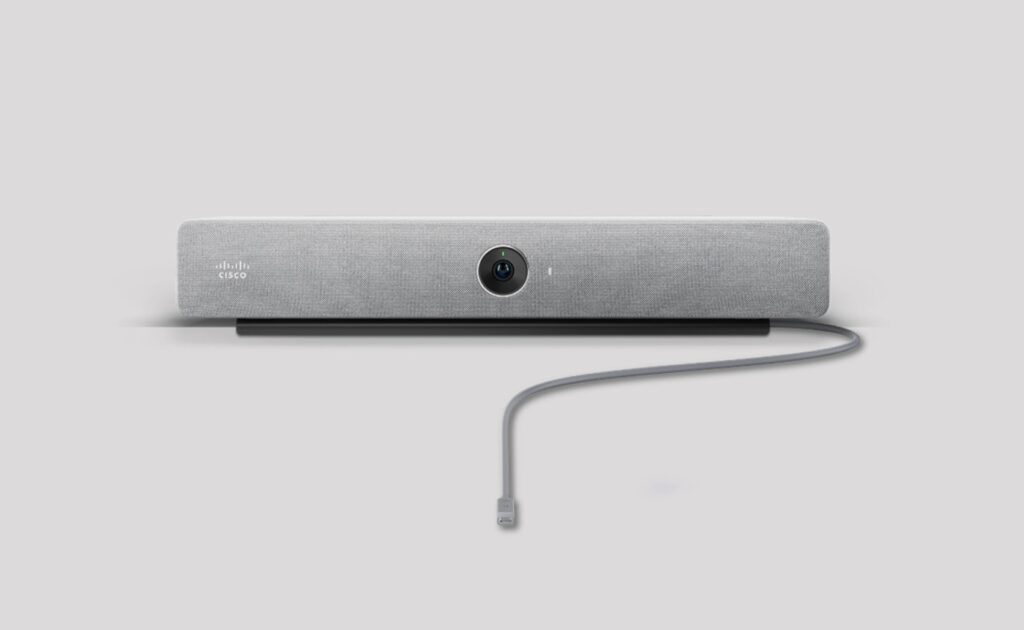
The Cisco Room Bar is a compact video bar for huddle and small rooms. It has a 12 MP camera with a 120° horizontal view, 5x digital zoom, auto framing, Frames mode and speaker tracking.
- Native Webex plus Teams, Zoom and Meet interop
- 120° horizontal view
- AI noise removal and spatial audio
- Two 4K60 HDMI outputs
Key Takeaways
- Cisco Control Hub management
- External mic input
- 1.5 kg
Best For
- Webex rooms
- Huddle rooms
- Cisco-managed fleets
Avoid If
- Your room seats more than five without an extra mic
- You don't use Webex or Cisco management
Pros & Cons
The Room Bar is a strong fit for Webex and Cisco-managed rooms. It has a 120° view, AI noise removal, spatial audio and interop with the other platforms. Cisco rates its mics for five people within 3 m, so it is a huddle and small-room device unless you add an external mic.
PROS
- Native Webex plus Teams, Zoom and Meet interop
- 120° horizontal view
- AI noise removal and spatial audio
- Two 4K60 HDMI outputs
CONS
- Mics optimised for 3 m and up to 5 people
- 1080p video
Review Scores
Score Breakdown
8.5/10 Expert Score
- Optics & Room Coverage7.7/10
- AI Speaker Tracking & Framing8.9/10
- Room Audio Pickup & Output7.6/10
- OS Platform & Ecosystem9.8/10
- Deployment & I/O9.4/10
How this score is calculated
Each criterion is the weighted average of its available spec scores (0–10) from our Video Bars & Conference Cameras scoring matrix. Empty specs are skipped, not scored as 0. The Expert Score is the weighted average of the scored criteria, shown out of 10; stars = Expert Score / 20, rounded to the nearest half star.
| Criterion | Weight | From specs | Score |
|---|---|---|---|
| Optics & Room CoverageZoom: 5x digital → 6.5; Field of View: 120 → 9.0; Ideal Room Size: Up to 5 people within 3 m → 8.5; Max Resolution: 12 MP → 6.5 | 30% | 7.7 | 7.7 |
| AI Speaker Tracking & FramingSpeaker Tracking: Yes → 10.0; Auto Framing: Auto framing → 8.5; Multi-Stream / Gallery: Frames mode, People Focus (Webex) → 6.0; AI Features: Auto framing → 8.0 | 25% | 8.9 | 8.9 |
| Room Audio Pickup & OutputBuilt-in Mics: 4 → 8.0; Mic Pickup Range: 3 m → 6.5; Expansion Mics: 1 analog mic input → 7.0; Beamforming: Yes → 10.0; Speakers: Stereo → 8.0; Max SPL: 93 → 9.8 | 20% | 7.6 | 7.6 |
| OS Platform & EcosystemAppliance Mode: Yes → 10.0; USB / BYOD Mode: Yes → 10.0; Remote Management: Cisco Control Hub → 10.0; Teams Rooms: Webex → 9.5; Certifications: Microsoft Teams Rooms → 8.5 | 15% | 9.8 | 9.8 |
| Deployment & I/OMounting: Consolidated wall/screen mount → 8.5; HDMI: 1 x HDMI-in (4K30), 2 x HDMI-out (4K60) → 10.0; Power over Ethernet: PoE port for Room Navigator and one Cis… → 10.0 | 10% | 9.4 | 9.4 |
| Expert Score | 8.5/10 | ||
Scores by Use Case
- Small room60/100
- Large room60/100
Cisco Room Bar Review
Optics & Room Coverage 7.7/10
- Zoom 5x digital
- View 120°
- Room Size Up to 5 people within 3 m
AI Speaker Tracking & Framing 8.9/10
- Tracking Yes
- Gallery Frames mode
- AI Auto framing
Room Audio Pickup & Output 7.6/10
- Mics 4
- Pickup 3 m
- Add Mics 1 analog mic input
- Beamform Yes
OS Platform & Ecosystem 9.8/10
- Appliance Yes
- Mgmt Cisco Control Hub
- Teams Rooms Webex
- Certified Microsoft Teams Rooms
Deployment & I/O 9.4/10
- Mounting Consolidated wall/screen mo…
- HDMI 1 x HDMI-in
- PoE PoE port for Room Navigator…
Full Specifications
General
| Best For | Webex rooms |
|---|---|
| Ideal Room Size | Up to 5 people within 3 m (add external mic for larger) |
Camera
| Sensor | 1/2.3" CMOS |
|---|---|
| Zoom | 5x digital |
| Field of View | 120° |
| Speaker Tracking | Yes |
| Megapixels | 12 MP |
| Aperture | f/2.5 |
| Horizontal FOV | 120° |
| Vertical FOV | 95° |
| Focus | Fixed focus |
| Multi-Stream / Gallery | Frames mode, People Focus (Webex) |
| People Counting | Yes |
| Camera | 12 MP, 1/2.3" CMOS, f/2.5, fixed focus; 1080p video |
| Camera Resolution | 1080p, 30 fps |
| AI Features | Auto framing, Frames mode, People focus (Webex), speaker tracking, AI noise removal |
| Max Frame Rate | 30 fps |
| Whiteboard Camera | View whiteboard content from Cisco Board/Desk or Webex app |
Connectivity
| Power over Ethernet | PoE port for Room Navigator and one Cisco IP mic |
|---|---|
| USB | 1 x USB-C input, 1 x USB-A |
| HDMI | 1 x HDMI-in (4K30), 2 x HDMI-out (4K60) |
| Network | Ethernet 100/1000, Wi-Fi, IPv4/IPv6, 802.1X |
| Wireless | Bluetooth (radio versions) |
| Displays Supported | 2 |
| Ports | Analog mic input, PoE port for IP mic |
| Content Sharing | HDMI, USB-C, wireless sharing; 4K content |
| HDMI In | 1 x HDMI (4K30) |
| HDMI Out | 2 x HDMI (4K60) |
| Ethernet | 2 x RJ-45 100/1000 (1 LAN, 1 PoE for Navigator) |
| Wi-Fi | Wi-Fi 802.11a/b/g/n/ac, 2×2 MIMO |
| Bluetooth | Bluetooth and BLE (radio versions) |
| USB Host Ports | 1 x USB-A 2.0 |
| Line In / Out | 1 x analog mic input |
Platforms
| Remote Management | Cisco Control Hub |
|---|---|
| Teams Rooms | Webex (RoomOS) with Teams, Zoom and Google Meet interop; Microsoft Teams Rooms on Android; USB-C BYOD |
| Certifications | Microsoft Teams Rooms |
| Operating System | RoomOS 11 or later / Teams Rooms on Android |
| USB / BYOD Mode | Yes (USB-C passthrough; Room Bar BYOD model) |
| Touch Controller | Cisco Room Navigator (table or wall) |
| Zoom Rooms | Interop (SIP / WebRTC) |
| Google Meet | Interop (WebRTC, RoomOS mode) |
| Webex | Native (RoomOS) |
| SIP / H.323 | Yes (H.323, SIP; 4-way MultiSite option) |
| Appliance Mode | Yes |
| Firmware Updates | Via Control Hub |
Design
| Mounting | Consolidated wall/screen mount; above or below display (can be flipped) |
|---|---|
| Weight | 1.5 kg |
| Privacy Cover | Privacy cover included |
| Dimensions | 534 x 82 x 64 mm |
| Power | 100-240 VAC, 12 V DC, PSU-12VDC-86W |
| Power Consumption | 14.3 W in meeting, 8.2 W idle, 86 W peak |
| Colors | First Light, Carbon |
| Operating Temperature | 0 to 35 °C |
In the Box
| Warranty | 1-year limited |
|---|---|
| Optional Accessories | Table Microphone Pro, Ceiling Microphone Pro, Room Navigator, multi-head cables |
| In the Box | Room Bar, Room Navigator (bundle), HDMI 2.0 cable 1.5 m, 86 W power supply, privacy cover, Ethernet cable 8 m, mounting kit |
| Licence Included | Cisco Device Subscription (sold separately) |
Identifiers
| Model Number | CS-BAR (TTC7-28) |
|---|
Audio
| Built-in Mics | 4 |
|---|---|
| Mic Pickup Range | 3 m |
| Speakers | Stereo, 2 full-range drivers, 100 Hz-20 kHz, 93 dB max SPL |
| Audio Processing | AEC, AGC, AI noise removal, de-reverberation, full duplex, spatial audio, beamforming |
| Expansion Mics | 1 analog mic input; 1 Cisco IP microphone via PoE |
| Mic Array | 4-element beamforming array + front-facing tracking mics |
| Max SPL | 93 dB |
| Speaker Frequency Range | 100 Hz – 20 kHz |
| Beamforming | Yes |
| AI Noise Suppression | Yes |
Design & Setup
| Mounts | Mounting kit included |
|---|---|
| Security | HTTPS/SSH management, SRTP AES-128/256-GCM, end-to-end encryption (Webex), WPA3 |
Product Details
| Brand | Cisco |
|---|---|
| Model | Room Bar |
Price Comparison
| Store | Price | Deal |
|---|---|---|
| Cisco.comOfficial Cisco store | See price | View deal (opens in a new tab) |
The Verdict
I’d choose the Cisco Room Bar for Webex shops and companies that want one platform from huddle to boardroom. For Teams or Zoom-first teams on a tighter budget, the Logitech Rally Bar Huddle or Neat Bar 2 are simpler. If the room has more than six seats, add an external mic or move to a larger bar.
FAQs
How many people does the Cisco Room Bar suit?
Cisco says the built-in mics are optimised for up to five people within 3 m. For more, add an external microphone.
Does the Room Bar work with Microsoft Teams?
Yes. It supports Microsoft Teams Rooms on Android and video interop for Teams in RoomOS mode.
Can I add a microphone?
Yes. It has an analog mic input and supports one Cisco IP microphone over PoE.
Can I use the Cisco Room Bar with my laptop?
Yes. In USB-C passthrough mode the laptop uses the bar’s camera, mics and speakers, and shares content over the same cable. There is also a BYOD-only Room Bar model.
How much power does the Room Bar use?
Cisco lists 14.3 W in a meeting, 8.2 W idle and 7 W networked standby, from an 86 W 12 V supply.
What camera does the Room Bar have?
A 12 MP 1/2.3-inch sensor with an f/2.5 fixed-focus lens, 120° horizontal and 95° vertical view, 5x digital zoom, and 1080p30 video.
Does it support wireless sharing?
Yes. Webex app, Miracast and Apple AirPlay in RoomOS mode, and Teams Cast or Miracast in Teams Rooms mode.
What warranty does Cisco give?
A 1-year limited warranty.