
AVer CAM570 vs Poly Studio R30 Comparison
Compare AVer CAM570 vs Poly Studio R30 side by side: specs, ratings, pros and cons, and which one fits your room best.
On this page
At a Glance
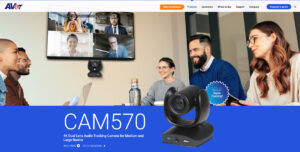
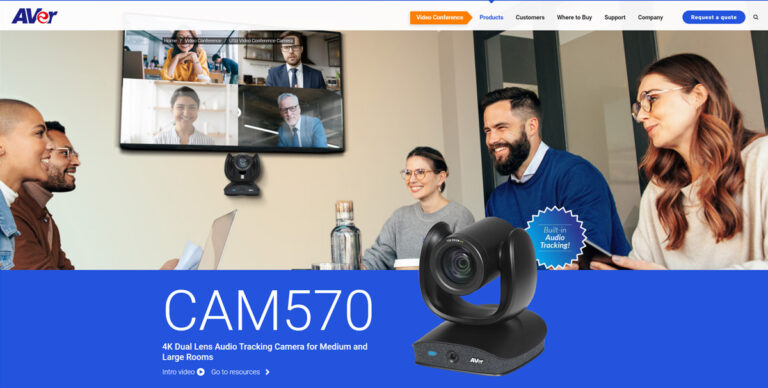
The AVer CAM570 is a dual-lens 4K conference camera with a 12x optical PTZ lens, a fixed wide AI lens, built-in audio tracking and Smart Gallery framing for medium and large rooms.
- Best For
- Medium to large rooms
- Resolution
- 4K
- Zoom
- 12x optical, 36x total
- Field of View
- 90° diagonal (PTZ), 95° diagonal (AI lens)
- Auto Framing
- Smart Gallery, audio tracking
- Camera
- Sony 4K Exmor (PTZ lens and AI lens)
- Connection
- USB, HDMI
- Teams Rooms
- Zoom certified; works with Google Meet and Microsoft Teams
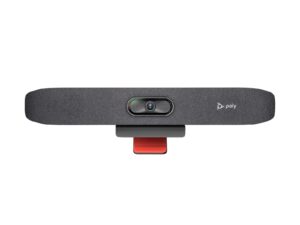
The Poly Studio R30 is a USB video bar for small rooms. It has a 4K camera at 30 fps with a 120° view, 5x zoom (4x with auto tracking) and group, people, speaker and presenter framing.
- Best For
- Small rooms
- Resolution
- 2160p 4K UHD (3840 x 2160), 30 fps
- Zoom
- 5x (4x with auto tracking)
- Field of View
- 120°
- Auto Framing
- Group, people, speaker and presenter framing
- Camera
- 4K
- Connection
- USB-C, USB-A
- Teams Rooms
- USB: works with Teams, Zoom and other PC apps
Review Scores Compared
Expert Score
Optics & Room Coverage
AI Speaker Tracking & Framing
Room Audio Pickup & Output
OS Platform & Ecosystem
Deployment & I/O
Editorial Reviews Comparison
Optics & Room Coverage
- AVer CAM5708.3/10
- Poly Studio R308.4/10Leader
AVer CAM570
Both lenses capture 4K, with the PTZ lens handling the main shot and the AI lens analysing the room. Output reaches 4K for platforms that support it. Image quality is sharp and natural in well-lit rooms, with faces clear at the far end of a boardroom. Like most PTZ cameras, it benefits from even lighting rather than strong windows behind people.
Poly Studio R30
A 4K sensor with a 120° field of view and 5x zoom supports group, people, speaker and presenter framing. It's a USB peripheral, so the PC or Mac does the meeting work. However, in my presenter test, tracking kept a speaker in frame while they walked over to a whiteboard.
AI Speaker Tracking & Framing
- AVer CAM5708.7/10
- Poly Studio R309.3/10Leader
AVer CAM570
The PTZ lens offers 12x optical and 3x digital zoom, for 36x total. That is ample reach for medium and large rooms. Optical zoom keeps speakers at the back of a room sharp, rather than cropping a wide image. Moves between speakers are smooth because the AI lens has already located them.
Poly Studio R30
The Studio R30 has speaker tracking: speaker framing, presenter tracking. Official AI features include Group, people, speaker and presenter framing. Zoom is listed as 5x (4x with auto tracking). In rooms I've set up, I care whether tracking stays with the speaker without hunting around the table.
Room Audio Pickup & Output
- AVer CAM570—
- Poly Studio R307.3/10
Poly Studio R30
Three integrated beamforming mics cover about 4.57 m. I'd expect clear voices across a typical meeting table. Past that, quieter talkers start to drop, and the Poly Studio X32 with NoiseBlockAI is the better step up. Three beamforming mics at about 4.57 m suit a personal office or tiny huddle, not a ten-seat table.
OS Platform & Ecosystem
- AVer CAM57010.0/10Leader
- Poly Studio R307.6/10
AVer CAM570
The CAM570 works with Teams, Zoom and Google Meet. AVer PTZ Management and AVer EZManager handle settings, presets and firmware updates. The software covers tracking modes, gallery options and image tuning, though the interface feels less refined than Poly Lens or Logitech Sync. For larger deployments, AVer's management tools support remote updates across rooms, and AVer offers long warranty coverage compared with many rivals.
Poly Studio R30
As a USB device, it's certified for Microsoft Teams and Zoom, and whatever app runs on the computer can use it. That flexibility suits BYOD rooms, but it means the room is only as reliable as the PC behind it. Our soundbar vs. video bar guide explains when a USB bar beats a full appliance.
Deployment & I/O
- AVer CAM57010.0/10Leader
- Poly Studio R306.0/10
AVer CAM570
The camera connects to a room PC over USB and supports HDMI for direct display or capture. Mounting options include shelf and wall placement. As a USB camera, it works with any UVC meeting app. Setup takes longer than a video bar because you need separate speakers and microphones for the call audio.
Poly Studio R30
Poly Lens handles firmware and settings, and the bar takes power from an external 12 V supply. One USB-C cable runs to the host. Clamping, plugging and testing should take a short while.
Why AVer CAM570 Beats Poly Studio R30 (and Vice Versa)
Why AVer CAM570 beats Poly Studio R30
- Better deployment & i/o: 10.0 vs 6.0 out of 10
- Better os platform & ecosystem: 10.0 vs 7.6 out of 10
- Ideal Room Size: Medium to large rooms vs Small and huddle rooms
- Zoom: 12x optical, 36x total vs 5x (4x with auto tracking)
Why Poly Studio R30 beats AVer CAM570
- Better ai speaker tracking & framing: 9.3 vs 8.7 out of 10
- Camera Resolution: 2160p 4K UHD (3840 x 2160), 30 fps vs 4K
- Field of View: 120° vs 90° diagonal (PTZ), 95° diagonal (AI lens)
- Pan / Tilt: Manual pan, tilt and zoom control vs Yes
- Auto Framing: Group, people, speaker and presenter framing vs Smart Gallery, audio tracking
- Horizontal FOV: 110° vs 78° (PTZ), 82° (AI lens)
Review-score leads of 0.5+ points out of 10 first, then specs where only one comes out ahead.
Full Specifications
General
| AVer CAM570 | Poly Studio R30 | |
|---|---|---|
| Release Year | 2023 | — |
| Max Frame Rate | 30 fps | — |
| Sensor | Sony 4K Exmor (PTZ lens and AI lens) | — |
| Camera Presets | 10 | — |
| Megapixels | — | 8 MP |
| Vertical FOV | 50° (PTZ), 52° (AI lens) | — |
| Digital Zoom | 3x | — |
| HDR | WDR | — |
| Low-Light Performance | Sony 4K Exmor, crystal clear in any lighting | — |
| Pan Range | ±170° | — |
| Tilt Range | +90° / −30° | — |
| Focus | Minimum focus distance 1.5 m | — |
| People Counting | Yes | — |
| Video Codecs | H.264 (network); YUV/YUY2/MJPEG on USB family cameras | — |
| Connection | USB, HDMI | USB-C, USB-A |
| Control Protocols | VISCA, Pelco-P, Pelco-D, VISCA over IP, IR remote, PTZApp 2, web UI | — |
| USB | Yes | 1 x USB-C 5 Gbps, 2 x USB 2.0 Type-A |
| IP Streaming | Yes (RJ45); virtual USB streaming from IP | — |
| Network | IP (RJ45) | — |
| Ports | — | 4.5 mm power input |
| Microsoft Teams | Microsoft Teams (compatible applications list) | — |
| Zoom | Zoom certified | — |
| Software | AVer PTZ Management, EZManager | — |
| OS Compatibility | Windows 7/10/11, macOS 14.4 or later | — |
| Remote Control | Yes (IR remote included) | — |
| Weight | 2100 g | 0.45 kg (1 lb) Better |
| Privacy Cover | — | Attachable lens cover |
| Dimensions | 170.8 x 190.5 x 173 mm | 17.5 x 3.4 x 3.2 in (with monitor clamp) |
| Power | AC 100–240 V, 12 V 2 A adapter; PoE+ 802.3at | External 12 V / 3 A |
| Power Consumption | 12 V, 2 A | — |
| Operating Temperature | 0 to 40 °C | — |
| In the Box | CAM570, power adapter (3 m), USB 3.1 Type-B to Type-A cable (3 m), remote, Mini DIN9 to Mini DIN8 RS-232 adapter, HDMI cable (3 m), wall mount bracket and screws, QR card, tripod screw, drill paper | — |
| Warranty | 3-year camera (optional 2-year European extension noted on the datasheet) | — |
| Model Number | CAM570 | — |
| Audio Input | Audio line-in | — |
| Audio Processing | — | Beamforming |
| Mic Array | — | Integrated mics |
| Security | — | Kensington lock slot |
Optics & Room Coverage
| AVer CAM5708.3/10 | Poly Studio R308.4/10 Better | |
|---|---|---|
| Optical Zoom | 12x | — |
| Zoom | 12x optical, 36x total Better | 5x (4x with auto tracking) |
| Field of View | 90° diagonal (PTZ), 95° diagonal (AI lens) | 120° Better |
| Ideal Room Size | Medium to large rooms Better | Small and huddle rooms |
| Pan / Tilt | Yes | Manual pan, tilt and zoom control Better |
| Best For | Medium to large rooms | Small rooms |
| Camera Resolution | 4K | 2160p 4K UHD (3840 x 2160), 30 fps Better |
| Horizontal FOV | 78° (PTZ), 82° (AI lens) | 110° Better |
| Camera | Sony 4K Exmor (PTZ lens and AI lens) | 4K |
AI Speaker Tracking & Framing
| AVer CAM5708.7/10 | Poly Studio R309.3/10 Better | |
|---|---|---|
| Speaker Tracking | Yes (audio tracking) | Yes (speaker framing, presenter tracking) |
| Auto Framing | Smart Gallery, audio tracking | Group, people, speaker and presenter framing Better |
| Multi-Stream / Gallery | Smart gallery; simultaneous USB, HDMI and IP output | — |
| AI Features | — | Group, people, speaker and presenter framing |
Room Audio Pickup & Output
| AVer CAM570 | Poly Studio R307.3/10 | |
|---|---|---|
| Built-in Mics | Built-in voice-sensor array for audio tracking (not a conferencing microphone); audio line-in supported | 3 |
| Mic Pickup Range | — | 4.57 m |
| Speakers | — | Single speaker, 100 Hz-20 kHz, 90 dB SPL @ 0.5 m |
OS Platform & Ecosystem
| AVer CAM57010.0/10 Better | Poly Studio R307.6/10 | |
|---|---|---|
| Appliance Mode | — | No |
| USB / BYOD Mode | — | Yes (USB to PC or Mac) |
| Remote Management | Yes (EZManager 2, PTZApp 2) | Poly Lens |
| Teams Rooms | Zoom certified; works with Google Meet and Microsoft Teams | USB: works with Teams, Zoom and other PC apps |
| Certifications | Zoom certified; works with Google Meet and Microsoft Teams | Microsoft Teams, Zoom |
| Operating System | — | None (USB peripheral) |
Deployment & I/O
| AVer CAM57010.0/10 Better | Poly Studio R306.0/10 | |
|---|---|---|
| Mounting | — | Monitor clamp |
| HDMI | Yes | — |
| Power over Ethernet | Yes | — |
| Video Outputs | USB, HDMI, IP | — |
Takeaways
- Our pick: AVer CAM570, with the highest spec-based rating (4.5/5).
- Choose AVer CAM570 for medium to large rooms.
- Choose Poly Studio R30 for small rooms.
Pros and Cons
AVer CAM570
PROS
- Dual lenses for smooth tracking
- 12x optical zoom
- Smart Gallery individual views
- Audio tracking built in
CONS
- Larger than single-lens cameras
- Software less polished than leaders
- Needs separate room audio for calls
Poly Studio R30
PROS
- 4K camera with 120° view
- Four framing modes
- One USB-C cable to the laptop
- Teams and Zoom certified
CONS
- Three mics and one speaker
- Needs a laptop (no appliance mode)
Similar Comparisons
 AVer CAM5709.0/10
 Yealink UVC869.4/10AVer CAM570 vs Yealink UVC86
- AVer CAM5709.0/10
 Yealink MeetingBar A409.2/10AVer CAM570 vs Yealink MeetingBar A40
- AVer CAM5709.0/10
 Poly Studio E609.0/10AVer CAM570 vs Poly Studio E60
- AVer CAM5709.0/10
 Poly Studio X509.0/10AVer CAM570 vs Poly Studio X50
Quick Verdict
- AVer CAM570 9.0Best overallLeads in OS Platform & Ecosystem, Deployment & I/O
- Poly Studio R30 8.0Leads in Optics & Room Coverage, AI Speaker Tracking & Framing