At a glance
| Zoom | 5x (4x with auto tracking) |
|---|---|
| View | 120° |
| Camera | 4K |
| Teams Rooms | USB: works with Teams, Zoom and other PC apps |
- Model Studio R30
PolyLast updated on October 2026
Poly Studio R30 Review
- Small room EXCELLENT
- Large room FAIR
Prices, shipping and returns are handled by the retailer.
On this page
Overview
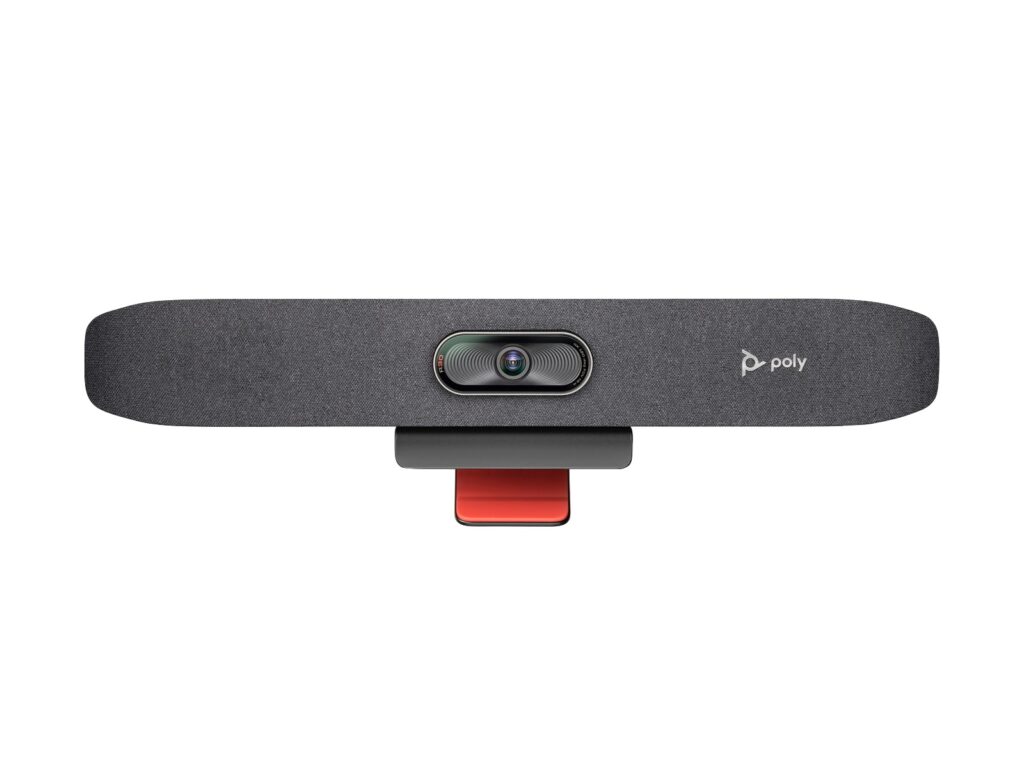
The Poly Studio R30 is a USB video bar for small rooms. It has a 4K camera at 30 fps with a 120° view, 5x zoom (4x with auto tracking) and group, people, speaker and presenter framing.
- 4K camera with 120° view
- Four framing modes
- One USB-C cable to the laptop
- Teams and Zoom certified
Key Takeaways
- Pickup up to 4.57 m
- Privacy cover
- Poly Lens management
Best For
- Small rooms
- BYOD rooms
- Budget rollouts
Avoid If
- You want a room system without a laptop
- Your room is medium-sized
Pros & Cons
The Studio R30 is a straightforward USB bar. It has a 4K camera with a 120° view, four framing modes and Teams and Zoom certification. It has three mics and one speaker, so it is best for small rooms, and it needs a laptop to run the meeting.
PROS
- 4K camera with 120° view
- Four framing modes
- One USB-C cable to the laptop
- Teams and Zoom certified
CONS
- Three mics and one speaker
- Needs a laptop (no appliance mode)
Review Scores
Score Breakdown
8.0/10 Expert Score
- Optics & Room Coverage8.4/10
- AI Speaker Tracking & Framing9.3/10
- Room Audio Pickup & Output7.3/10
- OS Platform & Ecosystem7.6/10
- Deployment & I/O6.0/10
How this score is calculated
Each criterion is the weighted average of its available spec scores (0–10) from our Video Bars & Conference Cameras scoring matrix. Empty specs are skipped, not scored as 0. The Expert Score is the weighted average of the scored criteria, shown out of 10; stars = Expert Score / 20, rounded to the nearest half star.
| Criterion | Weight | From specs | Score |
|---|---|---|---|
| Optics & Room CoverageZoom: 5x (4x with auto tracking) → 6.5; Field of View: 120 → 9.0; Ideal Room Size: Small and huddle rooms → 7.0; Pan / Tilt: Manual pan, tilt and zoom control → 10.0; Max Resolution: 4K → 9.5 | 30% | 8.4 | 8.4 |
| AI Speaker Tracking & FramingSpeaker Tracking: Yes → 10.0; Auto Framing: Group → 8.5; AI Features: Group → 8.0 | 25% | 9.3 | 9.3 |
| Room Audio Pickup & OutputBuilt-in Mics: 3 → 7.0; Mic Pickup Range: 4.57 m → 7.9; Speakers: Single speaker → 6.0 | 20% | 7.3 | 7.3 |
| OS Platform & EcosystemAppliance Mode: No → 4.0; USB / BYOD Mode: Yes (USB to PC or Mac) → 10.0; Remote Management: Poly Lens → 10.0; Teams Rooms: USB: works with Teams → 6.0; Certifications: Microsoft Teams, Zoom → 10.0 | 15% | 7.6 | 7.6 |
| Deployment & I/OMounting: Monitor clamp → 6.0 | 10% | 6.0 | 6.0 |
| Expert Score | 8.0/10 | ||
Scores by Use Case
- Small room100/100
- Large room40/100
Poly Studio R30 Review
Optics & Room Coverage 8.4/10
- Zoom 5x (4x with auto tracking)
- View 120°
- Room Size Small and huddle rooms
AI Speaker Tracking & Framing 9.3/10
- Tracking Yes
- AI Group
Room Audio Pickup & Output 7.3/10
- Mics 3
- Pickup 4.57 m
- Speakers Single speaker
OS Platform & Ecosystem 7.6/10
- Appliance No
- BYOD Yes (USB to PC or Mac)
- Mgmt Poly Lens
- Teams Rooms USB: works with Teams
Deployment & I/O 6.0/10
- Mounting Monitor clamp
Full Specifications
General
| Best For | Small rooms |
|---|---|
| Ideal Room Size | Small and huddle rooms |
Camera
| Zoom | 5x (4x with auto tracking) |
|---|---|
| Field of View | 120° |
| Speaker Tracking | Yes (speaker framing, presenter tracking) |
| Megapixels | 8 MP |
| Horizontal FOV | 110° |
| Camera | 4K |
| Camera Resolution | 2160p 4K UHD (3840 x 2160), 30 fps |
| Pan and Tilt | Manual pan, tilt and zoom control |
| AI Features | Group, people, speaker and presenter framing |
Connectivity
| USB | 1 x USB-C 5 Gbps, 2 x USB 2.0 Type-A |
|---|---|
| Ports | 4.5 mm power input |
Platforms
| Remote Management | Poly Lens |
|---|---|
| Teams Rooms | USB: works with Teams, Zoom and other PC apps |
| Certifications | Microsoft Teams, Zoom |
| Operating System | None (USB peripheral) |
| USB / BYOD Mode | Yes (USB to PC or Mac) |
| Appliance Mode | No |
Design
| Mounting | Monitor clamp |
|---|---|
| Weight | 0.45 kg (1 lb) |
| Privacy Cover | Attachable lens cover |
| Dimensions | 17.5 x 3.4 x 3.2 in (with monitor clamp) |
| Power | External 12 V / 3 A |
Audio
| Built-in Mics | 3 |
|---|---|
| Mic Pickup Range | 4.57 m |
| Speakers | Single speaker, 100 Hz-20 kHz, 90 dB SPL @ 0.5 m |
| Audio Processing | Beamforming |
| Mic Array | Integrated mics |
Design & Setup
| Security | Kensington lock slot |
|---|
Product Details
| Brand | Poly |
|---|---|
| Model | Studio R30 |
Price Comparison
| Store | Price | Deal |
|---|---|---|
| Hp.comOfficial Poly store | See price | View deal (opens in a new tab) |
The Verdict
I’d pick the R30 for budget huddle rooms that already have a PC or a BYOD habit. If you want an appliance with no PC to manage, the Poly Studio X32 is the step up. For a wider panoramic view in a small room, the Jabra PanaCast 50 is the rival.
FAQs
Does the Studio R30 need a computer?
Yes. It is a USB video bar, so the meeting runs on the connected laptop or PC.
What framing modes does the R30 have?
Group, people, speaker and presenter framing.
How far does it pick up voices?
Up to 4.57 m.
Which rooms is the Studio R30 for?
HP positions it for small rooms that need a simple USB video bar, used with a room PC or BYOD laptop.
What is the R30 camera?
A 4K 8 MP camera with a 110° horizontal view, per HP’s USB video bar comparison.
Does the R30 track the presenter?
Yes. HP lists speaker framing, group framing and presenter tracking.
Is the R30 stereo?
No. It has a single (mono) speaker. The larger Poly Studio USB adds stereo speakers.
How is it powered?
From an external 12 V / 3 A power supply.