
BenQ ScreenBar Halo vs Logitech Litra Glow Comparison
Compare BenQ ScreenBar Halo vs Logitech Litra Glow side by side: specs, ratings, pros and cons, and which one fits your room best.
On this page

At a Glance
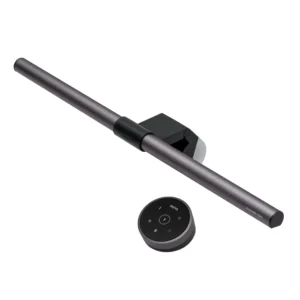
Need light on the desk for evening calls without glare on the screen? The BenQ ScreenBar Halo is a monitor light bar with 2700 K to 6500 K LEDs rated CRI 95+, a rear backlight, auto-dimming and a wireless dial controller.
- Best For
- Home office desks and late meetings
- Accessory Type
- Monitor light bar
- Launch Price
- $179
- Works With
- Flat and curved monitors (1000R to 1800R)
- Connection
- USB-C (power)
- Brightness
- 800 lux at 45 cm
Looking for the cheapest fix for a dim webcam picture? The Logitech Litra Glow is a 250-lumen light that clips to a monitor, with 2700 K to 6500 K colour temperature and a removable mount for $59.99.
- Best For
- Video calls from a home desk
- Accessory Type
- Monitor-mounted streaming light
- Launch Price
- $59.99
- Works With
- Windows, macOS
- Connection
- USB-C to USB-A cable
- Brightness
- 250 lumens
Review Scores Compared
Expert Score
Primary Output Performance
Build & Desk Ergonomics
Software Suite & Automation
Universal Compatibility
Setup & Installation
Editorial Reviews Comparison
Primary Output Performance
- BenQ ScreenBar Halo8.0/10Leader
- Logitech Litra Glow7.2/10
BenQ ScreenBar Halo
Dual-colour LEDs adjust from 2700 K to 6500 K, with a CRI of 95 or higher. BenQ rates illuminance at 800 lux at 45 cm, covering 63 x 40 cm at 500 lux. A rear backlight lights the wall behind the monitor, which acts as bias lighting and reduces the contrast between a bright screen and a dark room.
Logitech Litra Glow
Logitech's TrueSoft technology uses full-spectrum LEDs behind a diffuser, aimed at natural-looking skin tones. It works as a small key light, putting soft light on the face from the front. Spec-based reasoning: more light on the face lets the webcam use less gain, which reduces image noise. For a bigger setup, the Elgato Key Light Air covers more area but costs more and uses a desk clamp.
Build & Desk Ergonomics
- BenQ ScreenBar Halo8.1/10Leader
- Logitech Litra Glow6.0/10
BenQ ScreenBar Halo
The bar is aluminium, with an asymmetric optical design that throws light down onto the desk rather than onto the screen. A counterweight clamp holds it on the monitor. The clamp fits flat and curved monitors, including curved displays from 1000R to 1800R. The single USB-C lead is the only cable to the monitor; the controller is wireless.
Logitech Litra Glow
The light weighs 99 g, or 177 g with the monitor mount. The frosted diffuser softens the LEDs into an even, wide panel of light. The mount clips to most monitors and laptops and swivels 360 degrees. Remove the mount and a 1/4-20 thread takes a tripod or arm. The power and brightness buttons sit on the back edge.
Software Suite & Automation
- BenQ ScreenBar Halo6.0/10
- Logitech Litra Glow8.3/10Leader
BenQ ScreenBar Halo
There is no app: brightness, colour temperature, auto-dimming and the backlight are all set from the wireless controller.
Logitech Litra Glow
Logitech G HUB adds presets and on-screen control for brightness and colour temperature.
Universal Compatibility
- BenQ ScreenBar Halo8.2/10
- Logitech Litra Glow8.6/10Leader
BenQ ScreenBar Halo
BenQ lists monitor thickness ranges of 0.7 to 6 cm for flat screens and 1.6 to 3.8 cm for curved screens. Because it sits on the monitor, it can block a webcam clipped on top. Mount the webcam on a separate arm or below the screen if both are needed.
Logitech Litra Glow
The mount fits most monitors and laptops, with a 4 inch vertical telescoping extension, a 2 inch horizontal extension and 360 degree swivel. On a monitor that also carries a webcam, the telescoping arm lifts the light above the camera. As a USB-powered light it also runs from chargers and hubs, and with the mount removed it fits small tripods.
Setup & Installation
- BenQ ScreenBar Halo9.3/10Leader
- Logitech Litra Glow9.0/10
BenQ ScreenBar Halo
Installation is tool-free: place the clamp on the monitor and connect the USB-C cable to a port or adapter. Power draw is up to 6.5 W at 5 V 1.3 A. If a monitor's USB port can't supply that, a phone charger can power it instead. The wireless controller runs on three AAA batteries, and its dial adjusts brightness without reaching up to the monitor.
Logitech Litra Glow
The light connects with a 1.5 m USB-C to USB-A cable. Plug it in, clip it on and it turns on with the power button on the back. Buttons on the back adjust brightness and colour temperature, so software is optional. Logitech G HUB adds presets and syncs settings for streaming.
Why BenQ ScreenBar Halo Beats Logitech Litra Glow (and Vice Versa)
Why BenQ ScreenBar Halo beats Logitech Litra Glow
- Better build & desk ergonomics: 8.1 vs 6.0 out of 10
- Better primary output performance: 8.0 vs 7.2 out of 10
- Light Output: 800 lux at 45 cm vs 250 lumens
- Mount Type: Monitor clamp vs Monitor mount (removable)
- Brightness: 800 lux at 45 cm vs 250 lumens
Why Logitech Litra Glow beats BenQ ScreenBar Halo
- Better software suite & automation: 8.3 vs 6.0 out of 10
- Weight: 99 (light), 177 (with mount) vs 800 g
Review-score leads of 0.5+ points out of 10 first, then specs where only one comes out ahead.
Full Specifications
General
| BenQ ScreenBar Halo | Logitech Litra Glow | |
|---|---|---|
| Best For | Home office desks and late meetings | Video calls from a home desk |
| Release Year | 2021 | 2022 |
| Launch Price | $179 | $59.99 Better |
| Use Case | Desk lighting | Video calls and streaming |
| Colors | Metallic Grey | — |
| Model Number | ScreenBar Halo | Litra Glow |
Primary Output Performance
| BenQ ScreenBar Halo8.0/10 Better | Logitech Litra Glow7.2/10 | |
|---|---|---|
| Accessory Type (Lighting, Mounts & Stands, Docks & Hubs, Capture, Backdrops, Other) | Monitor light bar | Monitor-mounted streaming light |
| Brightness | 800 lux at 45 cm Better | 250 lumens |
| Light Output | 800 lux at 45 cm Better | 250 lumens |
| CRI | Ra 95 or higher | — |
| Color Temperature | 2700 K to 6500 K | 2700 K to 6500 K |
| Mount Type | Monitor clamp Better | Monitor mount (removable) |
| Height Adjustment | — | 4 inch telescoping extension |
| Tilt / Swivel | — | Yes |
| Key Features | Rear backlight, auto-dimming, wireless controller | TrueSoft full-spectrum light, monitor mount |
| Materials | Aluminium | — |
Build & Desk Ergonomics
| BenQ ScreenBar Halo8.1/10 Better | Logitech Litra Glow6.0/10 | |
|---|---|---|
| Dimensions | Lamp 500 x 95 x 97 mm; controller 74 x 74 x 38 mm | — |
| Weight | 800 g | 99 (light), 177 (with mount) Better |
| Adjustable | Yes | Yes |
Software Suite & Automation
| BenQ ScreenBar Halo6.0/10 | Logitech Litra Glow8.3/10 Better | |
|---|---|---|
| App / Software Control | — | Logitech G HUB |
| Companion App | — | Logitech G HUB |
| Remote Control | Wireless controller (3 x AAA) | — |
| Wireless | Wireless controller | — |
Universal Compatibility
| BenQ ScreenBar Halo8.2/10 | Logitech Litra Glow8.6/10 Better | |
|---|---|---|
| OS Support | — | Windows, macOS |
| Connection | USB-C (power) | USB-C to USB-A cable |
| Mount Thread | — | 1/4-20 |
| Compatible Devices | Flat and curved monitors (1000R to 1800R) | Monitors and laptops |
| Cable Length | 1.5 m | 1.5 m |
| Works With | Flat and curved monitors (1000R to 1800R) | Windows, macOS |
| Screen / Device Size | Monitor thickness: flat 0.7–6 cm; curved 1.6–3.8 cm | — |
Setup & Installation
| BenQ ScreenBar Halo9.3/10 Better | Logitech Litra Glow9.0/10 | |
|---|---|---|
| Tool-Free Setup | Yes | — |
| Plug and Play | Yes | Yes |
| In the Box | Light bar, clamp, wireless controller, USB-C cable | Light, monitor mount, USB-C to USB-A cable |
| Cables Included | USB cable (150 cm) | — |
| Power | 5 V 1.3 A (up to 6.5 W) | — |
Takeaways
- Logitech Litra Glow costs the least ($59.99), and BenQ ScreenBar Halo the most ($179).
- Our pick: BenQ ScreenBar Halo, with the highest spec-based rating (4/5).
- Choose BenQ ScreenBar Halo for home office desks and late meetings.
- Choose Logitech Litra Glow for video calls from a home desk.
Pros and Cons
BenQ ScreenBar Halo
PROS
- Asymmetric optics keep light off the screen
- Rear backlight acts as bias lighting
- Wireless dial controller
- Fits flat and curved monitors
CONS
- Does not light your face for video
- Controller uses AAA batteries
- Pricier than basic light bars
Logitech Litra Glow
PROS
- $59.99 list price
- Clips to monitors and laptops
- 2700 K to 6500 K colour range
- Buttons on the light, no app required
CONS
- 250 lumens limits large rooms
- USB-A cable needs an adapter on some laptops
- No wireless control
Similar Comparisons
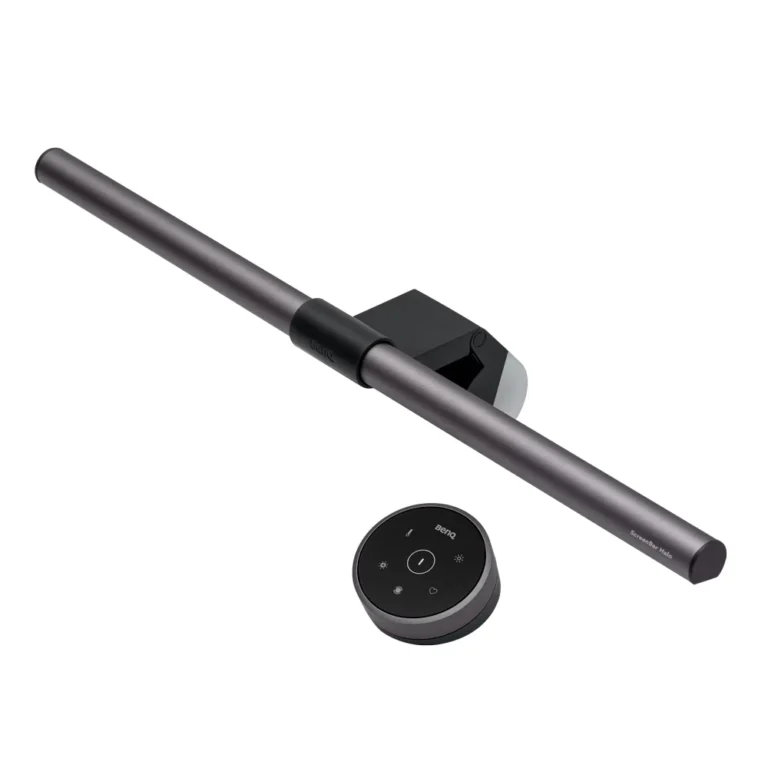 BenQ ScreenBar Halo7.9/10
 Elgato Key Light Air MK.29.0/10BenQ ScreenBar Halo vs Elgato Key Light Air MK.2
- BenQ ScreenBar Halo7.9/10
 Elgato Key Light8.6/10BenQ ScreenBar Halo vs Elgato Key Light
 Logitech Litra Glow7.5/10Elgato Key Light Air MK.29.0/10Logitech Litra Glow vs Elgato Key Light Air MK.2
- Logitech Litra Glow7.5/10Elgato Key Light8.6/10Logitech Litra Glow vs Elgato Key Light
Quick Verdict
- BenQ ScreenBar Halo 7.9Best overallLeads in Primary Output Performance, Build & Desk Ergonomics, Setup & Installation
- Logitech Litra Glow 7.5Leads in Software Suite & Automation, Universal Compatibility