
Room Bar vs PanaCast 50 Comparison
Compare Room Bar vs PanaCast 50 side by side: specs, ratings, pros and cons, and which one fits your room best.
On this page
At a Glance
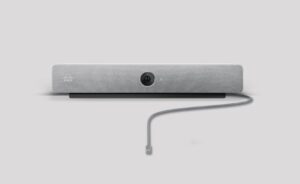
Room Bar
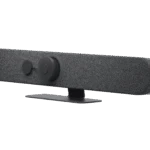
The Cisco Room Bar is a compact video bar for huddle and small rooms. It has a 12 MP camera with a 120° horizontal view, 5x digital zoom, auto framing, Frames mode and speaker tracking.
- Best For
- Webex rooms
- Zoom
- 5x digital
- View
- 120°
- Camera
- 12 MP, 1/2.3" CMOS, f/2.5, fixed focus; 1080p video
- Teams Rooms
- Webex (RoomOS) with Teams, Zoom and Google Meet interop; Microsoft Teams Rooms on Android; USB-C BYOD
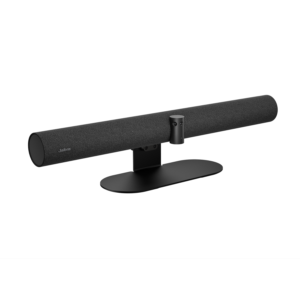
PanaCast 50
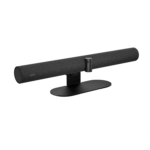
The Jabra PanaCast 50 uses three 13 MP cameras stitched into a 180° panoramic-4K view. That lets you push the table up to the wall and still see everyone.
- Best For
- Medium rooms
- Zoom
- Up to 6x lossless digital
- View
- 180°
- Camera
- 3 x 13 MP camera array, panoramic 4K
- Teams Rooms
- USB: Microsoft Teams, Zoom and others; Teams Rooms and Zoom Rooms
Review Scores Compared
Expert Score
Optics & Room Coverage
AI Speaker Tracking & Framing
Room Audio Pickup & Output
OS Platform & Ecosystem
Deployment & I/O
Why Room Bar Beats PanaCast 50 (and Vice Versa)
Why Room Bar beats PanaCast 50
- Better os platform & ecosystem: 9.8 vs 8.8 out of 10
- Better deployment & i/o: 9.4 vs 8.5 out of 10
- Vertical FOV: 95° vs 54°
- Camera Resolution: 1080p, 30 fps vs Panoramic-4K 3840 x 1080 @ 30 fps
- AI Features: Auto framing, Frames mode, People focus (Webex), speaker tra… vs Virtual Director, Intelligent Zoom, Dynamic Composition, Int…
- Ethernet: 2 x RJ-45 100/1000 (1 LAN, 1 PoE for Navigator) vs RJ-45
Why PanaCast 50 beats Room Bar
- Better room audio pickup & output: 9.8 vs 7.6 out of 10
- Better optics & room coverage: 8.3 vs 7.7 out of 10
- Ideal Room Size: Up to 4.5 x 6 m (15 x 20 ft), Microsoft "medium room" vs Up to 5 people within 3 m (add external mic for larger)
- Zoom: Up to 6x lossless digital vs 5x digital
- Field of View: 180° vs 120°
- Megapixels: 13 MP vs 12 MP
Review-score leads of 0.5+ points out of 10 first, then specs where only one comes out ahead.
Full Specifications
General
| Room Bar | PanaCast 50 | |
|---|---|---|
| Best For | Webex rooms | Medium rooms |
| Ideal Room Size | Up to 5 people within 3 m (add external mic for larger) | Up to 4.5 x 6 m (15 x 20 ft), Microsoft "medium room" Better |
Camera
| Room Bar | PanaCast 50 | |
|---|---|---|
| Sensor | 1/2.3" CMOS | — |
| Zoom | 5x digital | Up to 6x lossless digital Better |
| Field of View | 120° | 180° Better |
| Speaker Tracking | Yes | Yes (Automatic Speaker Detection) |
| Megapixels | 12 MP | 13 MP Better |
| Aperture | f/2.5 | — |
| Horizontal FOV | 120° | 180° Better |
| Vertical FOV | 95° Better | 54° |
| HDR | — | Yes (Vivid HDR) |
| Focus | Fixed focus | — |
| Multi-Stream / Gallery | Frames mode, People Focus (Webex) | — |
| People Counting | Yes | Yes (PeopleCount) |
| Camera | 12 MP, 1/2.3" CMOS, f/2.5, fixed focus; 1080p video | 3 x 13 MP camera array, panoramic 4K Better |
| Camera Resolution | 1080p, 30 fps Better | Panoramic-4K 3840 x 1080 @ 30 fps |
| Pan and Tilt | — | Manual PTZ (digital); 180° H x 54° V view |
| AI Features | Auto framing, Frames mode, People focus (Webex), speaker tracking, AI noise removal Better | Virtual Director, Intelligent Zoom, Dynamic Composition, Intelligent Meeting Space, PeopleCount, Vivid HDR, dual-stream whiteboard |
| Max Frame Rate | 30 fps | 30 fps |
| Cameras | — | 3 |
| Whiteboard Camera | View whiteboard content from Cisco Board/Desk or Webex app | Yes (whiteboard sharing) |
Connectivity
| Room Bar | PanaCast 50 | |
|---|---|---|
| Power over Ethernet | PoE port for Room Navigator and one Cisco IP mic | — |
| USB | 1 x USB-C input, 1 x USB-A | USB-A, USB-C (USB 2.0/3.0) Better |
| HDMI | 1 x HDMI-in (4K30), 2 x HDMI-out (4K60) | — |
| Network | Ethernet 100/1000, Wi-Fi, IPv4/IPv6, 802.1X | Ethernet (RJ45) |
| Wireless | Bluetooth (radio versions) | Bluetooth LE (remote control, Sound+) |
| Displays Supported | 2 | — |
| Ports | Analog mic input, PoE port for IP mic | Ethernet (RJ45), Aux-out for assistive listening |
| Content Sharing | HDMI, USB-C, wireless sharing; 4K content | — |
| HDMI In | 1 x HDMI (4K30) | — |
| HDMI Out | 2 x HDMI (4K60) | — |
| Ethernet | 2 x RJ-45 100/1000 (1 LAN, 1 PoE for Navigator) Better | RJ-45 |
| Wi-Fi | Wi-Fi 802.11a/b/g/n/ac, 2x2 MIMO | — |
| Bluetooth | Bluetooth and BLE (radio versions) | Bluetooth LE (remote, Sound+) |
| USB Host Ports | 1 x USB-A 2.0 | — |
| Line In / Out | 1 x analog mic input | — |
Platforms
| Room Bar | PanaCast 50 | |
|---|---|---|
| Remote Management | Cisco Control Hub Better | Jabra Direct, Jabra Xpress, Jabra Sound+ |
| Teams Rooms | Webex (RoomOS) with Teams, Zoom and Google Meet interop; Microsoft Teams Rooms on Android; USB-C BYOD | USB: Microsoft Teams, Zoom and others; Teams Rooms and Zoom Rooms |
| Certifications | Microsoft Teams Rooms | Microsoft Teams, Microsoft Teams Rooms, Zoom Rooms, Zoom |
| Operating System | RoomOS 11 or later / Teams Rooms on Android | — |
| USB / BYOD Mode | Yes (USB-C passthrough; Room Bar BYOD model) | Yes (USB) |
| Touch Controller | Cisco Room Navigator (table or wall) | — |
| Zoom Rooms | Interop (SIP / WebRTC) | Certified |
| Google Meet | Interop (WebRTC, RoomOS mode) | — |
| Webex | Native (RoomOS) | — |
| SIP / H.323 | Yes (H.323, SIP; 4-way MultiSite option) | — |
| Appliance Mode | Yes | — |
| Firmware Updates | Via Control Hub | Jabra Direct / Jabra Xpress |
| Remote Control | — | Bluetooth LE remote |
Design
| Room Bar | PanaCast 50 | |
|---|---|---|
| Mounting | Consolidated wall/screen mount; above or below display (can be flipped) | Wall mount included; table stand and other mounts available |
| Weight | 1.5 kg Better | 2.2 kg |
| Privacy Cover | Privacy cover included | — |
| Dimensions | 534 x 82 x 64 mm | 650 x 80 x 125 mm |
| Power | 100-240 VAC, 12 V DC, PSU-12VDC-86W | External power supply (included) |
| Power Consumption | 14.3 W in meeting, 8.2 W idle, 86 W peak | — |
| Colors | First Light, Carbon | — |
| Operating Temperature | 0 to 35 °C | 5 to 35 °C |
In the Box
| Room Bar | PanaCast 50 | |
|---|---|---|
| Warranty | 1-year limited | 2 years |
| Optional Accessories | Table Microphone Pro, Ceiling Microphone Pro, Room Navigator, multi-head cables | Table stand and other mounts |
| In the Box | Room Bar, Room Navigator (bundle), HDMI 2.0 cable 1.5 m, 86 W power supply, privacy cover, Ethernet cable 8 m, mounting kit | PanaCast 50, power supply, wall mount, USB-C to USB-A cable 2 m (USB 3.0) |
| Licence Included | Cisco Device Subscription (sold separately) | — |
Identifiers
| Room Bar | PanaCast 50 | |
|---|---|---|
| Model Number | CS-BAR (TTC7-28) | — |
Audio
| Room Bar | PanaCast 50 | |
|---|---|---|
| Built-in Mics | 4 | 8 Better |
| Mic Pickup Range | 3 m | — |
| Speakers | Stereo, 2 full-range drivers, 100 Hz-20 kHz, 93 dB max SPL Better | 4 speakers: 2 x 50 mm woofers, 2 x 20 mm tweeters, 80 Hz-20 kHz |
| Audio Processing | AEC, AGC, AI noise removal, de-reverberation, full duplex, spatial audio, beamforming | Beamforming, full duplex, echo and static-noise removal |
| Expansion Mics | 1 analog mic input; 1 Cisco IP microphone via PoE | — |
| Mic Array | 4-element beamforming array + front-facing tracking mics | 8-mic beamforming array |
| Max SPL | 93 dB | — |
| Speaker Frequency Range | 100 Hz - 20 kHz Better | 80 Hz - 20 kHz |
| Mic Frequency Range | — | 100 Hz - 8 kHz |
| Beamforming | Yes | Yes |
| AI Noise Suppression | Yes | — |
| Audio Out | — | Aux-out for assistive listening |
Design & Setup
| Room Bar | PanaCast 50 | |
|---|---|---|
| Mounts | Mounting kit included | — |
| Security | HTTPS/SSH management, SRTP AES-128/256-GCM, end-to-end encryption (Webex), WPA3 | — |
Takeaways
- It's a tie on our rating (4.5/5) between Room Bar and PanaCast 50, so choose on the rows that matter most to you.
- Choose Room Bar for webex rooms.
- Choose PanaCast 50 for medium rooms.
Pros and Cons
Room Bar
PROS
- Native Webex plus Teams, Zoom and Meet interop
- 120° horizontal view
- AI noise removal and spatial audio
- Two 4K60 HDMI outputs
CONS
- Mics optimised for 3 m and up to 5 people
- 1080p video
PanaCast 50
PROS
- 180° panoramic-4K view
- Eight beamforming mics
- Four speakers (2 woofers, 2 tweeters)
- 2-year warranty
CONS
- Needs a room PC or laptop (USB)
- 6x zoom is digital
Similar Comparisons
 Room Bar vs Rally Bar

- Room Bar vs Rally Bar Huddle
- Room Bar vs Rally Bar Mini
 PanaCast 50 vs Rally Bar
- PanaCast 50 vs Rally Bar Huddle
- PanaCast 50 vs Rally Bar Mini
Quick Verdict
- Room Bar 8.5Leads in OS Platform & Ecosystem, Deployment & I/O
- PanaCast 50 8.9Best overallLeads in Optics & Room Coverage, AI Speaker Tracking & Framing, Room Audio Pickup & Output