
Elgato Facecam MK.2 vs Insta360 Link 2 Comparison
Compare Elgato Facecam MK.2 vs Insta360 Link 2 side by side: specs, ratings, pros and cons, and which one fits your room best.
When you buy through our links, we may earn an affiliate commission at no extra cost to you. Learn more
On this page
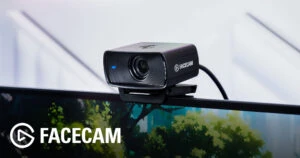
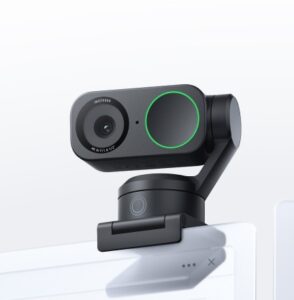
At a Glance
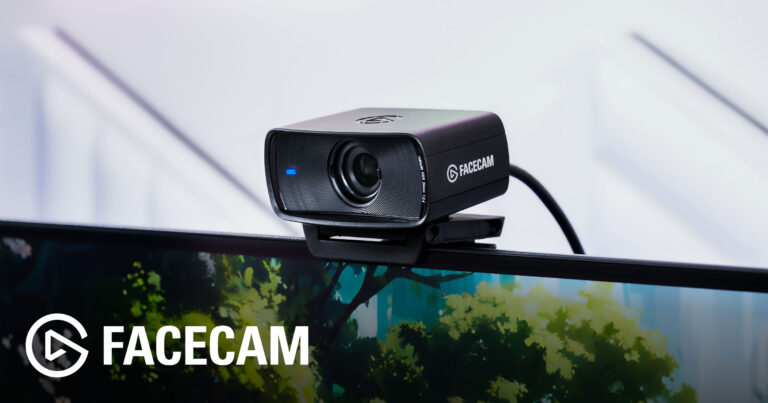
Streaming or recording from a fixed seat and want an uncompressed signal? The Elgato Facecam MK.2 is a 1080p webcam that sends uncompressed 1080p60 over USB 3.0 from a Sony STARVIS 1/2.5-inch sensor, with a fixed-focus f/2.4 lens and an 84° view.
Official Elgato page (opens in a new tab)View on Amazon (opens in a new tab)
- Best For
- Streamers
- Resolution
- 1080p at 60 fps (uncompressed over USB 3.0)
- Field of View
- 84°
- Autofocus
- No (fixed focus, 30-120 cm)
- Light Correction
- Yes (HDR, up to 1080p30)
- Microphones
- None
- Privacy Shutter
- Yes (privacy built in)
- Connection
- USB-C (USB 3.0 for uncompressed)
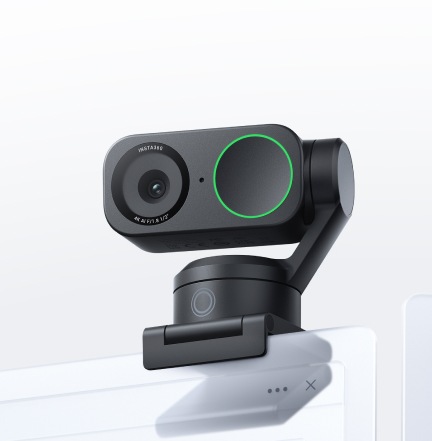
The Insta360 Link 2 is a 4K webcam on a 2-axis gimbal with a 1/2-inch sensor, f/1.8 lens and HDR in all modes, plus AI tracking, Smart Whiteboard and DeskView. Consider it if you want a webcam that follows you to a whiteboard.
Official Insta360 page (opens in a new tab)View on Amazon (opens in a new tab)
- Best For
- Teachers
- Resolution
- 4K
- Field of View
- 79.5°
- Autofocus
- Yes (10 cm to infinity)
- Light Correction
- Yes (1/2" sensor)
- Microphones
- AI noise-canceling
- Privacy Shutter
- No (Privacy Mode tilts the gimbal down instead)
- Connection
- USB-C (USB 2.0), USB-C to USB-A adapter
Review Scores Compared
Expert Score
Visual Image Quality
Autofocus & Low-Light
FOV & Framing
Privacy, Mount & Build
Software & App Controls
Connectivity & Port Interface
Integrated Audio
Find Your Winner
Tell us how much each area matters to you. Your winner updates instantly and is remembered for this category.
Your winner
Insta360 Link 2
Leads on Visual Image Quality and Autofocus & Low-Light.
- Elgato Facecam MK.27.8
- Insta360 Link 27.9
Your pick is personal. Our Expert Score and editorial verdict do not change.
Editorial Reviews Comparison
Visual Image Quality
- Elgato Facecam MK.27.7/10
- Insta360 Link 28.9/10Leader
Elgato Facecam MK.2
Elgato sends 1080p at 60 fps uncompressed over USB 3.0, or 720p at up to 120 fps, from a Sony STARVIS 1/2.5-inch sensor with an f/2.4 lens. Elgato aims it at streamers who want an untouched signal. Spec-based reasoning: an uncompressed feed avoids the compression artifacts an MJPEG stream can add before OBS encodes it.
Insta360 Link 2
A 1/2-inch sensor behind an f/1.8 lens records 4K30 or 1080p60, with HDR in all modes. Spec-based reasoning: a 1/2-inch sensor is larger than most desk webcams use, which gives it more light-gathering area. On a call the platform downscales the feed, so the 4K output is most useful for recording, digital zoom and the whiteboard modes.
Autofocus & Low-Light
- Elgato Facecam MK.24.6/10
- Insta360 Link 29.5/10Leader
Elgato Facecam MK.2
The STARVIS sensor and HDR up to 1080p30 help in mixed light, and Camera Hub exposes full manual exposure, ISO and white balance. Spec-based reasoning: with manual exposure locked and a key light, the STARVIS sensor is comparable on paper to the Razer Kiyo Pro, which uses a similar Sony sensor.
Insta360 Link 2
The large 1/2-inch sensor and fast f/1.8 aperture give it a real low-light advantage, and HDR helps with a bright window behind you. Spec-based reasoning: that sensor and aperture pairing gives it more low-light headroom than the Logitech Brio 500 and puts it near the OBSBOT Tiny 2.
FOV & Framing
- Elgato Facecam MK.29.5/10Leader
- Insta360 Link 28.7/10
Elgato Facecam MK.2
An 84° fixed-focus lens is sharp between 30 cm and 120 cm. There's no autofocus, which means no focus hunting when you move a hand in front of the camera. Objects held closer than 30 cm go soft. Streamers who show items on camera are better served by the OBSBOT Tiny 2's PDAF.
Insta360 Link 2
A two-axis gimbal with AI tracking follows you as you move, and Smart Whiteboard and DeskView modes handle writing and overhead shots. Gesture control and a portrait mode are included. Insta360 describes the tracking as following the user around the room. PDAF autofocus from 10 cm keeps up with quick movements.
Privacy, Mount & Build
- Elgato Facecam MK.29.5/10Leader
- Insta360 Link 26.2/10
Elgato Facecam MK.2
Elgato does not list a built-in shutter. A detachable 1.8 m USB cable is long enough for a rear-mounted PC. The monitor mount and 1/4-inch thread cover desk arms used by streamers who sit farther back.
Insta360 Link 2
At 101.5 g, it uses a magnetic mount with a 1/4-inch thread on the mount. When idle, the gimbal can point the lens down, which works as a visible privacy position. The magnetic mount plus the 1/4-inch thread make it quick to move between a monitor and an arm; a stable surface matters with a gimbal.
Software & App Controls
- Elgato Facecam MK.28.5/10Leader
- Insta360 Link 27.8/10
Elgato Facecam MK.2
Camera Hub handles exposure, colour and presets. USB 3.0 is needed for uncompressed output, and USB 2.0 falls back to MJPEG. Camera Hub can save presets, for example one for daylight and one for a key light.
Insta360 Link 2
It connects by USB-C, with a USB-A adapter included, over USB 2.0. Link Controller handles tracking, framing and image settings. Our best video conferencing webcams guide compares it with the fixed models.
Connectivity & Port Interface
- Elgato Facecam MK.28.8/10Leader
- Insta360 Link 26.0/10
Elgato Facecam MK.2
The Facecam MK.2 has a USB-C port, needs USB 3.0 for uncompressed video and falls back to MJPEG on USB 2.0. The 1.8 m cable is detachable, and there is no USB-A adapter in the box. As a UVC 1.5 camera it works without a special driver. Elgato lists Windows 11 or later and macOS 13.3 Ventura or later.
Insta360 Link 2
The Link 2 has a USB-C port and runs over USB 2.0, with a USB-C to USB-A adapter included. It outputs H.264 or MJPEG, and Insta360 lists Windows 10 or later and macOS 11 or later.
Integrated Audio
- Elgato Facecam MK.2—
- Insta360 Link 23.3/10
Elgato Facecam MK.2
There's no microphone. Elgato assumes you already run a dedicated mic. For meetings, pair it with a headset or a USB mic. If you want an all-in-one camera, look at the Logitech MX Brio instead.
Insta360 Link 2
Insta360 rates its AI noise-cancelling mics for roughly 3 m. For long calls, a headset still picks up voice from closer.
Why Elgato Facecam MK.2 Beats Insta360 Link 2 (and Vice Versa)
Why Elgato Facecam MK.2 beats Insta360 Link 2
- Better privacy, mount & build: 9.5 vs 6.2 out of 10
- Better connectivity & port interface: 8.8 vs 6.0 out of 10
- Better fov & framing: 9.5 vs 8.7 out of 10
- Better software & app controls: 8.5 vs 7.8 out of 10
- Camera Resolution: 1080p at 60 fps (uncompressed over USB 3.0) vs 4K
- Max Frame Rate: 60 (1080p), 120 (720p) vs 30 (4K), 60 (1080p)
Why Insta360 Link 2 beats Elgato Facecam MK.2
- Better autofocus & low-light: 9.5 vs 4.6 out of 10
- Better visual image quality: 8.9 vs 7.7 out of 10
- Autofocus: Yes (10 cm to infinity) vs No (fixed focus, 30-120 cm)
- Aperture: f/1.8 vs f/2.4
- Focus Type: PDAF autofocus vs Fixed focus
- Mounting: Magnetic mount vs Monitor mount with 1/4 in thread
Review-score leads of 0.5+ points out of 10 first, then specs where only one comes out ahead.
Full Specifications
General
| Elgato Facecam MK.2 | Insta360 Link 2 | |
|---|---|---|
| Best For | Streamers | Teachers |
| Weight | 90 g Better | 101.5 g |
| Dimensions | 84 x 38 x 61 mm | 71.3 x 58.9 x 38 mm |
| Colors | — | Graphite Black | Arctic White |
| In the Box | Facecam MK.2, monitor mount with 1/4 in thread, 1.8 m USB-C to USB-C 3.0 braided cable | — |
| Model Number | 10WAC9901 | — |
Visual Image Quality
| Elgato Facecam MK.27.7/10 | Insta360 Link 28.9/10 Better | |
|---|---|---|
| Max Frame Rate | 60 (1080p), 120 (720p) Better | 30 (4K), 60 (1080p) |
| Sensor Size | 1/2.5" | 1/2" |
| Sensor | Sony STARVIS 1/2.5" CMOS | 1/2" |
| HDR | Yes (up to 1080p30) | Yes (all modes) |
| Resolutions & Frame Rates | 1080p60/30, 720p60/30, 540p60/30 (uncompressed over USB 3.0) Better | 4K@30/25/24, 1080p@60/50/30/25/24, 720p@60/50/30/25/24, 360p@30/25/24 (landscape and portrait) |
| Video Format | Uncompressed (USB 3.0), MJPEG (USB 2.0) | H.264, MJPEG |
| Lens | Elgato Prime Lens, 24 mm full-frame equivalent | 26 mm equivalent, f/1.8 |
| Camera Resolution | 1080p at 60 fps (uncompressed over USB 3.0) Better | 4K |
Autofocus & Low-Light
| Elgato Facecam MK.24.6/10 | Insta360 Link 29.5/10 Better | |
|---|---|---|
| Autofocus | No (fixed focus, 30-120 cm) | Yes (10 cm to infinity) Better |
| Focus Type | Fixed focus | PDAF autofocus Better |
| Aperture | f/2.4 | f/1.8 Better |
| Light Correction | Yes (HDR, up to 1080p30) | Yes (1/2" sensor) |
| Focus Range | 30 - 120 cm | 10 cm - infinity |
| Auto Exposure | Yes (manual shutter speed, ISO, and other controls in Camera Hub / Studio) | Yes |
| Auto White Balance | Yes | Yes |
FOV & Framing
| Elgato Facecam MK.29.5/10 Better | Insta360 Link 28.7/10 | |
|---|---|---|
| Field of View | 84° Better | 79.5° |
| FOV Presets | Adjustable, up to 84° Better | Fixed 79.5° DFOV / 67° HFOV |
| AI Framing | — | AI tracking on 2-axis gimbal, Smart Whiteboard, DeskView |
| Digital Zoom | — | 4 x |
| Subject Tracking | Face tracking (requires an NVIDIA RTX GPU) | AI Tracking on 2-axis gimbal |
| Pan / Tilt | Digital pan, tilt and zoom (Elgato Studio app) | 2-axis gimbal |
| Gesture Control | — | Yes |
| Portrait Mode | — | Yes |
| Horizontal FOV | — | 67° |
Privacy, Mount & Build
| Elgato Facecam MK.29.5/10 Better | Insta360 Link 26.2/10 | |
|---|---|---|
| Privacy Shutter | Yes (privacy built in) Better | No (Privacy Mode tilts the gimbal down instead) |
| Tripod Thread | 1/4 in thread | 1/4 in (on mount) |
| Detachable Cable | Yes | — |
| Mounting | Monitor mount with 1/4 in thread | Magnetic mount Better |
| Clip Type | Monitor mount (clamp) with 1/4-inch thread | — |
Software & App Controls
| Elgato Facecam MK.28.5/10 Better | Insta360 Link 27.8/10 | |
|---|---|---|
| Software | Elgato Camera Hub Better | Link Controller |
| Operating Systems | Windows 11+, macOS 13.3 Ventura+ | Windows 10+, macOS 11+ |
| Manual Controls | Shutter speed, ISO, white balance, zoom, pan, tilt, noise reduction | EV ±3, ISO 100-3200, shutter 1/8000-1/30 s, WB 2000-10000 K |
| Onboard Memory / Profiles | Yes | — |
| Virtual Camera | — | Yes (macOS 13+) |
| Background Effects | Blur or replace background (AI green screen; requires an NVIDIA RTX GPU) | Natural Bokeh, background blur, background replacement |
| Works With | Zoom, OBS Studio, Discord and more | — |
Connectivity & Port Interface
| Elgato Facecam MK.28.8/10 Better | Insta360 Link 26.0/10 | |
|---|---|---|
| USB Standard | USB 3.0 (USB 2.0 supported with MJPEG) Better | USB 2.0 |
| USB-A Adapter | No | Yes Better |
| Cable Length | 1.8 m | — |
| Uncompressed Video | Yes (NV12, YUY2 and other uncompressed formats over USB 3.0; MJPEG on USB 2.0) Better | No (H.264, MJPEG only) |
| Connection | USB-C (USB 3.0 for uncompressed) Better | USB-C (USB 2.0), USB-C to USB-A adapter |
| UVC | UVC 1.5 | — |
Integrated Audio
| Elgato Facecam MK.2 | Insta360 Link 23.3/10 | |
|---|---|---|
| Microphones | None | AI noise-canceling |
| Microphone Count | 0 | — |
| Noise Reduction | — | Yes |
| Mic Range | — | 3 m |
Takeaways
- Our pick: Insta360 Link 2, with the highest spec-based rating (4/5).
- Choose Elgato Facecam MK.2 for streamers.
- Choose Insta360 Link 2 for teachers.
Pros and Cons
Elgato Facecam MK.2
PROS
- Uncompressed 1080p60 over USB 3.0
- Sony STARVIS sensor
- 720p120 for smooth motion
- Light at 90 g
CONS
- Fixed focus (30-120 cm)
- No built-in mic listed
Insta360 Link 2
PROS
- AI tracking on a 2-axis gimbal
- Smart Whiteboard and DeskView
- HDR at every resolution
- Portrait 4K mode
CONS
- 79.5° view is narrower than most here
- USB 2.0 connection
Similar Comparisons
 Insta360 Link 27.9/10
 Logitech MX Brio9.0/10Insta360 Link 2 vs Logitech MX Brio
 Elgato Facecam MK.27.8/10Logitech MX Brio9.0/10Elgato Facecam MK.2 vs Logitech MX Brio
- Insta360 Link 27.9/10
 OBSBOT Tiny 28.8/10Insta360 Link 2 vs OBSBOT Tiny 2
- Elgato Facecam MK.27.8/10OBSBOT Tiny 28.8/10Elgato Facecam MK.2 vs OBSBOT Tiny 2
Quick Verdict
- Elgato Facecam MK.2 7.8Leads in FOV & Framing, Privacy, Mount & Build, Software & App Controls
- Insta360 Link 2 7.9Best overallLeads in Visual Image Quality, Autofocus & Low-Light