
Link 2 vs PanaCast 20 Comparison
Compare Link 2 vs PanaCast 20 side by side: specs, ratings, pros and cons, and which one fits your room best.
On this page
At a Glance
Link 2
The Insta360 Link 2 is a 4K webcam on a 2-axis gimbal with a 1/2-inch sensor, f/1.8 lens and HDR in all modes. It has AI tracking, Smart Whiteboard and DeskView modes.
- Best For
- Teachers
- Res.
- 4K
- View
- 79.5°
- Autofocus
- Yes (10 cm to infinity)
- Mics
- AI noise-canceling
- Connect
- USB-C (USB 2.0), USB-C to USB-A adapter
PanaCast 20
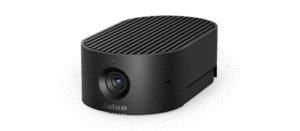
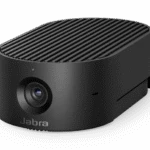
The Jabra PanaCast 20 is a personal 4K webcam with a 13 MP sensor and a wide 117° diagonal field of view. It has Intelligent Zoom, Vivid HDR and picture-in-picture.
- Best For
- Corporate IT
- Res.
- 4K
- View
- 117°
- Autofocus
- —
- Mics
- 3 MEMS
- Connect
- USB-C (USB 3.0/2.0)
Review Scores Compared
Expert Score
Image Quality
Low-Light Performance
Field of View & Framing
Microphone
Build & Privacy
Connection & Software
Why Link 2 Beats PanaCast 20 (and Vice Versa)
Why Link 2 beats PanaCast 20
- Better low-light performance: 8.0 vs 7.5 out of 10
- Sensor: 1/2" vs 1/3.2"
- Digital Zoom: 4 x vs 3 (lossless at 720p)
- Weight: 101.5 g vs 136 g
Why PanaCast 20 beats Link 2
- Better field of view & framing: 9.8 vs 6.3 out of 10
- Field of View: 117° vs 79.5°
Review-score leads of 0.5+ points out of 10 first, then specs where only one comes out ahead.
Full Specifications
General
| Link 2 | PanaCast 20 | |
|---|---|---|
| Best For | Teachers | Corporate IT |
Image
| Link 2 | PanaCast 20 | |
|---|---|---|
| Max Resolution | 4K | 4K |
| Max Frame Rate | 30 (4K), 60 (1080p) | 30 fps |
| Sensor | 1/2" Better | 1/3.2" |
| Megapixels | — | 13 MP |
| Field of View | 79.5° | 117° Better |
| Autofocus | Yes (10 cm to infinity) | — |
| HDR | Yes (all modes) | Yes (Vivid HDR) |
| Digital Zoom | 4 x Better | 3 (lossless at 720p) |
| AI Framing | AI tracking on 2-axis gimbal, Smart Whiteboard, DeskView | Intelligent Zoom, picture-in-picture |
| Aperture | f/1.8 | f/2.25 |
Audio
| Link 2 | PanaCast 20 | |
|---|---|---|
| Microphones | AI noise-canceling | 3 MEMS |
| Mic Range | 3 m | — |
| Noise Reduction | Yes | — |
Design & Privacy
| Link 2 | PanaCast 20 | |
|---|---|---|
| Mounting | Magnetic mount | — |
| Tripod Thread | 1/4 in (on mount) | — |
| Weight | 101.5 g Better | 136 g |
| Dimensions | — | 44 x 25 x 80 mm |
| Colors | Graphite Black | Arctic White | — |
| Pan / Tilt | 2-axis gimbal | — |
Connectivity
| Link 2 | PanaCast 20 | |
|---|---|---|
| Connection | USB-C (USB 2.0), USB-C to USB-A adapter | USB-C (USB 3.0/2.0) |
| Cable Length | — | 1.5 m |
| Software | Link Controller | Jabra Direct, Jabra Xpress |
| Operating Systems | Windows 10+, macOS 11+ | Windows 8.1/10/11, macOS 10.15+ |
| Certifications | — | Microsoft Teams, Zoom |
In the Box
| Link 2 | PanaCast 20 | |
|---|---|---|
| In the Box | — | PanaCast 20, carry case, 1.5 m USB-C to USB-A cable |
| Warranty | — | 2 years |
Takeaways
- It's a tie on our rating (4/5) between Link 2 and PanaCast 20, so choose on the rows that matter most to you.
- Choose Link 2 for teachers.
- Choose PanaCast 20 for corporate IT.
Pros and Cons
Link 2
PROS
- AI tracking on a 2-axis gimbal
- Smart Whiteboard and DeskView
- HDR at every resolution
- Portrait 4K mode
CONS
- 79.5° view is narrower than most here
- USB 2.0 connection
PanaCast 20
PROS
- 4K30 with Vivid HDR
- Widest view here: 117°
- Teams and Zoom certified
- Intelligent Zoom and picture-in-picture
CONS
- Autofocus not listed
- Small 1/3.2-inch sensor
Similar Comparisons
- Link 2 vs PowerConf C200

- Link 2 vs Facecam MK.2
- Link 2 vs Brio 500
 PanaCast 20 vs PowerConf C200
- PanaCast 20 vs Facecam MK.2
- PanaCast 20 vs Brio 500
Quick Verdict
- Link 2 7.9Leads in Low-Light Performance
- PanaCast 20 8.5Best overallLeads in Field of View & Framing