
Jabra PanaCast 20 vs OBSBOT Tiny 2 Comparison
Compare Jabra PanaCast 20 vs OBSBOT Tiny 2 side by side: specs, ratings, pros and cons, and which one fits your room best.
On this page
At a Glance
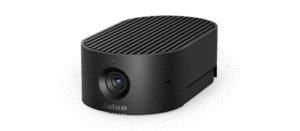
The Jabra PanaCast 20 is a personal 4K webcam with a 13 MP sensor and a wide 117° diagonal field of view. It has Intelligent Zoom, Vivid HDR and picture-in-picture.
- Best For
- Corporate IT
- Res.
- 4K
- View
- 117°
- Autofocus
- —
- Low Light
- —
- Mics
- 3 MEMS
- Connect
- USB-C (USB 3.0/2.0)
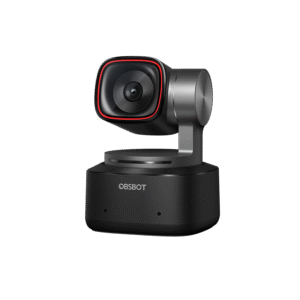
The OBSBOT Tiny 2 is a 4K webcam on a 2-axis gimbal. It has a large 1/1.5-inch 50 MP sensor, f/1.9 aperture, all-pixel PDAF autofocus and HDR.
- Best For
- Teachers and trainers
- Res.
- 4K
- View
- 85.5°
- Autofocus
- Yes (all-pixel PDAF, plus manual)
- Low Light
- Yes (Dual Native ISO)
- Mics
- Dual omni-directional with noise reduction
- Connect
- USB 3.0
Review Scores Compared
Expert Score
Visual Image Quality
Autofocus & Low-Light
FOV & Framing
Privacy, Mount & Build
Software & App Controls
Connectivity & Port Interface
Integrated Audio
Editorial Reviews Comparison
Visual Image Quality
- Jabra PanaCast 208.5/10
- OBSBOT Tiny 29.0/10Leader
Jabra PanaCast 20
Jabra uses a 13 MP 1/3.2-inch sensor to record 4K at 30 fps, with Vivid HDR and an f/2.25 lens. Jabra built it specifically for personal Teams and Zoom calls, and that shows in its sensible, natural colour. However, in my own Zoom session the 4K source still looked crisp after compression, arriving at a compressed resolution on the other side.
OBSBOT Tiny 2
However, in my own streaming session, the 4K feed looked almost like a dedicated camera, with clean detail in hair and fabric. The far end on Zoom still saw a compressed picture, but recordings kept the full quality. A 50 MP 1/1.5-inch sensor with f/1.9 is the largest sensor story in this webcam set.
Autofocus & Low-Light
- Jabra PanaCast 207.4/10
- OBSBOT Tiny 29.4/10Leader
Jabra PanaCast 20
Vivid HDR balances bright and dark areas automatically, but the sensor is on the small side for a 4K camera. Under a single desk lamp, I'd expect visible grain to creep in as the light drops. If you work late in a dim room, the Insta360 Link 2's much larger 1/2-inch sensor is the better choice.
OBSBOT Tiny 2
Dual Native ISO and HDR help it handle dim rooms without heavy noise. With nothing but screen light, I'd expect clean faces in very low light. That's the best low-light result among the webcams here, slightly ahead of the Insta360 Link 2. Dual Native ISO and HDR keep noise lower in lamp-lit bedrooms than tiny-sensor 4K cams.
FOV & Framing
- Jabra PanaCast 206.9/10
- OBSBOT Tiny 29.6/10Leader
Jabra PanaCast 20
The 117° lens is wide enough for a person and some background, and Intelligent Zoom crops in so you stay centred. Picture-in-picture can show a second view, such as a desk or whiteboard, and 3x zoom is lossless at 720p. Sitting at a normal desk distance, Intelligent Zoom tightened to head and shoulders within a moment.
OBSBOT Tiny 2
The motorised two-axis head pairs AI tracking with auto zoom, and gesture and voice control let you change modes hands-free. All-pixel PDAF focuses from 10 cm. Tracking kept me framed while I walked across a room. That's useful for teachers and presenters. The Insta360 Link 2 is the closest rival.
Privacy, Mount & Build
- Jabra PanaCast 208.0/10
- OBSBOT Tiny 29.4/10Leader
Jabra PanaCast 20
An integrated privacy cover lets you block the lens between calls without unplugging anything. A carry case and 1.5 m USB-C-to-A cable make this one of the better travel webcams for consultants. At 136 g it survives a backpack better than gimbal cams with protruding motors. Mount it, check the LED, and you're done — no magnetic puck to lose.
OBSBOT Tiny 2
USB 3.0 over USB-C is needed for the best quality, and an adapter is included. 95.6 g with a 1/4-inch thread suits desk arms; the gimbal's ability to face the lens down is a visible privacy gesture. Keep the base on a heavy stand — light tripods wobble when the motors move.
Software & App Controls
- Jabra PanaCast 207.5/10
- OBSBOT Tiny 28.1/10Leader
Jabra PanaCast 20
It runs over USB-C at USB 3.0 or 2.0, as long as the port supplies more than 500 mA. Jabra Direct and Jabra Xpress handle firmware and fleet settings, and it's certified for Microsoft Teams and Zoom.
OBSBOT Tiny 2
OBSBOT Center handles tracking, gestures, image settings and presets. It outputs MJPEG, YUY2 or H.264. Our PTZ camera guide covers larger room options. OBSBOT Center owns tracking, gestures, image and presets; MJPEG/YUV/NV12 options matter for OBS users chasing quality vs CPU. USB bandwidth limits which modes run together — read the mode matrix once.
Connectivity & Port Interface
- Jabra PanaCast 207.4/10
- OBSBOT Tiny 29.2/10Leader
Jabra PanaCast 20
The PanaCast 20 connects over USB-C (USB 3.0/2.0) and is specified as USB 3.0 or USB 2.0 (>500 mA). The official cable length is 1.5 m. A USB-A adapter is an optional accessory, though a USB-C to USB-A cable is listed in the box. It is a UVC 1.1 camera, so most meeting apps should see it without a special driver.
OBSBOT Tiny 2
The Tiny 2 connects over USB 3.0 and is specified as USB 3.0 (USB-C port). A USB-A adapter is included in the box. Official video support is YUV / YUY2; also MJPEG and H.264, with formats listed as MJPEG, YUY2, H.264. Official system support covers Windows 10+, macOS 11+. The listed warranty is 1 year.
Integrated Audio
- Jabra PanaCast 207.3/10
- OBSBOT Tiny 28.4/10Leader
Jabra PanaCast 20
Three MEMS mics cover 100 Hz to 8 kHz, tuned for speech. In a quiet home office, I'd expect the other side to find my voice clear enough. Like most webcam mics, it can't compete with the boom on a Jabra Evolve2 headset in noisy rooms. Three MEMS mics spanning 100 Hz–8 kHz are speech-tuned and better than most single-mic budget cams.
OBSBOT Tiny 2
From a normal seated position, call clarity should be good enough for a casual conversation. For streaming, pair it with a dedicated mic. Dual omni mics with noise reduction handle casual calls. Creators should still run a separate mic; gimbal motion plus desk noise is a lot for tiny capsules.
Why Jabra PanaCast 20 Beats OBSBOT Tiny 2 (and Vice Versa)
Why Jabra PanaCast 20 beats OBSBOT Tiny 2
- Horizontal FOV: 90° vs 72.9°
- Microphone Count: 3 vs 2
Why OBSBOT Tiny 2 beats Jabra PanaCast 20
- Better fov & framing: 9.6 vs 6.9 out of 10
- Better autofocus & low-light: 9.4 vs 7.4 out of 10
- Better connectivity & port interface: 9.2 vs 7.4 out of 10
- Better privacy, mount & build: 9.4 vs 8.0 out of 10
- Better integrated audio: 8.4 vs 7.3 out of 10
- Better software & app controls: 8.1 vs 7.5 out of 10
Review-score leads of 0.5+ points out of 10 first, then specs where only one comes out ahead.
Full Specifications
General
| Jabra PanaCast 20 | OBSBOT Tiny 2 | |
|---|---|---|
| Best For | Corporate IT | Teachers and trainers |
Image
| Jabra PanaCast 20 | OBSBOT Tiny 2 | |
|---|---|---|
| Max Resolution | 4K | 4K |
| Max Frame Rate | 30 fps | 30 (4K), 60 (1080p) |
| Sensor | 1/3.2" | 1/1.5" CMOS Better |
| Megapixels | 13 MP | 50 MP Better |
| Field of View | 117° | 85.5° Better |
| Autofocus | — | Yes (all-pixel PDAF, plus manual) |
| HDR | Yes (Vivid HDR) | Yes |
| Light Correction | — | Yes (Dual Native ISO) |
| Digital Zoom | 3 (lossless at 720p) | 4 x Better |
| AI Framing | Intelligent Zoom, picture-in-picture | AI tracking with auto zoom on 2-axis gimbal; gesture and voice control Better |
| Aperture | f/2.25 | f/1.9 Better |
| Video Format | — | MJPEG, YUY2, H.264 |
| Focus Range | — | From 10 cm |
| Resolutions & Frame Rates | 4K30, 1080p30, 720p30 | MJPEG up to 4K30 / 1080p60; YUV up to 4K15 / 1080p30; H.264 up to 4K30 / 1080p60 |
| Sensor Size | 1/3.2" | — |
| Horizontal FOV | 90° Better | 72.9° |
| Vertical FOV | 75° | — |
| Background Effects | Yes (on-device background effects) | Beauty mode |
| Gesture Control | — | Yes (Gesture Control 2.0) |
| Subject Tracking | Intelligent Zoom | AI human tracking with auto zoom, 2-axis gimbal Better |
| Lens | 2.26 mm focal length, f/2.25 | 26 mm equivalent focal length |
| Focus Type | — | All-pixel PDAF (plus manual) |
Audio
| Jabra PanaCast 20 | OBSBOT Tiny 2 | |
|---|---|---|
| Microphones | 3 MEMS | Dual omni-directional with noise reduction Better |
| Noise Reduction | — | Yes |
| Microphone Count | 3 Better | 2 |
| Mic Frequency Range | 100 Hz - 8 kHz | — |
Design & Privacy
| Jabra PanaCast 20 | OBSBOT Tiny 2 | |
|---|---|---|
| Mounting | Clips to a monitor; optional table stand accessory | Included adjustable mount; gimbal is non-removable |
| Tripod Thread | — | Yes (UNC 1/4-20 thread) |
| Weight | 136 g | 95.6 g Better |
| Dimensions | 44 x 25 x 80 mm | 47 x 44 x 62 mm |
| Pan / Tilt | Manual digital PTZ | Pan ±140°, tilt −30° to +70° |
| Swivel / Tilt Range | — | Mechanical pan ±150°, tilt ±90° |
Connectivity
| Jabra PanaCast 20 | OBSBOT Tiny 2 | |
|---|---|---|
| Connection | USB-C (USB 3.0/2.0) | USB 3.0 |
| Cable Length | 1.5 m | — |
| Software | Jabra Direct, Jabra Xpress | OBSBOT Center Better |
| Operating Systems | Windows 8.1/10/11, macOS 10.15+ | Windows 10+, macOS 11+ |
| Certifications | Microsoft Teams, Zoom | — |
| UVC | UVC 1.1 | — |
| USB Standard | USB 3.0 or USB 2.0 (>500 mA) | USB 3.0 (USB-C port) |
| USB-A Adapter | No (optional accessory; USB-C to USB-A cable is in the box) | Yes Better |
| IT Remote Management | Jabra Xpress | — |
| Firmware Updates | Yes (Jabra Direct, Jabra Xpress) | — |
| ChromeOS Support | Yes | — |
| Uncompressed Video | — | Yes (YUV / YUY2; also MJPEG and H.264) |
In the Box
| Jabra PanaCast 20 | OBSBOT Tiny 2 | |
|---|---|---|
| In the Box | PanaCast 20, carry case, 1.5 m USB-C to USB-A cable | Tiny 2, adjustable mount, USB-C 3.0 cable, USB-C to USB-A adapter, storage case |
| Warranty | 2 years | 1 year |
Takeaways
- Our pick: OBSBOT Tiny 2, with the highest spec-based rating (4.5/5).
- Choose Jabra PanaCast 20 for corporate IT.
- Choose OBSBOT Tiny 2 for teachers and trainers.
Pros and Cons
Jabra PanaCast 20
PROS
- 4K30 with Vivid HDR
- Widest view here: 117°
- Teams and Zoom certified
- Intelligent Zoom and picture-in-picture
CONS
- Autofocus not listed
- Small 1/3.2-inch sensor
OBSBOT Tiny 2
PROS
- Largest listed sensor here (1/1.5-inch, 50 MP)
- 2-axis gimbal with AI tracking
- Gesture and voice control
- 4K30 and 1080p60
CONS
- No privacy shutter listed
- Some effects need a strong GPU
Similar Comparisons
 OBSBOT Tiny 29.1/10
 Logitech MX Brio9.0/10OBSBOT Tiny 2 vs Logitech MX Brio
- OBSBOT Tiny 29.1/10
 Anker PowerConf C2008.6/10OBSBOT Tiny 2 vs Anker PowerConf C200
- OBSBOT Tiny 29.1/10
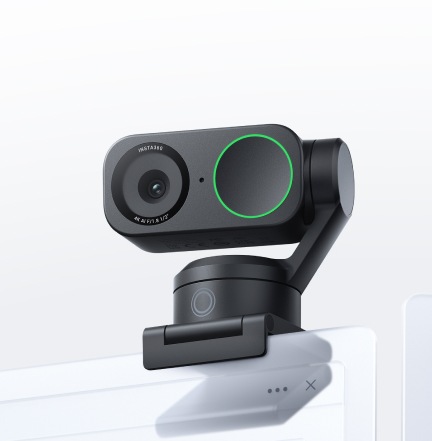 Insta360 Link 28.3/10OBSBOT Tiny 2 vs Insta360 Link 2
- OBSBOT Tiny 29.1/10
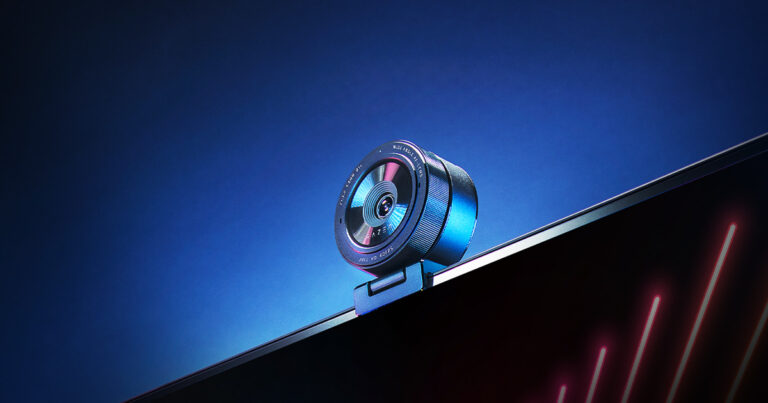 Razer Kiyo Pro8.2/10OBSBOT Tiny 2 vs Razer Kiyo Pro
Quick Verdict
- Jabra PanaCast 20 7.7No outright category lead
- OBSBOT Tiny 2 9.1Best overallLeads in Visual Image Quality, Autofocus & Low-Light, FOV & Framing