
Logitech C920e vs Logitech MX Brio Comparison
Compare Logitech C920e vs Logitech MX Brio side by side: specs, ratings, pros and cons, and which one fits your room best.
On this page

At a Glance
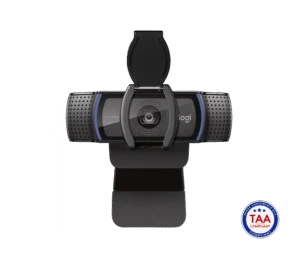
The Logitech C920e is the business version of the long-running C920. It records 1080p at 30 fps with a 3 MP sensor, autofocus, a glass lens and a 78° field of view.
- Best For
- IT fleets
- Res.
- 1080p
- View
- 78°
- Autofocus
- Yes
- Low Light
- Yes (RightLight 2, for low light)
- Mics
- Stereo
- Shutter
- Yes (attachable privacy shutter)
- Connect
- USB-A
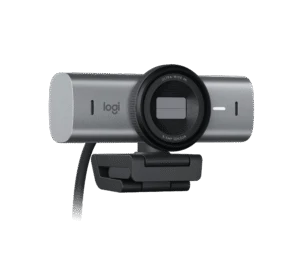
The Logitech MX Brio is Logitech's top webcam. It uses an 8.5 MP Sony STARVIS sensor, records 4K at 30 fps or 1080p at 60 fps, and lets you pick a 90°, 78° or 65° field of view.
- Best For
- Executives and presenters
- Res.
- 4K
- View
- 90°
- Autofocus
- Yes (advanced autofocus)
- Low Light
- Yes (RightLight 5 with face-based enhancement)
- Mics
- Dual beamforming
- Shutter
- Yes (built-in privacy shutter)
- Connect
- USB-C (USB 3.0), detachable USB-C to USB-C
Review Scores Compared
Expert Score
Visual Image Quality
Autofocus & Low-Light
FOV & Framing
Privacy, Mount & Build
Software & App Controls
Connectivity & Port Interface
Integrated Audio
Editorial Reviews Comparison
Visual Image Quality
- Logitech C920e6.6/10
- Logitech MX Brio9.4/10Leader
Logitech C920e
A 3 MP sensor records 1080p at 30 fps with autofocus. The C920e is the business version of the most common webcam in offices worldwide. However, across a week of my own Zoom calls, autofocus stayed reliable, with only occasional hunting in very low light. The picture looks a generation older than the Brio 500's but is perfectly serviceable.
Logitech MX Brio
The MX Brio records up to 4K, or 1080p at 60 fps, from an 8.5 MP Sony STARVIS sensor. That's a big step above the tiny modules in most laptops. However, through a long day of my own Teams calls, the extra resolution mostly bought headroom for digital zoom and local recording.
Autofocus & Low-Light
- Logitech C920e8.8/10
- Logitech MX Brio9.3/10Leader
Logitech C920e
RightLight 2 adjusts exposure in dim rooms. Under typical office fluorescents, it's fine. In a dim home office, I'd expect noise to appear. For darker rooms, the Razer Kiyo Pro or MX Brio handle low light much better. RightLight 2 is the same family as the Brio 300 — acceptable in a lamp-lit office, soft in near-darkness.
Logitech MX Brio
RightLight 5 with face-based exposure brightens your face specifically, rather than the whole frame. Late in the evening, with just screen glow on your face, it should stay usable in very low light. That's better than the Brio 500 and close to the Razer Kiyo Pro. RightLight 5's face-based exposure is the practical upgrade: your face stays readable when a white wall would fool older RightLight versions.
FOV & Framing
- Logitech C920e8.1/10
- Logitech MX Brio8.6/10Leader
Logitech C920e
A 78° fixed field of view with no digital zoom or auto-framing. Focus can be set manually in Logi Tune. For one person at a desk, the framing is natural. Two people side by side will be tight. 78° fixed FOV without auto-framing is predictable for training rooms where the camera shouldn't re-crop mid-lesson.
Logitech MX Brio
You can choose a 90°, 78° or 65° field of view, with 4x digital zoom. Show Mode lets you tilt the camera down to show something on your desk. Show Mode switched to the desk view in a moment in my estimate. That's useful for sketches or product demos without a second camera.
Privacy, Mount & Build
- Logitech C920e8.2/10
- Logitech MX Brio9.8/10Leader
Logitech C920e
At 162 g, it uses a universal clip for laptops and monitors with a tripod-ready design. An attachable privacy shutter is listed. The 1.5 m USB-A cable is fixed, which suits older desktops and docks. 162 g with a universal clip and tripod-ready base suits monitors that thinner cams wobble on.
Logitech MX Brio
The detachable USB-C to USB-C cable means you can swap in a longer one for a desk setup. Detachable clip, 1/4-inch thread and a built-in privacy shutter cover the three mount/privacy habits that matter. At 137 g it sits securely on a laptop if the cable hangs straight down. Works With Chromebook marking helps schools and lock-down fleets that reject unverified USB video devices.
Software & App Controls
- Logitech C920e6.0/10
- Logitech MX Brio7.5/10Leader
Logitech C920e
Logi Tune handles focus and image settings. It's certified for Microsoft Teams and Zoom, which is why IT departments buy it in bulk. Our Logitech Brio 500 review covers the modern alternative.
Logitech MX Brio
Logi Options+ and G HUB handle settings. Certification covers Teams, Zoom and Google Meet, plus Works With Chromebook. Our Insta360 Link 2 review covers the tracking alternative.
Connectivity & Port Interface
- Logitech C920e6.1/10
- Logitech MX Brio8.7/10Leader
Logitech C920e
The C920e connects over USB-A. The cable is fixed to the camera, and the official length is 1.5 m. The listed warranty is 3-year limited hardware. When I set a webcam up on a desk, the first thing I check is whether the cable will reach the laptop without tugging the mount.
Logitech MX Brio
The MX Brio connects over USB-C (USB 3.0), detachable USB-C to USB-C and is specified as USB 3.0. The cable is detachable, and the official length is 1.5 m. It is a UVC camera, so most meeting apps should see it without a special driver. Official system support covers Windows 10+, macOS 10.15+, ChromeOS and Linux (UVC).
Integrated Audio
- Logitech C920e7.8/10
- Logitech MX Brio8.9/10Leader
Logitech C920e
Stereo omnidirectional mics are rated to about 1 m. In a quiet room, I'd expect a clear enough result from the far end. Most offices that deploy C920e cameras pair them with headsets. Stereo omni mics to about 1 m are desk-distance tools. Sit closer rather than boosting gain, which raises noise.
Logitech MX Brio
In a moderately noisy room, I'd expect a clear enough result from the far end. For hour-long sessions, I'd still put a headset on. Dual beamforming mics with AI noise reduction to about 1.2 m are among the better webcam arrays here. They still lose to a boom headset in a noisy café.
Why Logitech C920e Beats Logitech MX Brio (and Vice Versa)
Why Logitech C920e beats Logitech MX Brio
- Resolutions & Frame Rates: 1080p30, 720p30 vs 4K30, 1080p60
Why Logitech MX Brio beats Logitech C920e
- Better visual image quality: 9.4 vs 6.6 out of 10
- Better connectivity & port interface: 8.7 vs 6.1 out of 10
- Better privacy, mount & build: 9.8 vs 8.2 out of 10
- Better software & app controls: 7.5 vs 6.0 out of 10
- Better integrated audio: 8.9 vs 7.8 out of 10
- Better autofocus & low-light: 9.3 vs 8.8 out of 10
Review-score leads of 0.5+ points out of 10 first, then specs where only one comes out ahead.
Full Specifications
General
| Logitech C920e | Logitech MX Brio | |
|---|---|---|
| Best For | IT fleets | Executives and presenters |
Image
| Logitech C920e | Logitech MX Brio | |
|---|---|---|
| Max Resolution | 1080p | 4K Better |
| Max Frame Rate | 30 fps | 60 (1080p) Better |
| Sensor | — | Sony STARVIS |
| Megapixels | 3 MP | 8.5 MP Better |
| Field of View | 78° | 90° Better |
| Autofocus | Yes | Yes (advanced autofocus) |
| HDR | — | Yes (RightLight 5) |
| Light Correction | Yes (RightLight 2, for low light) | Yes (RightLight 5 with face-based enhancement) |
| Digital Zoom | 1 x | 4 x Better |
| AI Framing | — | Show Mode |
| Resolutions & Frame Rates | 1080p30, 720p30 Better | 4K30, 1080p60 |
| FOV Presets | — | 90° / 78° / 65° |
| Auto Exposure | — | Yes |
| Auto White Balance | — | Yes |
| Manual Controls | — | ISO, shutter speed, white balance, tint, vibrance (Logi Options+ / G HUB) |
| Focus Type | Autofocus (manual via Logi Tune) | — |
Audio
| Logitech C920e | Logitech MX Brio | |
|---|---|---|
| Microphones | Stereo | Dual beamforming |
| Mic Range | 1 m | 1.2 m Better |
| Noise Reduction | — | Yes (AI noise reduction) |
| Microphone Count | 2 | 2 |
| Mic Pickup Pattern | Omnidirectional | Beamforming |
Design & Privacy
| Logitech C920e | Logitech MX Brio | |
|---|---|---|
| Privacy Shutter | Yes (attachable privacy shutter) | Yes (built-in privacy shutter) |
| Mounting | Universal clip (laptops, LCDs, monitors) | Detachable universal clip (laptops, monitors) |
| Tripod Thread | Tripod-ready clip | 1/4 in thread |
| Weight | 162 g | 137 g Better |
| Dimensions | 94 x 43.3 x 71 mm (with clip) | 44 x 98 x 36 mm (without mount) |
Connectivity
| Logitech C920e | Logitech MX Brio | |
|---|---|---|
| Connection | USB-A | USB-C (USB 3.0), detachable USB-C to USB-C |
| Cable Length | 1.5 m | 1.5 m |
| Software | Logi Tune | Logi Options+, G HUB |
| Operating Systems | — | Windows 10+, macOS 10.15+, ChromeOS and Linux (UVC) |
| Certifications | Microsoft Teams, Zoom | Microsoft Teams, Zoom, Google Meet, Works With Chromebook, Streamlabs |
| UVC | — | Yes |
| USB Standard | — | USB 3.0 |
| Detachable Cable | No | Yes Better |
In the Box
| Logitech C920e | Logitech MX Brio | |
|---|---|---|
| In the Box | Webcam with attached 1.5 m USB-A cable, privacy shutter, user documentation | MX Brio, USB-C 3.0 cable, mount clip with removable adapter, user documentation |
| Warranty | 3-year limited hardware | 1-year limited hardware |
Identifiers
| Logitech C920e | Logitech MX Brio | |
|---|---|---|
| Model Number | 960-001360 | — |
Compatibility
| Logitech C920e | Logitech MX Brio | |
|---|---|---|
| Works With | Google Meet, Webex, GoToMeeting, BlueJeans, Fuze, Microsoft DirectShow | — |
Takeaways
- Our pick: Logitech MX Brio, with the highest spec-based rating (4.5/5).
- Choose Logitech C920e for iT fleets.
- Choose Logitech MX Brio for executives and presenters.
Pros and Cons
Logitech C920e
PROS
- 3-year limited warranty
- Autofocus with glass lens
- USB-A for older PCs
- Attachable privacy shutter
CONS
- No HDR or 4K
- USB-A only
Logitech MX Brio
PROS
- 4K30 or 1080p60, 8.5 MP STARVIS sensor
- RightLight 5 with HDR
- Built-in privacy shutter
- Certified for Teams, Zoom and Meet
CONS
- Needs a USB 3.0 USB-C port
- 1-year warranty on the page we checked
Similar Comparisons
 Logitech MX Brio9.0/10
 OBSBOT Tiny 29.1/10Logitech MX Brio vs OBSBOT Tiny 2
- Logitech MX Brio9.0/10
 Anker PowerConf C2008.6/10Logitech MX Brio vs Anker PowerConf C200
- Logitech MX Brio9.0/10
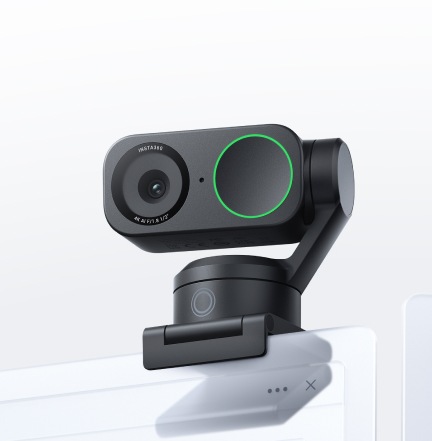 Insta360 Link 28.3/10Logitech MX Brio vs Insta360 Link 2
- Logitech MX Brio9.0/10
 Razer Kiyo Pro8.2/10Logitech MX Brio vs Razer Kiyo Pro
Quick Verdict
- Logitech C920e 7.4No outright category lead
- Logitech MX Brio 9.0Best overallLeads in Visual Image Quality, Autofocus & Low-Light, FOV & Framing