
Logitech C920e vs Razer Kiyo Pro Comparison
Compare Logitech C920e vs Razer Kiyo Pro side by side: specs, ratings, pros and cons, and which one fits your room best.
On this page

At a Glance
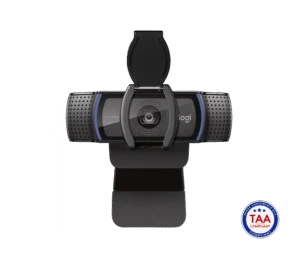
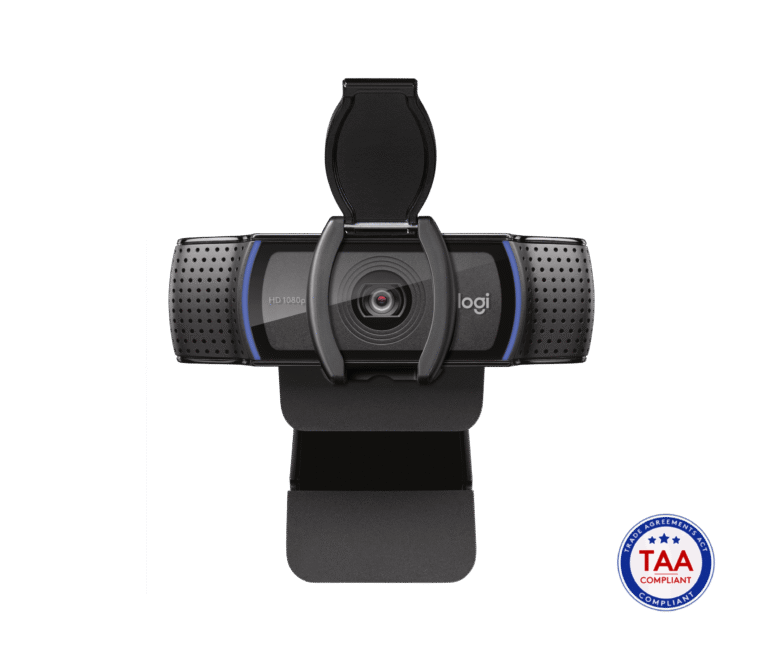
The Logitech C920e is the business version of the long-running C920. It records 1080p at 30 fps with a 3 MP sensor, autofocus, a glass lens and a 78° field of view.
- Best For
- IT fleets
- Res.
- 1080p
- View
- 78°
- Autofocus
- Yes
- Low Light
- Yes (RightLight 2, for low light)
- Mics
- Stereo
- Shutter
- Yes (attachable privacy shutter)
- Connect
- USB-A
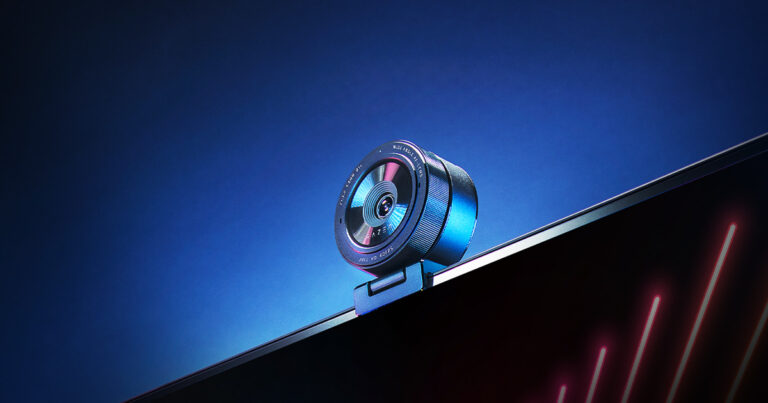
The Razer Kiyo Pro is a 1080p webcam with a Sony STARVIS IMX327 sensor and an adaptive light sensor. It records 1080p at up to 60 fps, with HDR at 30 fps.
- Best For
- Dim rooms
- Res.
- 1080p at 60 fps
- View
- 103°
- Autofocus
- Yes
- Low Light
- Yes (adaptive light sensor, Sony STARVIS sensor)
- Mics
- Stereo omni-directional
- Shutter
- Yes (privacy cover included)
- Connect
- USB 3.0 (USB-C port on camera)
Review Scores Compared
Expert Score
Visual Image Quality
Autofocus & Low-Light
FOV & Framing
Privacy, Mount & Build
Software & App Controls
Connectivity & Port Interface
Integrated Audio
Editorial Reviews Comparison
Visual Image Quality
- Logitech C920e6.6/10
- Razer Kiyo Pro7.7/10Leader
Logitech C920e
A 3 MP sensor records 1080p at 30 fps with autofocus. The C920e is the business version of the most common webcam in offices worldwide. However, across a week of my own Zoom calls, autofocus stayed reliable, with only occasional hunting in very low light. The picture looks a generation older than the Brio 500's but is perfectly serviceable.
Razer Kiyo Pro
A Sony STARVIS IMX327 sensor with an f/2.0 lens records 1080p at 60 fps, with HDR at 30 fps. Razer aimed it at streamers who work in mixed or low light. However, when I streamed with it myself, 1080p60 looked smooth and clean in OBS. On meeting apps, the far end saw a compressed picture, which is still a solid picture.
Autofocus & Low-Light
- Logitech C920e8.8/10
- Razer Kiyo Pro9.0/10Leader
Logitech C920e
RightLight 2 adjusts exposure in dim rooms. Under typical office fluorescents, it's fine. In a dim home office, I'd expect noise to appear. For darker rooms, the Razer Kiyo Pro or MX Brio handle low light much better. RightLight 2 is the same family as the Brio 300 — acceptable in a lamp-lit office, soft in near-darkness.
Razer Kiyo Pro
An adaptive light sensor and the STARVIS sensor make low light its main strength. With one lamp on the far side of the room, the picture should hold up in that kind of dim light. That's on par with the MX Brio and ahead of the C920e. Adaptive light sensing plus STARVIS is why the Kiyo Pro still gets recommended for rooms with one lamp.
FOV & Framing
- Logitech C920e8.1/10
- Razer Kiyo Pro8.4/10Leader
Logitech C920e
A 78° fixed field of view with no digital zoom or auto-framing. Focus can be set manually in Logi Tune. For one person at a desk, the framing is natural. Two people side by side will be tight. 78° fixed FOV without auto-framing is predictable for training rooms where the camera shouldn't re-crop mid-lesson.
Razer Kiyo Pro
A 103° wide lens with 90° and 80° options. There's no auto-framing. At 103°, two people fit comfortably. For a single person, 80° looks cleaner. 103°/90°/80° FOV options without auto-framing mean you pick a field of view and sit inside it. 103° fits two people at roughly desk width; 80° looks cleaner for solo talking heads.
Privacy, Mount & Build
- Logitech C920e8.2/10
- Razer Kiyo Pro9.6/10Leader
Logitech C920e
At 162 g, it uses a universal clip for laptops and monitors with a tripod-ready design. An attachable privacy shutter is listed. The 1.5 m USB-A cable is fixed, which suits older desktops and docks. 162 g with a universal clip and tripod-ready base suits monitors that thinner cams wobble on.
Razer Kiyo Pro
At 196.3 g, it's the heaviest webcam here, with a detachable L-shaped stand and a 1/4-inch thread. 196.3 g with a detachable L-stand and 1/4-inch thread is the heaviest webcam here — stable on monitors that make lighter cams tip. Our spec sheet doesn't list a privacy shutter, so unplug or cover the lens when idle.
Software & App Controls
- Logitech C920e6.0/10
- Razer Kiyo Pro6.0/10
Logitech C920e
Logi Tune handles focus and image settings. It's certified for Microsoft Teams and Zoom, which is why IT departments buy it in bulk. Our Logitech Brio 500 review covers the modern alternative.
Razer Kiyo Pro
Razer Synapse handles image settings and HDR. It needs USB 3.0 for full quality. Razer Synapse centralises HDR and image controls but wants an account on some versions — plan that for managed PCs. Uncompressed modes need USB 3.0 bandwidth reserved; close other capture devices if the feed drops. For meetings-only users, set Synapse once and leave it; daily slider fiddling isn't required.
Connectivity & Port Interface
- Logitech C920e6.1/10
- Razer Kiyo Pro8.4/10Leader
Logitech C920e
The C920e connects over USB-A. The cable is fixed to the camera, and the official length is 1.5 m. The listed warranty is 3-year limited hardware. When I set a webcam up on a desk, the first thing I check is whether the cable will reach the laptop without tugging the mount.
Razer Kiyo Pro
The Kiyo Pro connects over USB 3.0 (USB-C port on camera) and is specified as USB 3.0. The official cable length is 1.5 m. Official video support is uncompressed 1080p60 over USB 3.0, with formats listed as H.264. The listed warranty is 1 year. When I set a webcam up on a desk, the first thing I check is whether the cable will reach the laptop without tugging the mount.
Integrated Audio
- Logitech C920e7.8/10
- Razer Kiyo Pro8.0/10Leader
Logitech C920e
Stereo omnidirectional mics are rated to about 1 m. In a quiet room, I'd expect a clear enough result from the far end. Most offices that deploy C920e cameras pair them with headsets. Stereo omni mics to about 1 m are desk-distance tools. Sit closer rather than boosting gain, which raises noise.
Razer Kiyo Pro
Stereo omnidirectional mics are included. At desk distance, listeners would likely find it adequate. Streamers will want a dedicated mic. Stereo omni mics are a convenience for quick meetings. Anyone streaming with a real mic should disable them to avoid double audio paths. At desk distance they're average; step up to a headset or USB mic for anything polished.
Why Logitech C920e Beats Razer Kiyo Pro (and Vice Versa)
Why Logitech C920e beats Razer Kiyo Pro
- Megapixels: 3 MP vs 2.1 MP
- Field of View: 78° vs 103°
- Weight: 162 g vs 196.3 g
Why Razer Kiyo Pro beats Logitech C920e
- Better connectivity & port interface: 8.4 vs 6.1 out of 10
- Better privacy, mount & build: 9.6 vs 8.2 out of 10
- Better visual image quality: 7.7 vs 6.6 out of 10
- Max Frame Rate: 60 fps vs 30 fps
Review-score leads of 0.5+ points out of 10 first, then specs where only one comes out ahead.
Full Specifications
General
| Logitech C920e | Razer Kiyo Pro | |
|---|---|---|
| Best For | IT fleets | Dim rooms |
Image
| Logitech C920e | Razer Kiyo Pro | |
|---|---|---|
| Max Resolution | 1080p | 1080p at 60 fps |
| Max Frame Rate | 30 fps | 60 fps Better |
| Sensor | — | Sony STARVIS IMX327 |
| Megapixels | 3 MP Better | 2.1 MP |
| Field of View | 78° Better | 103° |
| Autofocus | Yes | Yes |
| HDR | — | Yes (at 30 fps) |
| Light Correction | Yes (RightLight 2, for low light) | Yes (adaptive light sensor, Sony STARVIS sensor) |
| Digital Zoom | 1 x | — |
| Aperture | — | f/2.0 |
| Video Format | — | H.264 |
| Resolutions & Frame Rates | 1080p30, 720p30 | — |
| FOV Presets | — | 103° / 90° / 80° |
| Focus Type | Autofocus (manual via Logi Tune) | — |
Audio
| Logitech C920e | Razer Kiyo Pro | |
|---|---|---|
| Microphones | Stereo | Stereo omni-directional |
| Mic Range | 1 m | — |
| Microphone Count | 2 | — |
| Mic Pickup Pattern | Omnidirectional | — |
Design & Privacy
| Logitech C920e | Razer Kiyo Pro | |
|---|---|---|
| Privacy Shutter | Yes (attachable privacy shutter) | Yes (privacy cover included) |
| Mounting | Universal clip (laptops, LCDs, monitors) | Detachable L-shaped stand |
| Tripod Thread | Tripod-ready clip | 1/4 in thread |
| Weight | 162 g Better | 196.3 g |
| Dimensions | 94 x 43.3 x 71 mm (with clip) | — |
| Clip Type | — | Detachable L-stand for monitor or table; 1/4 in tripod thread |
Connectivity
| Logitech C920e | Razer Kiyo Pro | |
|---|---|---|
| Connection | USB-A | USB 3.0 (USB-C port on camera) |
| Cable Length | 1.5 m | 1.5 m |
| Software | Logi Tune | Razer Synapse |
| Certifications | Microsoft Teams, Zoom | — |
| USB Standard | — | USB 3.0 |
| Detachable Cable | No | — |
| Uncompressed Video | — | Yes (uncompressed 1080p60 over USB 3.0) |
In the Box
| Logitech C920e | Razer Kiyo Pro | |
|---|---|---|
| In the Box | Webcam with attached 1.5 m USB-A cable, privacy shutter, user documentation | — |
| Warranty | 3-year limited hardware | 1 year |
Identifiers
| Logitech C920e | Razer Kiyo Pro | |
|---|---|---|
| Model Number | 960-001360 | RZ19-0364 |
Compatibility
| Logitech C920e | Razer Kiyo Pro | |
|---|---|---|
| Works With | Google Meet, Webex, GoToMeeting, BlueJeans, Fuze, Microsoft DirectShow | — |
Takeaways
- Our pick: Razer Kiyo Pro, with the highest spec-based rating (4/5).
- Choose Logitech C920e for iT fleets.
- Choose Razer Kiyo Pro for dim rooms.
Pros and Cons
Logitech C920e
PROS
- 3-year limited warranty
- Autofocus with glass lens
- USB-A for older PCs
- Attachable privacy shutter
CONS
- No HDR or 4K
- USB-A only
Razer Kiyo Pro
PROS
- Sony STARVIS sensor with adaptive light sensor
- 1080p at 60 fps, HDR at 30 fps
- Wide 103/90/80° view
- Gorilla Glass 3 lens
CONS
- No privacy shutter listed
- Heavier at 196.3 g
Similar Comparisons
 Razer Kiyo Pro8.2/10
 OBSBOT Tiny 29.1/10Razer Kiyo Pro vs OBSBOT Tiny 2
- Razer Kiyo Pro8.2/10
 Logitech MX Brio9.0/10Razer Kiyo Pro vs Logitech MX Brio
- Razer Kiyo Pro8.2/10
 Anker PowerConf C2008.6/10Razer Kiyo Pro vs Anker PowerConf C200
 Logitech C920e7.4/10OBSBOT Tiny 29.1/10Logitech C920e vs OBSBOT Tiny 2
Quick Verdict
- Logitech C920e 7.4No outright category lead
- Razer Kiyo Pro 8.2Best overallLeads in Visual Image Quality, Autofocus & Low-Light, FOV & Framing