
Tail 2 vs Studio R30 Comparison
Compare Tail 2 vs Studio R30 side by side: specs, ratings, pros and cons, and which one fits your room best.
On this page
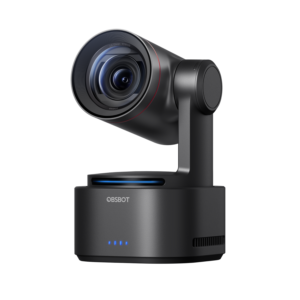
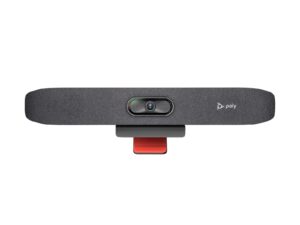
At a Glance
Tail 2
The OBSBOT Tail 2 is a 4K60 PTZR camera with a 1/1.5-inch sensor, 5x optical zoom and AI Tracking 2.0, with HDMI, USB-C, SDI and NDI outputs for presenter-led rooms and live production.
- Best For
- Presenter-led hybrid rooms
- Res.
- 4K
- Zoom
- 12 x
- View
- —
- Framing
- Yes (AI Tracking 2.0)
- Camera
- —
- Connect
- USB-C, HDMI, SDI, Ethernet
- Teams Rooms
- —
Studio R30
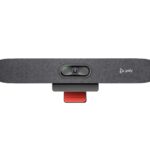
The Poly Studio R30 is a USB video bar for small rooms. It has a 4K camera at 30 fps with a 120° view, 5x zoom (4x with auto tracking) and group, people, speaker and presenter framing.
- Best For
- Small rooms
- Res.
- —
- Zoom
- 5x (4x with auto tracking)
- View
- 120°
- Framing
- —
- Camera
- 4K
- Connect
- —
- Teams Rooms
- USB: works with Teams, Zoom and other PC apps
Review Scores Compared
Expert Score
Optics & Room Coverage
AI Speaker Tracking & Framing
Room Audio Pickup & Output
OS Platform & Ecosystem
Deployment & I/O
Why Tail 2 Beats Studio R30 (and Vice Versa)
Why Tail 2 beats Studio R30
- Ideal Room Size: Small to medium, plus training rooms and stages vs Small and huddle rooms
- Zoom: 12 x vs 5x (4x with auto tracking)
Why Studio R30 beats Tail 2
- Better optics & room coverage: 8.4 vs 7.9 out of 10
- Speaker Tracking: Yes (speaker framing, presenter tracking) vs Presenter tracking
Review-score leads of 0.5+ points out of 10 first, then specs where only one comes out ahead.
Full Specifications
General
| Tail 2 | Studio R30 | |
|---|---|---|
| Best For | Presenter-led hybrid rooms | Small rooms |
| Ideal Room Size | Small to medium, plus training rooms and stages Better | Small and huddle rooms |
| Release Year | 2024 | — |
Camera
| Tail 2 | Studio R30 | |
|---|---|---|
| Max Resolution | 4K | — |
| Max Frame Rate | 60 fps | — |
| Sensor | 1/1.5" CMOS | — |
| Zoom | 12 x Better | 5x (4x with auto tracking) |
| Optical Zoom | 5 x | — |
| Field of View | — | 120° |
| Pan / Tilt | Yes (PTZ plus rotation) | — |
| Auto Framing | Yes (AI Tracking 2.0) | — |
| Speaker Tracking | Presenter tracking | Yes (speaker framing, presenter tracking) Better |
| Megapixels | — | 8 MP |
| Horizontal FOV | — | 110° |
| Digital Zoom | 12x hybrid | — |
| Focus | Phase-detection autofocus | — |
| NDI Support | Yes | — |
| Camera | — | 4K |
| Camera Resolution | — | 2160p 4K UHD (3840 x 2160), 30 fps |
| Pan and Tilt | — | Manual pan, tilt and zoom control |
| AI Features | — | Group, people, speaker and presenter framing |
Connectivity
| Tail 2 | Studio R30 | |
|---|---|---|
| Connection | USB-C, HDMI, SDI, Ethernet | — |
| Video Outputs | HDMI, 3G-SDI, USB-C (UVC), NDI over Ethernet | — |
| USB | USB-C | 1 x USB-C 5 Gbps, 2 x USB 2.0 Type-A |
| HDMI | Yes | — |
| SDI | Yes (3G-SDI) | — |
| IP Streaming | NDI | — |
| Network | Ethernet | — |
| Ports | — | 4.5 mm power input |
Platforms
| Tail 2 | Studio R30 | |
|---|---|---|
| Remote Management | — | Poly Lens |
| Software | OBSBOT Center, OBSBOT Start app | — |
| OS Compatibility | Windows, macOS (UVC for meeting apps) | — |
| Teams Rooms | — | USB: works with Teams, Zoom and other PC apps |
| Certifications | — | Microsoft Teams, Zoom |
| Operating System | — | None (USB peripheral) |
| USB / BYOD Mode | — | Yes (USB to PC or Mac) |
| Appliance Mode | — | No |
Design
| Tail 2 | Studio R30 | |
|---|---|---|
| Mounting | 1/4-inch tripod thread | Monitor clamp |
| Weight | — | 0.45 kg (1 lb) |
| Privacy Cover | — | Attachable lens cover |
| Dimensions | — | 17.5 x 3.4 x 3.2 in (with monitor clamp) |
| Power | — | External 12 V / 3 A |
Identifiers
| Tail 2 | Studio R30 | |
|---|---|---|
| Model Number | Tail 2 | — |
Audio
| Tail 2 | Studio R30 | |
|---|---|---|
| Built-in Mics | — | 3 |
| Mic Pickup Range | — | 4.57 m |
| Speakers | — | Single speaker, 100 Hz-20 kHz, 90 dB SPL @ 0.5 m |
| Audio Processing | — | Beamforming |
| Mic Array | — | Integrated mics |
Design & Setup
| Tail 2 | Studio R30 | |
|---|---|---|
| Security | — | Kensington lock slot |
Takeaways
- It's a tie on our rating (4/5) between Tail 2 and Studio R30, so choose on the rows that matter most to you.
- Choose Tail 2 for presenter-led hybrid rooms.
- Choose Studio R30 for small rooms.
Pros and Cons
Tail 2
PROS
- 5x optical and 12x hybrid zoom
- 4K60 recording paths
- AI Tracking 2.0
- HDMI, USB-C, SDI, Ethernet/PoE+
CONS
- NDI needs a license on many SKUs
- Heavier production feature set than a simple meeting PTZ
- Not a Zoom Rooms appliance by itself
Studio R30
PROS
- 4K camera with 120° view
- Four framing modes
- One USB-C cable to the laptop
- Teams and Zoom certified
CONS
- Three mics and one speaker
- Needs a laptop (no appliance mode)
Similar Comparisons
 Tail 2 vs Studio X32
- Tail 2 vs Room Bar
- Tail 2 vs PanaCast 50
 Studio R30 vs Studio X32
- Studio R30 vs Room Bar
- Studio R30 vs PanaCast 50
Quick Verdict
- Tail 2 8.2Best overallLeads in AI Speaker Tracking & Framing
- Studio R30 8.0Leads in Optics & Room Coverage