
Studio R30 vs MeetingBar A40 Comparison
Compare Studio R30 vs MeetingBar A40 side by side: specs, ratings, pros and cons, and which one fits your room best.
On this page
At a Glance
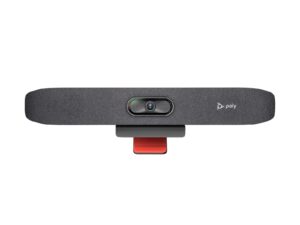
Studio R30
The Poly Studio R30 is a USB video bar for small rooms. It has a 4K camera at 30 fps with a 120° view, 5x zoom (4x with auto tracking) and group, people, speaker and presenter framing.
- Best For
- Small rooms
- Zoom
- 5x (4x with auto tracking)
- View
- 120°
- Camera
- 4K
- Teams Rooms
- USB: works with Teams, Zoom and other PC apps
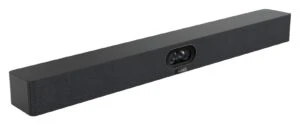
MeetingBar A40
The Yealink MeetingBar A40 is an Android 13 all-in-one bar with two 48 MP lenses, 4K output at up to 60 fps, a 120° view and 6x digital zoom on an electronic gimbal.
- Best For
- Small to medium rooms
- Zoom
- 6x digital
- View
- 120°
- Camera
- Dual 4K lenses (2 x 48 MP), electronic gimbal, 10-bit HDR
- Teams Rooms
- Microsoft Teams Rooms on Android, Zoom Rooms, SIP/H.323 general mode
Review Scores Compared
Expert Score
Optics & Room Coverage
AI Speaker Tracking & Framing
Room Audio Pickup & Output
OS Platform & Ecosystem
Deployment & I/O
Why Studio R30 Beats MeetingBar A40 (and Vice Versa)
Why Studio R30 beats MeetingBar A40
- Camera Resolution: 2160p 4K UHD (3840 x 2160), 30 fps vs 4K, up to 60 fps (4K60 / 1080p60 output)
- Ports: 4.5 mm power input vs Ethernet, Yealink VCH port (RJ-45), 3.5 mm line-in/line-out,…
Why MeetingBar A40 beats Studio R30
- Better deployment & i/o: 10.0 vs 6.0 out of 10
- Better os platform & ecosystem: 9.9 vs 7.6 out of 10
- Better room audio pickup & output: 9.0 vs 7.3 out of 10
- Zoom: 6x digital vs 5x (4x with auto tracking)
- Megapixels: 48 MP vs 8 MP
- Teams Rooms: Microsoft Teams Rooms on Android, Zoom Rooms, SIP/H.323 gene… vs USB: works with Teams, Zoom and other PC apps
Review-score leads of 0.5+ points out of 10 first, then specs where only one comes out ahead.
Full Specifications
General
| Studio R30 | MeetingBar A40 | |
|---|---|---|
| Best For | Small rooms | Small to medium rooms |
| Ideal Room Size | Small and huddle rooms | — |
Camera
| Studio R30 | MeetingBar A40 | |
|---|---|---|
| Zoom | 5x (4x with auto tracking) | 6x digital Better |
| Field of View | 120° | 120° |
| Speaker Tracking | Yes (speaker framing, presenter tracking) | Yes |
| Camera Presets | — | 9 |
| Megapixels | 8 MP | 48 MP Better |
| Horizontal FOV | 110° | 110° |
| Vertical FOV | — | 54° |
| HDR | — | Yes (10-bit HDR) |
| Focus | — | Depth of field 1-5 m |
| Multi-Stream / Gallery | — | Picture-in-picture, multi-focus framing, Smart Gallery (Zoom) |
| People Counting | — | Yes |
| Camera | 4K | Dual 4K lenses (2 x 48 MP), electronic gimbal, 10-bit HDR |
| Camera Resolution | 2160p 4K UHD (3840 x 2160), 30 fps Better | 4K, up to 60 fps (4K60 / 1080p60 output) |
| Pan and Tilt | Manual pan, tilt and zoom control | Electronic gimbal (digital PTZ), 9 presets |
| AI Features | Group, people, speaker and presenter framing | IntelliFocus, auto framing, speaker tracking, people counting, picture-in-picture, multi-focus framing, Smart Gallery (Zoom) |
| Max Frame Rate | — | 60 fps |
| Cameras | — | 2 |
Connectivity
| Studio R30 | MeetingBar A40 | |
|---|---|---|
| USB | 1 x USB-C 5 Gbps, 2 x USB 2.0 Type-A | 1 x USB 2.0 Type-A, 1 x USB-C |
| HDMI | — | 2 x HDMI-out |
| Network | — | Ethernet, TCP/IP (IPv4/IPv6) |
| Wireless | — | Wi-Fi 6 (2x2 MIMO, dual-band), Bluetooth 5.0 |
| Displays Supported | — | 2 |
| Ports | 4.5 mm power input Better | Ethernet, Yealink VCH port (RJ-45), 3.5 mm line-in/line-out, security lock slot |
| Content Sharing | — | Teams: 1080p in meeting, 4K local; Zoom: 1080p |
| HDMI Out | — | 2 x HDMI |
| Wi-Fi | — | Wi-Fi 6, 2x2 MIMO, dual band |
| Bluetooth | — | Bluetooth 5.0 |
| USB Host Ports | — | 1 x USB 2.0 Type-A |
| Line In / Out | — | 3.5 mm line in / line out |
Platforms
| Studio R30 | MeetingBar A40 | |
|---|---|---|
| Remote Management | Poly Lens | Yealink Device Management Platform, Yealink Management Cloud Service, Teams Admin Center/Intune, Zoom Device Management |
| Teams Rooms | USB: works with Teams, Zoom and other PC apps | Microsoft Teams Rooms on Android, Zoom Rooms, SIP/H.323 general mode Better |
| Certifications | Microsoft Teams, Zoom | Microsoft Teams, Zoom |
| Operating System | None (USB peripheral) | Android 13 |
| USB / BYOD Mode | Yes (USB to PC or Mac) | — |
| Zoom Rooms | — | Certified |
| SIP / H.323 | — | Yes (general mode) |
| Appliance Mode | No | Yes Better |
Design
| Studio R30 | MeetingBar A40 | |
|---|---|---|
| Mounting | Monitor clamp | Wall mount, TV clip mount or desktop |
| Weight | 0.45 kg (1 lb) | — |
| Privacy Cover | Attachable lens cover | Electric lens cap |
| Dimensions | 17.5 x 3.4 x 3.2 in (with monitor clamp) | 650 x 62 x 80 mm |
| Power | External 12 V / 3 A | — |
Audio
| Studio R30 | MeetingBar A40 | |
|---|---|---|
| Built-in Mics | 3 | 8 Better |
| Mic Pickup Range | 4.57 m | 6 m (4 m high-quality) Better |
| Speakers | Single speaker, 100 Hz-20 kHz, 90 dB SPL @ 0.5 m | 2 x 10 W, 80 Hz-18 kHz, max 112 dB SPL Better |
| Audio Processing | Beamforming | — |
| Expansion Mics | — | Supports 2 expansion microphones |
| Mic Array | Integrated mics | 8 MEMS mic array |
| Speaker Output | — | 2 x 10 W |
| Max SPL | — | 112 dB |
| Speaker Frequency Range | — | 80 Hz - 18 kHz |
| Audio Out | — | 3.5 mm line out |
Design & Setup
| Studio R30 | MeetingBar A40 | |
|---|---|---|
| Mounts | — | Wall mount, TV clip mount |
| Security | Kensington lock slot | HTTPS web access |
| Security Slot | — | Yes |
Takeaways
- Our pick: MeetingBar A40, with the highest spec-based rating (4.5/5).
- Choose Studio R30 for small rooms.
- Choose MeetingBar A40 for small to medium rooms.
Pros and Cons
Studio R30
PROS
- 4K camera with 120° view
- Four framing modes
- One USB-C cable to the laptop
- Teams and Zoom certified
CONS
- Three mics and one speaker
- Needs a laptop (no appliance mode)
MeetingBar A40
PROS
- Dual 48 MP lenses, 4K60
- Eight mics, 6 m pickup
- Two expansion mics supported
- Electric lens cap
CONS
- Digital zoom only
- Weight not listed on the datasheet we checked
Similar Comparisons
 Studio R30 vs Tail 2
- Studio R30 vs Studio X32
- Studio R30 vs Room Bar
- Studio R30 vs PanaCast 50
 MeetingBar A40 vs Room Bar
- MeetingBar A40 vs PanaCast 50
Quick Verdict
- Studio R30 8.0Leads in Optics & Room Coverage
- MeetingBar A40 9.0Best overallLeads in AI Speaker Tracking & Framing, Room Audio Pickup & Output, OS Platform & Ecosystem