At a glance
| Resolution | 4K |
|---|---|
| Zoom | 5x digital |
| Field of View | 120° diagonal |
| Auto Framing | RightSight (supported setups) |
| Camera | 4K Ultra HD image sensor |
| Connection | USB 3.0 |
- Model MeetUp
- Released 2017
LogitechLast updated on November 2026
Logitech MeetUp Review
- Small room EXCELLENT
- Large room FAIR
Prices, shipping and returns are handled by the retailer.
On this page
Overview
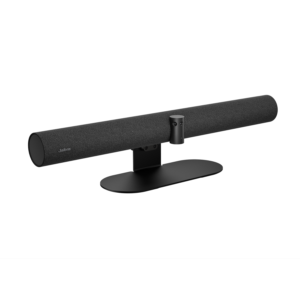
The Logitech MeetUp is an all-in-one conference camera for small rooms, with a 120 degree field of view, 4K Ultra HD sensor, 5x digital zoom, motorised pan and tilt, three beamforming mics and an integrated speaker.
- Wide 120° view for small rooms
- Camera, mics and speaker in one bar
- Simple USB connection
- Expansion mic option
Key Takeaways
- Tuned for rooms up to about six people
- Motorised pan and tilt with presets
- Optional Expansion Mic extends pickup to 5 m
Best For
- Huddle rooms
- Small offices
- USB room setups
Avoid If
- You need AI auto-framing as standard
- Your room seats more than eight
Pros & Cons
The MeetUp remains a dependable huddle room bar with a very wide view. Newer models add better AI framing, but the MeetUp still covers small rooms well at a lower price.
PROS
- Wide 120° view for small rooms
- Camera, mics and speaker in one bar
- Simple USB connection
- Expansion mic option
CONS
- Only 5x digital zoom
- Older design than newer AI bars
- Mic range limited to about 4 m
Review Scores
Score Breakdown
8.5/10 Expert Score
- Optics & Room Coverage8.4/10
- AI Speaker Tracking & Framing8.5/10
- Room Audio Pickup & Output8.7/10
- OS Platform & Ecosystem10.0/10
- Deployment & I/O6.5/10
How this score is calculated
Each criterion is the weighted average of its available spec scores (0–10) from our Conference Cameras scoring matrix. Empty specs are skipped, not scored as 0. The Expert Score is the weighted average of the scored criteria, shown out of 10; stars = Expert Score / 20, rounded to the nearest half star.
| Criterion | Weight | From specs | Score |
|---|---|---|---|
| Optics & Room CoverageZoom: 5x digital → 6.5; Field of View: 120° diagonal → 9.0; Ideal Room Size: Huddle rooms up to about six people → 7.0; Pan / Tilt: Yes (motorised) → 10.0; Max Resolution: 4K → 9.5 | 30% | 8.4 | 8.4 |
| AI Speaker Tracking & FramingSpeaker Tracking: Yes → 10.0; Auto Framing: RightSight (supported setups) → 6.0 | 25% | 8.5 | 8.5 |
| Room Audio Pickup & OutputBuilt-in Mics: Three beamforming mics, 4 m range → 8.0; Full Duplex: Yes → 10.0 | 20% | 8.7 | 8.7 |
| OS Platform & EcosystemRemote Management: Logitech Sync → 10.0; Certifications: Microsoft Teams, Zoom → 10.0 | 15% | 10.0 | 10.0 |
| Deployment & I/OMounting: Wall mount → 8.5; Power over Ethernet: No → 4.0 | 10% | 6.5 | 6.5 |
| Expert Score | 8.5/10 | ||
Scores by Use Case
- Small room100/100
- Large room40/100
Logitech MeetUp Review
Logitech launched the MeetUp in 2017 as one of the first all-in-one bars designed for small huddle rooms. Logitech has since added the MeetUp 2 with AI framing, but the original remains widely deployed and sold.
Optics & Room Coverage 8.4/10
The sensor supports 4K Ultra HD at 30 fps over USB 3.0, with 1080p and 720p for most meeting platforms. RightLight adjusts exposure for windows and dim rooms.
In small rooms the picture is sharp and well balanced, with natural skin tones. Edges of the wide view show some distortion, which is common with lenses this wide.
Compared with newer bars such as the Logitech Rally Bar Huddle the image processing is older, but it still looks good on a standard call.
The field of view is 120 degrees diagonal, 113 degrees horizontal and 80.7 degrees vertical. Motorised pan of plus or minus 25 degrees and tilt of plus or minus 15 degrees adds flexibility.
The wide view captures people sitting close to the screen, which is the main challenge in huddle rooms. Camera presets let you save positions for common seating layouts.
RightSight automatic framing arrived through firmware for supported setups, but it is less sophisticated than the AI framing on newer Logitech bars.
- Zoom 5x digital
- View 120° diagonal
- Room Size Huddle rooms up to about si…
- Pan/Tilt Yes (motorised)
AI Speaker Tracking & Framing 8.5/10
Zoom is 5x digital, using the extra resolution of the 4K sensor to crop in. There is no optical zoom.
In a small room that is enough to frame a person at the end of the table without much loss in quality. Beyond a few metres the crop softens faces noticeably.
Rooms that need to zoom on a whiteboard or presenter at the far end should look at a PTZ camera with optical zoom instead. Saved presets help here, because the camera can jump straight to a framed seat instead of zooming live.
- Tracking Yes
- Framing RightSight
Room Audio Pickup & Output 8.7/10
The MeetUp uses three beamforming mics, 4 m range.
Full-duplex audio is listed, so both ends can talk without the usual half-duplex clipping. It is specified for Huddle rooms up to about six people. When I commission a bar, I walk the table first and check whether the built-in array can cover the seats you actually have.
- Duplex Yes
OS Platform & Ecosystem 10.0/10
MeetUp is certified for Microsoft Teams and Zoom, and works with Google Meet and other platforms. Logitech Sync handles fleet management and firmware updates.
Sync lets IT teams monitor devices remotely and push updates across many rooms. That consistency is useful in larger organisations with dozens of huddle spaces.
As an older product, it receives fewer new features than current Rally models. For a straightforward huddle room it still does the essentials well. Firmware still arrives through Sync, so security patches keep coming for deployed units.
- Certified Microsoft Teams, Zoom
Deployment & I/O 6.5/10
MeetUp connects to a room PC or laptop by a single USB cable. Three beamforming microphones cover about 4 m, and an optional Expansion Mic extends pickup to 5 m.
The integrated speaker reaches 95 dB SPL at 0.5 m, which is plenty for a small room. A wall mount is included, and a TV mount is sold separately.
The remote control handles volume, mute and camera movement, which helps when the room PC is tucked out of reach.
- Mounting Wall mount
- PoE No
Full Specifications
General
| Best For | Small huddle rooms |
|---|---|
| Ideal Room Size | Huddle rooms up to about six people |
| Release Year | 2017 |
| Launch Price | $899 |
Camera
| Camera Resolution | 4K |
|---|---|
| Max Frame Rate | 30 fps |
| Sensor | 4K Ultra HD image sensor |
| Zoom | 5x digital |
| Field of View | 120° diagonal |
| Pan / Tilt | Yes (motorised) |
| Auto Framing | RightSight (supported setups) |
| Speaker Tracking | Yes (RightSight automatically adjusts position and zoom to frame everyone) |
| Camera Presets | Yes |
| Horizontal FOV | 113° |
| Vertical FOV | 80.7° |
| Digital Zoom | 5x |
| Pan Range | ±25° |
| Tilt Range | ±15° |
| Camera | 4K Ultra HD image sensor |
Connectivity
| Connection | USB 3.0 |
|---|---|
| Video Outputs | USB (USB 2.0 cable included; USB 3.0 required for 4K) |
| Power over Ethernet | No |
| USB | USB 3.0 |
| HDMI | No |
| SDI | No |
| Wireless | No |
Platforms
| Certifications | Microsoft Teams, Zoom |
|---|---|
| Remote Management | Logitech Sync |
| Microsoft Teams | Yes |
| Zoom | Yes |
| Software | Logitech Sync |
| OS Compatibility | Windows, macOS, Chrome devices (plug-and-play USB) |
| Teams Rooms | Microsoft Teams, Zoom |
Design
| Remote Control | Yes |
|---|---|
| Mounting | Wall mount (included), TV mount (optional) |
| Weight | 1040 g |
| Dimensions | 104 x 400 x 85 mm |
| Power | Included power adapter |
In the Box
| In the Box | MeetUp conference camera, remote control, 5 m USB 2.0 cable, power adapter, wall mounting hardware |
|---|---|
| Warranty | 2-year limited hardware warranty (1- and 3-year extensions available) |
| Optional Accessories | Expansion Mic (optional) |
Identifiers
| Model Number | MeetUp |
|---|
Audio
| Built-in Mics | Three beamforming mics, 4 m range |
|---|---|
| Audio Input | Optional Logitech Expansion Mic for MeetUp (one supported, not included) |
| Audio Output | Integrated speaker, 95 dB SPL at 0.5 m |
| Full Duplex | Yes |
Product Details
| Brand | Logitech |
|---|---|
| Model | MeetUp |
| Model number | MeetUp |
| Release year | 2017 |
Price Comparison
| Store | Price | Deal |
|---|---|---|
| Logitech.comOfficial Logitech store | Launch price $899 | View deal (opens in a new tab) |
The Verdict
I’d choose the MeetUp for a tight huddle room on a budget. For better AI framing and audio, the Rally Bar Huddle is the modern choice.
FAQs
What is the MeetUp field of view?
120 degrees diagonal.
Does it support 4K?
Yes, 4K at 30 fps over USB 3.0.
How much zoom does it have?
5x digital zoom.
Does it have built-in audio?
Yes, three beamforming mics and a speaker.
How far do the mics reach?
About 4 m, or 5 m with the Expansion Mic.
Is it Teams certified?
Yes, it is certified for Microsoft Teams and Zoom.
Is there a remote control?
Yes.
What is the difference from MeetUp 2?
MeetUp 2 adds newer AI framing and audio processing.