At a glance
| Zoom | Up to 6x lossless digital |
|---|---|
| View | 180° |
| Camera | 3 x 13 MP camera array, panoramic 4K |
| Teams Rooms | USB: Microsoft Teams, Zoom and others; Teams Rooms and Zoom Rooms |
- Model PanaCast 50
JabraLast updated on October 2026
Jabra PanaCast 50 Review
- Small room STRONG
- Large room STRONG
Prices, shipping and returns are handled by the retailer.
On this page
Overview
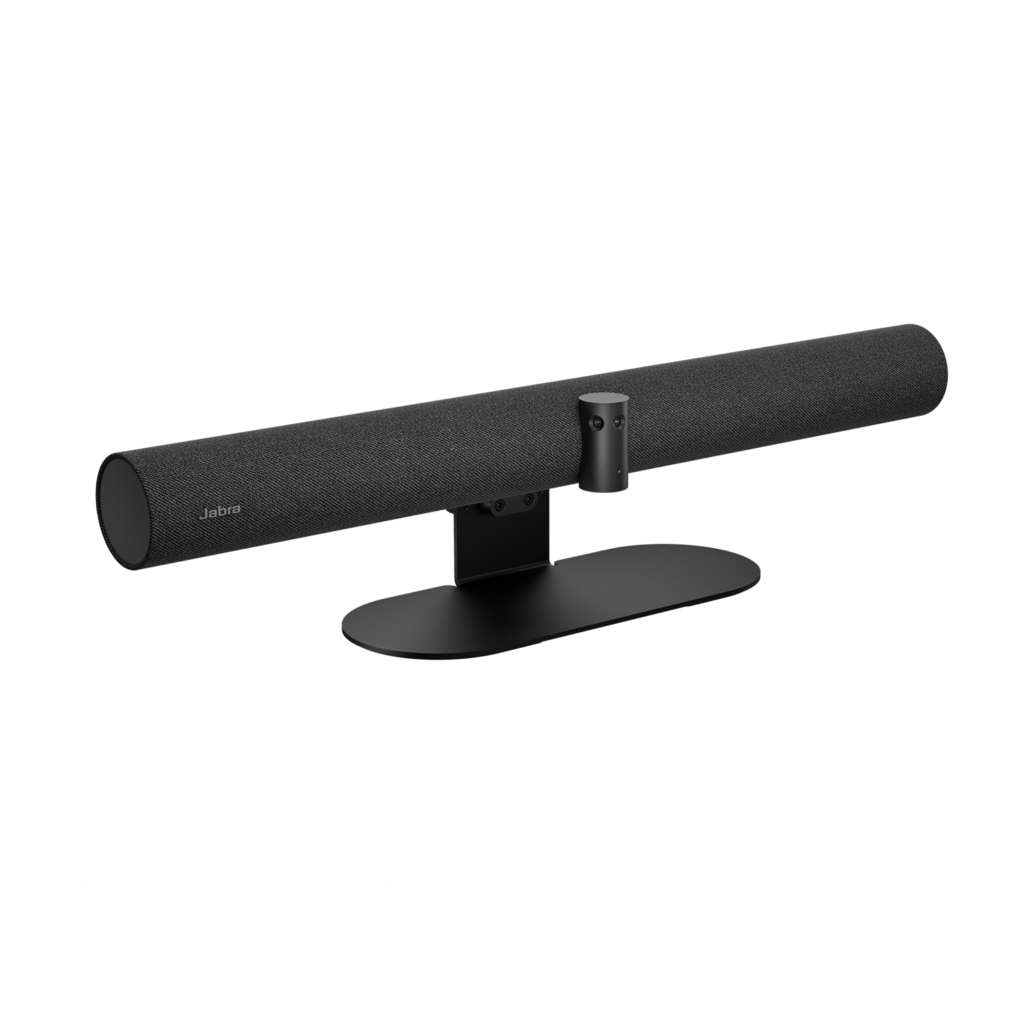
The Jabra PanaCast 50 uses three 13 MP cameras stitched into a 180° panoramic-4K view. That lets you push the table up to the wall and still see everyone.
Jabra made the PanaCast 50 available in mid-2021 as a panoramic-4K USB video bar with a 180° field of view for medium rooms — the room-scale sibling to personal cams like the PanaCast 20. It arrived in the same hybrid-work camera push that emphasised AI people framing over fixed wide shots.
For how it stacks up against other bars, our PanaCast 50 vs Poly Studio comparison and Jabra’s availability announcement are useful context.
- 180° panoramic-4K view
- Eight beamforming mics
- Four speakers (2 woofers, 2 tweeters)
- 2-year warranty
Key Takeaways
- Virtual Director and Intelligent Zoom
- Dual-stream whiteboard
- Aux-out for assistive listening
Best For
- Medium rooms
- Tables against the wall
- Teams and Zoom rooms
Avoid If
- You want a standalone appliance
- Your room is larger than 4.5 x 6 m
Pros & Cons
The PanaCast 50 has the widest view in this group and ties for the most mics, plus four speakers and smart framing. It is certified for Teams and Zoom rooms up to 4.5 x 6 m. It runs as a USB device with a room PC or laptop rather than as a standalone appliance.
PROS
- 180° panoramic-4K view
- Eight beamforming mics
- Four speakers (2 woofers, 2 tweeters)
- 2-year warranty
CONS
- Needs a room PC or laptop (USB)
- 6x zoom is digital
Review Scores
Score Breakdown
8.9/10 Expert Score
- Optics & Room Coverage8.3/10
- AI Speaker Tracking & Framing9.2/10
- Room Audio Pickup & Output9.8/10
- OS Platform & Ecosystem8.8/10
- Deployment & I/O8.5/10
How this score is calculated
Each criterion is the weighted average of its available spec scores (0–10) from our Video Bars & Conference Cameras scoring matrix. Empty specs are skipped, not scored as 0. The Expert Score is the weighted average of the scored criteria, shown out of 10; stars = Expert Score / 20, rounded to the nearest half star.
| Criterion | Weight | From specs | Score |
|---|---|---|---|
| Optics & Room CoverageZoom: Up to 6x lossless digital → 6.7; Field of View: 180 → 10.0; Ideal Room Size: Up to 4.5 x 6 m → 7.5; Pan / Tilt: Manual PTZ → 6.0; Max Resolution: 3 x 13 MP camera array, panoramic 4K → 9.5 | 30% | 8.3 | 8.3 |
| AI Speaker Tracking & FramingSpeaker Tracking: Yes (Automatic Speaker Detection) → 10.0; Auto Framing: Virtual Director → 8.5; AI Features: Virtual Director → 6.0 | 25% | 9.2 | 9.2 |
| Room Audio Pickup & OutputBuilt-in Mics: 8 → 10.0; Beamforming: Yes → 10.0; Speakers: 4 speakers: 2 x 50 mm woofers → 8.0 | 20% | 9.8 | 9.8 |
| OS Platform & EcosystemUSB / BYOD Mode: Yes (USB) → 10.0; Remote Management: Jabra Direct, Jabra Xpress, Jabra Sound+ → 6.0; Teams Rooms: USB: Microsoft Teams → 9.5; Certifications: Microsoft Teams → 10.0 | 15% | 8.8 | 8.8 |
| Deployment & I/OMounting: Wall mount included → 8.5 | 10% | 8.5 | 8.5 |
| Expert Score | 8.9/10 | ||
Scores by Use Case
- Small room80/100
- Large room80/100
Jabra PanaCast 50 Review
Optics & Room Coverage 8.3/10
- Zoom Up to 6x lossless digital
- View 180°
- Room Size Up to 4.5 x 6 m
AI Speaker Tracking & Framing 9.2/10
- Tracking Yes
- AI Virtual Director
Room Audio Pickup & Output 9.8/10
- Mics 8
- Beamform Yes
- Speakers 4 speakers: 2 x 50 mm woofe…
OS Platform & Ecosystem 8.8/10
- BYOD Yes (USB)
- Mgmt Jabra Direct
- Teams Rooms USB: Microsoft Teams
- Certified Microsoft Teams
Deployment & I/O 8.5/10
- Mounting Wall mount included
Full Specifications
General
| Best For | Medium rooms |
|---|---|
| Ideal Room Size | Up to 4.5 x 6 m (15 x 20 ft), Microsoft "medium room" |
Camera
| Zoom | Up to 6x lossless digital |
|---|---|
| Field of View | 180° |
| Speaker Tracking | Yes (Automatic Speaker Detection) |
| Megapixels | 13 MP |
| Horizontal FOV | 180° |
| Vertical FOV | 54° |
| HDR | Yes (Vivid HDR) |
| People Counting | Yes (PeopleCount) |
| Camera | 3 x 13 MP camera array, panoramic 4K |
| Camera Resolution | Panoramic-4K 3840 x 1080 @ 30 fps |
| Pan and Tilt | Manual PTZ (digital); 180° H x 54° V view |
| AI Features | Virtual Director, Intelligent Zoom, Dynamic Composition, Intelligent Meeting Space, PeopleCount, Vivid HDR, dual-stream whiteboard |
| Max Frame Rate | 30 fps |
| Cameras | 3 |
| Whiteboard Camera | Yes (whiteboard sharing) |
Connectivity
| USB | USB-A, USB-C (USB 2.0/3.0) |
|---|---|
| Network | Ethernet (RJ45) |
| Wireless | Bluetooth LE (remote control, Sound+) |
| Ports | Ethernet (RJ45), Aux-out for assistive listening |
| Ethernet | RJ-45 |
| Bluetooth | Bluetooth LE (remote, Sound+) |
Platforms
| Remote Management | Jabra Direct, Jabra Xpress, Jabra Sound+ |
|---|---|
| Teams Rooms | USB: Microsoft Teams, Zoom and others; Teams Rooms and Zoom Rooms |
| Certifications | Microsoft Teams, Microsoft Teams Rooms, Zoom Rooms, Zoom |
| USB / BYOD Mode | Yes (USB) |
| Zoom Rooms | Certified |
| Firmware Updates | Jabra Direct / Jabra Xpress |
| Remote Control | Bluetooth LE remote |
Design
| Mounting | Wall mount included; table stand and other mounts available |
|---|---|
| Weight | 2.2 kg |
| Dimensions | 650 x 80 x 125 mm |
| Power | External power supply (included) |
| Operating Temperature | 5 to 35 °C |
In the Box
| Warranty | 2 years |
|---|---|
| Optional Accessories | Table stand and other mounts |
| In the Box | PanaCast 50, power supply, wall mount, USB-C to USB-A cable 2 m (USB 3.0) |
Audio
| Built-in Mics | 8 |
|---|---|
| Speakers | 4 speakers: 2 x 50 mm woofers, 2 x 20 mm tweeters, 80 Hz-20 kHz |
| Audio Processing | Beamforming, full duplex, echo and static-noise removal |
| Mic Array | 8-mic beamforming array |
| Speaker Frequency Range | 80 Hz – 20 kHz |
| Mic Frequency Range | 100 Hz – 8 kHz |
| Beamforming | Yes |
| Audio Out | Aux-out for assistive listening |
Product Details
| Brand | Jabra |
|---|---|
| Model | PanaCast 50 |
Price Comparison
| Store | Price | Deal |
|---|---|---|
| Jabra.comOfficial Jabra store | See price | View deal (opens in a new tab) |
The Verdict
I’d pick the PanaCast 50 for medium rooms with people seated close to the screen, where the 180° view stops anyone being cut off. If the room is long, a Logitech Rally Bar with Mic Pods reaches further. For an all-in-one appliance with no room PC, look at the Poly Studio X52 or Neat Bar 2.
FAQs
What room size is the PanaCast 50 for?
Jabra says it is certified for Microsoft Teams for rooms up to 4.5 x 6 m (15 x 20 ft), a medium meeting room.
How many cameras does the PanaCast 50 have?
Three 13 MP cameras with real-time video stitching.
Do I need a separate speakerphone?
No. It has eight mics and four speakers built in.
What is the PanaCast 50 field of view?
180° horizontal and 54° vertical, from three 13 MP cameras stitched into one panoramic 4K image.
Does it count people?
Yes. PeopleCount is built in, and Jabra offers an SDK.
What are the operating temperatures?
5 °C to 35 °C in use and -20 °C to 60 °C in storage.
How long is the USB cable?
2 m, USB-C to USB-A (USB 3.0).
Does it support whiteboard sharing?
Yes. Jabra lists whiteboard sharing with a dual-stream view.