
Anker PowerConf C200 vs Logitech C920e Comparison
Compare Anker PowerConf C200 vs Logitech C920e side by side: specs, ratings, pros and cons, and which one fits your room best.
When you buy through our links, we may earn an affiliate commission at no extra cost to you. Learn more
On this page


At a Glance
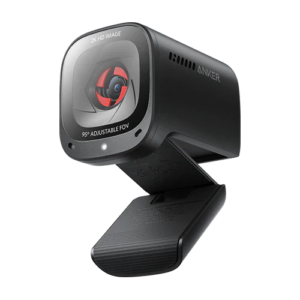
Want more than 1080p for a budget price? The Anker PowerConf C200 is a compact 2K webcam that records 2560 x 1440 at 30 fps on a 5 MP sensor, with autofocus, a selectable 95°, 78° or 65° view, stereo mics and a built-in privacy cover.
Official Anker page (opens in a new tab)View on Amazon (opens in a new tab)
- Best For
- Budget buyers
- Resolution
- 2K (2560 x 1440)
- Field of View
- 95°
- Autofocus
- Yes (15 cm to 3 m)
- Light Correction
- Yes (low-light optimised; no HDR)
- Microphones
- Dual stereo with AGC and noise cancellation
- Privacy Shutter
- Yes (built-in camera cover switch)
- Connection
- USB-C
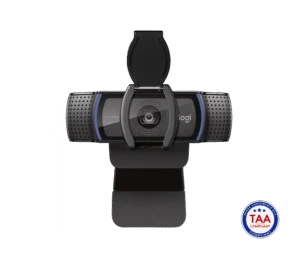
If you are equipping a team with one dependable, certified webcam, the Logitech C920e is the business version of the C920, recording 1080p at 30 fps on a 3 MP sensor with autofocus, a glass lens, a 78° view and a 3-year warranty.
Official Logitech page (opens in a new tab)View on Amazon (opens in a new tab)
- Best For
- IT fleets
- Resolution
- 1080p
- Field of View
- 78°
- Autofocus
- Yes
- Light Correction
- Yes (RightLight 2, for low light)
- Microphones
- Stereo
- Privacy Shutter
- Yes (attachable privacy shutter)
- Connection
- USB-A
Review Scores Compared
Expert Score
Visual Image Quality
Autofocus & Low-Light
FOV & Framing
Privacy, Mount & Build
Software & App Controls
Connectivity & Port Interface
Integrated Audio
Find Your Winner
Tell us how much each area matters to you. Your winner updates instantly and is remembered for this category.
Your winner
Anker PowerConf C200
Leads on Visual Image Quality and FOV & Framing.
- Anker PowerConf C2008.6
- Logitech C920e7.4
Your pick is personal. Our Expert Score and editorial verdict do not change.
Editorial Reviews Comparison
Visual Image Quality
- Anker PowerConf C2007.5/10Leader
- Logitech C920e6.6/10
Anker PowerConf C200
The C200 records 2K at 2560 x 1440 and 30 fps from a 5 MP 1/2.7-inch sensor. It outputs MJPEG or YUV, which meeting apps accept without a special driver. Meeting platforms compress video before it reaches the far end, so the extra resolution shows most in self-view, recordings and digital zoom.
Logitech C920e
A 3 MP sensor records 1080p at 30 fps with autofocus. It is the business edition of Logitech's C920. Spec-based reasoning: 1080p30 without HDR is a generation behind the Brio 500, but it meets what Teams and Zoom send in most calls.
Autofocus & Low-Light
- Anker PowerConf C2008.7/10
- Logitech C920e8.8/10Leader
Anker PowerConf C200
Anker doesn't publish a dedicated low-light mode in our spec data, so the C200 relies on its sensor and auto exposure. Spec-based reasoning: with no HDR listed and a 1/2.7-inch sensor, a lamp or window in front of the user does more for image quality than any setting. For darker rooms, the Razer Kiyo Pro's STARVIS sensor holds detail better.
Logitech C920e
RightLight 2 adjusts exposure in dim rooms. Spec-based reasoning: without HDR or a low-light sensor, it needs even office lighting. For darker rooms, the Razer Kiyo Pro or MX Brio handle low light much better. RightLight 2 is the same light correction used on the Brio 300, so adding a lamp helps more than any setting.
FOV & Framing
- Anker PowerConf C2008.3/10Leader
- Logitech C920e8.1/10
Anker PowerConf C200
You can switch the field of view between 95°, 78° and 65° in AnkerWork, and autofocus covers 15 cm to 3 m. At 95°, two people fit side by side at a desk, while 65° crops out more of the room. The Logitech Brio 500 offers the same three angles but adds auto-framing.
Logitech C920e
A 78° fixed field of view with no digital zoom or auto-framing. Focus can be set manually in Logi Tune. For one person at a desk, the framing is natural. Two people side by side will be tight. For dynamic framing, the Brio 500 or MX Brio is the upgrade inside Logitech's line.
Privacy, Mount & Build
- Anker PowerConf C2009.7/10Leader
- Logitech C920e8.2/10
Anker PowerConf C200
At 83 g, the C200 is a small matte-black block with an integrated clip and a 1/4-inch tripod thread. The clip's rubber pad grips laptop lids and thin monitors well. Privacy is a physical cover rather than a software toggle. When it's closed, a bright red iris fills the lens opening, so you can see from across the desk that the camera is blocked.
Logitech C920e
At 162 g, it uses a universal clip for laptops and monitors with a tripod-ready design. Logitech includes a privacy shutter that clips onto the C920e. The 1.5 m USB-A cable is fixed, which suits older desktops and docks.
Software & App Controls
- Anker PowerConf C2008.8/10Leader
- Logitech C920e6.0/10
Anker PowerConf C200
Connection is USB-C; field of view, image tuning and firmware updates go through the AnkerWork app. It's plug-and-play on Windows and macOS. If you're new to external cameras, the guide to webcam types explains where a 2K model fits.
Logitech C920e
Logi Tune handles focus and image settings. It's certified for Microsoft Teams and Zoom, which is why IT departments buy it in bulk. Our Logitech Brio 500 review covers the modern alternative.
Connectivity & Port Interface
- Anker PowerConf C20010.0/10Leader
- Logitech C920e6.1/10
Anker PowerConf C200
The PowerConf C200 connects over USB-C. The box includes a USB-C to USB-A cable, so older ports still work. Anker lists Windows 7 or later and macOS 10.11 or later, and an 18-month warranty.
Logitech C920e
The C920e connects over USB-A. The cable is fixed to the camera, and the official length is 1.5 m. Logitech lists a 3-year limited hardware warranty. In the box: the webcam with its attached 1.5 m USB-A cable, a privacy shutter and documentation.
Integrated Audio
- Anker PowerConf C2008.4/10Leader
- Logitech C920e7.8/10
Anker PowerConf C200
For long meetings, a headset or the Jabra Speak2 55 speakerphone picks up voice from closer. Anker rates the dual stereo mics, with automatic gain control, for pickup up to 3 m, which covers a solo desk; two people side by side are better served by a speakerphone. Noise cancellation is built in, but a USB mic remains the better choice for recording.
Logitech C920e
Stereo omnidirectional mics are rated to about 1 m. Most offices that deploy C920e cameras pair them with headsets. In a two-person office, a table speakerphone still beats these capsules.
Why Anker PowerConf C200 Beats Logitech C920e (and Vice Versa)
Why Anker PowerConf C200 beats Logitech C920e
- Better connectivity & port interface: 10.0 vs 6.1 out of 10
- Better software & app controls: 8.8 vs 6.0 out of 10
- Better privacy, mount & build: 9.7 vs 8.2 out of 10
- Better visual image quality: 7.5 vs 6.6 out of 10
- Better integrated audio: 8.4 vs 7.8 out of 10
- Megapixels: 5 MP vs 3 MP
Why Logitech C920e beats Anker PowerConf C200
- Camera Resolution: 1080p vs 2K (2560 x 1440)
- Field of View: 78° vs 95°
- Resolutions & Frame Rates: 1080p30, 720p30 vs 2K30, 1080p30, 720p30, 320x240@30
Review-score leads of 0.5+ points out of 10 first, then specs where only one comes out ahead.
Full Specifications
General
| Anker PowerConf C200 | Logitech C920e | |
|---|---|---|
| Best For | Budget buyers | IT fleets |
| Release Year | 2022 | — |
| Weight | 83 g Better | 162 g |
| Dimensions | 55 x 51 x 41 mm | 94 x 43.3 x 71 mm (with clip) |
| In the Box | PowerConf C200, USB-C to USB-A cable, quick start guide, safety manual | Webcam with attached 1.5 m USB-A cable, privacy shutter, user documentation |
| Warranty | 18 months | 3-year limited hardware |
| Model Number | A3369 | 960-001360 |
Visual Image Quality
| Anker PowerConf C2007.5/10 Better | Logitech C920e6.6/10 | |
|---|---|---|
| Max Frame Rate | 30 fps | 30 fps |
| Sensor | 1/2.7" CMOS | — |
| Megapixels | 5 MP Better | 3 MP |
| Resolutions & Frame Rates | 2K30, 1080p30, 720p30, 320x240@30 | 1080p30, 720p30 Better |
| Video Format | MJPEG / YUV | — |
| Camera Resolution | 2K (2560 x 1440) | 1080p Better |
Autofocus & Low-Light
| Anker PowerConf C2008.7/10 | Logitech C920e8.8/10 Better | |
|---|---|---|
| Autofocus | Yes (15 cm to 3 m) | Yes |
| Focus Type | Autofocus | Autofocus (manual via Logi Tune) |
| Aperture | f/2.0 | — |
| Light Correction | Yes (low-light optimised; no HDR) | Yes (RightLight 2, for low light) |
| Focus Range | 15 cm to 3 m | — |
FOV & Framing
| Anker PowerConf C2008.3/10 Better | Logitech C920e8.1/10 | |
|---|---|---|
| Field of View | 95° | 78° Better |
| FOV Presets | 95° / 78° / 65° | — |
| Digital Zoom | — | 1 x |
Privacy, Mount & Build
| Anker PowerConf C2009.7/10 Better | Logitech C920e8.2/10 | |
|---|---|---|
| Privacy Shutter | Yes (built-in camera cover switch) | Yes (attachable privacy shutter) |
| Tripod Thread | 1/4 in thread | Tripod-ready clip |
| Detachable Cable | — | No |
| Mounting | Adjustable clip/stand | Universal clip (laptops, LCDs, monitors) |
Software & App Controls
| Anker PowerConf C2008.8/10 Better | Logitech C920e6.0/10 | |
|---|---|---|
| Software | AnkerWork | Logi Tune |
| Operating Systems | Windows 7+, macOS 10.11+ | — |
| Certifications | — | Microsoft Teams, Zoom |
| Works With | Zoom, Google Meet, Microsoft Teams, Skype for Business, BlueJeans, Cisco Webex, FaceTime, OBS, XSplit, Twitch, YouTube | Google Meet, Webex, GoToMeeting, BlueJeans, Fuze, Microsoft DirectShow |
Connectivity & Port Interface
| Anker PowerConf C20010.0/10 Better | Logitech C920e6.1/10 | |
|---|---|---|
| Cable Length | — | 1.5 m |
| Uncompressed Video | Yes (YUV; also MJPEG) | — |
| Connection | USB-C | USB-A |
| Linux Support | No | — |
Integrated Audio
| Anker PowerConf C2008.4/10 Better | Logitech C920e7.8/10 | |
|---|---|---|
| Microphones | Dual stereo with AGC and noise cancellation | Stereo |
| Microphone Count | 2 | 2 |
| Mic Pickup Pattern | — | Omnidirectional |
| Noise Reduction | Yes | — |
| Mic Range | 3 m Better | 1 m |
Takeaways
- Our pick: Anker PowerConf C200, with the highest spec-based rating (4.3/5).
- Choose Anker PowerConf C200 for budget buyers.
- Choose Logitech C920e for iT fleets.
Pros and Cons
Anker PowerConf C200
PROS
- 2K at 30 fps
- Autofocus, 95/78/65° view
- Stereo mics with noise cancellation
- Built-in cover switch
CONS
- No HDR listed
- Small 1/2.7-inch sensor
Logitech C920e
PROS
- 3-year limited warranty
- Autofocus with glass lens
- USB-A for older PCs
- Attachable privacy shutter
CONS
- No HDR or 4K
- USB-A only
Similar Comparisons
 Anker PowerConf C2008.6/10
 Logitech MX Brio9.0/10Anker PowerConf C200 vs Logitech MX Brio
- Anker PowerConf C2008.6/10
 OBSBOT Tiny 28.8/10Anker PowerConf C200 vs OBSBOT Tiny 2
- Anker PowerConf C2008.6/10
 Razer Kiyo Pro8.3/10Anker PowerConf C200 vs Razer Kiyo Pro
- Anker PowerConf C2008.6/10
 Jabra PanaCast 208.1/10Anker PowerConf C200 vs Jabra PanaCast 20
Quick Verdict
- Anker PowerConf C200 8.6Best overallLeads in Visual Image Quality, FOV & Framing, Privacy, Mount & Build
- Logitech C920e 7.4Leads in Autofocus & Low-Light