
Huddly L1 vs Poly Studio R30 Comparison
Compare Huddly L1 vs Poly Studio R30 side by side: specs, ratings, pros and cons, and which one fits your room best.
On this page


At a Glance
The Huddly L1 is an AI conference camera with a 1 inch 20.3 MP 6K sensor, a 103 degree diagonal field of view, Genius Framing, Dynamic Light Optimization and a single-cable PoE connection for medium and large rooms.
- Best For
- Medium and large Teams Rooms
- Resolution
- 1080p
- Zoom
- Up to 5x digital
- Field of View
- 103° diagonal
- Auto Framing
- Genius Framing
- Camera
- 1 inch CMOS, 20.3 MP, 6K
- Connection
- RJ45 PoE to USB 3.0 adapter
- Teams Rooms
- Microsoft Teams Rooms
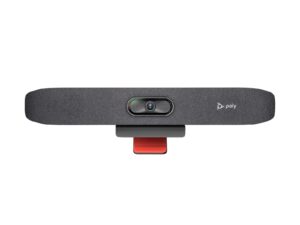
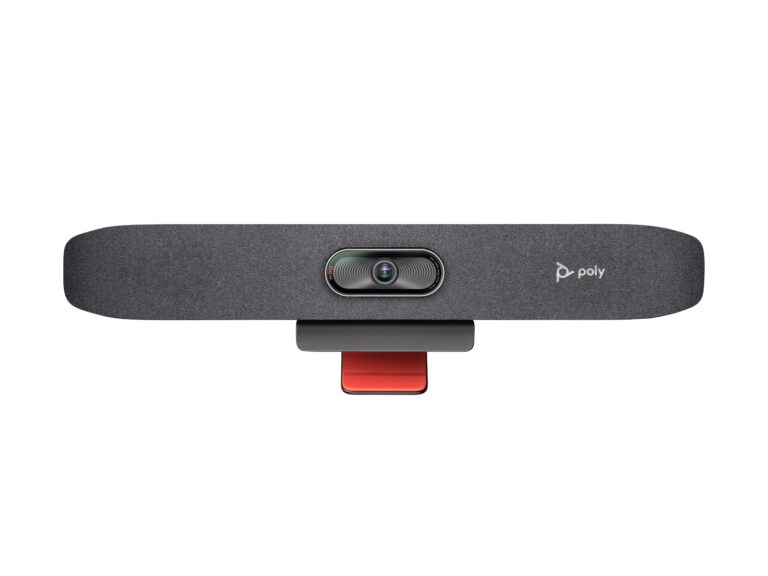
The Poly Studio R30 is a USB video bar for small rooms. It has a 4K camera at 30 fps with a 120° view, 5x zoom (4x with auto tracking) and group, people, speaker and presenter framing.
- Best For
- Small rooms
- Resolution
- 2160p 4K UHD (3840 x 2160), 30 fps
- Zoom
- 5x (4x with auto tracking)
- Field of View
- 120°
- Auto Framing
- Group, people, speaker and presenter framing
- Camera
- 4K
- Connection
- USB-C, USB-A
- Teams Rooms
- USB: works with Teams, Zoom and other PC apps
Review Scores Compared
Expert Score
Optics & Room Coverage
AI Speaker Tracking & Framing
Room Audio Pickup & Output
OS Platform & Ecosystem
Deployment & I/O
Editorial Reviews Comparison
Optics & Room Coverage
- Huddly L17.7/10
- Poly Studio R308.4/10Leader
Huddly L1
The L1 uses a 1 inch 20.3 MP CMOS sensor with 6K resolution and outputs 1080p or 720p at 30 fps. Dynamic Light Optimization balances exposure across bright windows and darker corners. The large sensor is the standout, giving clean faces with low noise in rooms that are dim or backlit.
Poly Studio R30
A 4K sensor with a 120° field of view and 5x zoom supports group, people, speaker and presenter framing. It's a USB peripheral, so the PC or Mac does the meeting work. However, in my presenter test, tracking kept a speaker in frame while they walked over to a whiteboard.
AI Speaker Tracking & Framing
- Huddly L19.4/10Leader
- Poly Studio R309.3/10
Huddly L1
Zoom is digital, up to 5x, using the 6K sensor to crop without heavy quality loss. There are no moving parts or optical lens changes. In medium rooms, 5x digital zoom frames people at the far end with good clarity. In very deep rooms, faces at the back become softer than with an optical PTZ camera.
Poly Studio R30
The Studio R30 has speaker tracking: speaker framing, presenter tracking. Official AI features include Group, people, speaker and presenter framing. Zoom is listed as 5x (4x with auto tracking). In rooms I've set up, I care whether tracking stays with the speaker without hunting around the table.
Room Audio Pickup & Output
- Huddly L14.0/10
- Poly Studio R307.3/10Leader
Huddly L1
The Huddly L1 has no built-in conferencing microphone. Official notes say video-only camera; official page says L1 pairs with the room audio solution you choose. It is specified for Medium to large rooms. When I commission a bar, I walk the table first and check whether the built-in array can cover the seats you actually have.
Poly Studio R30
Three integrated beamforming mics cover about 4.57 m. I'd expect clear voices across a typical meeting table. Past that, quieter talkers start to drop, and the Poly Studio X32 with NoiseBlockAI is the better step up. Three beamforming mics at about 4.57 m suit a personal office or tiny huddle, not a ten-seat table.
OS Platform & Ecosystem
- Huddly L18.5/10Leader
- Poly Studio R307.6/10
Huddly L1
The L1 is certified for Microsoft Teams Rooms and works with Zoom and other UVC platforms. The Huddly app and Huddly Insights handle settings, updates and analytics. Huddly Insights can provide anonymous people count data, helping facilities teams understand how rooms are used. That supports space planning across an office.
Poly Studio R30
As a USB device, it's certified for Microsoft Teams and Zoom, and whatever app runs on the computer can use it. That flexibility suits BYOD rooms, but it means the room is only as reliable as the PC behind it. Our soundbar vs. video bar guide explains when a USB bar beats a full appliance.
Deployment & I/O
- Huddly L110.0/10Leader
- Poly Studio R306.0/10
Huddly L1
The camera connects over a single RJ45 Ethernet cable with PoE to a Huddly USB to PoE adapter, which links to the room computer over USB 3.0. One cable to the camera simplifies installation, especially for wall mounts far from the PC. The adapter needs mains power and sits near the computer.
Poly Studio R30
Poly Lens handles firmware and settings, and the bar takes power from an external 12 V supply. One USB-C cable runs to the host. Clamping, plugging and testing should take a short while.
Why Huddly L1 Beats Poly Studio R30 (and Vice Versa)
Why Huddly L1 beats Poly Studio R30
- Better deployment & i/o: 10.0 vs 6.0 out of 10
- Better os platform & ecosystem: 8.5 vs 7.6 out of 10
- Ideal Room Size: Medium to large rooms vs Small and huddle rooms
- Megapixels: 20.3 MP vs 8 MP
- USB: USB 3.0 (via adapter) vs 1 x USB-C 5 Gbps, 2 x USB 2.0 Type-A
- Teams Rooms: Microsoft Teams Rooms vs USB: works with Teams, Zoom and other PC apps
Why Poly Studio R30 beats Huddly L1
- Better room audio pickup & output: 7.3 vs 4.0 out of 10
- Better optics & room coverage: 8.4 vs 7.7 out of 10
- Camera Resolution: 2160p 4K UHD (3840 x 2160), 30 fps vs 1080p
- Field of View: 120° vs 103° diagonal
- Horizontal FOV: 110° vs 92°
- Camera: 4K vs 1 inch CMOS, 20.3 MP, 6K
Review-score leads of 0.5+ points out of 10 first, then specs where only one comes out ahead.
Full Specifications
General
| Huddly L1 | Poly Studio R30 | |
|---|---|---|
| Release Year | 2021 | — |
| Max Frame Rate | 30 fps | — |
| Sensor | 1 inch CMOS, 20.3 MP, 6K | — |
| Megapixels | 20.3 MP Better | 8 MP |
| Sensor Size | 1 inch | — |
| Vertical FOV | 65° | — |
| Digital Zoom | 5x | — |
| HDR | Dynamic Light Optimization | — |
| People Counting | Yes (Huddly Insights) | — |
| Connection | RJ45 PoE to USB 3.0 adapter | USB-C, USB-A |
| USB | USB 3.0 (via adapter) Better | 1 x USB-C 5 Gbps, 2 x USB 2.0 Type-A |
| SDI | No | — |
| Network | RJ45 | — |
| Ports | — | 4.5 mm power input |
| Microsoft Teams | Yes | — |
| Software | Huddly app, Huddly Insights | — |
| Weight | — | 0.45 kg (1 lb) |
| Privacy Cover | — | Attachable lens cover |
| Dimensions | — | 17.5 x 3.4 x 3.2 in (with monitor clamp) |
| Power | — | External 12 V / 3 A |
| In the Box | Camera, mount, USB to PoE adapter | — |
| Model Number | L1 | — |
| Audio Processing | — | Beamforming |
| Mic Array | — | Integrated mics |
| Security | — | Kensington lock slot |
Optics & Room Coverage
| Huddly L17.7/10 | Poly Studio R308.4/10 Better | |
|---|---|---|
| Zoom | Up to 5x digital | 5x (4x with auto tracking) |
| Field of View | 103° diagonal | 120° Better |
| Ideal Room Size | Medium to large rooms Better | Small and huddle rooms |
| Pan / Tilt | No mechanical pan or tilt (digital framing only) | Manual pan, tilt and zoom control |
| Best For | Medium and large Teams Rooms | Small rooms |
| Camera Resolution | 1080p | 2160p 4K UHD (3840 x 2160), 30 fps Better |
| Horizontal FOV | 92° | 110° Better |
| Camera | 1 inch CMOS, 20.3 MP, 6K | 4K Better |
AI Speaker Tracking & Framing
| Huddly L19.4/10 Better | Poly Studio R309.3/10 | |
|---|---|---|
| Speaker Tracking | Yes (Speaker Mode; also Collaboration Mode, Gallery View and Group Framing) | Yes (speaker framing, presenter tracking) |
| Auto Framing | Genius Framing | Group, people, speaker and presenter framing |
| AI Features | — | Group, people, speaker and presenter framing |
Room Audio Pickup & Output
| Huddly L14.0/10 | Poly Studio R307.3/10 Better | |
|---|---|---|
| Built-in Mics | No (video-only camera; official page says L1 pairs with the room audio solution you choose) | 3 Better |
| Mic Pickup Range | — | 4.57 m |
| Speakers | — | Single speaker, 100 Hz-20 kHz, 90 dB SPL @ 0.5 m |
OS Platform & Ecosystem
| Huddly L18.5/10 Better | Poly Studio R307.6/10 | |
|---|---|---|
| Appliance Mode | — | No |
| USB / BYOD Mode | — | Yes (USB to PC or Mac) |
| Remote Management | — | Poly Lens |
| Teams Rooms | Microsoft Teams Rooms Better | USB: works with Teams, Zoom and other PC apps |
| Certifications | Microsoft Teams Rooms | Microsoft Teams, Zoom |
| Operating System | — | None (USB peripheral) |
Deployment & I/O
| Huddly L110.0/10 Better | Poly Studio R306.0/10 | |
|---|---|---|
| Mounting | — | Monitor clamp |
| HDMI | No (Ethernet to the camera; USB via the Huddly USB Adapter) | — |
| Power over Ethernet | Yes (via Huddly adapter) | — |
| Video Outputs | Ethernet; USB plug-and-play via the Huddly USB Adapter | — |
Takeaways
- Our pick: Poly Studio R30, with the highest spec-based rating (4/5).
- Choose Huddly L1 for medium and large Teams Rooms.
- Choose Poly Studio R30 for small rooms.
Pros and Cons
Huddly L1
PROS
- Large 1 inch sensor handles difficult light
- Genius Framing adapts to the room
- Single Ethernet cable to the camera
- Certified for Microsoft Teams Rooms
CONS
- Video output tops out at 1080p30
- Digital zoom only
- No built-in microphones
Poly Studio R30
PROS
- 4K camera with 120° view
- Four framing modes
- One USB-C cable to the laptop
- Teams and Zoom certified
CONS
- Three mics and one speaker
- Needs a laptop (no appliance mode)
Similar Comparisons
 Poly Studio R308.0/10
 Yealink UVC869.4/10Poly Studio R30 vs Yealink UVC86
- Poly Studio R308.0/10
 Yealink MeetingBar A409.2/10Poly Studio R30 vs Yealink MeetingBar A40
 Huddly L17.7/10Yealink UVC869.4/10Huddly L1 vs Yealink UVC86
- Poly Studio R308.0/10
 AVer CAM5709.0/10Poly Studio R30 vs AVer CAM570
Quick Verdict
- Huddly L1 7.7Leads in AI Speaker Tracking & Framing, OS Platform & Ecosystem, Deployment & I/O
- Poly Studio R30 8.0Best overallLeads in Optics & Room Coverage, Room Audio Pickup & Output