
Brio 300 vs Kiyo Pro Comparison
Compare Brio 300 vs Kiyo Pro side by side: specs, ratings, pros and cons, and which one fits your room best.
On this page

At a Glance
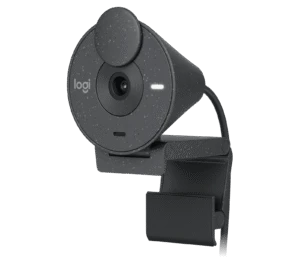
Brio 300
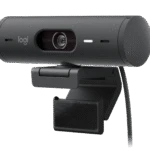
The Logitech Brio 300 is an entry-level 1080p webcam. It has a 2 MP sensor, fixed focus, a 70° field of view and RightLight 2 auto light correction.
- Best For
- Students
- Res.
- 1080p
- View
- 70°
- Autofocus
- No (fixed focus)
- Low Light
- Yes (RightLight 2)
- Mics
- Mono
- Shutter
- Yes (integrated privacy shutter)
- Connect
- USB-C (attached cable)
Kiyo Pro
The Razer Kiyo Pro is a 1080p webcam with a Sony STARVIS IMX327 sensor and an adaptive light sensor. It records 1080p at up to 60 fps, with HDR at 30 fps.
- Best For
- Dim rooms
- Res.
- 1080p at 60 fps
- View
- 103°
- Autofocus
- Yes
- Low Light
- Yes (adaptive light sensor, Sony STARVIS sensor)
- Mics
- Stereo omni-directional
- Shutter
- —
- Connect
- USB 3.0 (USB-C port on camera)
Review Scores Compared
Expert Score
Visual Image Quality
Autofocus & Low-Light
FOV & Framing
Privacy, Mount & Build
Software & App Controls
Connectivity & Port Interface
Integrated Audio
Why Brio 300 Beats Kiyo Pro (and Vice Versa)
Why Brio 300 beats Kiyo Pro
- Field of View: 70° vs 103°
- Weight: 74.6 g vs 196.3 g
Why Kiyo Pro beats Brio 300
- Better autofocus & low-light: 9.0 vs 4.5 out of 10
- Better integrated audio: 8.0 vs 5.0 out of 10
- Better privacy, mount & build: 9.4 vs 7.5 out of 10
- Better connectivity & port interface: 7.9 vs 6.1 out of 10
- Better visual image quality: 7.7 vs 6.6 out of 10
- Max Frame Rate: 60 fps vs 30 fps
Review-score leads of 0.5+ points out of 10 first, then specs where only one comes out ahead.
Full Specifications
General
| Brio 300 | Kiyo Pro | |
|---|---|---|
| Best For | Students | Dim rooms |
Image
| Brio 300 | Kiyo Pro | |
|---|---|---|
| Max Resolution | 1080p | 1080p at 60 fps |
| Max Frame Rate | 30 fps | 60 fps Better |
| Sensor | — | Sony STARVIS IMX327 |
| Megapixels | 2 MP | 2.1 MP Better |
| Field of View | 70° Better | 103° |
| Autofocus | No (fixed focus) | Yes Better |
| HDR | — | Yes (at 30 fps) |
| Light Correction | Yes (RightLight 2) | Yes (adaptive light sensor, Sony STARVIS sensor) |
| Digital Zoom | 1 x | — |
| Aperture | — | f/2.0 |
| Video Format | — | H.264 |
| Resolutions & Frame Rates | 1080p30, 720p30 | — |
| FOV Presets | — | 103° / 90° / 80° |
| Focus Type | Fixed focus | — |
Audio
| Brio 300 | Kiyo Pro | |
|---|---|---|
| Microphones | Mono | Stereo omni-directional Better |
| Mic Range | 1.22 m | — |
| Microphone Count | 1 | — |
Design & Privacy
| Brio 300 | Kiyo Pro | |
|---|---|---|
| Privacy Shutter | Yes (integrated privacy shutter) | — |
| Mounting | — | Detachable L-shaped stand |
| Tripod Thread | — | 1/4 in thread |
| Weight | 74.6 g Better | 196.3 g |
| Dimensions | 65.6 x 53.1 x 45 mm (incl. mount clip) | — |
| Colors | Graphite | Off-white | Rose | — |
| Activity Light | Yes | — |
| Materials | Min. 48% recycled plastic (plastic parts) | — |
Connectivity
| Brio 300 | Kiyo Pro | |
|---|---|---|
| Connection | USB-C (attached cable) | USB 3.0 (USB-C port on camera) |
| Cable Length | 1.5 m | 1.5 m |
| Software | Logi Tune | Razer Synapse |
| USB Standard | — | USB 3.0 |
| Detachable Cable | No | — |
In the Box
| Brio 300 | Kiyo Pro | |
|---|---|---|
| In the Box | Brio 300 with attached USB-C cable, user documentation | — |
| Warranty | 1-year limited hardware | — |
Identifiers
| Brio 300 | Kiyo Pro | |
|---|---|---|
| Model Number | — | RZ19-0364 |
Takeaways
- Our pick: Kiyo Pro, with the highest spec-based rating (4/5).
- Choose Brio 300 for students.
- Choose Kiyo Pro for dim rooms.
Pros and Cons
Brio 300
PROS
- Integrated privacy shutter
- RightLight 2 light correction
- USB-C plug and play
- Very light at 74.6 g
CONS
- Fixed focus
- Mono mic, 70° view
Kiyo Pro
PROS
- Sony STARVIS sensor with adaptive light sensor
- 1080p at 60 fps, HDR at 30 fps
- Wide 103/90/80° view
- Gorilla Glass 3 lens
CONS
- No privacy shutter listed
- Heavier at 196.3 g
Similar Comparisons
 Brio 300 vs C920e

- Brio 300 vs Facecam MK.2
- Brio 300 vs PanaCast 20
- Brio 300 vs Brio 500
 Kiyo Pro vs Facecam MK.2
- Kiyo Pro vs PanaCast 20
Quick Verdict
- Brio 300 6.3No outright category lead
- Kiyo Pro 8.1Best overallLeads in Visual Image Quality, Autofocus & Low-Light, FOV & Framing