
Poly Studio R30 vs Yealink SmartVision 60 Comparison
Compare Poly Studio R30 vs Yealink SmartVision 60 side by side: specs, ratings, pros and cons, and which one fits your room best.
On this page
At a Glance
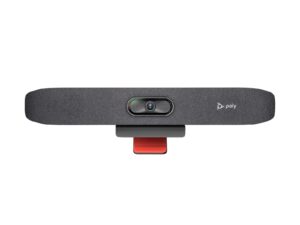
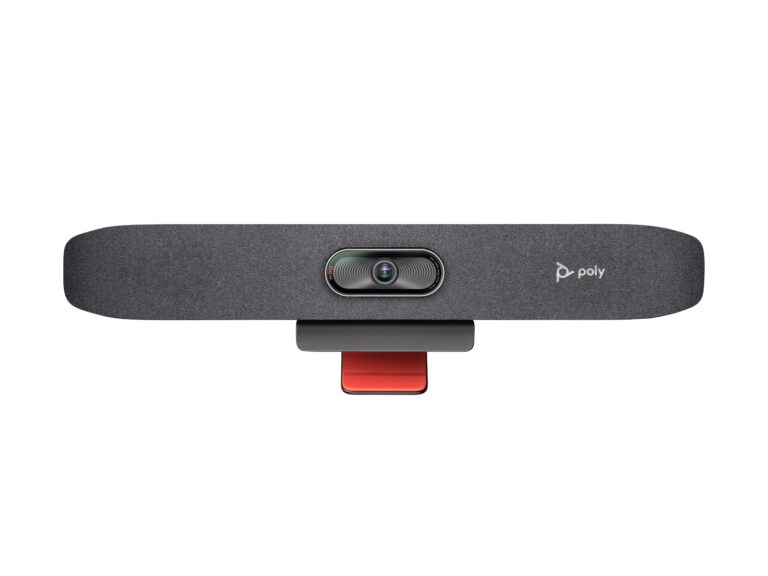
Equipping small rooms where people bring their own laptop? The Poly Studio R30 is a USB video bar for small rooms. It has a 4K camera at 30 fps with a 120° view, 5x zoom (4x with auto tracking) and group, people, speaker and presenter framing.
- Best For
- Small rooms
- Launch Price
- —
- Resolution
- 2160p 4K UHD (3840 x 2160), 30 fps
- Zoom
- 5x (4x with auto tracking)
- Field of View
- 120°
- Auto Framing
- Group, people, speaker and presenter framing
- Camera
- 4K
- Connection
- USB-C, USB-A
- Teams Rooms
- USB: works with Teams, Zoom and other PC apps
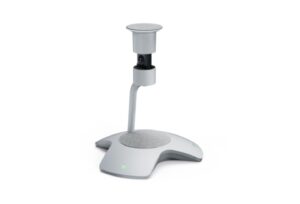
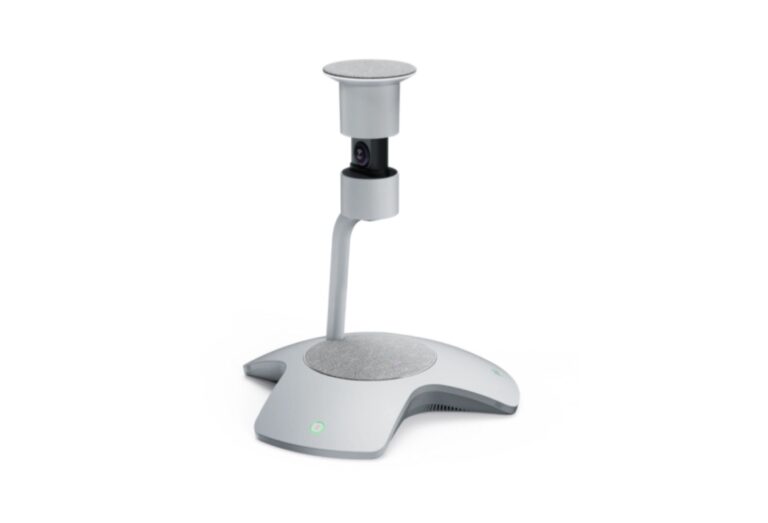
Equipping a Teams Room where people gather around one table? The Yealink SmartVision 60 is a 360° all-in-one camera co-developed with Microsoft for Teams Rooms, with a 10K panoramic camera (360° by 60° field of view), 5x digital zoom, an electric privacy cover, six MEMS microphones with 6 m pickup, a 5 W speaker, and USB-C 3.0.
- Best For
- Medium Teams Rooms with a central table
- Launch Price
- $1,999
- Resolution
- 10K panoramic camera
- Zoom
- 5 x
- Field of View
- 360° x 60°
- Auto Framing
- Individual people frames
- Camera
- 10K 360° camera
- Connection
- USB-C 3.0
- Teams Rooms
- Microsoft Teams Rooms
Review Scores Compared
Expert Score
Optics & Room Coverage
AI Speaker Tracking & Framing
Room Audio Pickup & Output
OS Platform & Ecosystem
Deployment & I/O
Editorial Reviews Comparison
Optics & Room Coverage
- Poly Studio R308.4/10Leader
- Yealink SmartVision 608.0/10
Poly Studio R30
A 4K sensor with a 120° field of view and 5x zoom supports group, people, speaker and presenter framing. It's a USB peripheral, so the PC or Mac does the meeting work. With tracking on, zoom is limited to 4x, which is still enough for a huddle room. At 0.45 kg, the R30 clamps straight onto a monitor or TV, which makes it the lightest and simplest bar here.
Yealink SmartVision 60
The 10K camera produces a 360° panorama with a 60° vertical field of view. Yealink designed it to make every seat in a medium boardroom clearly visible. The high capture resolution is used to crop individual people sharply, rather than to send a 10K stream. Faces look clear on a large display even when the panorama is shown at the same time.
AI Speaker Tracking & Framing
- Poly Studio R309.3/10Leader
- Yealink SmartVision 608.7/10
Poly Studio R30
The Studio R30 has speaker tracking: speaker framing, presenter tracking. Official AI features include Group, people, speaker and presenter framing. Zoom is listed as 5x (4x with auto tracking).
Yealink SmartVision 60
Zoom is digital, at up to 5x, which relies on the high-resolution sensor to keep detail. There is no optical zoom, as is typical for 360° devices. For deeper rooms, pair it with a front-of-room bar such as the Logitech Rally Bar to cover people seated further away.
Room Audio Pickup & Output
- Poly Studio R307.3/10
- Yealink SmartVision 609.0/10Leader
Poly Studio R30
Three integrated beamforming mics cover about 4.57 m. For larger rooms, the Poly Studio X32 with NoiseBlockAI is the step up. Three beamforming mics at about 4.57 m suit a personal office or tiny huddle, not a ten-seat table. Seat everyone inside that arc or the far end will sound distant.
Yealink SmartVision 60
The SmartVision 60 uses 6 MEMS arrays (6 m pickup) plus 6+1 AI array. It is specified for Medium rooms (6 m pickup).
OS Platform & Ecosystem
- Poly Studio R307.6/10Leader
- Yealink SmartVision 606.8/10
Poly Studio R30
As a USB device, it's certified for Microsoft Teams and Zoom, and whatever app runs on the computer can use it. That flexibility suits BYOD rooms, but it means the room is only as reliable as the PC behind it. Our soundbar vs. video bar guide explains when a USB bar beats a full appliance.
Yealink SmartVision 60
SmartVision 60 is built for Microsoft Teams Rooms, with Multi-Stream People Feed, live transcription and participant identification. Transcription with speaker names works through Teams voice recognition, which requires enrolment in Microsoft's voice profiles. Admins should check licensing for these features. Firmware and settings are managed through Yealink Device Management or the Teams admin centre, depending on the deployment.
Deployment & I/O
- Poly Studio R306.0/10
- Yealink SmartVision 607.8/10Leader
Poly Studio R30
Poly Lens handles firmware and settings, and the bar takes power from an external 12 V supply. One USB-C cable runs to the host.
Yealink SmartVision 60
The device connects with one USB-C 3.0 cable to a Teams Rooms system and uses an external 15 V, 2.4 A power adapter. It has mute buttons for the mics and camera. The electric privacy cover lifts automatically with a meeting and lowers afterward, with a ring of LEDs showing status.
Why Poly Studio R30 Beats Yealink SmartVision 60 (and Vice Versa)
Why Poly Studio R30 beats Yealink SmartVision 60
- Better os platform & ecosystem: 7.6 vs 6.8 out of 10
- Better ai speaker tracking & framing: 9.3 vs 8.7 out of 10
- Camera Resolution: 2160p 4K UHD (3840 x 2160), 30 fps vs 10K panoramic camera
- Auto Framing: Group, people, speaker and presenter framing vs Individual people frames
- Remote Management: Poly Lens vs Yealink Device Management, Teams admin centre
Why Yealink SmartVision 60 beats Poly Studio R30
- Better deployment & i/o: 7.8 vs 6.0 out of 10
- Better room audio pickup & output: 9.0 vs 7.3 out of 10
- Ideal Room Size: Medium rooms (6 m pickup) vs Small and huddle rooms
- Field of View: 360° x 60° vs 120°
- Horizontal FOV: 360° vs 110°
- Camera: 10K 360° camera vs 4K
Review-score leads of 0.5+ points out of 10 first, then specs where only one comes out ahead.
Full Specifications
General
| Poly Studio R30 | Yealink SmartVision 60 | |
|---|---|---|
| Release Year | — | 2022 |
| Launch Price | — | $1,999 |
| Weight | 0.45 kg (1 lb) | — |
| Privacy Cover | Attachable lens cover | Electric lifting privacy cover |
| Dimensions | 17.5 x 3.4 x 3.2 in (with monitor clamp) | — |
| Model Number | — | SmartVision 60 |
Optics & Room Coverage
| Poly Studio R308.4/10 Better | Yealink SmartVision 608.0/10 | |
|---|---|---|
| Zoom | 5x (4x with auto tracking) | 5 x |
| Field of View | 120° | 360° x 60° Better |
| Ideal Room Size | Small and huddle rooms | Medium rooms (6 m pickup) Better |
| Pan / Tilt | Manual pan, tilt and zoom control | No mechanical PTZ; 360° camera with electric privacy cover |
| Megapixels | 8 MP | — |
| Sensor | — | 10K 360° camera |
| Vertical FOV | — | 60° |
| Digital Zoom | — | 5x |
| Best For | Small rooms | Medium Teams Rooms with a central table |
| Camera Resolution | 2160p 4K UHD (3840 x 2160), 30 fps Better | 10K panoramic camera |
| Horizontal FOV | 110° | 360° Better |
| Camera | 4K | 10K 360° camera Better |
AI Speaker Tracking & Framing
| Poly Studio R309.3/10 Better | Yealink SmartVision 608.7/10 | |
|---|---|---|
| Speaker Tracking | Yes (speaker framing, presenter tracking) | Yes (Microsoft Teams intelligent speaker features, including people identification) |
| Auto Framing | Group, people, speaker and presenter framing Better | Individual people frames |
| Multi-Stream / Gallery | — | Multi-Stream People Feed |
| AI Features | Group, people, speaker and presenter framing | — |
Room Audio Pickup & Output
| Poly Studio R307.3/10 | Yealink SmartVision 609.0/10 Better | |
|---|---|---|
| Built-in Mics | 3 | 6 MEMS arrays (6 m pickup) plus 6+1 AI array Better |
| Mic Pickup Range | 4.57 m | — |
| Speakers | Single speaker, 100 Hz-20 kHz, 90 dB SPL @ 0.5 m | — |
| Mic Array | Integrated mics | — |
| Audio Processing | Beamforming | — |
| Audio Output | — | 5 W speaker (7 W max) |
OS Platform & Ecosystem
| Poly Studio R307.6/10 Better | Yealink SmartVision 606.8/10 | |
|---|---|---|
| Appliance Mode | No | — |
| USB / BYOD Mode | Yes (USB to PC or Mac) | — |
| Remote Management | Poly Lens Better | Yealink Device Management, Teams admin centre |
| Teams Rooms | USB: works with Teams, Zoom and other PC apps | Microsoft Teams Rooms Better |
| Microsoft Teams | — | Yes |
| Software | — | Microsoft Teams Rooms features including live transcription, translation, and participant identification |
| Security | Kensington lock slot | — |
| Certifications | Microsoft Teams, Zoom | Microsoft Teams Rooms |
| Operating System | None (USB peripheral) | — |
Deployment & I/O
| Poly Studio R306.0/10 | Yealink SmartVision 607.8/10 Better | |
|---|---|---|
| Mounting | Monitor clamp | Table |
| HDMI | — | No (USB-C 3.0 interface listed) |
| Connection | USB-C, USB-A | USB-C 3.0 |
| USB | 1 x USB-C 5 Gbps, 2 x USB 2.0 Type-A | USB-C 3.0 Better |
| Ports | 4.5 mm power input | — |
| Power | External 12 V / 3 A | External 15 V, 2.4 A adapter |
| Operating Temperature | — | 0 to 40 °C |
Takeaways
- Our pick: Yealink SmartVision 60, with the highest spec-based rating (4.1/5).
- Choose Poly Studio R30 for small rooms.
- Choose Yealink SmartVision 60 for medium Teams Rooms with a central table.
Pros and Cons
Poly Studio R30
PROS
- 4K camera with 120° view
- Four framing modes
- One USB-C cable to the laptop
- Teams and Zoom certified
CONS
- Three mics and one speaker
- Needs a laptop (no appliance mode)
Yealink SmartVision 60
PROS
- 10K 360° panoramic view
- Multi-Stream People Feed in Teams
- Automatic lifting privacy cover
- 6 m 360° pickup
CONS
- Designed for Teams first
- Needs a separate power adapter
- No optical zoom
Similar Comparisons
 Yealink SmartVision 608.2/10
 Yealink UVC869.4/10Yealink SmartVision 60 vs Yealink UVC86
 Poly Studio R308.0/10Yealink UVC869.4/10Poly Studio R30 vs Yealink UVC86
- Yealink SmartVision 608.2/10
 AVer CAM5509.2/10Yealink SmartVision 60 vs AVer CAM550
- Yealink SmartVision 608.2/10
 Owl Labs Meeting Owl 4+9.2/10Yealink SmartVision 60 vs Owl Labs Meeting Owl 4+
Quick Verdict
- Poly Studio R30 8.0Leads in Optics & Room Coverage, AI Speaker Tracking & Framing, OS Platform & Ecosystem
- Yealink SmartVision 60 8.2Best overallLeads in Room Audio Pickup & Output, Deployment & I/O