At a glance
| Resolution | 10K panoramic camera |
|---|---|
| Zoom | 5 x |
| Field of View | 360° x 60° |
| Auto Framing | Individual people frames |
| Camera | 10K 360° camera |
| Connection | USB-C 3.0 |
- Model SmartVision 60
- Released 2022
YealinkLast updated on November 2026
Yealink SmartVision 60 Review
- Small room STRONG
- Large room STRONG
Prices, shipping and returns are handled by the retailer.
On this page
Overview
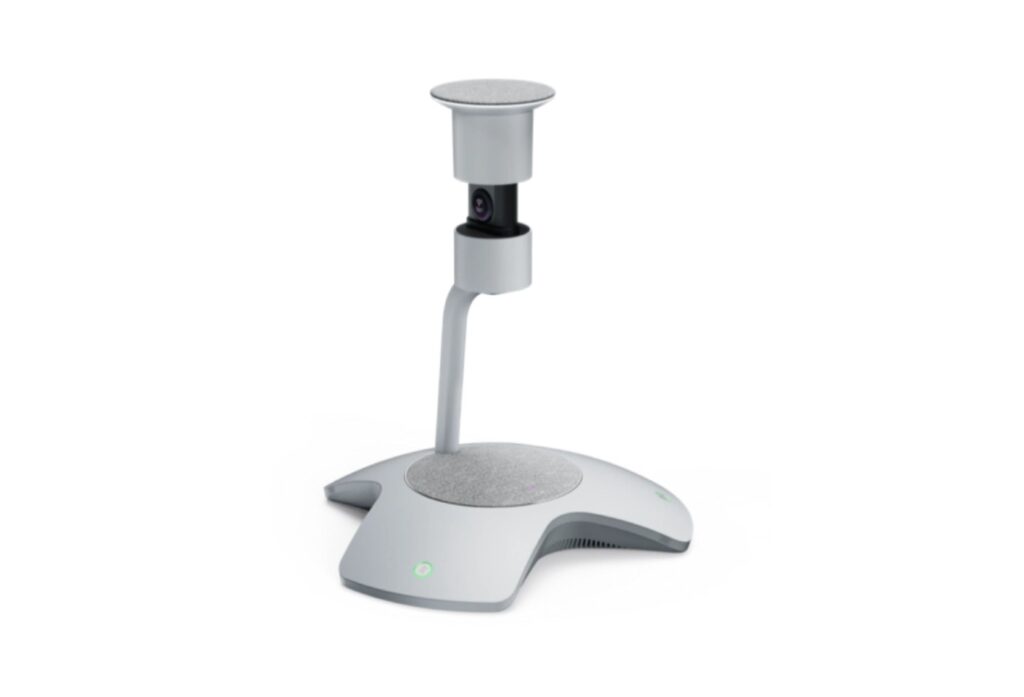
Equipping a Teams Room where people gather around one table? The Yealink SmartVision 60 is a 360° all-in-one camera co-developed with Microsoft for Teams Rooms, with a 10K panoramic camera (360° by 60° field of view), 5x digital zoom, an electric privacy cover, six MEMS microphones with 6 m pickup, a 5 W speaker, and USB-C 3.0.
- 10K 360° panoramic view
- Multi-Stream People Feed in Teams
- Automatic lifting privacy cover
- 6 m 360° pickup
Key Takeaways
- 6 MEMS mics plus 6+1 AI array
- 5 W speaker
- 0 to 40 °C operation
Best For
- Teams Rooms
- Medium rooms
- Central tables
Avoid If
- Your rooms use Zoom Rooms
- You need a front-of-room camera
Pros & Cons
SmartVision 60 is a capable Teams-first centre-table camera, with a sharp 360° panorama and a clever privacy cover. It is less flexible outside Microsoft rooms.
PROS
- 10K 360° panoramic view
- Multi-Stream People Feed in Teams
- Automatic lifting privacy cover
- 6 m 360° pickup
CONS
- Designed for Teams first
- Needs a separate power adapter
- No optical zoom
Review Scores
Score Breakdown
8.2/10 Expert Score
- Optics & Room Coverage8.0/10
- AI Speaker Tracking & Framing8.7/10
- Room Audio Pickup & Output9.0/10
- OS Platform & Ecosystem6.8/10
- Deployment & I/O7.8/10
How this score is calculated
Each criterion is the weighted average of its available spec scores (0–10), calculated from official specifications using our Conference Cameras scoring matrix. Empty specs are skipped, not scored as 0. The Expert Score is the weighted average of the scored criteria, shown out of 10; stars = Expert Score ÷ 2 (a 9.4/10 score is 4.7 stars), to one decimal.
| Criterion | Weight | From specs | Score |
|---|---|---|---|
| Optics & Room CoverageZoom: 5 → 6.5; Field of View: 360° x 60° → 10.0; Ideal Room Size: Medium rooms (6 m pickup) → 7.5; Pan / Tilt: No mechanical PTZ → 10.0; Max Resolution: 10K panoramic camera → 6.0 | 30% | 8.0 | 8.0 |
| AI Speaker Tracking & FramingSpeaker Tracking: Yes → 10.0; Auto Framing: Individual people frames → 6.0; Multi-Stream / Gallery: Multi-Stream People Feed → 10.0 | 25% | 8.7 | 8.7 |
| Room Audio Pickup & OutputBuilt-in Mics: 6 MEMS arrays → 9.0 | 20% | 9.0 | 9.0 |
| OS Platform & EcosystemRemote Management: Yealink Device Management → 6.0; Certifications: Microsoft Teams Rooms → 8.5 | 15% | 6.8 | 6.8 |
| Deployment & I/OMounting: Table → 6.0; HDMI: No (USB-C 3.0 interface listed) → 10.0 | 10% | 7.8 | 7.8 |
| Expert Score | 8.2/10 | ||
Scores by Use Case
- Small room80/100
- Large room80/100
Yealink SmartVision 60 Review
Yealink is a Chinese maker of IP phones and meeting room systems. It developed the SmartVision 60 with Microsoft as an intelligent camera for Microsoft Teams Rooms, following the earlier Teams intelligent speaker concept.
Optics & Room Coverage 8.0/10
The 10K camera produces a 360° panorama with a 60° vertical field of view. Yealink designed it to make every seat in a medium boardroom clearly visible.
The high capture resolution is used to crop individual people sharply, rather than to send a 10K stream. Faces look clear on a large display even when the panorama is shown at the same time.
Next to an Owl Labs 360° camera, the Yealink is more tightly tied to Teams, with Microsoft’s AI handling the people views.
The 360° horizontal and 60° vertical view captures everyone around the table. Multi-Stream People Feed gives each participant their own frame in the Teams gallery.
It also helps identify who is speaking.
Six MEMS microphones pick up voices up to 6 m away in all directions, and a separate 6+1 array supports AI features such as live transcription with speaker identification.
- Zoom 5 x
- View 360° x 60°
- Room Size Medium rooms (6 m pickup)
- Pan/Tilt No mechanical PTZ
AI Speaker Tracking & Framing 8.7/10
Zoom is digital, at up to 5x, which relies on the high-resolution sensor to keep detail. There is no optical zoom, as is typical for 360° devices.
For deeper rooms, pair it with a front-of-room bar such as the Logitech Rally Bar to cover people seated further away.
- Tracking Yes
- Framing Individual people frames
- Gallery Multi-Stream People Feed
Room Audio Pickup & Output 9.0/10
The SmartVision 60 uses 6 MEMS arrays (6 m pickup) plus 6+1 AI array.
It is specified for Medium rooms (6 m pickup).
OS Platform & Ecosystem 6.8/10
SmartVision 60 is built for Microsoft Teams Rooms, with Multi-Stream People Feed, live transcription and participant identification.
Transcription with speaker names works through Teams voice recognition, which requires enrolment in Microsoft’s voice profiles. Admins should check licensing for these features.
Firmware and settings are managed through Yealink Device Management or the Teams admin centre, depending on the deployment. Microsoft has retired some voice assistant features since launch, so the core value today is the camera, audio and people feeds.
- Mgmt Yealink Device Management
Deployment & I/O 7.8/10
The device connects with one USB-C 3.0 cable to a Teams Rooms system and uses an external 15 V, 2.4 A power adapter. It has mute buttons for the mics and camera.
The electric privacy cover lifts automatically with a meeting and lowers afterward, with a ring of LEDs showing status. That visible signal reassures people in sensitive meetings.
It operates from 0 to 40 °C and fits on a central table without extra mounts. Plan a cable route to the room PC, because the USB-C link carries all audio and video.
- Mounting Table
- HDMI No
Full Specifications
General
| Release Year | 2022 |
|---|---|
| Launch Price | $1,999 |
| Privacy Cover | Electric lifting privacy cover |
| Model Number | SmartVision 60 |
Optics & Room Coverage 8.0/10
| Zoom | 5 x |
|---|---|
| Field of View | 360° x 60° |
| Ideal Room Size | Medium rooms (6 m pickup) |
| Pan / Tilt | No mechanical PTZ; 360° camera with electric privacy cover |
| Sensor | 10K 360° camera |
| Vertical FOV | 60° |
| Digital Zoom | 5x |
| Best For | Medium Teams Rooms with a central table |
| Camera Resolution | 10K panoramic camera |
| Horizontal FOV | 360° |
| Camera | 10K 360° camera |
AI Speaker Tracking & Framing 8.7/10
| Speaker Tracking | Yes (Microsoft Teams intelligent speaker features, including people identification) |
|---|---|
| Auto Framing | Individual people frames |
| Multi-Stream / Gallery | Multi-Stream People Feed |
Room Audio Pickup & Output 9.0/10
| Built-in Mics | 6 MEMS arrays (6 m pickup) plus 6+1 AI array |
|---|---|
| Audio Output | 5 W speaker (7 W max) |
OS Platform & Ecosystem 6.8/10
| Remote Management | Yealink Device Management, Teams admin centre |
|---|---|
| Teams Rooms | Microsoft Teams Rooms |
| Microsoft Teams | Yes |
| Software | Microsoft Teams Rooms features including live transcription, translation, and participant identification |
| Certifications | Microsoft Teams Rooms |
Deployment & I/O 7.8/10
| Mounting | Table |
|---|---|
| HDMI | No (USB-C 3.0 interface listed) |
| Connection | USB-C 3.0 |
| USB | USB-C 3.0 |
| Power | External 15 V, 2.4 A adapter |
| Operating Temperature | 0 to 40 °C |
Product Details
| Brand | Yealink |
|---|---|
| Model | SmartVision 60 |
| Model number | SmartVision 60 |
| Release year | 2022 |
Price Comparison
| Store | Price | Deal |
|---|---|---|
| Yealink.comOfficial Yealink store | Launch price $1,999 | View deal (opens in a new tab) |
The Verdict
Buy the Yealink SmartVision 60 if you are buying for Teams Rooms where people gather around a single table.
Skip it if your rooms use Zoom Rooms. For rooms where everyone faces the screen, the Jabra PanaCast 50 fits better.
Everything here is taken from Yealink’s published specs and user documentation. How the specs turn into the Expert Score is explained on How We Score.
FAQs
What resolution is the SmartVision 60 camera?
A 10K 360° panoramic camera.
What is its field of view?
360° horizontal and 60° vertical.
How far do the mics reach?
6 m in all directions.
Does it have a privacy cover?
Yes, an electric cover that lifts with meetings.
How does it connect?
USB-C 3.0.
Which platform is it designed for?
Microsoft Teams Rooms.
How much zoom does it have?
5x digital.
What powers it?
An external 15 V, 2.4 A adapter.