At a glance
| Resolution | 4K |
|---|---|
| Zoom | 12x optical, 36x total |
| Field of View | 80° diagonal |
| Auto Framing | Auto framing |
| Camera | 4K sensor |
| Connection | USB 2.0 Type-B |
- Model UVC84
- Released 2020
YealinkLast updated on November 2026
Yealink UVC84 Review
- Small room STRONG
- Large room STRONG
Prices, shipping and returns are handled by the retailer.
On this page
Overview
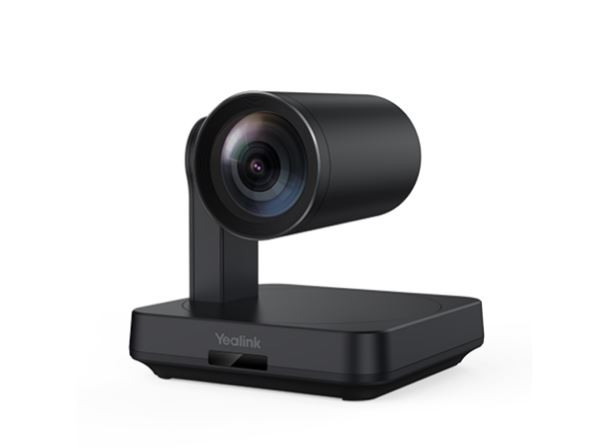
The Yealink UVC84 is a 4K USB PTZ conference camera with 12x optical zoom, 36x total zoom, an 80 degree diagonal field of view and auto framing, designed for medium meeting rooms with a room PC.
- 4K sensor with 12x optical zoom
- Auto framing keeps groups in view
- Simple USB connection
- Strong value for a PTZ
Key Takeaways
- 36x total zoom with digital
- 80° diagonal field of view
- Works with Yealink RoomConnect software
Best For
- Medium meeting rooms
- Training rooms
- Yealink room systems
Avoid If
- You need HDMI or NDI outputs
- You want an all-in-one bar
Pros & Cons
The Yealink UVC84 is a capable, good-value PTZ camera for medium rooms. Optical zoom and auto framing work well, though connections are limited to USB and it needs separate audio.
PROS
- 4K sensor with 12x optical zoom
- Auto framing keeps groups in view
- Simple USB connection
- Strong value for a PTZ
CONS
- No built-in microphones
- USB 2.0 connection limits 4K options
- Fewer outputs than broadcast PTZs
Review Scores
Score Breakdown
7.9/10 Expert Score
- Optics & Room Coverage8.1/10
- AI Speaker Tracking & Framing9.4/10
- OS Platform & Ecosystem6.0/10
- Deployment & I/O6.0/10
How this score is calculated
Each criterion is the weighted average of its available spec scores (0–10) from our Conference Cameras scoring matrix. Empty specs are skipped, not scored as 0. The Expert Score is the weighted average of the scored criteria, shown out of 10; stars = Expert Score / 20, rounded to the nearest half star. Not scored for this product (it doesn't apply, or the published specs don't cover it): Room Audio Pickup & Output. Its weight is shared by the other criteria.
| Criterion | Weight | From specs | Score |
|---|---|---|---|
| Optics & Room CoverageOptical Zoom: 12x → 9.5; Zoom: 12x optical, 36x total → 7.9; Field of View: 80° diagonal → 6.3; Ideal Room Size: Medium rooms → 7.5; Pan / Tilt: Yes → 6.0; Max Resolution: 4K → 9.5 | 38% | 8.1 | 8.1 |
| AI Speaker Tracking & FramingSpeaker Tracking: Yes → 10.0; Auto Framing: Auto framing → 8.5 | 31% | 9.4 | 9.4 |
| Room Audio Pickup & Output | — | No built-in room audio | N/A |
| OS Platform & EcosystemRemote Management: Yealink Device Management Platform → 6.0 | 19% | 6.0 | 6.0 |
| Deployment & I/OMounting: Wall bracket included → 6.0 | 13% | 6.0 | 6.0 |
| Expert Score | 7.9/10 | ||
Scores by Use Case
- Small room80/100
- Large room80/100
Yealink UVC84 Review
Yealink, based in Xiamen, is one of the largest makers of video conferencing hardware and supplies many Microsoft Teams Rooms systems. The UVC84 sits in its USB camera range between the fixed UVC40 bar and higher-end PTZ models.
Optics & Room Coverage 8.1/10
The UVC84 uses a 4K sensor and outputs 4K, 1080p and 720p at 30 fps. Image processing handles typical office lighting with balanced colour and good sharpness.
Faces stay crisp at the far end of a medium room, and the 4K sensor gives room for digital cropping on top of the optical lens. Bright windows behind participants can darken faces, so blinds help on sunny days.
Compared with the Logitech Rally Camera the picture is a little less refined in tricky light, but the price difference is significant for many organisations.
The diagonal field of view is 80 degrees, which suits rooms where participants sit at a table facing the screen rather than wrapped around it.
Auto framing adjusts the shot as people join or leave, so remote viewers see the whole group without wasted space. It is less sophisticated than dual-lens speaker tracking, but it works reliably.
In wide or short rooms, the 80 degree view can miss people sitting close to the camera, so a wide-angle bar may suit those spaces better.
- Optical 12x
- Zoom 12x optical, 36x total
- View 80° diagonal
- Room Size Medium rooms
AI Speaker Tracking & Framing 9.4/10
The lens provides 12x optical zoom, extended to 36x total with 3x digital zoom. Optical zoom keeps detail intact when framing a single speaker or a whiteboard.
In practice the 12x lens reaches the back of a typical boardroom without softening faces. Movement between presets is smooth, and the camera settles quickly without overshooting the target.
For very large spaces, the digital stage starts to soften the image, so place the camera so the optical range covers the furthest seats you need to frame.
- Tracking Yes
- Framing Auto framing
OS Platform & Ecosystem 6.0/10
The UVC84 is compatible with Microsoft Teams, Zoom and other platforms as a standard UVC camera. Yealink RoomConnect and the Yealink Device Management Platform handle updates.
For IT teams running Yealink room systems, the camera fits into an existing management platform. That simplifies firmware updates across many rooms.
The UVC84 datasheet lists supported platforms and resolutions in detail, which is useful during procurement. Teams and Zoom treat it as a generic camera, so camera control in the meeting app relies on standard UVC commands. That works for pan, tilt and zoom in most clients, and presets can also be stored on the remote.
Deployment & I/O 6.0/10
The camera connects to the room PC over USB 2.0 with a Type-B port, and Yealink includes a mount and remote control. It needs separate microphones and speakers.
Plug-and-play USB means it works with any UVC-compatible meeting app. Installation takes minutes if the room PC and audio system are already in place.
USB 2.0 limits bandwidth for uncompressed 4K, but conferencing platforms rarely use full 4K, so it is not a practical problem for meetings. A long active USB extension may be needed when the room PC sits behind a credenza.
- Mounting Wall bracket included
Full Specifications
General
| Best For | Medium meeting rooms on USB |
|---|---|
| Ideal Room Size | Medium rooms |
| Release Year | 2020 |
Camera
| Camera Resolution | 4K |
|---|---|
| Max Frame Rate | 30 fps |
| Sensor | 4K sensor |
| Zoom | 12x optical, 36x total |
| Optical Zoom | 12x |
| Field of View | 80° diagonal |
| Pan / Tilt | Yes |
| Auto Framing | Auto framing |
| Speaker Tracking | Yes (mechanical PTZ; Yealink AI tracking in supported kits) |
| Camera Presets | Yes |
| Horizontal FOV | 80° |
| Digital Zoom | 3x |
| Pan Range | ±100° |
| Tilt Range | +40° / −90° |
| Camera | 4K sensor |
Connectivity
| Connection | USB 2.0 Type-B |
|---|---|
| USB | USB 2.0 Type-B |
Platforms
| Remote Management | Yealink Device Management Platform |
|---|---|
| Software | Yealink RoomConnect |
| OS Compatibility | Windows 7, Windows 10, macOS 10.10 or higher |
Design
| Remote Control | Yes |
|---|---|
| Mounting | Wall bracket included |
| Weight | 1150 g |
| Dimensions | 155 x 155 x 182 mm |
| Power | External adapter, AC 100–240 V in, DC 48 V / 0.7 A out |
| Operating Temperature | 0 to 40 °C |
In the Box
| In the Box | UVC84 camera, VCR20 remote, power adapter, wall bracket and accessories, 7 m USB cable |
|---|
Identifiers
| Model Number | UVC84 |
|---|
Audio
| Audio Output | 3.5 mm line-out |
|---|
Product Details
| Brand | Yealink |
|---|---|
| Model | UVC84 |
| Model number | UVC84 |
| Release year | 2020 |
Price Comparison
| Store | Price | Deal |
|---|---|---|
| Yealink.comOfficial Yealink store | See price | View deal (opens in a new tab) |
The Verdict
I’d choose the UVC84 for a medium room that needs optical zoom on a budget. For broadcast outputs, the PTZOptics Move 4K is the step up, and for small rooms, the Rally Bar Mini is simpler.
FAQs
What resolution does the UVC84 support?
4K, 1080p and 720p at 30 fps.
How much optical zoom does it have?
12x optical, with 36x total.
What is the field of view?
80 degrees diagonal.
Does it have auto framing?
Yes.
How does it connect?
By USB 2.0 Type-B.
Does it have microphones?
No, it needs separate audio.
Is there a remote control?
Yes.
Which platforms does it support?
Teams, Zoom and other UVC apps.