
Understanding Google One Vs. Google Workspace Comparison
If you’re trying to decide between Google One and Google Workspace, the confusing part is that both pages list the same things: more storage, Gmail, Google Meet, and Gemini AI. On paper they look almost identical.
The short answer: Google One is for personal accounts, and Google Workspace is for businesses and teams. The details still matter, though, especially if you freelance, run a small business, or host a lot of Google Meet calls for work. The ticket I see most often is someone who bought more storage on a personal Gmail account and then found out it doesn’t give them a business email address or admin controls.
In this post, I’ll compare both services plan by plan, with their 2026 prices, Meet limits, pros, and cons. Then I’ll give you a simple rule for picking one.
Let’s take it step by step.
What is Google One?
Google One is Google’s subscription service for personal Google accounts. Every Google account comes with 15 GB of free storage, shared across Gmail, Google Drive, Google Photos, and more. When you need more space or extra features, you upgrade to a Google One plan.
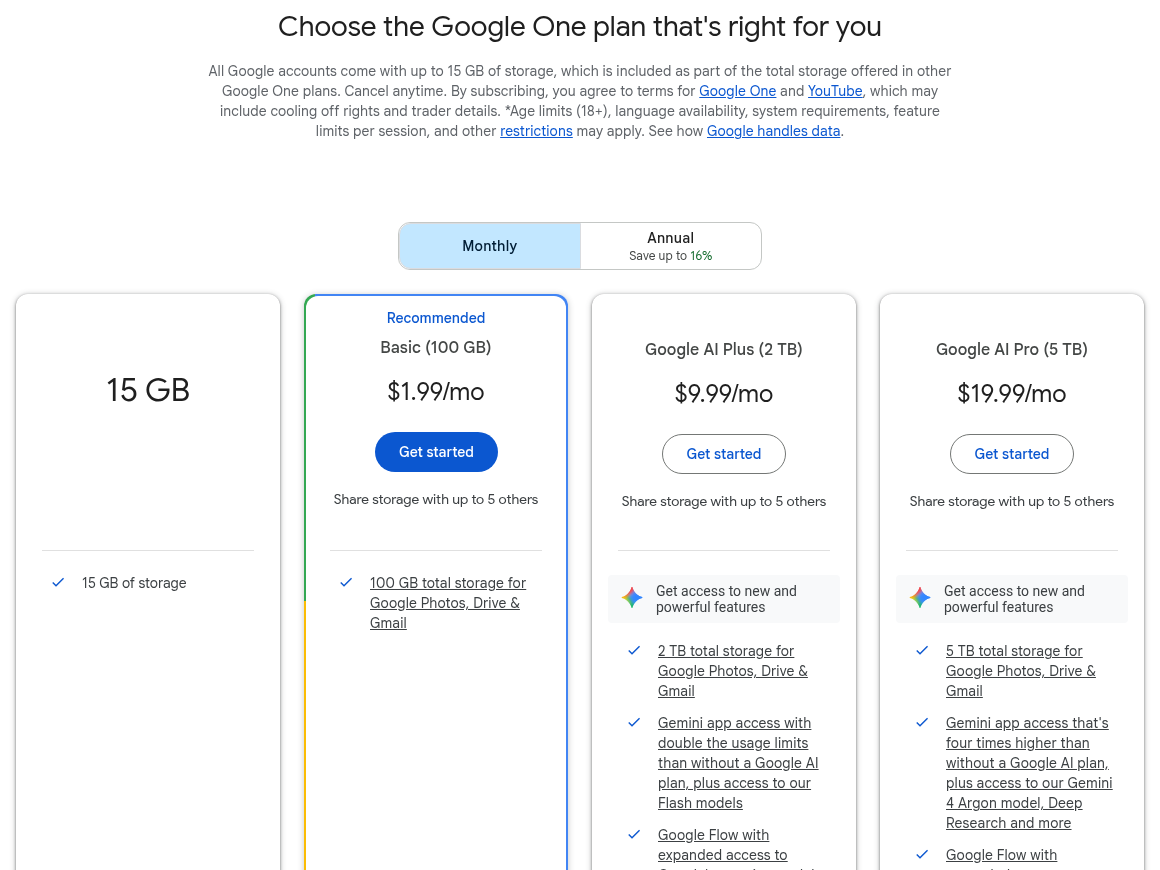
In 2026, Google One has four main options: the free 15 GB plan, Basic (100 GB), Google AI Plus (2 TB), and Google AI Pro (5 TB). The old Premium and AI Premium plans have been replaced by the Google AI plans, which add Gemini features on top of storage. You can move up or down a plan whenever your storage or AI needs change.
Here is the in-depth comparison table of Google One (U.S. prices from the Google One plans page):
| Plan | Storage | Monthly price | What you get |
|---|---|---|---|
| Free | 15 GB | $0 | Storage for Gmail, Drive, and Photos, plus free Google Meet |
| Basic | 100 GB | $1.99 | More storage, shareable with up to 5 family members |
| Google AI Plus | 2 TB | $9.99 | 2 TB storage, more Gemini access, Gemini in Gmail, and premium Meet features like longer calls and recording |
| Google AI Pro | 5 TB | $19.99 | 5 TB storage, Gemini in Gmail, Docs, and Vids, Deep Research, YouTube Premium Lite, and AI notes in Google Meet |
There’s also a higher Google AI Ultra plan for heavy AI users, but it’s far more than most people need.
Google One is mainly useful when you run out of space. The extra storage is shared across Google Drive, Gmail, and Google Photos, and your existing 15 GB is simply added into the plan, as Google explains in its help page on how existing storage works with Google One. You can also share your plan with up to five other people in your family group.
- Very cheap storage, starting at $1.99 a month
- Share storage with up to 5 family members
- Works with your existing Gmail address
- Google AI plans add Gemini and premium Google Meet features
- Easy to cancel anytime
- No custom email domain (you stay on @gmail.com)
- No admin console to manage other users
- Meet participant limit stays at 100
- Not designed for business data, retention, or compliance
What is Google Workspace?
Google Workspace is the rebranded name of G Suite, Google’s suite of cloud computing, productivity, and collaboration tools for businesses. Google renamed G Suite to Workspace in 2020.
It includes apps like Gmail, Google Drive, Google Docs, Google Sheets, Google Slides, Google Forms, Google Sites, Google Keep, Google Calendar, Google Chat (formerly Google Hangouts), Google Meet, Google Vids, Gemini, and Apps Script. Google Jamboard used to be part of this list, but Google shut the app down at the end of 2024 (see the Jamboard end-of-life notice).
It also includes security and management tools, such as the Google Admin console, endpoint management for company phones and laptops, and Google Vault for keeping and searching data (from Business Plus).
As paid add-ons, you can buy tools like Google Voice and Google Meet hardware for meeting rooms. AppSheet, Google’s no-code app builder, is now included in the Business plans.
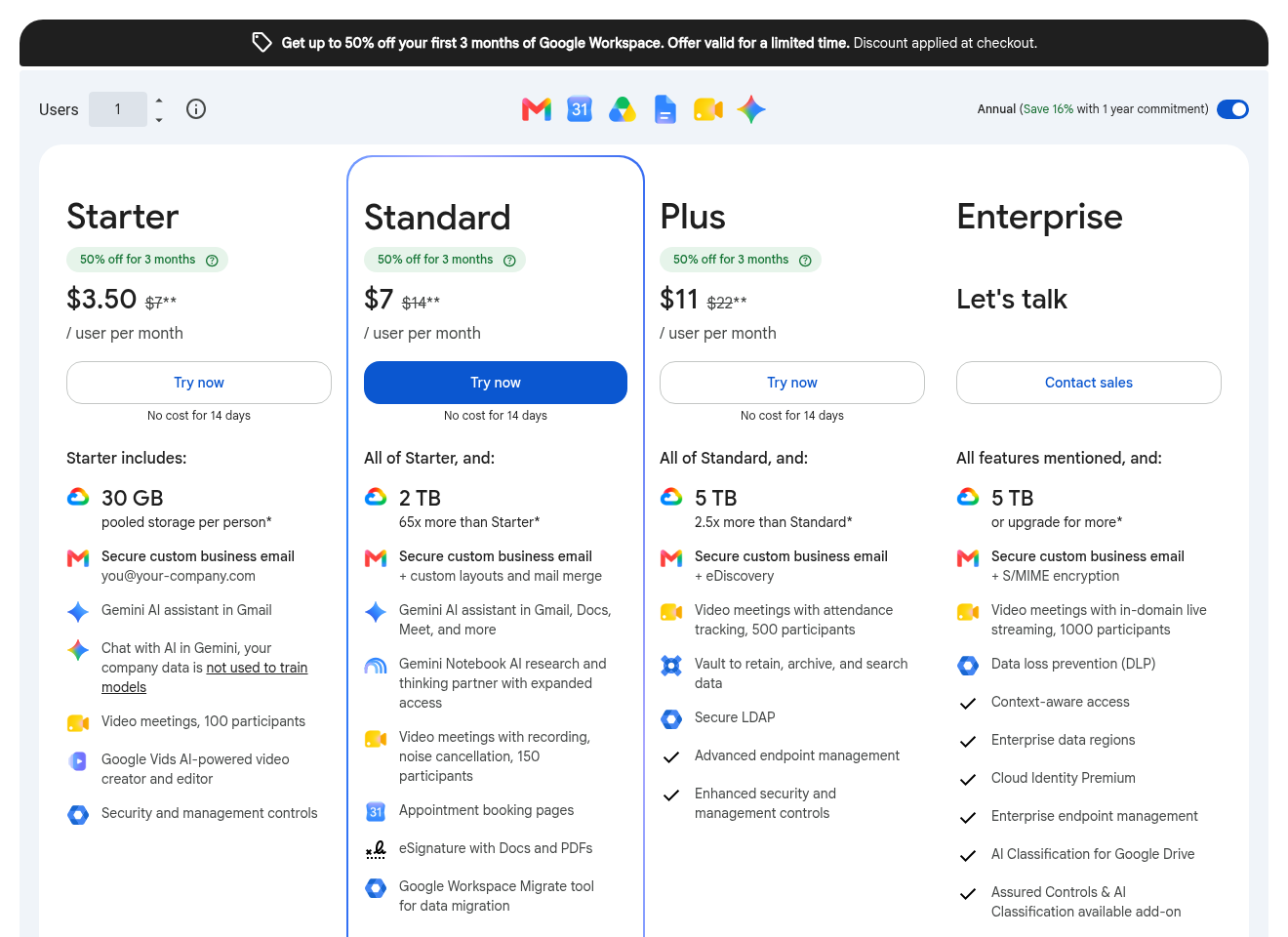
Comparing Google Workspace Pricing Plans and Features (U.S. prices from the Google Workspace pricing page):
| Plan | Price per user | Storage per user | Meet participants | Key extras |
|---|---|---|---|---|
| Business Starter | $7/month | 30 GB | 100 | Custom email, Gemini in Gmail, Google Vids |
| Business Standard | $14/month | 2 TB | 150 | Meet recording, noise cancellation, Gemini in Docs and Meet, booking pages, eSignature |
| Business Plus | $22/month | 5 TB | 500 | Attendance tracking, Vault, advanced security |
| Enterprise | Contact sales | 5 TB or more | 1,000 | Live streaming, data loss prevention, S/MIME, data regions |
New customers often get a discount for the first few months, and every plan comes with a 14-day free trial. Business plans can have up to 300 users, and Enterprise has no limit. Google’s Compare Google Workspace editions page lists every feature by plan if you need the full detail.
- Custom business email like [email protected]
- Admin console to add, remove, and manage users
- Bigger Google Meet calls (up to 1,000 people) with recording on most plans
- Shared drives, Vault, and strong security controls
- 24-hour group meetings on every plan
- Priced per user, so it gets expensive for big teams
- Business Starter has only 30 GB and no Meet recording
- Needs a domain name and some setup
- More than most individuals need
Comparing Google One Vs. Google Workspace
Now let’s put them side by side. In each section below, I compare Google One first and then Google Workspace.
Storage
Google One is cheaper per terabyte for one person. For $9.99 a month, Google AI Plus gives you 2 TB, which you can share with your family. In Workspace, storage is pooled across your organization, from 30 GB per user on Starter to 5 TB per user on Business Plus.
This is the biggest difference. With Google One, you keep your @gmail.com address. With Workspace, you get a professional address on your own domain, which looks much more trustworthy to clients. Even a solo freelancer can set this up; Google has a quick start guide for one-person businesses.
Google Meet Features
Free Google accounts can hold 60-minute group calls with up to 100 people. Google One AI plans unlock longer calls, recording, and noise cancellation, and AI Pro adds AI meeting notes. Workspace plans offer 24-hour group calls on every plan, and Business Standard adds recording for up to 150 participants. Business Plus raises that to 500, which matters if you run big calls (see our list of the best platforms for large group meetings). For the full free-account picture, read our breakdown of Google Meet free features and limitations. If the 60-minute limit is your only problem, also check our list of free video conferencing platforms with no time limit.
Security and Control
Workspace is built for organizations. Admins can reset passwords, remove access when someone leaves, enforce 2-step verification, and keep data with Vault. Google One accounts are personal, so you can’t control them centrally. From a network and admin point of view, that’s the deciding factor for any team: when I integrate a mix of tools on one company network, I want every account under one console, not scattered across personal logins.
Which One Should You Choose?
- Choose Google One if you need more storage for photos, files, and email on your personal Gmail account, or if you want Gemini and better Google Meet features for yourself and your family.
- Choose Google Workspace if you run a business, even a one-person business, and want a custom email address, team management, and professional Meet features.
- Choose Business Standard if you record meetings or host calls with more than 100 people. It’s the plan I recommend for most small teams.
- Stay on the free plan if 15 GB is enough and your group calls fit in 60 minutes.
Not sure what your meetings really need? Our guide on what features a virtual meeting platform should have can help you decide, and if you’re new to Meet, here’s how to start or join a Google Meet meeting. To see what free plans can and can’t do across apps, check our guide to free meeting platform features and limitations.
Conclusion:
Google One and Google Workspace look similar, but they solve different problems. Google One is the easy, low-cost way to get more storage and AI features on your personal account. Google Workspace is a full business toolkit with custom email, admin controls, and bigger meetings.
My rule is simple. Use Google One when the account belongs to you. Use Google Workspace when the account belongs to a business. If you’re still unsure, start small: try Google One Basic for $1.99 a month, or take the 14-day free Workspace trial and see whether your team really uses the extra features.
Which one are you on, Google One or Google Workspace, and what made you pick it? Share your experience in the comments below and give this post a star rating. If something in your setup doesn’t fit either plan, feel free to contact us.