
The Features and Limitations of Google Meet Free Account

Today, as the demand for remote collaboration continues to grow, the importance of powerful and user-friendly video conferencing tools cannot be overstated.
That’s where Google Meet comes in. As part of Google’s Workspace and Google One family of tools, it has attracted attention for its tight integration with other Google Workspace applications and its accessibility across devices for all your virtual meeting needs.
If you are looking for the features and limitations of Google Meet, it is natural that you want to know about the free plan first. Each plan has different features and limitations, designed for different group sizes and purposes.
In this blog, we will go through Google Meet’s free account advantages and disadvantages to provide a comprehensive guide to help you make the most of its features while being mindful of its limitations.
Don’t worry! I’ve checked everything against Google’s own help pages, so the limits below are current for 2026.

So, let’s get started.
What Does Google Meet Free Mean?
“Google Meet Free” refers to the no-cost version of Google Meet, which comes with every personal Google Account and its free 15 GB of storage. If you have Gmail, you already have it. Google’s own Meet features help page is the source for the participant and time limits below.
This free plan comes with certain limitations but remains an attractive option for individuals, educational institutions, small teams, and organizations with budget constraints.
However, if the features of the free plan in Google Meet do not meet your requirements, you may need to consider upgrading to a paid plan from either Google One or Google Workspace.
In simple words, Google One plans (like Google AI Plus and Google AI Pro) are for personal accounts, and Google Workspace plans (like Business Starter and Business Standard) are for businesses that want a custom email domain and admin controls.
But before considering a paid plan, let’s evaluate the free features to determine if they fully meet your needs. This method could potentially save you some money. After exploring the features, we will also explore the limitations of the free plan.
So now let’s see the features and advantages of the free Google Meet plan.
The Features and Benefits of Free Google Meet
The free plan is more generous than most people expect. Here is what you get with a regular Google Account, without paying anything:
1. Meetings with Up to 100 Participants
You can invite up to 100 people to a single meeting. According to Google, that’s the same participant limit as the Google One 2 TB plans and the Workspace Business Starter plan. For family calls, classes, and small team meetings, it’s usually more than enough.
2. One-on-One Calls for Up to 24 Hours
If it’s just you and one other person, you can talk for up to 24 hours on a computer. That’s perfect for long tutoring sessions, interviews, or catching up with a friend abroad.
3. Group Calls for Up to 60 Minutes
With three or more people, a free meeting can last up to 60 minutes. Compared to Zoom’s free plan, which stops group meetings at 40 minutes, that’s 20 extra minutes, which is a real difference for a weekly team check-in. (Zoom still wins on some other free extras—see all the Zoom Meeting free plan features.)
4. No Software to Install
Google Meet runs in your browser. You just open meet.google.com in Chrome, Edge, Firefox, or Safari and start a call. On phones, you can use the Google Meet app or join right from the Gmail app. If you’re new to it, here’s our step-by-step guide on how to start or join a Google Meet meeting.
5. Screen Sharing
You can present your entire screen, a single window, or one Chrome tab. If you share a tab, you can also share its sound, which is great for videos and slides with audio.
6. Free Live Captions
Turn on captions, and Meet shows what people are saying as text on the screen in real time. This helps in noisy places, for people with hearing difficulties, and when someone speaks fast. Translated captions are a paid feature, but basic live captions are free.
7. Background Blur and Visual Effects
You can blur your background, replace it with a picture, or use simple filters. It’s a small thing, but it really helps when your room isn’t tidy.
8. In-Meeting Chat and Reactions
Send messages and links in the meeting chat, and react with emoji without interrupting the speaker. The full emoji set is a premium feature, but the basic reactions work on the free plan.
9. Google Calendar and Gmail Integration
When you create an event in Google Calendar, you can add a Meet link with one click. Everyone gets the invitation and the link by email, so nobody has to ask “Where do I join?” five minutes before the call.
10. Works on Almost Any Device
Meet works on Windows, Mac, ChromeOS, and Linux computers, and on Android and iPhone. Google only asks for a dual-core processor and 2 GB of memory at minimum, so even older laptops can join a call.
11. Secure by Default
All video and audio in Google Meet is encrypted in transit, and meeting codes are hard to guess. On free calls, people without a Google Account can’t just walk in. The host has to let them in first.
So now let’s see the limitations and disadvantages of the free Google Meet plan.
The Limitations and Disadvantages of Free Google Meet

Now the other side. Here are the limits you’ll run into on a free account, so you can decide if they’re deal-breakers for you:
1. Group Calls End After 60 Minutes
This is the biggest one. At 50 minutes, everyone hears a chime and sees a warning, and at 60 minutes the call ends. You can start a new call, but it breaks the flow of a long workshop or class.
2. No Meeting Recording
You can’t record meetings on the free plan. Recording needs a paid plan such as Google One’s Google AI Plus (2 TB) or Google AI Pro, or Workspace Business Standard (or higher). If you need a free option, Zoom lets you record locally, and we’ve explained how to record Zoom meetings on a free account.
3. No AI Notes or Transcripts
Features like “Take notes for me” and meeting transcripts aren’t included. Google has made Take notes for me available to Google AI Pro and Ultra subscribers, but not to free accounts.
4. No Breakout Rooms, Polls, or Q&A
Teachers and trainers will miss these. Breakout rooms, polls, Q&A, and attendance tracking are all premium features.
5. No Noise Cancellation
Meet’s noise cancellation, which filters out keyboard clicks and barking dogs, isn’t available for free. A good headset with a noise-canceling mic is the easiest workaround.
6. Guests Need a Google Account or Your Approval
On free meetings, people either sign in with a Google Account or wait for the host to approve them. Paid plans allow anonymous joins, so guests can join from a link without signing in.
7. No Dial-In Phone Numbers
Free meetings don’t include phone numbers for joining by call. Everyone has to join from a computer or the app with an internet connection.
8. No Live Streaming or Translated Captions
You can’t live stream a free meeting to YouTube or to a large audience, and features like translated captions and real-time speech translation are only on paid plans.
9. Limited Video Quality and Storage
Adjustable 1080p video is listed as a premium feature, so free calls usually stay at a lower resolution. Also, your free 15 GB of storage is shared between Gmail, Google Drive, and Google Photos.
10. Fewer Host Controls
Free hosts can do the basics, but advanced moderation, like multiple co-hosts, is part of the paid plans.
Compare Google Meet Specifications
Here’s how the free plan compares with the most common paid plans in 2026. Prices are U.S. monthly prices from Google’s Google One and Google Workspace pricing pages, and features come from Google’s premium Meet features list.
| Plan | Price | Participants | Group call length | Recording | AI notes |
|---|---|---|---|---|---|
| Free Google Account | $0 | 100 | 60 minutes | No | No |
| Google AI Plus (2 TB) | $9.99/month | 100 | Longer calls | Yes | No |
| Google AI Pro (5 TB) | $19.99/month | 100 | Up to 24 hours | Yes | Yes |
| Workspace Business Starter | $7/user/month | 100 | Up to 24 hours | No | No |
| Workspace Business Standard | $14/user/month | 150 | Up to 24 hours | Yes | Yes |
| Workspace Business Plus | $22/user/month | 500 | Up to 24 hours | Yes | Yes |
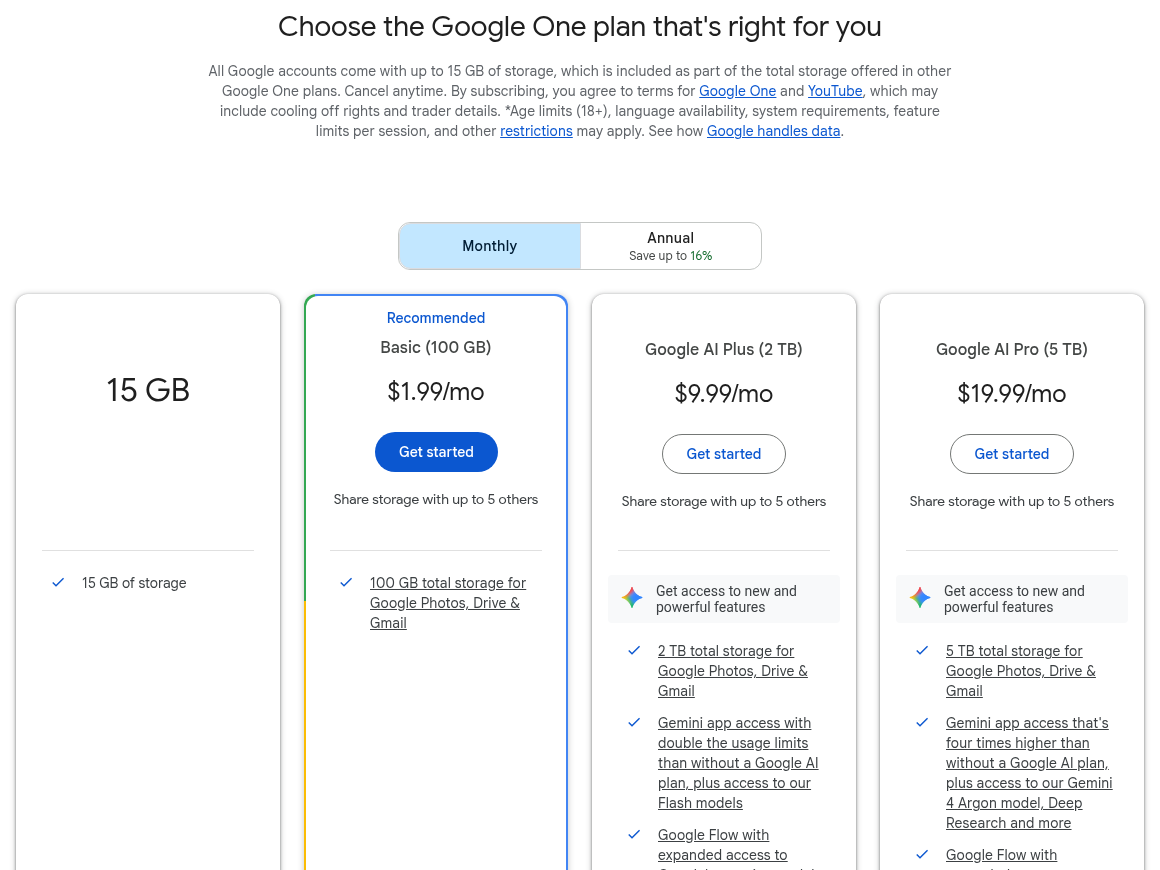
Google doesn’t publish the exact group call length for Google AI Plus, so it’s listed as “longer calls” here. Also note that the 100 GB Basic plan for $1.99 doesn’t unlock any premium Meet features. It only adds storage.
Which Plan Should You Choose?
- Stay on the free plan if your group calls are under an hour and you don’t need recordings.
- Pick Google AI Plus or AI Pro if you use a personal Gmail account and want recording, longer calls, and noise cancellation. AI Pro also adds AI meeting notes.
- Pick Workspace Business Standard if you run a business and need a custom email address, recording, 150 participants, and admin controls. Business Starter is cheaper, but it doesn’t include recording.
Still not sure Google Meet is right for you? Compare it with Microsoft Teams free features and limitations or see our list of free video conferencing platforms with no time limit.
Conclusion:
Google Meet’s free plan is one of the best free video calling options in 2026. You get 100 participants, one-hour group calls, 24-hour one-on-one calls, screen sharing, and free live captions, all from your browser and without installing anything.
The main trade-offs are the 60-minute cap on group calls and the lack of recording, breakout rooms, and AI notes. If those matter to you, I recommend trying Google AI Pro or Workspace Business Standard. Otherwise, the free plan will do the job just fine.
Did this post help you understand Google Meet’s free plan? Please share your experience in the comments below and give this post a star rating. If you have any questions, feel free to contact us. We’ll be happy to hear your thoughts, thanks.