
Virtual Meetings Advantages and Disadvantages

A virtual meeting is a real-time interaction between people in different physical locations, communicating using virtual meeting equipment, software, and internet-based platforms.
Unlike traditional in-person meetings, virtual meetings are held entirely online via video, audio, or text-based formats.
These days, virtual meetings have become a crucial part of how we communicate, collaborate, and conduct business. Whether you’re working remotely, attending an online class, or participating in a global webinar, chances are you’ve experienced them firsthand.
This growing shift toward remote communication has been accelerated by technological advancements and global events like the COVID-19 pandemic, starting a new era of work and learning.
And it’s not slowing down. Gallup’s 2026 data shows that 52% of remote-capable U.S. employees work hybrid and another 26% work fully remote. That means a big part of their week happens on a screen.
But like any tool, virtual meetings have their pros and cons. While they offer unparalleled convenience and cost savings, they also present challenges like reduced engagement, technical difficulties, and lack of human connection – all of which are thoroughly explored in this detailed guide.
Additionally, we have described everything related to the advantages and disadvantages of virtual meetings, including when you should avoid virtual meetings, what makes virtual meetings more effective, which virtual meeting platform you should use, what the requirements are for conducting successful virtual meetings, and more.
So, let’s get it started!
What is a Virtual Meeting?
A virtual meeting is a live online gathering where people communicate and collaborate remotely using an internet connection, digital tools, and hardware, without the need to be physically present in the same location.

These meetings can be held via video call, audio conference, or text-based chat using Zoom, Microsoft Teams, Google Meet, and other virtual meeting platforms. Participants typically join the meeting using devices such as smartphones, tablets, or computers, and other necessary equipment.
What Are The Different Types of Virtual Meetings?
Not every virtual meeting looks the same. Some are full video calls, some are just voices on a line, and some are one-way presentations to hundreds of people. Here are the five main types you’ll come across:
1. Video Conferencing
Video conferencing is the most popular type of virtual meeting where participants connect to see and hear each other in real-time using their webcams and microphones.

It mimics a face-to-face meeting and is ideal for team discussions, client meetings, interviews, or collaborative work sessions from anywhere in the world.
2. Teleconferencing
Teleconferencing (aka Audio-Only Meetings) is a virtual meeting where participants communicate through audio only. This is useful in low-bandwidth environments or when video isn’t necessary.

It is often used in professional settings like customer service, business conference calls, and remote interviews. Platforms like GoTo Meeting and Google Meet (join by phone) are popular options for teleconferencing. It can connect multiple participants in different locations for a group conversation using a telephone, desk phone, smartphone, or computer.
3. Webinars
A webinar is a large-scale virtual presentation that is typically hosted by one or more presenters while the audience primarily listens. There may be limited interaction through Q&A or polls. It’s great for online training, product demonstrations, or educational sessions.

Platforms like Zoom and Webex are widely known for online webinars, offering powerful features like broadcasting, screen sharing, participant management, Q&A sessions, and the ability to engage with large audiences in a professional and organized way.
4. Online Chatting
Online chat is the most widely used type of virtual meeting, where two or more participants can communicate virtually in real-time through text-based messages as well as other media, including images, videos, or audio files.

This type of virtual meeting is often used on social media platforms, dating sites, customer support, team collaboration, and online communication sites.
5. Virtual Social Events
Virtual social events are virtual meetings that are designed to promote social interaction and connection. They can take many forms, such as virtual happy hours, online game nights, virtual parties, and other online events.

Virtual event platforms like Zoom Events, vFairs, and Airmeet have become increasingly popular for hosting these types of virtual meetings. All of these platforms help you curate and share recordings across all sessions, with engagement analytics that expand the reach of your event according to your needs.
Now, let’s take a look at recent trends and explore what the future of virtual meetings could look like.
Latest Trends and Future of Virtual Meetings
Recent trends in virtual meetings show rapid advancements in AI-powered features, enhanced security, and improved user experience, setting the stage for more groundbreaking innovations.
The future of virtual meetings is set to be transformative, driven by cutting-edge technologies like artificial intelligence (AI), augmented reality (AR), virtual reality (VR), and real-time language translation, making interactions more immersive, lively, and inclusive.
We can expect virtual meetings to evolve from simple video calls to fully interactive digital environments where participants feel like they are sitting in the same room, regardless of physical distance.
As technology advances beyond the common features of virtual meetings, new features like automated note-taking, emotion recognition, virtual avatars, and holographic displays will redefine how teams around the world connect, collaborate, and make decisions.
And honestly, a lot of this is already here in 2026. Here are a few real examples:
- AI notes and summaries: Zoom added My Notes, Google Meet has Take notes for me, and Microsoft Teams has intelligent recap with Copilot or Teams Premium.
- Real-time translation: Google Meet Speech Translation translates what you say into another language, in a voice like yours, on eligible paid plans.
- AI agents: Zoom launched AI Companion 3.0 with agents that can draft follow-ups and documents from your meetings.
- Bot controls: Because AI notetaker bots now join so many calls, Zoom and Microsoft added ways to block unwanted bots from meetings.
Advantages of Virtual Meetings
Let’s take a look at the key benefits that make virtual meetings so effective and widely accepted:
No Need for Physical Meeting Spaces
While traditional in-person meetings require booking conference rooms, event spaces, or meeting halls, which often involve time-consuming coordination, limited availability, and rental costs, virtual meetings eliminate these logistical hassles.

Because they are held online, there is no need to compete for physical space, set up rooms, or worry about seating plans and associated costs.
Scalability for Any Meeting Size
From one-on-one calls to webinars with hundreds of participants, virtual meetings scale effortlessly. This makes them perfect for everything from team check-ins to product launches or training.

For example, instead of needing a 200-seat conference room for 200 people, you can use virtual meeting platforms like Zoom, Microsoft Teams, Google Meet, and Webex to hold meetings with hundreds of people from their own space, using computers or mobile devices. (Keep in mind that most free plans stop at 100 participants, so bigger groups usually need a paid plan.)
This convenience allows teams to focus entirely on the meeting content, making scheduling and hosting sessions faster, more flexible, and more efficient, whether for internal discussions or client-facing presentations.
Easier to Organize and Schedule
Virtual meetings make the entire process of organizing and scheduling easier than traditional in-person meetings. With integrated calendar tools like Google Calendar, Microsoft Outlook, or built-in scheduling features, you can create, invite, and update meetings with just a few clicks.
Automatic reminders, time zone adjustments, and RSVP tracking make coordination effortless, even for global teams. There’s no need to worry about room availability, travel arrangements, or physical materials; everything is handled digitally. Plus, rescheduling is much easier, saving valuable time and avoiding unnecessary delays. This streamlined setup encourages more frequent, timely communication and better team coordination.
Saves Time and Travel Costs
One of the most immediate benefits of virtual meetings is avoiding the hassle of travel. Participants can join the meeting from their home, office, or anywhere with an internet connection – saving both time and money.

Also, there is no need for flights, hotel bookings, or long trips, making it a cost-effective solution for both individuals and businesses, including international teams or clients, and startups and large enterprises.
Environmentally Friendly
Virtual meetings reduce the need for physical meetings, which means less travel and lower carbon emissions, helping organizations meet their sustainability goals.

The difference is bigger than most people think. A study published in Nature Communications found that moving a conference from in-person to virtual can cut its carbon footprint by 94% and its energy use by 90%.
In addition, organizations can lower their environmental impact further by cutting paper use, vehicle fuel, and other energy costs.
Enables Remote and Flexible Work
Virtual meetings are the backbone of today’s remote and hybrid work environments. By eliminating the need for physical presence, they empower employees to work from anywhere – whether it’s from home, at a co-working space, or even while traveling. This flexibility not only enhances work-life balance but also opens up opportunities for businesses to hire top talent from around the world without geographic constraints.

Employees can use digital collaboration tools like Slack, Google Workspace, and Microsoft Teams that facilitate effective collaboration and communication for teams working remotely or in hybrid settings. As a result, it helps to create a more inclusive, adaptive, and future-ready workforce that goes beyond the confines of the traditional office.
Real-Time File and Screen Sharing
One of the most significant benefits of remote meetings is the ability to share files and screens in real time. In face-to-face meetings, this often requires printed materials, projectors, or additional setup time.
This is why virtual meetings are often more effective in a variety of situations, from content-based discussions and collaborative editing to real-time training, product demos, and technical troubleshooting, as they reduce delays, eliminate the need for physical equipment, and keep participants aligned and engaged through instant file and screen sharing.
Increases Meeting Accessibility
Virtual meetings dramatically improve accessibility by allowing participants to join from anywhere in the world, regardless of their physical location or mobility limitations.
Whether someone is working remotely, traveling, or facing health or transportation challenges, they can join and participate in the meeting with just an internet connection and a device.

Most modern platforms also offer accessibility features like live captions in Microsoft Teams, screen reader support, sign language interpreter windows, and recording options, making it easier for people with hearing or vision impairments to participate.
This inclusion ensures that everyone has a fair chance to be present, heard, and engaged, regardless of ability or location.
Improves Productivity
Virtual meetings can significantly increase productivity by reducing the time and effort spent on travel, setup, and logistics. Instead of traveling or booking a physical space, teams can join meetings instantly, keeping the workflow smooth and uninterrupted.
Built-in tools like screen sharing, live chat, breakout rooms, and shared digital whiteboards make collaboration faster and more focused. Team members can share files in real time, co-edit documents, and make decisions quickly without waiting for follow-ups.
Increased Attendance Rates
Another big strength of virtual meetings is increased participation. By removing traditional barriers such as travel, room availability, and strict schedules, it has become easier than ever for participants to join from anywhere.
Whether team members are working remotely, traveling, or managing busy calendars, they can log in from their computer or mobile device without the hassle. Plus, automatic calendar invites and reminders help keep everyone on track.
The result? More consistent attendance, richer collaboration, and stronger team engagement, all critical to efficiently achieving goals.
Business Continuity in Emergencies
Virtual meetings play a crucial role in ensuring business continuity during emergencies and unexpected disruptions. Whether it’s a natural disaster, a public health crisis like COVID-19, or sudden travel restrictions, remote meeting platforms help teams stay connected and keep the business running, especially when they are integrated with the business apps people already use.
Multi-Device Accessibility
Online meetings also work across multiple devices. Whether you’re using a desktop computer, laptop, tablet, or smartphone, you can easily join and participate in meetings from almost anywhere.

Supports Collaboration Across Time Zones
Online meetings make it easy for teams spread across time zones to collaborate effectively. Instead of struggling to coordinate in-person meetings across countries or continents, teams can use scheduling tools, shared calendars, and asynchronous communication features to plan virtual meetings at mutually convenient times.

Easy to Record and Replay
Another big advantage of virtual meetings is the ability to record sessions with just one click. The most popular platforms, such as Zoom, Microsoft Teams, and Google Meet, offer built-in recording features that capture audio, video, screen shares, and even live chat.
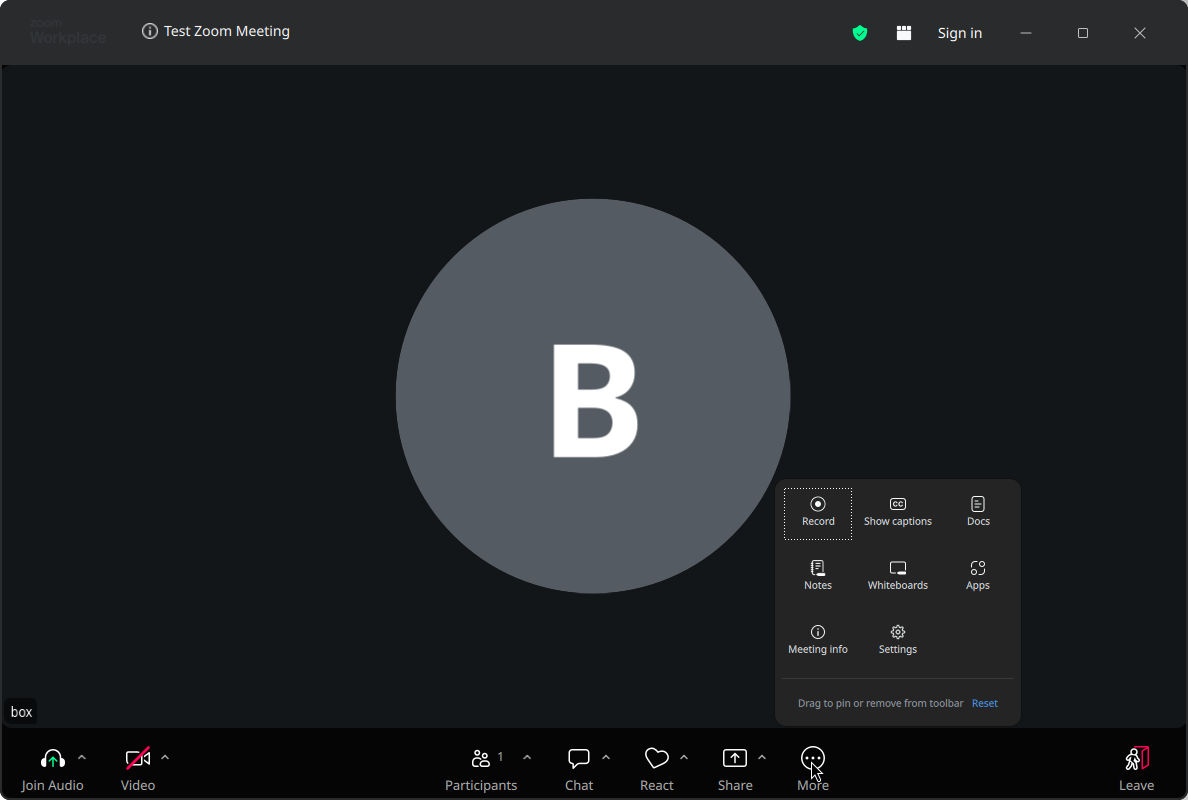
This means that anyone who missed the meeting – whether due to time zone differences, scheduling conflicts, or personal emergencies – can watch the replay at their convenience.
Even the free plans can do this. For example, you can record a Zoom meeting with a free account straight to your computer. Just remember to tell people before you hit record. It’s polite, and in many places it’s the law.
Interactive Tools & Features
One of their most appealing benefits is the wide range of built-in interactive tools that enhance engagement and collaboration. Most modern platforms – such as Zoom, Microsoft Teams, and Google Meet – go beyond simple video and audio communication. For example, they offer features like live polls, Q&A sessions, breakout rooms, whiteboards, reactions/emojis, and chat functionality to keep participants actively engaged.
Ideal for Learning & Training
Virtual meetings have become a powerful tool for learning and employee training, offering convenience, scalability, and flexibility that are often lacking in traditional classrooms. With features like screen sharing, video demonstrations, interactive whiteboards, quizzes, and breakout rooms, instructors can deliver engaging, hands-on sessions in real time, no matter where students are. This is especially useful for students who take classes from home.
Additionally, whether you’re onboarding new employees, running software tutorials, or hosting professional development workshops, they make it easy to standardize training, reach larger or remote audiences, and record sessions for future reference.
Participants can learn at their own pace, revisit complex topics through replays, and actively engage with instructors through chat and Q&A features. Overall, this digital approach not only saves on travel and space costs but also allows schools and organizations to train students and teams more efficiently, making virtual meetings an ideal solution for modern learning environments.
Real-Time Insights & Analytics
One of the hidden strengths of virtual meetings is the ability to track real-time data and engagement analytics, which gives hosts a deep understanding of how attendees interact during a session. Most modern platforms provide detailed metrics like attendance duration, participation rates, chat activity, poll results, and even speaker time distribution, although the more detailed reports are usually on paid plans. For example, Microsoft Teams offers meeting attendance reports that show who joined, when, and for how long.
These insights help organizers identify which parts of the meeting were most engaging, who actively contributed, and whether key points were understood. This is especially valuable for training, webinars, sales demos, and client meetings, where measuring impact is essential.
Unlike traditional in-person meetings, where feedback is often informal or delayed, virtual meeting analytics provide measurable results in real time, enabling teams to refine future sessions, improve their content, improve overall communication skills, and increase productivity.
Simplifies Follow-Up and Action Tracking
Virtual meetings improve post-meeting workflow through integrated documentation and task delegation. By using AI-generated summaries, centralized note-taking, and cross-platform compatibility with tools like Zoom Workplace, Google Workspace, Microsoft Teams, Slack, or Asana, organizations reduce administrative overhead while improving accountability and speed of execution.
Secure and Controlled Environment
Security is a top priority for any business, especially in virtual meetings, where sensitive data is often shared. Fortunately, leading platforms include strong features like end-to-end encryption, password protection, waiting rooms, and host controls that provide a safe and controlled environment to keep meetings secure by limiting who can join or share content during the meeting.
These measures help prevent unauthorized access, data leaks, and disruptions like “zoombombing.” Additionally, administrators can manage user permissions, monitor participant activity, and ensure compliance with industry regulations like GDPR or HIPAA.
This secure digital space enables organizations to confidently discuss confidential matters, handle client calls, and collaborate without worrying about security breaches or privacy concerns.
Virtual meetings have changed the way we connect, collaborate, and conduct business, offering flexibility, cost-efficiency, and real-time accessibility. However, like any technology, they also have their own challenges and limitations. In this next section, we’ll explore the disadvantages of virtual meetings to help you better prepare and overcome potential pitfalls.
Disadvantages of Virtual Meetings
Virtual meetings are great, but they are not perfect. If you have ever sat through a frozen screen or a two-hour call where nobody turned on their camera, you already know that.
Here are the main disadvantages of virtual meetings you should be ready for:
Technical Issues and Poor Internet Connection
This is the number one complaint, and for good reason. A weak Wi-Fi signal, an outdated app, or a microphone that suddenly stops working can turn a 30-minute meeting into a 50-minute one.
Video also needs more bandwidth than most people think. Zoom recommends about 2.6 Mbps upload and 1.8 Mbps download just for 720p HD group calls. If someone in the house is streaming a movie at the same time, you’ll probably feel it.
Video Call Fatigue (aka “Zoom Fatigue”)

Ever felt more tired after a day of video calls than after a day in the office? You’re not imagining it. Stanford professor Jeremy Bailenson explained four likely causes: too much close-up eye contact, extra mental effort to read and send body language, staring at your own face all day, and sitting still in one spot.
A later study of 9,787 people backed this up. People who had more meetings, longer meetings, and fewer breaks reported more fatigue, and women reported it more than men.
Less Personal Connection and Body Language
A lot of human communication happens without words. In a small video tile, you miss most of it, like a colleague leaning forward with interest or someone looking uncomfortable with an idea.
Small talk before and after the meeting also disappears. Those little hallway chats are often where trust is built, and they are hard to recreate online.
Distractions and Multitasking
When the camera is off, it is very easy to check email, scroll your phone, or reply to chats while “listening”. At home, there are kids, pets, delivery people, and the washing machine too.
It adds up. Microsoft’s 2025 Work Trend Index found that people are interrupted every two minutes during core work hours by meetings, emails, or chat pings.
Lower Engagement in Large Meetings
In a big call, many people stay muted with their cameras off, and it’s hard for the host to tell if anyone is still following. Quiet participants rarely speak up, and conversations can end up being dominated by two or three voices.
Time Zone Problems and Longer Workdays
Working with people around the world is a big advantage, but it has a cost. According to the same Microsoft report, 30% of meetings now span multiple time zones, and meetings after 8 p.m. went up 16% year over year. Someone always ends up joining very early or very late.
Security and Privacy Risks
Uninvited guests (“zoombombing”) are less common now thanks to waiting rooms and passcodes, but new risks have appeared. In 2026, security researchers warned about fake Zoom meeting invites that ask you to install a fake “update”, which is actually spyware.
AI notetaker bots are another concern. They can join a call, record it, and store the transcript on a third-party server. That’s why Microsoft Teams now detects external bots and keeps them in the lobby until the organizer lets them in.
Time Limits on Free Plans
Free accounts are great for trying things out, but they come with limits. Zoom’s free plan ends group meetings at 40 minutes, while Google Meet and Microsoft Teams Free stop group calls at 60 minutes. If your meetings run long, you’ll either have to restart the call or pay for a plan.
Harder to Onboard and Build Trust
New team members often find it harder to learn the unwritten rules of a team when everything happens through a screen. Building trust with a new client can also take longer when you have never shaken hands or shared a coffee.
Not Everyone Has the Right Equipment
A good meeting needs a decent camera, a clear microphone, and a stable connection. Not everyone has those at home, especially students and people in areas with slow internet. Check our video conferencing setup requirements guide if you want to know what you really need.
When Should You Choose Virtual Meetings?
So, does that mean you should go back to meeting rooms? Not at all. The trick is to pick the right format for the right conversation.
Virtual meetings are usually the better choice when:
- Your team or clients are in different cities or countries.
- The meeting is short and focused, like a daily check-in or a quick status update.
- You need to share screens, documents, or dashboards with everyone at once.
- You want to record the session for people who can’t attend live.
- You’re running training, webinars, or classes for a large or remote audience.
- Travel would cost more than the meeting is worth.
When Should You Avoid Virtual Meetings?
On the other hand, I recommend meeting in person (if you can) for:
- Sensitive conversations, like performance reviews, layoffs, or personal issues.
- Resolving a conflict between people or teams.
- Long creative workshops and brainstorming sessions that need a lot of energy.
- The first meeting with an important new client or partner.
- Team-building and onboarding days for new employees.
And if half the team is in the office and half is at home, a well-planned hybrid meeting can give you the best of both. Just make sure the remote people can see and hear everything, which usually means a proper video bar in the room instead of a laptop at the end of the table.
Virtual vs. In-Person Meetings
Both formats have their place. Here is a quick side-by-side comparison so you can see where each one wins:

In short, virtual meetings win on cost, speed, and reach, while in-person meetings win on connection. That’s exactly why hybrid work has stuck around. Want a deeper comparison? Read our guide on the difference between a virtual meeting and an online meeting too.
Things You Can Do with Virtual Meetings and Can’t (Pros and Cons)
Here is the quick version, if you just want the summary:
- Meet anyone, anywhere, with just a link
- Save travel time and money
- Share screens and files instantly
- Record meetings and get AI summaries
- Host hundreds of people at once
- Add live captions for accessibility
- Read full body language
- Build trust as quickly as face to face
- Avoid tech and internet problems
- Keep everyone engaged in long calls
- Run long free meetings (40 to 60 min limits)
- Fully control who records or transcribes
As you can see, most of the “can’t” items are not deal-breakers. With the right habits and tools, you can reduce almost all of them. Let’s see how.
Tips to Make Virtual Meetings More Effective
Good virtual meetings don’t happen by accident. Here are the tips that, in my experience, make the biggest difference:

1. Ask Yourself If It Needs to Be a Meeting
If the same thing can be said in a short email, a shared document, or a quick recorded video, skip the meeting. Your team will thank you.
2. Share a Clear Agenda Before the Meeting
Send the goal, the topics, and who is leading each part with the invite. People come prepared, and the meeting stays on track.
3. Keep It Short and Take Breaks
Try 25 or 50 minutes instead of a full hour, so people get a few minutes to breathe between calls. If a session must run long, add a five-minute break every hour. It really helps with video call fatigue.
4. Test Your Tech Five Minutes Early
Check your camera, microphone, and internet before you join. Most apps have a preview screen for this, and Zoom even has a free test meeting. If you’re new to Google Meet, use the green room preview before you click “Join now”.
5. Put the Camera at Eye Level and Light Your Face
Raise your laptop on a few books and sit facing a window or a lamp, not with your back to it. You’ll look much more natural, and people can actually see your expressions.
6. Hide Your Self-View
Staring at your own face all day is one of the main causes of fatigue in the Stanford research. Zoom, Teams, and Meet all let you hide your self-view while others still see you. Try it. The difference is surprising.
7. Mute When You’re Not Speaking
Background noise is distracting for everyone. Stay on mute and turn on noise suppression if your app has it. A headset with a good microphone helps a lot too.
8. Make It Interactive
Ask questions by name, use polls, reactions, and the chat, and split big groups into breakout rooms. People pay more attention when they know they might be asked to speak.
9. Record and Use AI Notes (With Consent)
Recording or turning on AI meeting notes means nobody has to type minutes during the call. Just tell everyone before you start, and follow your organization’s rules. If you’re on a free plan, here’s how to record Zoom meetings for free.
10. Keep Your Meeting Secure
Use a waiting room or lobby, don’t post meeting links publicly, and never install an “update” from a link in a meeting invite. Only download apps from the official website or app store.
11. Follow Up the Same Day
Send a short summary with decisions, action items, owners, and deadlines. A meeting without a follow-up is often just a conversation that people forget.
Want more? Our virtual meeting etiquette guide covers the do’s and don’ts in detail.
Which is The Best Platform for Virtual Meetings?
There is no single “best” platform for everyone. The right one depends on your team size, budget, and the apps you already use. If you want a full walkthrough, read our guide on choosing the right virtual meeting platform.
Here are the four most popular options and what their free plans include in 2026:
Zoom Workplace
Zoom is still the name most people think of first. It’s easy to use, works on almost any device, and has strong features like breakout rooms and local recording even on the free plan. The free Basic plan allows up to 100 participants for 40 minutes per meeting, and free users can try a few AI meeting summaries each month (see Zoom pricing).
Google Meet
Google Meet runs right in your browser, so there’s nothing to install. With a free Google account, you can host group calls of up to 100 people for 60 minutes, and one-on-one calls for up to 24 hours (Google’s limits). It’s a great pick if you already use Gmail and Google Calendar.
Microsoft Teams
Microsoft Teams Free replaced Skype for many people after Skype was retired in 2025. Free group meetings allow up to 100 people for 60 minutes, and one-on-one calls can last up to 30 hours. For businesses already on Microsoft 365, the paid version of Teams is usually the natural choice.
Webex
Webex by Cisco is popular with large enterprises because of its security features. The free Webex plan gives you meetings of up to 40 minutes with up to 100 attendees, plus whiteboards and local recording.
| Platform | Free participants | Free group meeting length | Best for |
|---|---|---|---|
| Zoom Workplace | 100 | 40 minutes | Most teams, webinars, education |
| Google Meet | 100 | 60 minutes (1:1 up to 24 hours) | Gmail and Google Workspace users |
| Microsoft Teams Free | 100 | 60 minutes (1:1 up to 30 hours) | Microsoft 365 users, former Skype users |
| Webex Free | 100 | 40 minutes | Security-focused businesses |
Need longer meetings without paying? Take a look at our list of free video conferencing platforms with no time limit.
Virtual Meeting Essentials and Requirements
You don’t need a fancy studio to run a good virtual meeting. But a few basics make a huge difference. For the full checklist, see our guide to video conferencing requirements.

- A computer, tablet, or smartphone: Any device from the last few years will do. For Zoom on a computer, 4 GB of RAM is the minimum, and 16 GB is recommended.
- A stable internet connection: For HD group video, plan for at least 3 Mbps up and down. A wired connection or sitting close to the router helps.
- A webcam: The built-in camera is fine for occasional calls. If you’re on camera every day, a good video conferencing webcam is worth it.
- A microphone or headset: People forgive a blurry video much faster than bad audio. A headset with a boom mic is cheap and effective.
- Good lighting: Face a window or use a small lamp or ring light in front of you.
- A quiet space: Close the door, and use noise suppression for anything you can’t control.
- Updated meeting software: Keep your app or browser up to date for the latest security fixes and features.
- Meeting room equipment (for offices): For hybrid meetings, an all-in-one video bar or a speakerphone helps remote people hear everyone in the room.
Once you have these basics, most of the common problems (echo, dark video, robotic audio) simply go away.
Conclusion:
A virtual meeting is easier to attend than a traditional meeting, and it is a cost-effective way to communicate with anyone around the world. And because it works on almost any device, it has become a format that most people are now comfortable with.
But every platform and technology has its own pros and cons, and virtual meetings are no different. Tech problems, video call fatigue, and weaker personal connection are real, but most of them can be managed with good habits and the right tools.
Virtual meeting platforms like Zoom, Microsoft Teams, Google Meet, and Webex act as your digital meeting room, so you can easily connect, collaborate, and complete important discussions.
So, my advice is simple: use virtual meetings for what they do best, and meet in person when the conversation really needs it. Keep meetings short, share an agenda, test your tech, and always follow up.
So, which side do you think wins for your work? Are virtual meetings a big advantage, or do you still prefer meeting face to face? Please let us know by commenting below and giving us a star rating to rate this post.
If you have any questions or suggestions, feel free to contact us. We’ll be happy to hear your thoughts, thanks.
FAQs
Below are answers to some frequently asked questions about virtual meetings: