
The 5 Best Webinar Platforms Compared (2026)
When you buy through our links, we may earn an affiliate commission at no extra cost to you. Learn more
A webinar is not the same as a team meeting. The host needs registration, a clear attendee cap, and a way for a large audience to watch without every guest needing a full meeting license.
The five platforms below are the ones I compare when a team asks which webinar product to buy, not which free meeting app to try for an all-hands.
If you are still deciding whether the event should be a webinar at all, start with webinar versus a virtual meeting. For a non-commercial walkthrough of putting on a free event, use how to host a free webinar.
Large-group meeting tools are a different job, covered in virtual meeting platforms for large groups, and free meeting plans are compared in free online meeting platforms with no time limit and Zoom, Google Meet, and Teams free-plan comparison. Scheduling the invite itself is in how to schedule a meeting and send an invite.
Every price and capacity figure in this comparison comes from an official vendor pricing, licensing, or help page. If a number did not actually appear there, I left it out and pointed you to the official page instead.
In this guide, I’ll compare the 5 best webinar platforms for 2026, and help you match official pricing and attendee limits to the event you need to run!
Let’s get it started!
How I Compared These Webinar Platforms
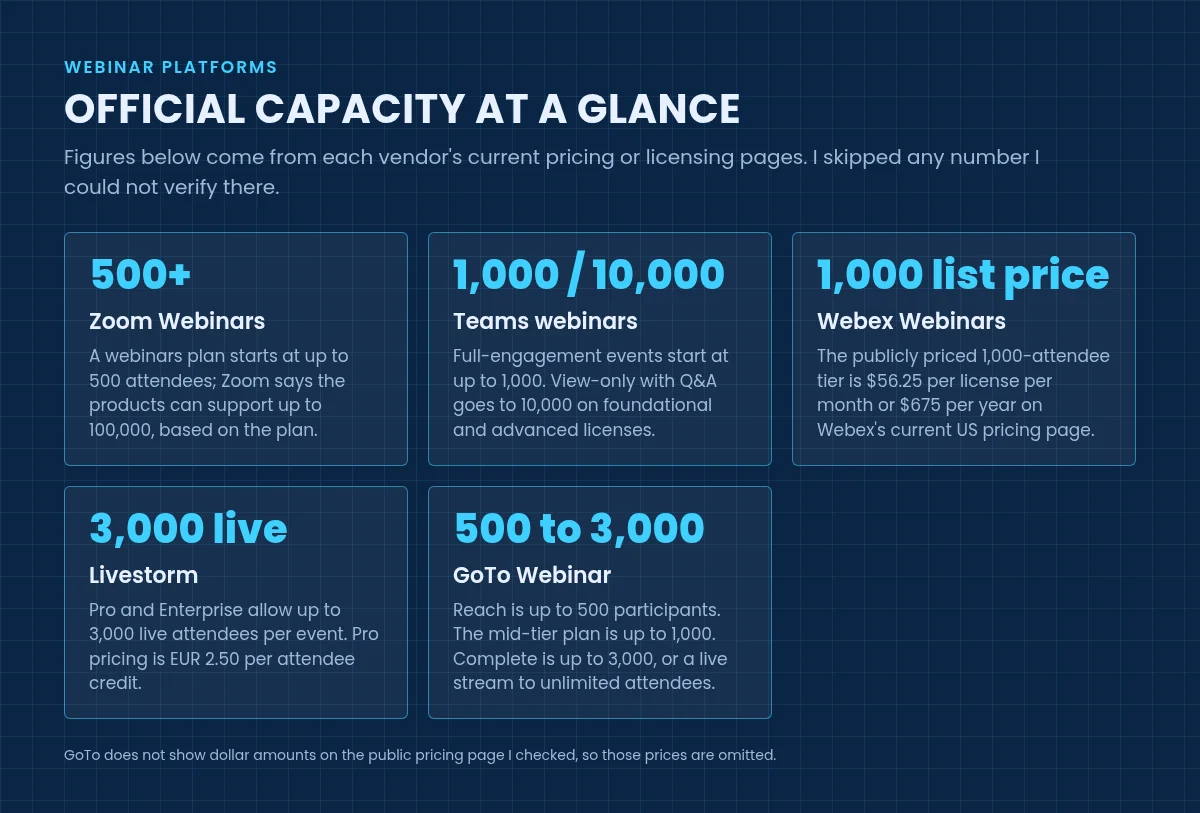
I compared public price where the vendor publishes one, the attendee or participant cap on each plan, session length, and whether attendees need their own account. I also noted where a feature sits only on a higher plan, such as Zoom’s Production Studio on Plus and Events, or GoTo’s unlimited live stream on Complete.
I did not use older Zoom PDFs, blog posts, or a Microsoft marketing page that does not carry the current licensing rules. Teams figures follow the licensing change dated 1 April 2026. GoTo dollar amounts are omitted because they were not on the public pricing page I checked. Livestorm’s Pro price stays in euro.
The 5 Best Webinar Platforms in 2026
These five are Zoom Webinars, Microsoft Teams webinars, Webex Webinars, GoTo Webinar, and Livestorm:
Zoom Webinars
Specifications
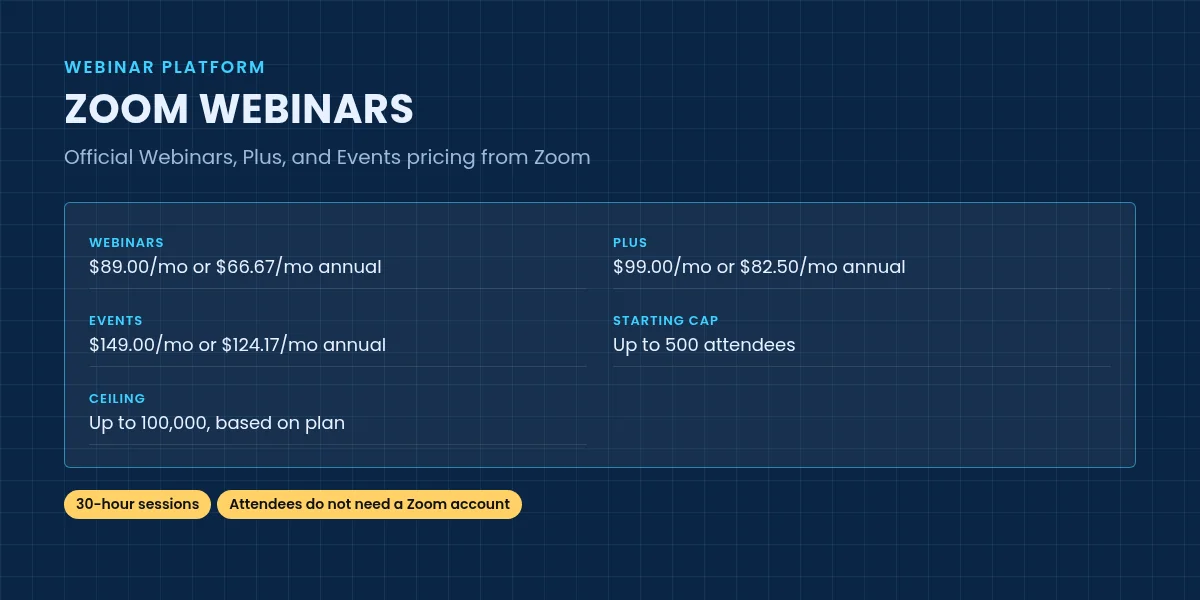
Public price (Webinars): $89.00 a month, or $66.67 a month billed annually | Webinars Plus: $99.00 a month, or $82.50 a month billed annually | Events: $149.00 a month, or $124.17 a month billed annually | Starting capacity: A Webinars plan for up to 500 attendees, per Zoom’s product page | Upper capacity: Up to 100,000 attendees, based on the plan; video panelists up to 1,000 | Session length: 30 hours | Attendee accounts: Attendees do not need a Zoom account
Why I Picked Zoom Webinars?
If the team already runs meetings in Zoom, a webinar should not force a new tool on the presenter or the audience. Zoom’s Webinars product page describes a Webinars plan for up to 500 attendees, and Zoom’s official Events and Webinars pricing page lists the current US dollar prices I am using here: Webinars at $89.00 a month billed monthly or $66.67 a month billed annually, Webinars Plus at $99.00 or $82.50, and Events at $149.00 or $124.17.
Zoom’s comparison also lists attendee capacity up to 100,000 and video panelists up to 1,000. The FAQ is clear that the number who can join is based on your plan, and that the products can support up to 100,000. I would not treat 100,000 as the default; it is the published ceiling, not the 500-attendee starting plan.
Session length is listed at 30 hours. Simulive, backstage, and Production Studio sit on the Plus and Events plans. Attendees do not need a Zoom account, which keeps the join path simple for customers and partners.
Who It’s For?
Teams that already schedule Zoom meetings and want a paid webinar plan with published monthly and annual prices, starting at a 500-attendee plan.
- Clear public US pricing for Webinars, Plus, and Events
- Attendees do not need a Zoom account
- Published 30-hour session length, with higher-end production tools on Plus and Events
- The 500-attendee starting plan is not the 100,000 ceiling
- Higher production tools sit on Plus or Events, not the base Webinars plan
- You still have to pick the right attendee cap when you buy
Microsoft Teams webinars
Specifications
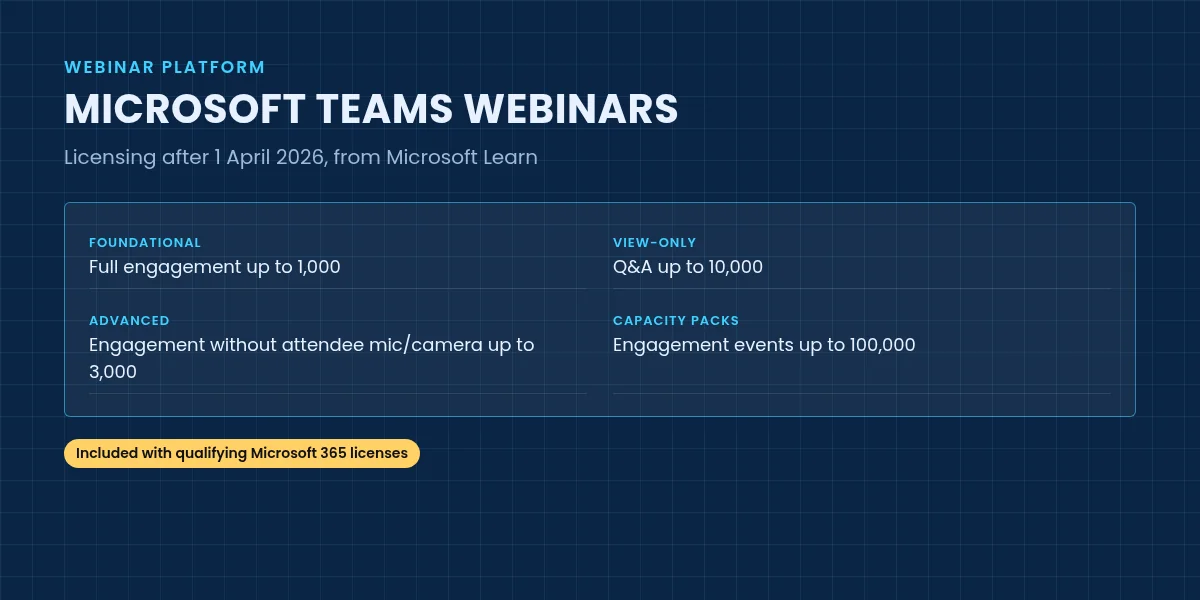
Who can schedule: Anyone who can schedule a Teams meeting, unless an admin policy blocks it | Foundational licenses: Full engagement up to 1,000; view-only with Q&A up to 10,000 | Advanced licenses: Full engagement (with attendee mic and camera) up to 1,000; engagement without requiring attendee mic and camera up to 3,000; view-only 10,000 | Capacity packs: Attendee Capacity Packs can scale engagement events up to 100,000 | Registration features: Advanced registration features generally up to 1,000 attendees | License change: Current rules as of 1 April 2026, per Microsoft Learn
Why I Picked Microsoft Teams webinars?
If the company already pays for Microsoft 365, a separate webinar vendor is often extra work for IT and for the people who have to join. I am using Microsoft’s Teams webinars get-started page and Microsoft’s Teams events licensing page, which reflect the licensing change that took effect on 1 April 2026. I am not using a generic Microsoft marketing page for these figures.
On foundational licenses such as Business Basic, Business Standard, Business Premium, and Teams Essentials, you can run events with registration and full engagement (microphone, camera, interactive chat, reactions, raise hand, polls, and Q&A) for up to 1,000 people, or a view-only event with Q&A for up to 10,000.
Advanced licenses such as Office or Microsoft 365 E1, E3, E5, and E7 keep that 1,000 cap for full engagement that includes attendee microphone and camera, raise it to 3,000 for engagement that does not require attendee microphone and camera, and still allow view-only events up to 10,000. Attendee Capacity Packs can scale engagement events up to 100,000.
Advanced registration features are generally limited to 1,000 attendees. Microsoft also notes that legacy Teams Premium purchased before 1 April 2026 can keep up to 100,000 until that license expires, and that Premium bought after April 2026 does not itself grant those event features. By default, anyone who can schedule a Teams meeting can schedule a webinar, unless an admin policy says otherwise.
Who It’s For?
Microsoft 365 organizations that want webinars inside Teams, and can match the event size to foundational licenses, advanced licenses, or an Attendee Capacity Pack.
- Webinars sit in the Microsoft 365 license you may already have
- Published engagement, view-only, and capacity-pack limits
- Scheduling follows the same Teams meeting permission, unless policy blocks it
- Exact dollar cost depends on your Microsoft 365 agreement, not a simple public webinar SKU
- Advanced registration features generally stop at 1,000 attendees
- The April 2026 license change means older Teams Premium assumptions can be wrong
Webex Webinars
Specifications
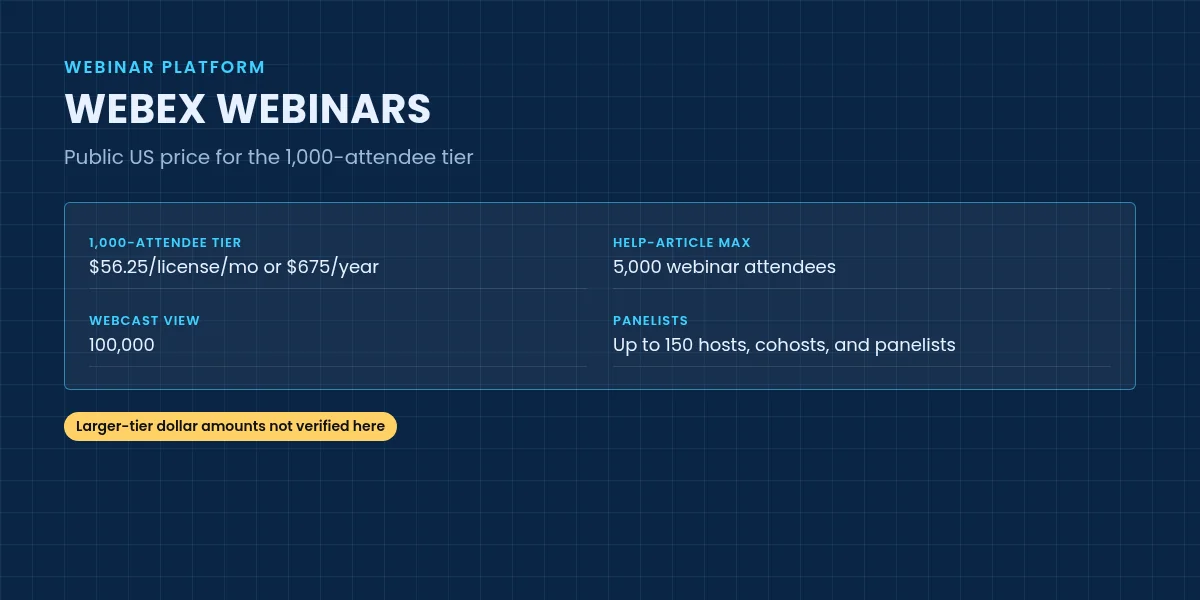
Public 1,000-attendee price: $56.25 per license per month (list $225), or $675 per license per year (list $2,700, 75% off) | Other listed capacities: 1,000, 3,000, 5,000, 10,000, and 10,000+; higher-tier dollar amounts were not verified here | Help-article maximums: Webinars 5,000 attendees; webcast view 100,000; plus up to 150 hosts, cohosts, and panelists | Session length: 24 hours, as listed for the 1,000-attendee tier | Panelists: Manage video panelists up to 500, as listed for the 1,000-attendee tier
Why I Picked Webex Webinars?
For a Cisco or Webex shop, keeping webinars on the same platform as meetings is usually the simpler path for hosts and for IT. Webex’s Webinars product page is the product page, and the dollar amounts I am quoting come only from Webex’s official Webinars pricing page. The publicly priced 1,000-attendee Webinars tier is $56.25 per license per month against a $225 list price, or $675 per license per year against a $2,700 list price, shown as 75% off.
That pricing page also lists capacity options at 1,000, 3,000, 5,000, 10,000, and 10,000+. I could not verify the dollar amounts for those larger tiers from the page as it rendered, so I am not inventing them. Use the official pricing page for current figures.
Webex’s official participant limit article (updated 10 November 2026) lists Webex Webinars at 5,000 attendees, a webcast view at 100,000, and up to 150 hosts, cohosts, and panelists. Features officially listed for the 1,000-attendee tier include unlimited webinars, registration, branded pages, automated emails, live, simulive, and on-demand sessions, practice sessions, moderation, breakout rooms, CRM, captions and translation, a 24-hour session length, and video panelists up to 500. Webex Events is a separate multi-session and hybrid product, up to 100,000, through sales.
Who It’s For?
Organizations already using Webex that want a published 1,000-attendee Webinars license, and can go to the official pricing page or sales for larger capacities.
- Published US price for the 1,000-attendee Webinars license
- Official help-article caps for webinars, webcast view, and panelists
- Live, simulive, and on-demand options listed on the 1,000-attendee tier
- Larger-tier dollar amounts were not clearly published in a form I could verify
- Webex Events is a separate product, not this Webinars license
- Session length on the 1,000-attendee tier is listed at 24 hours, shorter than Zoom’s published 30 hours
GoTo Webinar
Specifications
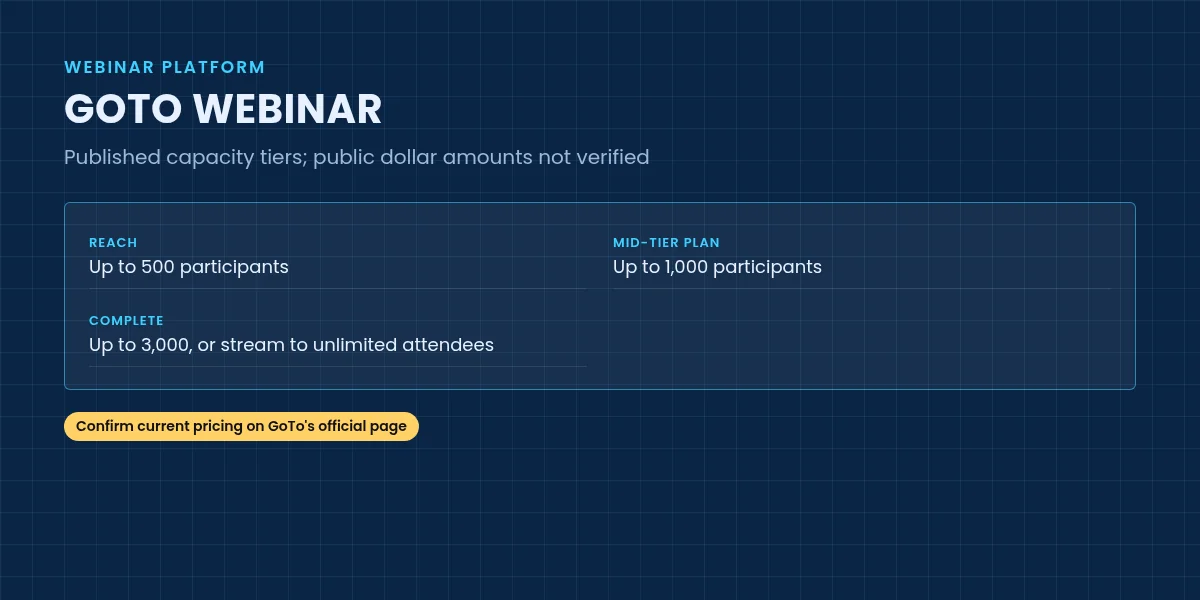
Reach plan: Up to 500 participants, 1 organizer seat, reporting, email reminders, polls and Live Q&A, mobile | Mid-tier plan: Up to 1,000 participants, branded webinars, custom URLs, cloud recordings, AI summaries, recordings as live (Simulive), breakout rooms | Complete plan: Custom pricing, up to 3,000 participants, stream live to unlimited attendees, paid events, GoTo Meeting license included | Public dollar amounts: Not shown on the official pricing page I checked; see that page or sales
Why I Picked GoTo Webinar?
GoTo Webinar is still a straightforward choice when the job is a marketing or training webinar and you want plan names tied to attendee caps. GoTo Webinar’s product page and GoTo’s official Webinar pricing page describe three plans. Reach is up to 500 participants, with one organizer seat, reporting, email reminders, polls and Live Q&A, and mobile access.
The mid-tier plan is up to 1,000 participants, and adds branded webinars, custom URLs, cloud recordings, AI summaries, the option to run recordings as live (Simulive), and breakout rooms. Complete is custom, with up to 3,000 participants, the option to stream live to unlimited attendees, paid events, and a GoTo Meeting license included.
I am not quoting dollar amounts. They did not appear on the public pricing page I checked, and I will not invent them. Use GoTo’s official pricing page or a sales quote for the current price.
Who It’s For?
Marketing, customer, and training teams that want a dedicated webinar product with published 500, 1,000, and 3,000 participant caps, and can confirm current pricing with GoTo.
- Three published capacity tiers at 500, 1,000, and 3,000
- Simulive, branding, and breakout rooms on the mid-tier plan
- Complete can stream live to unlimited attendees and include GoTo Meeting
- Public dollar amounts were not available to verify
- Complete pricing is custom
- A fifth organizer or a different cap still means reading the official plan details
Livestorm
Specifications
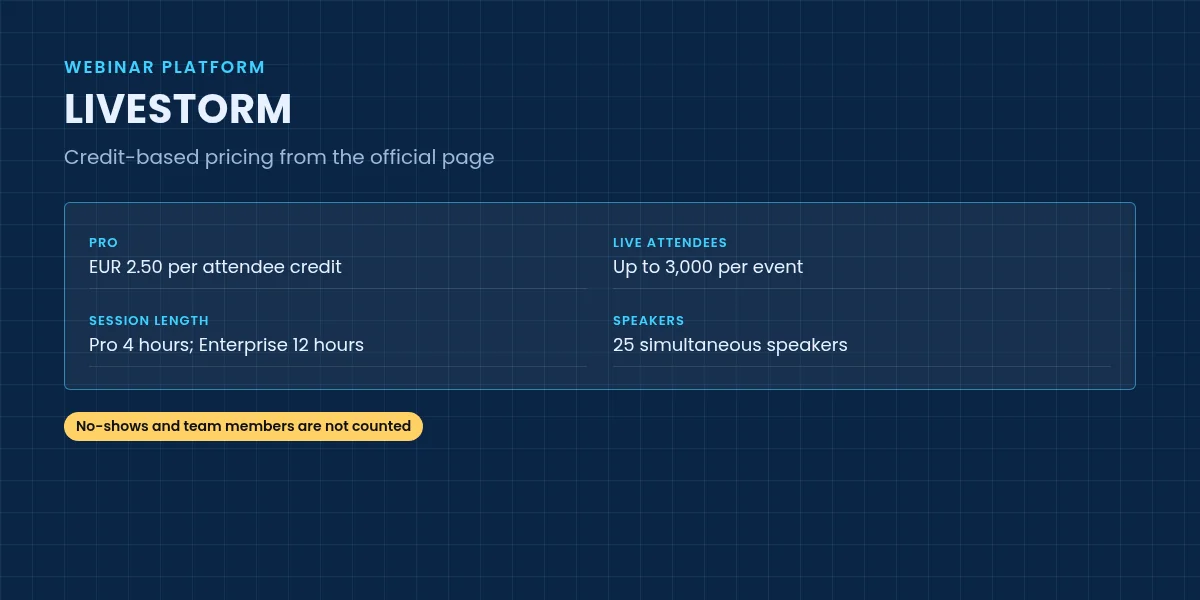
Pro price: EUR 2.50 per attendee credit | Enterprise: Custom pricing | Live attendees: Up to 3,000 per event on Pro and Enterprise | Session length: Pro up to 4 hours; Enterprise up to 12 hours | Speakers: 25 simultaneous speakers | Credits: 1 credit per unique participant per session over 12 months; team members and no-shows are not counted
Why I Picked Livestorm?
Livestorm is the browser-based option in this group, with pricing that follows attendee credits rather than a flat monthly webinar seat. Livestorm’s official pricing page lists Pro at EUR 2.50 per attendee credit, and Enterprise as custom. I am leaving that figure in euro, as published, rather than inventing a US dollar conversion.
Pro and Enterprise both allow up to 3,000 live attendees per event. Pro sessions can run up to 4 hours, Enterprise up to 12 hours, with 25 simultaneous speakers. Pro also includes unlimited events, recording, and team members.
Credits are counted as one credit per unique participant per session over 12 months. Team members and no-shows are not counted, and the same person watching live and then watching the replay of that same session counts once. That credit rule is the one to read carefully before you estimate a year of events.
Who It’s For?
Teams that want a browser-based webinar product and prefer credit-based pricing, with a published cap of 3,000 live attendees per event.
- Published Pro price of EUR 2.50 per attendee credit
- Up to 3,000 live attendees, 25 speakers, unlimited events on Pro
- No-shows and team members are not counted against credits
- Session length is 4 hours on Pro, 12 hours on Enterprise
- Pricing is in euro on the official page, not a verified US dollar figure
- Enterprise pricing is custom
Quick Comparison
| Platform | Public price (official) | Published attendee cap | Session length | Join path |
|---|---|---|---|---|
| Zoom Webinars | $89.00 a month, or $66.67 a month billed annually (Webinars plan) | Starting plan up to 500; products can support up to 100,000, based on the plan | 30 hours | Attendees do not need a Zoom account |
| Microsoft Teams webinars | Included with qualifying Microsoft 365 licenses; capacity packs are extra | Full engagement 1,000 (3,000 on advanced without attendee mic/camera); view-only 10,000; packs up to 100,000 | Follows your Teams event setup; see Microsoft docs | Join as a Teams webinar attendee |
| Webex Webinars | $56.25 / license / month or $675 / license / year for the 1,000-attendee tier | Help article: 5,000 webinar attendees; webcast view 100,000 | 24 hours on the 1,000-attendee tier | Webex webinar join link |
| GoTo Webinar | Not published on the public pricing page I checked | Reach 500; mid-tier 1,000; Complete 3,000, or stream to unlimited attendees | See official plan details | GoTo Webinar join link |
| Livestorm | EUR 2.50 per attendee credit on Pro; Enterprise custom | 3,000 live attendees per event on Pro and Enterprise | Pro 4 hours; Enterprise 12 hours | Browser-based; 25 simultaneous speakers |
How to Choose the Right Webinar Platform
- If the team already runs Zoom meetings and you want a published monthly or annual webinar price, start with Zoom Webinars and pick the attendee cap when you buy.
- If the company is on Microsoft 365, check the Teams events licensing page before you buy a second platform. The April 2026 license rules may already cover the event size you need.
- If the organization is on Webex, use the official 1,000-attendee Webinars price as the public starting point, and confirm larger tiers on the pricing page or with sales.
- If you want a dedicated marketing webinar tool with 500, 1,000, and 3,000 caps, use GoTo Webinar and get the current price from GoTo. I could not verify a public dollar figure.
- If you prefer browser-based events and credit-based pricing, use Livestorm, and budget in euro at EUR 2.50 per attendee credit on Pro.
Conclusion
I hope this guide has shown you how to compare webinar platforms using official prices and attendee limits, rather than leftover figures from an old blog post.
Zoom Webinars has the clearest public US price list in this group. Teams webinars belong inside Microsoft 365 if your license already covers the event. Webex Webinars publishes a 1,000-attendee US price, GoTo Webinar publishes capacity tiers without a public dollar amount I could verify, and Livestorm prices Pro at EUR 2.50 per attendee credit. Open the official pricing or licensing page before you buy, and match the cap to the largest event you actually need to run.
Which of these platforms is already in your stack? Are you planning a 500-person customer briefing, or something much larger? Let me know by commenting below and giving this post a star rating. If you have any questions or suggestions, feel free to contact us. I’d be happy to hear your thoughts, thanks.